
Rotating Proxies Explained: IP Rotation, Use Cases, and Best Practices



Send enough requests from the same IP address, and a website starts to notice. Anti-bot systems track request patterns and flag, throttle, or block addresses that look automated.
Rotating proxies solve that specific problem. They change the IP behind your traffic so requests don’t pile up on a single address. But rotation isn’t the right setup for every task. A scraper pulling thousands of pages needs different IP behavior than a login flow that has to stay on one connection from start to finish.
This guide covers what a rotating proxy is, how rotation actually works, which use cases benefit from it, when a sticky or static setup is the better call, and how to configure rotation correctly.

Need flexible IP rotation for your workflow? Try NodeMaven residential and mobile proxies for $3.50 and get 750MB of bandwidth
What is a rotating proxy?
A rotating proxy automatically changes the IP address assigned to your connection, instead of keeping one fixed address for every request.
Rather than sending all your traffic through a single IP, a rotating proxy service draws from a large pool and assigns a new address based on your settings. Depending on how it’s configured, rotation can happen:
- With every request, so each call gets a fresh IP
- On a fixed time interval, such as every few minutes
- According to a custom session rule you define, where the IP changes after a set duration
The point of rotation isn’t just to hide behind a different address. It’s to spread your traffic across enough IPs that it looks like normal activity from many different users, not one script working through the same connection.
How does proxy rotation work?
Proxy rotation happens in one of three main ways, and the right one depends on what you’re building.
- Per-request rotation. Every request gets a new IP. This is the standard setup for high-volume web scraping and data collection, where each page load should look like it came from a different visitor.
- Time-based rotation. The IP stays the same for a fixed window, then switches automatically. Useful when a task needs a few minutes of continuity without holding one IP indefinitely.
- Session-based or custom rotation. You define the trigger yourself, whether that’s a session ID or a duration matched to how long your workflow actually takes. This gives you the most control over the tradeoff between IP diversity and session stability.
None of these is universally correct. Rotation should match the workflow, not the other way around. Rotating on every request when a task needs a stable login session will break that session. Holding one IP for hours during a large scraping job will slow you down and increase the odds of a block.
What are rotating proxies used for?
Rotating proxies show up most often in workflows that send large volumes of requests and don’t need one identity to persist across them.
Web scraping
Collecting product data, SERP data, or public datasets at scale requires spreading requests across many IPs to avoid rate limits and blocklists. For scraping specifically, rotation is usually the default choice. See our guide to the best AI web scraping stack for a deeper look at tooling.
Price monitoring
Tracking prices across cities, countries, or product categories means repeated checks from many angles. Rotation combined with geo-targeting helps a team collect broader, more localized pricing data without manually switching proxy settings for every check.
SEO and SERP tracking
Search results vary by location and device. Rotating proxies let SEO teams pull SERP data from different regions without relying on one repeated connection, which makes rank tracking and competitor monitoring more accurate. Proxy for SEO quality matters here specifically, since a low-quality IP can return errors or distorted results.
Ad verification
Checking how ads render across regions, devices, and platforms like Google requires viewing them from more than one network. Rotating IPs across locations let teams verify local ad visibility, campaign delivery, and competitor ads without relying on a single narrow vantage point.
Market research
Research spanning multiple countries, marketplaces, or competitors’ benefits from the combination of rotation, clean IPs, and accurate geo-targeting, not just IP changes on their own. An Amazon proxy setup is a common example for teams researching pricing and product data.
Automated testing and QA
Running load tests or simulated user behavior from a single IP produces unrealistic results. Rotating across IPs gives testing tools a more accurate picture of how a site performs for real, distributed traffic.
Scraping at scale? Get NodeMaven residential and mobile proxies for $3.50 with 750MB of bandwidth and flexible IP rotation
Types of rotating proxies
Not every rotating proxy pulls IPs from the same source, and the source matters as much as the rotation logic itself.
Rotating residential proxies
Residential IPs are addresses assigned by internet service providers to real home routers. Because they look like ordinary consumer traffic, they’re harder for anti-bot systems to flag, especially when rotated across a large pool. Rotating residential proxies are the most common choice for account-sensitive scraping, SEO tracking across regions, and ecommerce data collection.
Example: An SEO team rotates residential IPs to check search rankings across dozens of cities without triggering search engine blocks.
Rotating mobile proxies
Mobile proxies route traffic through real 4G and 5G carrier networks. Because carrier IPs are shared across huge numbers of real mobile users and rotate naturally on their own, they’re the hardest proxy type to flag as automated. They work best for mobile-first platforms and workflows where detection risk is highest. Carrier rotation timing varies by network, so it is worth measuring before you rely on it; this guide on testing mobile proxy IP rotation shows a simple way to do it.
Example: A social media growth workflow uses rotating mobile proxies to engage across accounts on a mobile-first platform without triggering automated-behavior flags.
Rotating datacenter proxies
Datacenter IPs come from server infrastructure rather than ISPs or carriers. They’re fast and cost-efficient, but easier to identify and block in bulk, since many services maintain lists of known datacenter ranges. They’re a reasonable fit for high-speed, non-sensitive tasks that don’t touch logged-in accounts.
Example: Pulling public page metrics or post counts across many public profiles, without logging in anywhere.
Rotating vs Sticky vs Static Proxies
These three terms get used loosely, and mixing them up leads to the wrong setup for the job.
- Rotating changes the IP automatically, based on request count, time, or a custom rule.
- Sticky holds one IP for a temporary session, long enough to complete a workflow, then releases it. On NodeMaven residential proxies, sticky sessions can run up to 24 hours.
- Static keeps one fixed IP for the full length of your plan, whether that’s weeks or months. This is a separate proxy type, static residential proxies, not a rotation setting applied to a rotating proxy.
The distinction worth remembering: sticky is temporary stability inside a rotating setup, while static is a different proxy product built around identity that never changes.
| Factor | Rotating | Sticky | Static |
| IP behavior | Changes automatically | Fixed for a session, up to ~24 hours | Fixed for the life of the plan |
| Session persistence | None by default | Session-length | Permanent |
| Scraping | Strong fit | Works for short scraping runs | Weak fit, limited IP diversity |
| Login workflows | Weak fit, can break sessions | Strong fit | Strong fit |
| Browser automation | Weak fit unless the task is very short | Strong fit | Strong fit |
| Account management | Weak fit | Strong fit | Strong fit |
| Large-scale data collection | Strong fit | Limited, session-bound | Weak fit |
| IP control | Least control, pool-driven | Moderate | Full control, one dedicated IP |
- Use rotating when your task sends high volumes of independent requests, like scraping or monitoring.
- Use sticky when a task needs to stay logged in or mid-flow for a defined stretch of time, like a browser automation run or a checkout.
- Use static when a system requires the same IP indefinitely, such as an IP-whitelisted admin panel or a long-term account you manage over weeks.
Scraping at scale? Get NodeMaven residential and mobile proxies for $3.50 with 750MB of bandwidth and flexible IP rotation
How often should you rotate proxies?
There’s no single correct rotation interval. The right frequency depends entirely on the task.
| Workflow | Recommended proxy behavior |
| Large-scale scraping | Rotate per request |
| Price monitoring | Rotate by request, product group, or region |
| SEO tracking | Rotate by keyword, location, or search batch |
| Account management | Sticky session |
| Browser automation | Sticky session, keep the IP stable until the task finishes |
| Market research | Rotation combined with geo-targeting |
| Ad verification | Rotate by region or test scenario |
A login flow needs stability, but a scraper needs distribution. Match the two and most rotation problems disappear on their own.
How to set up proxy rotation
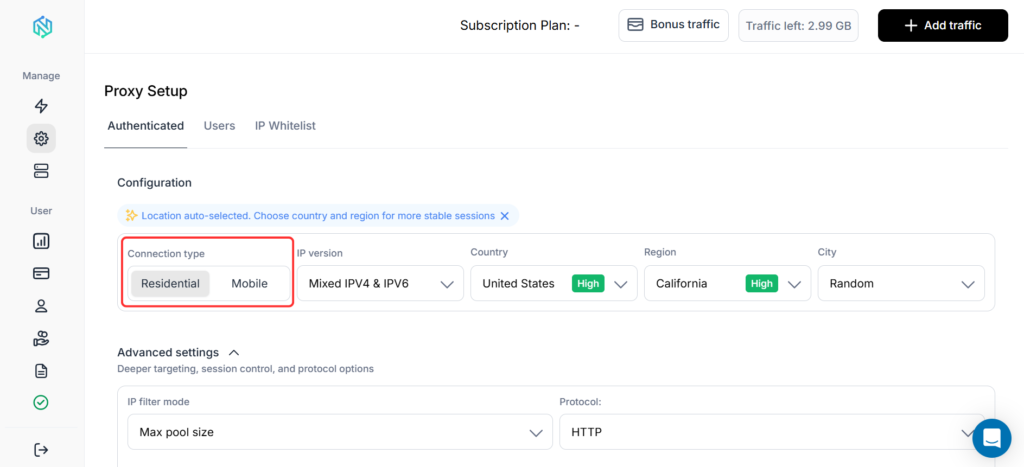
1. Choose your connection type
Start in the NodeMaven dashboard. For most rotation workflows, residential proxies are the most flexible option, since they support large-scale rotation, sticky sessions, and precise geo-targeting. Mobile proxies are a better fit for mobile-first platforms.
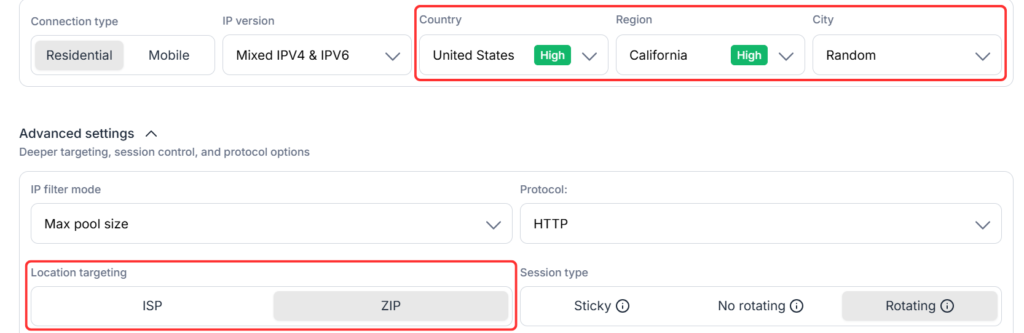
2. Choose location targeting
Set the location before configuring rotation. Country-level targeting is enough for some workflows; others need city, ZIP, or ISP-level precision, particularly for local SEO checks, price monitoring, and regional ad verification.
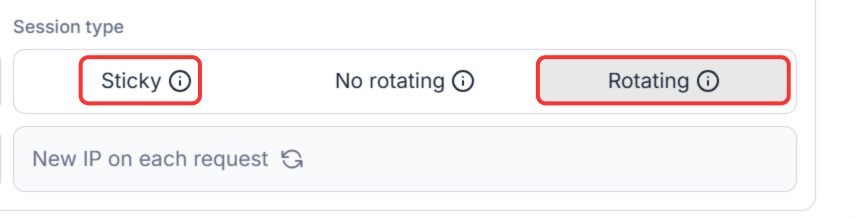
3. Select the session type
NodeMaven offers two main session types: Rotating, where the IP changes with every request, and Sticky, where the IP stays the same for a longer or custom session. Choose Rotating for high-volume, request-based tasks. Choose Sticky for logins, account management, and browser automation.
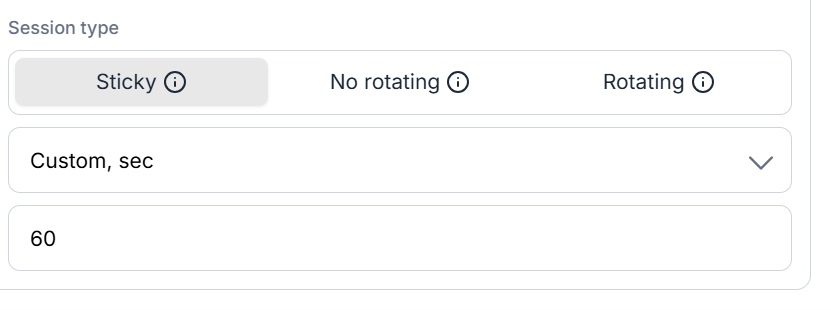
4. Configure sticky or custom rotation behavior
If you selected Sticky, choose “Keep IP as long as possible” for maximum continuity, or set a custom rotation window in seconds that matches how long your workflow typically takes.
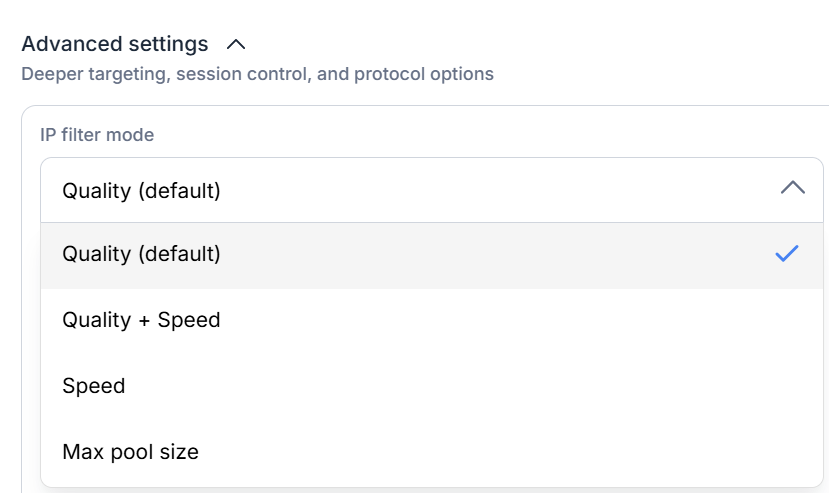
5. Choose the appropriate filter mode
Quality or Quality + Speed suits most workflows, prioritizing cleaner, more reliable IPs. Max Pool Size fits heavy rotation workflows where access to more IPs matters more than strict filtering.
6. Copy your proxy credentials
Once your settings are configured, copy the generated credentials. They already carry your session and targeting settings.
7. Connect the proxy to your tool
Add the credentials to your browser, antidetect browser, scraper, automation tool, or testing environment. The connection follows the rotation behavior you configured in the dashboard.
Common proxy rotation mistakes
Rotating during login sessions
Changing IPs mid-login interrupts the flow and can trigger re-authentication or CAPTCHAs. Use a Sticky session for anything that includes logging in, loading a dashboard, or completing a multi-step form.
Rotating too often
Frequent rotation makes sense for request-based tasks, but it creates unnecessary interruptions for browser-based or account workflows. Match rotation frequency to the task, not the other way around.
Using low-quality IPs
Rotation doesn’t fix a bad IP pool. Cycling through overused or flagged addresses just produces more failed requests and broken sessions. Use a provider that filters for IP quality before assignment, like NodeMaven’s IP Quality Filter.
Choosing the wrong filter mode
Rotation settings are only part of the setup. Use Quality or Quality + Speed for most workflows, and reserve Max Pool Size for heavy rotation tasks where volume matters more than strict filtering.
Ignoring geo-targeting
A correctly rotating IP is still the wrong IP if it comes from the wrong country or city. Pair rotation with accurate targeting, down to ZIP-level targeting where the task requires it.
Using the same setup for every workflow
A scraper, a browser profile, and a login-based account don’t need the same rotation logic. Configure rotation separately for each workflow, based on what that specific task requires.
Need both rotating and sticky sessions? Try NodeMaven residential and mobile proxies for $3.50 and get 750MB of bandwidth in one setup
How to choose a rotating proxy provider
Rotation logic is only half the equation. What matters just as much:
- IP quality, whether IPs are filtered for reputation before assignment, or just pulled from a raw pool
- Pool size and diversity, enough IPs and subnets to support your scale without repeat exposure
- Geographic coverage, country, city, and ISP-level targeting where your workflow needs precision
- Session control, the ability to switch between rotating and sticky, and to define custom rotation windows
- Filtering options, modes that let you prioritize quality, speed, or pool size depending on the task
- Protocol support, HTTPS and SOCKS5 compatibility with your tools
- Authentication, straightforward username and password or IP whitelisting
- Scalability, pricing and infrastructure that hold up as volume grows
- Integrations, compatibility with the scrapers, browsers, and automation tools you already use
- Monitoring, visibility into usage, success rates, and IP performance
- Pricing model, per-GB, per-IP, or subscription, matched to how you actually use proxies
Why use NodeMaven for rotating proxies?
Rotation only works well if the IPs behind it are clean and the session settings are flexible enough to match different workflows. That’s the problem NodeMaven is built around.
Premium residential and mobile IP pools give you real, high-trust addresses instead of recycled server IPs.
Flexible session control lets you choose Rotating for scraping and monitoring, Sticky for logins and account management, or a custom rotation window for anything in between. If a workflow needs a fixed IP for the long term instead, static residential proxies cover that separately.
Precise targeting by country, city, ZIP code, ISP means rotation and geo-targeting work together, which matters for SEO tracking, ad verification, and localized price monitoring.
Full support for HTTPS and SOCKS5, username and password authentication, IP whitelisting, and live usage statistics keeps the setup practical for teams running more than one workflow at a time. A quality guarantee and cashback on residential and mobile traffic back the whole thing.
Integration is straightforward across scrapers, browsers, antidetect tools, and automation frameworks.
Ready to set up proxy rotation? Try NodeMaven residential and mobile proxies for $3.50 with 750MB of bandwidth and flexible session control


