





Instagram Shadowban: Why Your Reach Dropped and What to Do


Your Reels used to reach people beyond your followers. Now several posts have stalled, and you don’t know whether Instagram has restricted your account or your content has stopped getting recommended. If you manage client accounts, you also need something more useful to report than “the algorithm changed.”
This guide explains how to check for an Instagram shadowban, investigate a reach drop, and choose what to fix. It also covers how proxies help keep your accounts stable and reduce connection issues.
Key takeaways
- Start with the reason shown in Account Status. Save the affected post, profile element, or feature restriction before editing, then use the available correction or review option.
- Measure the drop in actual non-follower reach. Compare posts of the same format at the same age, separating boosted posts, collaborations, and Trial Reels. A higher non-follower percentage can still represent fewer people reached.
- Check for problems that keep repeating. Remove unused app access, investigate unauthorized activity, and screen saved hashtag sets with MetaHashtags. Confirm flagged tags inside Instagram before changing captions.
- Use a fresh browser session with a proxy to investigate public access. Compare the same profile and post links while logged out, first on your usual connection and then through a verified proxy. A login wall or connection failure doesn’t establish a recommendation restriction.
- Give ongoing Instagram account work a consistent connection. NodeMaven ISP proxies provide dedicated static IPs in the US, UK, Germany, and other supported countries, with unlimited traffic. Use Connection Checker inside each configured environment to verify the assigned route.

NodeMaven ISP proxies give repeat account sessions a dedicated static address and unlimited traffic, with locations including the US, UK, and Germany. From $2.33/IP/30 days with code ISP25 for new users when buying 2+ IPs.
What is an Instagram shadowban?
An Instagram shadowban is an informal label for reduced visibility that the account owner can’t explain. One documented cause is recommendation ineligibility: a post remains published, but Instagram excludes the content or account from recommendations to people who don’t follow it.
Instagram’s ranking explanation describes stricter standards for recommendations than for content allowed on the platform. It also points creators to Account Status to check eligibility and appeal decisions.
Before changing anything, identify the problem you’re investigating:
| What you observe | Where to investigate |
| A post or account isn’t eligible for recommendations | The affected entry in Account Status |
| Likes, follows, comments, or another feature are unavailable | The exact restriction message and any displayed expiry |
| A profile or post won’t load through one connection | Browser, app, proxy, and network configuration |
| The account is disabled | The account review or recovery instructions |
| Account Status is clear, but discovery falls | Comparable post Insights and the audits below |
For example, an account disabled over suspected scraping needs the relevant recovery process. A hashtag test won’t explain or reverse that suspension.
How to check if you’re shadowbanned on Instagram
1. Read Account Status down to the affected item
Open Instagram settings and find Account Status, usually under More info and support. Expand the available categories rather than stopping at the first green check. Labels and available views can differ by account and app version.
If Instagram flags something, save the item, reason, and available action before editing. A recommendation problem may concern your bio or profile photo rather than the Reel you were about to delete.
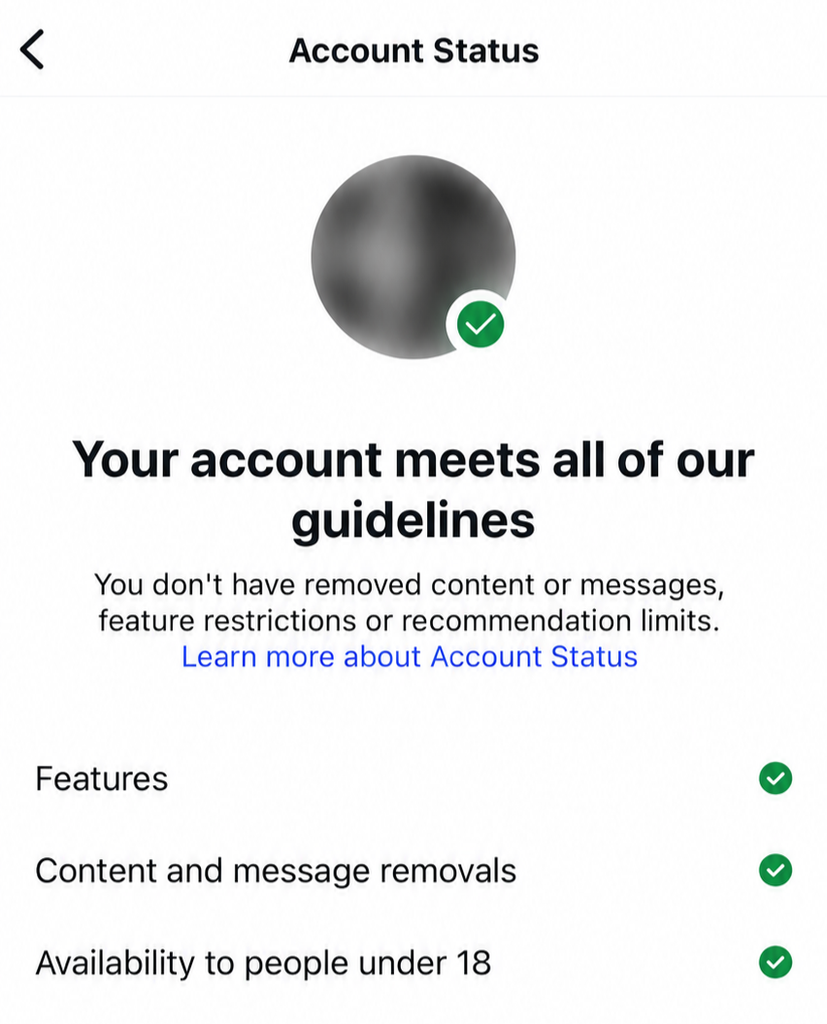
The screenshot below shows no removed content or messages, feature restrictions, or recommendation limits. If yours shows the same, continue to the performance and access checks.
2. Use Insights to locate the start and scope of the decline
Build a small comparison using several similar posts before and after the drop. Record each post at a comparable age, such as seven days after publication.
| Record | What it helps you separate |
| Publication date and format | A change affecting Reels versus the whole publishing schedule |
| Accounts reached and non-follower reach, where available | Audience size versus the percentage split |
| Shares, saves, and available viewing metrics | Changes in viewers’ response to the content |
| Boosted, collaboration, or Trial Reel status | Posts distributed under different conditions |
| Recommendation notices and dated account changes | The timing of a restriction, new integration, or connection change |
Use counts alongside percentages. In a hypothetical comparison, 60% non-follower reach from 1,000 accounts means 600 non-followers. An older post reaching 10,000 accounts with a 40% non-follower share reached 4,000. The larger percentage can hide a substantial decline.
Keep views and accounts reached separate, too. Repeat viewing can increase views without bringing in more people. Compare Reels with Reels: Instagram explains that Feed, Stories, Explore, and Reels have different ranking systems in its ranking overview.
A creator in r/instagramAsk describes very low Reel views despite clear Account Status. The thread illustrates the frustration, but doesn’t identify the cause.
Keep analytics exports consistent
For several client accounts, an export is easier to compare than scattered screenshots. Later supports Instagram analytics CSV exports for business and creator profiles on eligible paid plans.
3. Audit connected apps and unfamiliar sessions
Activity you didn’t perform can still come from your account. An old engagement service or someone with access could publish spam, leave repetitive comments, or follow accounts without your knowledge. Instagram’s Community Guidelines prohibit artificial engagement and repetitive spam, so check for this activity when investigating an unexplained restriction.
Find Apps and websites in Instagram’s settings and review active connections. Look for follower trackers, engagement services, and tools you tested but stopped using. Remove unnecessary access while keeping legitimate integrations you recognize.
Next, open Accounts Center → Password and security → Where you’re logged in, or the equivalent login-activity screen. Compare devices and session times with your own use, then check comments, follows, messages, and posts for activity you don’t recognize. A different city alone isn’t proof of intrusion, particularly on mobile networks, VPNs, or proxies.
If you find unauthorized activity, remove the tool’s access, log out unfamiliar sessions, change your password, and enable two-factor authentication. Instagram’s Security Checkup guidance recommends reviewing login activity and recovery information.
Compare the timing with your reach decline and any Account Status notices. This can uncover an ongoing source of rule-breaking activity that needs to stop, although an unfamiliar login alone doesn’t explain reduced recommendations.
4. Audit affected posts, including their hashtags
Use the date from your Insights comparison to narrow the review. Inspect posts immediately before and after the change, including captions added by scheduling tools.
| What you find | What to change |
| Another app’s watermark or a low-quality export | Use a clean, higher-quality source for future uploads |
| Reposts with little original contribution | Review originality and permission before continuing the format |
| A flagged bio, profile photo, or promotional claim | Address that specific entry in Account Status |
| A hashtag page displaying a restriction notice | Remove or replace that tag and save the notice |
| Captions unrelated to the post or engagement-bait wording | Rewrite the caption rather than swapping unrelated hashtags |
Originality is one documented recommendation factor. In its January 2026 update, Meta reported that original posts accounted for 75% of Instagram recommendations in the US following changes in the fourth quarter of 2025.
Check whether restricted hashtags are limiting discovery
A restricted hashtag can reduce opportunities for people to find your post through that tag. That loss of discovery can look like a shadowban, especially if you regularly reuse the same hashtag set. It doesn’t establish that Instagram has restricted the entire account.
MetaHashtags accepts captions or hashtags for screening. Task Ant checks against its list of reported restricted and spam-related tags.
If either tool flags a tag, open its page inside Instagram and look for a restriction notice. Remove confirmed restricted or irrelevant tags from affected captions, and review saved hashtag sets so you don’t keep adding them to new posts. Neither checker can confirm your account’s recommendation eligibility or establish that removing a tag will restore reach.
A post missing from hashtag results alone isn’t enough: ranking and the viewer’s context also affect what appears. Avoid bulk deleting posts based on a checker’s label.
5. Compare public visibility in fresh browser sessions
Open your profile and posts in a fresh Chrome profile to see how they appear without your saved Instagram login and cookies. Then repeat through a proxy to check whether access changes with a different IP.
- Open your profile URL and a recent post’s direct link in a fresh Chrome profile. Stay signed out of Instagram.
- Repeat in another fresh profile through a NodeMaven residential proxy in the same country. Follow the Chrome setup guide.
- Use Connection Checker to confirm the second profile actually uses the proxy IP. Creating a Chrome profile alone doesn’t change your address.
This checks public visibility, country-specific and connection-dependent access.
NodeMaven ISP proxies give repeat account sessions a dedicated static address and unlimited traffic, with locations including the US, UK, and Germany. From $2.33/IP/30 days with code ISP25 for new users when buying 2+ IPs.
How to fix an Instagram shadowban
Follow the correction or review route in Account Status
If Instagram names a post or profile element, correct that item or request a review when you believe the decision is wrong. Save the notice first, then record what you changed and what the status shows afterward.
For an unavailable feature, follow its displayed instructions or expiry. If the access audit exposed unauthorized activity, secure the account before resuming work through the same connected tools.
Archiving hides a post from your public profile while preserving it for your own access. Don’t assume that action clears an existing recommendation decision; use the options offered for the flagged item.
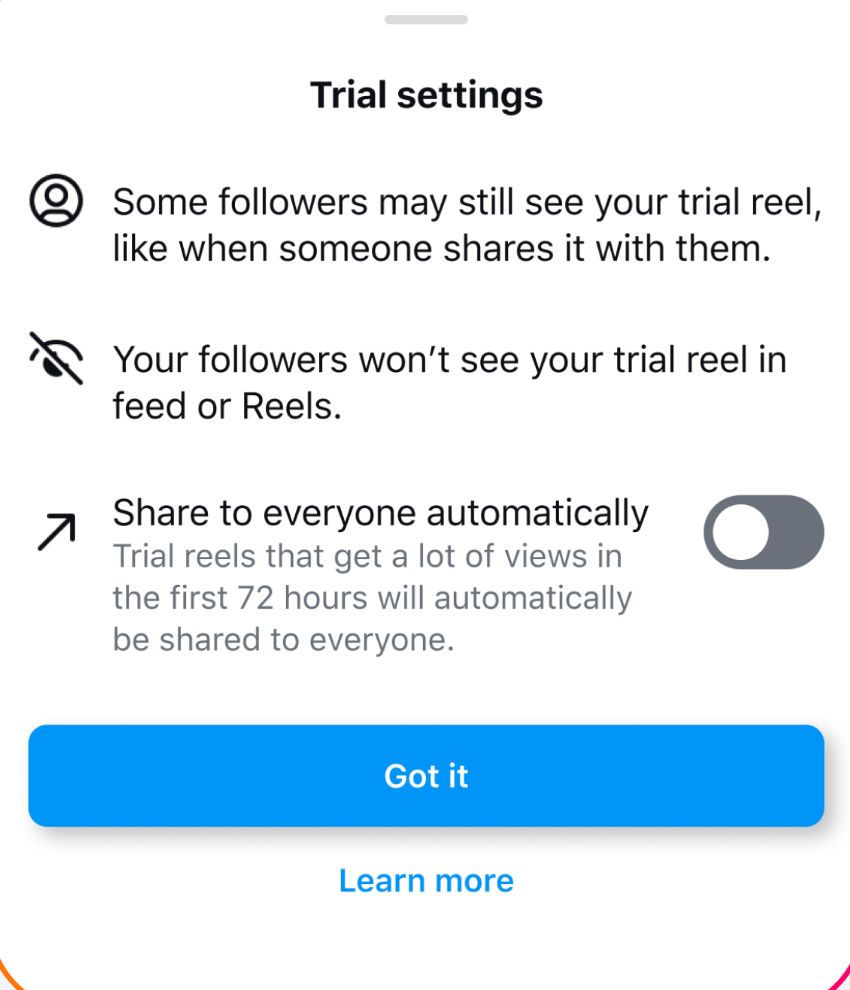
Test fresh content with Trial Reels
If Account Status shows no recommendation restriction and Trial Reels are available, use the feature to test a new original Reel with non-followers. Meta’s Trial Reels announcement describes engagement metrics becoming available after approximately 24 hours.
Compare the result with previous trials, keeping the format and measurement window consistent. A trial receiving non-follower reach demonstrates distribution for that Reel. A weak result doesn’t identify a hidden penalty, but it gives you a defined experiment to assess before changing the rest of your publishing schedule.
Keep a recovery record that separates the outcomes
Track the date, affected item, change, and result. Record these milestones separately:
- A restriction disappears from Account Status.
- A previously blocked feature works again.
- Comparable new posts reach non-followers.
- A connection keeps the expected address throughout the session.
A working login after correcting a proxy tells you about access. It doesn’t establish that recommendation eligibility changed.
For a reproducible issue, use the relevant review option or in-app reporting route. Include the affected post, first observed date, Account Status screenshot, and matching Insights. For a technical failure, add the exact message and app or browser version. Keep passwords and recovery codes out of reports.
How proxies can help prevent account instability and connection issues
For repeat Instagram account work, a dedicated proxy keeps the connection predictable instead of switching between shared VPN exits or rotating addresses. Each client environment gets a consistent route, reducing accidental IP changes when team members resume work.
In our proxy reliability research, the premium residential pool retained its IP in 98.1% of readable sessions, versus 71.4% for the budget pool.
NodeMaven ISP proxies provide dedicated static IPs and unlimited traffic, with locations including the US, UK, Germany and other countries. The address stays assigned for the order’s duration, supporting consistent account sessions.
For managing several Instagram accounts, proxies can be paired with antidetect and multi-account browsers such as Multilogin, where each browser profile can have its own assigned proxy. For a few accounts, separate Chrome profiles with individually configured proxy connections offer a simpler setup; follow our Chrome proxy settings guide.
After setup, open Connection Checker inside each environment to verify its assigned exit and check for another exposed public address.
NodeMaven ISP proxies give repeat account sessions a dedicated static address and unlimited traffic, with locations including the US, UK, and Germany. From $2.33/IP/30 days with code ISP25 for new users when buying 2+ IPs.
Conclusion
“Shadowban” groups together problems that need different responses: recommendation restrictions, reduced discovery, blocked actions, and connection failures. Account Status, comparable Insights, and public-access checks help replace that label with evidence you can explain, especially when reporting to clients.
For teams managing several accounts, NodeMaven ISP proxies give each working environment a dedicated static address and unlimited traffic. That keeps connection changes from complicating an already frustrating reach investigation, while content restrictions remain subject to Instagram’s review process.


