Try for $3.50

Playwright proxy

Learn how to use NodeMaven proxies with Playwright.
Run automation using residential, mobile, and ISP IPs.
Fully supports HTTP and SOCKS5, with built-in authentication and easy scaling

The first proxy
cashback
on the market

Get rewarded every month by
turning used traffic into reusable
proxy credits

Welcome gift
valued at $100+

  • Quality & speed filters
  • ZIP-Level targeting
  • Personal proxy expert

Exclusive quality guarantee

Earn $1 in bonus traffic every time
a proxy fails to perform

Learn more

What is Playwright?

Playwright is a browser automation framework built for running reliable scripts at scale. It allows you to control Chromium, Firefox, and WebKit, making it suitable for tasks like web scraping, testing, and automated workflows

It supports multiple languages, including JavaScript, Python, and C#, and provides full control over browser behavior, including network requests, sessions, and proxy configuration

With built-in support for proxy settings and authentication, Playwright makes it easy to run automation with different IPs and environments without breaking workflows

Custom proxy configuration
30+ million residential IPs pool
24/7 expert support

How to use NodeMaven proxies
with Playwright

Install Playwright and configure your proxy directly in your script using HTTP or SOCKS5 with authentication

Step 1

Check or install Node.js

Open your terminal and run:

node -v

If you see a version number, Node.js is already installed.
If not:

  • Go to the official Node.js website
  • Download the LTS version
  • Run the installer and complete the setup
Step 2

Install Playwright

Run this command:

npm init playwright@latest

Follow the prompts:

  • Choose JavaScript or TypeScript
  • Select test folder (default is fine)
  • Install browsers when asked

Once finished, Playwright is ready.

Step 3

Create your project folder

In your terminal:

mkdir playwright_nodemaven_project
cd playwright_nodemaven_project
Step 4

Create a script folder

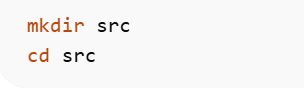
Create a separate folder for your Playwright scripts and move into it:

mkdir src
cd src
Step 5

Create your Playwright script

Create a file named:
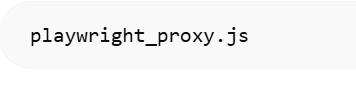
playwright_proxy.js
Step 6

Add proxy configuration

Paste this code:

const { chromium } = require('playwright');

(async () => {
const browser = await chromium.launch({
proxy: {
server: 'http://gate.nodemaven.com:8080',
username: 'YOUR_USERNAME',
password: 'YOUR_PASSWORD'
}
});

const context = await browser.newContext();
const page = await context.newPage();

await page.goto('https://example.com');
console.log(await page.title());

await browser.close();
})();

Step 7

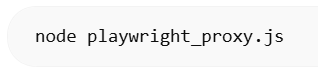
Run the script

From the src folder:

node playwright_proxy.js

If everything is set up correctly, you’ll see the page title printed in your terminal.
Try Nodemaven’s proxy servers for $3.50 and get 750MB of bandwidth

Try Nodemaven’s proxy servers for $3.50 and get 750MB of bandwidth

Easy integrations

Effortlessly integrate our premium
proxies with all major third-party tools

Multilogin
Dolphin Anty
Morelogin
Gologin
Multilogin
Dolphin Anty
Morelogin
Gologin
Multilogin
Dolphin Anty
Morelogin
Gologin
Multilogin
Dolphin Anty
Morelogin
Gologin

Choose premium proxies
for your workflow

Experience uninterrupted connection with high-quality
proxy IPs from NodeMaven

Residential Proxies

Residential Proxies

Real household IPs with rotating and sticky sessions. HTTP(S) and SOCKS5 support with flexible GB-based pricing for scalable proxy workflows

Recommended for:
Mobile Proxies

Mobile Proxies

Mobile IPs with rotating and sticky sessions for automation and account workflows. HTTP(S) and SOCKS5 support with GB-based pricing


Recommended for:
ISP proxies

ISP proxies

Static proxy server IPs with long sessions and consistent identity. HTTP(S) and SOCKS5 support with IP-based pricing and unlimited traffic

Recommended for:
Not sure which proxy type to choose?

Reviews from our
clients and partners

Honest feedback from the people who use and trust NodeMaven

The market’s first antidetect browser built for professional multi-accounting
NodeMaven works closely with Geelark to support reliable mobile multi-account workflows, tested and proven in daily use
The only high-quality proxy provider we agreed to integrate with
The only high-quality proxy provider we’ve chosen to integrate with. Nodemaven provides clean, stable traffic to power our workflows
Top #1 provider we recommend to our user and community
We recommend NodeMaven as the #1 proxy service for multi-accounting. 
It integrates closely with Dolphin Anty to ensure smooth setup

Frequently asked questions

To use a Playwright proxy, define proxy settings when launching the browser. You can pass a proxy server, along with authentication credentials, directly in your script. NodeMaven proxies support both HTTP and SOCKS5, making integration straightforward.

Playwright proxy settings are configured at browser launch using the proxy option. This includes the server address, protocol, and optional username/password for authentication. This allows full control over how requests are routed.

Yes, Playwright proxy authentication is supported natively. You can provide a username and password inside the proxy configuration. This works with NodeMaven proxies for secure and stable connections.

Yes, Playwright supports SOCKS5 proxy connections. NodeMaven offers SOCKS5 proxies that work seamlessly with Playwright, giving you flexibility depending on your use case.

A Playwright HTTP proxy handles web traffic at the protocol level, while a SOCKS5 proxy works at a lower level and supports more types of traffic. NodeMaven provides both options, so you can choose based on performance and compatibility needs.

To set a Playwright proxy server, pass the proxy configuration when launching the browser instance. This includes the server URL and optional credentials. NodeMaven makes this process simple with ready-to-use proxy formats.

The best proxy for Playwright depends on your use case, but residential and mobile proxies are ideal for avoiding detection. NodeMaven provides high-quality rotating proxies designed for automation, scraping, and multi-session workflows.

Buy proxy server for $3.50 and get 750MB of bandwidth

Start using high-quality proxies today
This site uses cookies to enhance your experience. By continuing, you agree to our use of cookies.