

How to Build an Amazon Price Tracker With Python



Web scraping can help you monitor Amazon prices without checking the same product page manually every day. In this tutorial, you will build a simple Amazon price tracker with Python that collects a product title, price, availability status, and page URL, then saves the results to a CSV file.
The example uses Python, Requests, BeautifulSoup, and a real Amazon product page structure. You will also see why Amazon price tracking often needs extra checks: prices can vary by location, pages can show CAPTCHAs, and selectors can change across product layouts.
For small tests, a basic script is enough. For higher-volume or location-sensitive tracking, clean residential proxies, sticky sessions, and ZIP-level targeting can make results more reliable because Amazon may return different prices, shipping details, and availability by region.
What this Amazon price tracker will do
The tracker in this guide will collect:
- Product title
- Current visible price
- Availability text
- Product URL
- Timestamp
- Price history in a CSV file
- Basic price-drop alert in the terminal
This is a beginner-friendly scraper, but it follows habits that matter in real price monitoring projects. It checks whether the expected data exists, avoids saving CAPTCHA pages as product data, and keeps the code easy to extend.
For a broader view of price tracking tools and workflows, NodeMaven also has a guide to price monitoring tools.
Before you start: Amazon scraping limitations
Amazon pages are more complex than a practice website. A product page can change depending on marketplace, ZIP code, shipping address, cookies, login state, deal status, and product type.
Before collecting data at scale, review Amazon’s Conditions of Use. For approved product-data use cases, also check Amazon’s Product Advertising API documentation.
This tutorial is for learning how price tracking works. If you plan to run a production scraper, also read NodeMaven’s guide on whether web scraping is legal.
Amazon price tracking usually becomes difficult because of:
- CAPTCHA pages instead of product pages
- 403 or 503 errors
- Prices split across several HTML elements
- Different prices by region or ZIP code
- Selectors changing between product layouts
- Requests returning different content than the browser
Developers run into these issues often. For example, this Stack Overflow discussion about Amazon CAPTCHA and price selector issues shows why fallback selectors and response validation matter.
Step 1: Set up the Python project
Create a new folder for the project and open it in your editor.
If you use macOS or Linux, run:
If you use Windows, run:
Now create a file named:
You can create it in VS Code, PyCharm, or any text editor. Keep this file open, because the next steps build the script piece by piece.
If this is your first scraper, the Python web scraping guide explains Requests, BeautifulSoup, selectors, and CSV export in more detail.
Tested setup: Python 3.12, Requests, BeautifulSoup4, and lxml. The script can run on macOS, Windows, or Linux after the environment is ready.
Step 2: Inspect an Amazon product page
Open the Amazon product page you want to track. Right-click the product title and select Inspect.
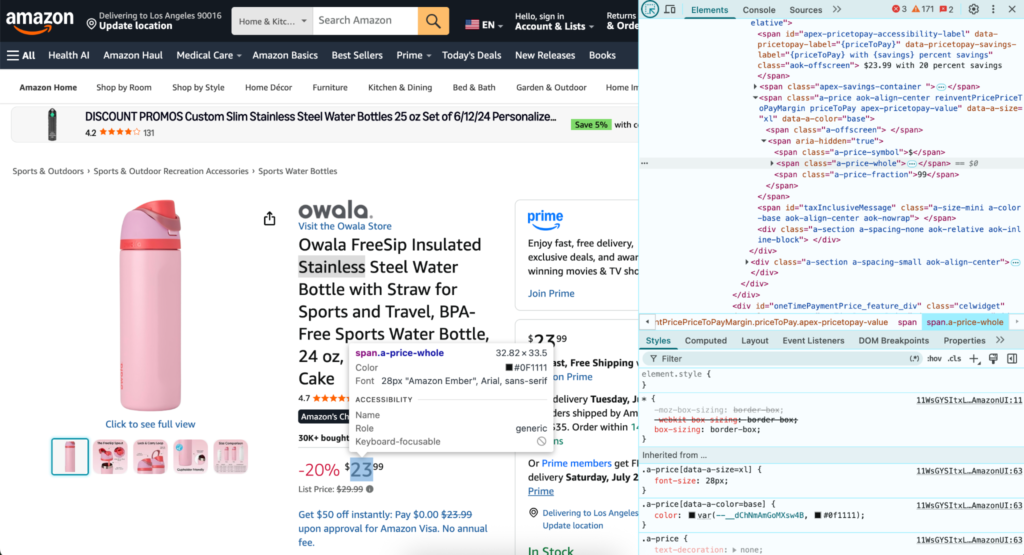
On the product page used for this test, the title was inside:
Then inspect the price. Amazon often stores the full price in an offscreen element, but on some pages the visible price is split into separate parts:
That is why the script uses fallback selectors instead of depending on one price element.
These selectors are examples to test, not guaranteed Amazon-wide selectors. Amazon pages can vary by marketplace, product category, deal layout, and availability status. Always inspect the exact page you plan to track.
Developers run into Amazon selector and CAPTCHA problems often. This Stack Overflow discussion about Amazon CAPTCHA and price selector issues is a useful example of why a scraper needs fallback selectors and response validation.
Step 3: Fetch the Amazon page with Requests
Now add a function that downloads the page HTML.
The custom headers make the request look closer to a normal browser request. This does not guarantee access, but it avoids sending the default Python Requests user agent.
The CAPTCHA check is also important. A request can return a successful 200 OK response and still contain a verification page instead of product data. Never treat a successful status code as proof that the scraper collected the right page.
Step 4: Extract title, price, and availability
Next, add BeautifulSoup and a few helper functions.
The first_text() function tries several selectors and returns the first value it finds. This is useful because Amazon can place the price in different parts of the page.
The split_price_text() function handles pages where the price is displayed as separate symbol, whole-number, and fraction elements. For example, $23.99 may appear in the HTML as $, 23, and 99.
The parse_price() function extracts a numeric value from the visible price text. This version assumes US-style prices such as $49.99. If you track another Amazon marketplace, adjust it for local currency and decimal formats.
Now add the product scraping function:
This function does one useful thing for reliability: it fails loudly when the title or price is missing. That is better than saving an empty value and discovering later that the CSV is full of broken rows.
Step 5: Save Amazon price history to CSV
A price tracker becomes more useful when every check is saved. Add this CSV function:
The newline="" setting follows Python’s CSV documentation and helps avoid extra blank lines on some systems.
After the script runs, the CSV file will look like this:
| timestamp | title | price_text | price | availability | url |
|---|---|---|---|---|---|
| 2026-07-24T10:15:30 | Owala FreeSip Insulated Stainless Steel Water Bottle | $23.99 | 23.99 | In Stock | Amazon product URL |
This simple history file is enough for a first version. Later, you can move the data into Google Sheets, a database, or a dashboard.
Step 6: Track multiple Amazon products
Now add a list of product URLs. Replace the example URLs with real Amazon product pages.
Then add a main function that loops through each product.
The sleep(10) delay keeps the script from requesting pages too quickly. For real tracking, avoid aggressive request rates. A price tracker usually does not need to check the same product every few seconds.
If you want more general scraping examples, NodeMaven has a guide to Python web scraping and a separate comparison of web scraping tools.
Step 7: Add price drop alerts and scheduling
A basic alert can run directly in the terminal.
Add a target price
Add this near the top of your script:
Then update the loop inside main():
This does not send an email or Telegram message yet. It simply prints a message when the price is below your target.
Schedule the tracker
For a simple setup, you can run the script manually once a day.
On macOS or Linux, you can later use cron. On Windows, you can use Task Scheduler. If you prefer a no-code setup, start with manual runs first and only automate once the script returns clean data.
For a real price monitoring workflow, store:
- Marketplace
- Region or ZIP code
- Timestamp
- Price
- Availability
- Product URL
- Error status, if the request failed
That extra context helps explain why a price changed. A lower price may come from a real discount, but it may also come from a different region, seller, coupon, or shipping setup.
Step 8: Add proxies for more reliable Amazon tracking
For a few manual tests, you may not need proxies. Once the tracker runs more often, checks several products, or compares prices by location, one local IP becomes a weak point.
Amazon may show different product data depending on the visible location. It can also return CAPTCHAs, unavailable pages, or inconsistent shipping details when the request pattern looks unusual.
This is where clean residential proxies and sticky sessions help. They let the tracker keep a stable region and avoid putting every request through the same local IP.

NodeMaven residential proxies help Python scrapers collect Amazon pricing data with cleaner IPs, stable sessions, and geo-targeting for regional price checks. Start with 750 MB for $3.50.
For Amazon specifically, NodeMaven’s Amazon proxies are useful when you need:
- Region-specific prices
- ZIP-level targeting
- Stable sessions for repeated checks
- Cleaner IP quality than public proxies or cheap VPNs
- Residential IPs that look closer to normal user traffic
For a deeper proxy setup, read NodeMaven’s guide to building a reliable web scraping proxy pool.
Add a proxy to the script
If you want to use proxies, replace the earlier fetch_page() function with this version.
Then pass the proxy into scrape_product():
Do not hardcode real proxy credentials in a shared file or public repository. Use environment variables if the script will be stored in GitHub or used by a team.
Choose the right proxy session
Use a sticky residential session when you want one product or one region to stay consistent during a tracking run. This is useful when Amazon stores location settings, shipping state, or cookies.
Use rotation only when each request is independent. Randomly changing IPs during the same product flow can create mismatched prices, extra verification, or inconsistent results.
NodeMaven’s guide to residential, mobile, and datacenter proxies explains which proxy type fits different scraping workflows.
Common Amazon price tracker errors and fixes
Amazon returns a 503 or 403 error
Amazon may reject a request when it does not like the request pattern, IP reputation, headers, or traffic source. Developers also discuss this in Stack Overflow threads about Amazon 503 errors with Requests and BeautifulSoup.
Try the following:
- Slow down the request rate.
- Check that your headers are set.
- Save the returned HTML and inspect it.
- Avoid running repeated requests from weak or overused IPs.
- Use clean residential proxies if the tracker runs at higher volume.
Amazon shows a CAPTCHA page
If Amazon returns a CAPTCHA page, the scraper received verification HTML instead of product HTML. The script in this tutorial checks for common CAPTCHA text and raises an error.
When this happens, reduce request frequency and check whether your headers, session behavior, and proxy quality make sense for the volume you are running. Clean residential proxies can help reduce CAPTCHA triggers caused by poor IP reputation, but they do not replace sensible request timing or response validation.
Do not save CAPTCHA pages as product data.
The title is missing
If the script cannot find the title, inspect the product page again.
The common selector is:
If the page uses a different layout, add another selector to TITLE_SELECTORS.
Also check whether the returned HTML is actually the product page. Sometimes the script receives a consent page, redirect page, or verification page instead.
The price is missing
Amazon prices can appear in different parts of the page. Some pages use offscreen price text, while others split the visible price into symbol, whole number, and fraction.
This is why the script uses both:
and:
If both fail, save the HTML and inspect the price section manually.
The price is different from your browser
Amazon prices may vary by country, ZIP code, shipping location, marketplace, cookies, and logged-in state. A product may also show coupons, limited-time discounts, or different buying options.
To reduce mismatches:
- Keep the region consistent.
- Store the marketplace and region in your CSV.
- Use a sticky session if location consistency matters.
- Compare the visible IP and location before comparing prices.
- Use ZIP-level targeting when shipping location affects the result.
NodeMaven supports precise geo-targeting, including ZIP-level targeting, which is useful when a tracker needs to compare Amazon prices, availability, and delivery options from a specific buyer location.
NodeMaven residential proxies help Python scrapers collect Amazon pricing data with cleaner IPs, stable sessions, and geo-targeting for regional price checks. Start with 750 MB for $3.50.
If Requests cannot access the visible page content, Selenium scraping may be a better option because it opens a browser and works with rendered pages.
Full Amazon price tracker code
Here is the complete script.
How NodeMaven improves Amazon price tracking
Amazon price tracking is more reliable when the scraper keeps a consistent location, clean IP reputation, and stable session behavior.
NodeMaven helps with the parts that usually break price trackers:
- Residential proxies: use real-user IPs instead of noisy VPN or datacenter addresses.
- Sticky sessions: keep the same IP while checking a product, category, or regional flow.
- ZIP-level targeting: compare prices, delivery options, and availability from specific buyer locations.
- Clean IP quality: reduce failed requests, CAPTCHA triggers, and unreliable page responses.
- Flexible setup: use HTTP or SOCKS5 proxies with Python, browser automation tools, or scraping stacks.
For Amazon monitoring, this means fewer mismatched regional results and cleaner price history.
NodeMaven residential proxies help Python scrapers collect Amazon pricing data with cleaner IPs, stable sessions, and geo-targeting for regional price checks. Start with 750 MB for $3.50.
Conclusion
A simple Amazon price tracker is a useful first scraping project because it shows the full workflow: fetching the page, checking selectors, extracting values, validating the response, and saving price history. Start with one or two products first, then add scheduling, alerts, and browser rendering only when the tracker needs them. For Amazon, clean proxies matter once you move beyond testing, because price, stock, delivery dates, and CAPTCHA frequency can all change depending on IP quality and location. NodeMaven residential proxies help keep tracking sessions cleaner and more consistent with sticky sessions and ZIP-level targeting.


