
Best proxies for Upwork and Fiverr in 2026: stay secure, avoid restrictions, and manage accounts safely



Upwork and Fiverr have become essential platforms for freelancers looking to connect with clients worldwide. Yet maintaining reliable access to these marketplaces isn’t always straightforward. Location restrictions, verification checks, account security reviews, and connectivity issues can all interrupt your workflow and affect day-to-day operations.
Fortunately, most of these challenges can be addressed with the right account setup and a reliable proxy solution. This guide explains how freelancer proxies work, compares residential, ISP, mobile, and datacenter options, and outlines best practices for creating a consistent and secure working environment on freelance platforms.

Need a stable Upwork or Fiverr proxy? Get residential and mobile proxies for $3.50 and maintain a consistent account environment
Why freelancers use proxies on Upwork and Fiverr
A proxy for freelancers isn’t always intended to disguise account activity. Its primary role is to provide a stable connection environment, helping ensure that normal actions such as logging in, completing projects, or communicating with clients don’t appear unusual due to inconsistent location or network signals.
Common reasons freelancers reach for a marketplace proxy include:
- Country restrictions
Upwork and Fiverr are not available, or are heavily limited, in some regions. A proxy lets freelancers in those areas register and log in from a supported location.
- Travel
Freelancers who move between countries often trigger location-mismatch warnings. A stable Upwork proxy or Fiverr proxy keeps the account’s apparent location consistent even while the person travels.
- Remote work setups
A proxy for remote workers is useful when a team works from coworking spaces, shared offices, or unstable home networks that change IP addresses frequently.
- Account consistency
Logging in from a stable IP, in a consistent location, reduces the number of “is this really you?” verification prompts.
- Agency workflows
Agencies with multiple verified team members use proxies so every team member has a stable, location-appropriate connection, without team members’ sessions interfering with one another on shared office Wi-Fi.
Can Upwork and Fiverr detect proxies?
Yes, but detection isn’t a simple yes/no proxy check. Upwork and Fiverr don’t outright ban every IP that belongs to a proxy network.
Instead, they analyze patterns over time:
- Location consistency
If your billing address says Germany but your IP suddenly jumps to Vietnam, then back to Germany an hour later, that’s a red flag. Not because a proxy was used, but because the pattern looks unstable.
- Browser fingerprints
Screen resolution, timezone, language settings, and installed fonts all combine into a fingerprint. If your IP says “Canada” but your system clock and browser language say otherwise, the mismatch stands out.
- Account history
A five-year-old account with consistent login patterns has more trust margin than a brand-new one. New accounts get more scrutiny, including around location.
Example: A freelancer based in Lagos who needs a UK-facing presence for client communication doesn’t get flagged just because they’re using an IP outside Nigeria. They get flagged if their IP jumps between three countries in a single week, their timezone setting doesn’t match their declared location, and their typing/activity patterns suddenly shift mid-session.
A clean residential proxy for Upwork or residential proxy for Fiverr, used consistently from one city or country, looks like normal user behavior. A proxy that rotates every few minutes, or one with a long blacklist history, always looks like abuse.
Protect your freelance accounts with clean residential IPs. Try NodeMaven proxies for $3.50 and keep your location consistent across sessions
Common mistakes that lead to account reviews
Most account flags aren’t caused by proxies themselves. They’re caused by how proxies are used.
The most common mistakes:
- Changing countries constantly
Switching your apparent location every session breaks the consistency platforms look for.
- Using free proxies
Free proxy IPs are usually shared by hundreds of unrelated users, many of whom have already been flagged or blacklisted.
- Using blacklisted IPs
Cheap or recycled IPs often carry a poor reputation before you’ve even logged in once.
- Location mismatches
Proxy country doesn’t match your timezone, browser language, or payment method country.
- Switching between home IP and proxy
Logging in from your home connection one day and a proxy the next, repeatedly, creates an inconsistent fingerprint history.
Quick safety checklist
- Use one proxy location per account, consistently
- Match timezone and browser language to the proxy’s country
- Avoid free or public proxy lists
- Check IP reputation before logging in for the first time
- Don’t alternate between home IP and proxy IP for the same account
- Keep one legitimate account per person; use agency tools for teams
Residential vs ISP vs Mobile vs Datacenter proxies
Not all proxy types behave the same way on freelance platforms. Here’s how they compare for Upwork and Fiverr use specifically.
| Proxy type | Trust level | Speed | Stability | Detection risk | Best use case | Recommended for Upwork/Fiverr |
| Residential proxies | High | Medium to fast | Good with sticky sessions | Low ✅ | Daily account use, browsing, messaging clients, project management | Yes |
| ISP proxies | High | Very fast | Very high (static IP) | Low ✅ | Long-term account management, consistent logins, professional freelancer workflows | Yes, often the best choice |
| Mobile proxies | Very high | Variable | Medium (depends on carrier IP rotation) | Very low ✅ | Account verification, mobile app access, high-trust actions | Yes, especially for verification |
| Datacenter proxies | Low | Very fast | High | High ❌ | General automation and non-sensitive tasks | No, not recommended for account logins |
Residential proxies
Residential proxies route traffic through real IP addresses assigned by internet service providers to actual households. To Upwork or Fiverr, the connection looks like a regular home user, because it is one.
Pros: Wide geographic coverage, high trust with anti-fraud systems, good for everyday account access.
Cons: Rotating pools can change your IP mid-session unless you specifically use sticky sessions.
Ideal for: Freelancers who need a believable, location-consistent presence for daily marketplace use. A sticky residential proxy is the safer choice over a fast-rotating pool.
ISP proxies
An ISP proxy for Upwork and Fiverr combines a residential-grade IP (assigned by a real ISP) with datacenter-grade speed and a static address that doesn’t change.
Pros: Very stable, fast, and the IP stays the same for the life of the subscription, ideal for an account you log into daily.
Cons: You don’t get the broad rotating pool that large-scale scraping needs (not a concern for an individual freelancer).
Ideal for: Freelancers and agencies who want one fixed, trustworthy IP tied to one account for months at a time. This is frequently the most practical proxy type for ongoing freelance platform use.
Mobile proxies
Mobile proxies use IPs assigned by mobile carriers to real 4G/5G/LTE devices.
Pros: Carrier IPs carry an unusually high trust level, since fraud systems rarely flag mobile carrier ranges.
Cons: IPs can rotate when a device switches cell towers, which makes long sessions less predictable.
Ideal for: A mobile proxy for verification (phone-style identity checks, SMS-adjacent verification flows, or short, high-trust sessions).
Datacenter proxies
Datacenter proxies come from servers in data centers, not from ISPs or carriers.
Pros: Cheap and fast.
Cons: Easily identified as non-residential traffic. Many datacenter IP ranges are already flagged across multiple platforms before you even use them.
Ideal for: Tasks unrelated to account logins. For Upwork or Fiverr account access specifically, datacenter proxies are not recommended.
Which proxy type is best for Upwork and Fiverr?
There’s no single “best” proxy, it depends on your situation.
New freelancers
If you’re just setting up your first account, a static residential proxy (ISP proxy) in your real or intended operating country gives the cleanest, most stable first impression. Avoid rotating proxies during account creation and verification.
Established freelancers
If your account already has history, the priority is consistency, not novelty. Stick with the same proxy location you’ve used before. A sticky residential proxy that holds your session for hours works well for daily logins and client communication.
Agency owners
Agencies should give each verified team member their own dedicated, location-matched proxy tied to that person’s own legitimate account. This keeps each account’s fingerprint clean and avoids accidentally linking separate, legitimate accounts to each other. Pairing this setup with remote workforce management software can help agency owners coordinate schedules, track deliverables, and keep distributed contractor teams organized alongside their proxy infrastructure.
Verification workflows
During identity Upwork account verification and Fiverr account verification steps, a mobile proxy or a static residential IP in the correct country reduces the chance of triggering extra review.
Long-term account management
For accounts you plan to use for years, an ISP proxy with a fixed IP is generally the most maintenance-free option, since it removes the variable of changing addresses entirely.
Managing clients on Upwork or Fiverr? Use static ISP proxies from $2.99/IP for reliable logins and long-term account stability
Best proxy providers for Upwork and Fiverr in 2026
The proxy market splits roughly into three tiers: large enterprise platforms built for big data operations, mid-market providers focused on accessible pricing and clean pools, and budget providers that trade quality for low cost. For freelancers, the mid-market tier is usually the right fit.
| Provider | Residential proxies | ISP proxies | Mobile proxies | Sticky sessions | Pricing level | Ideal user |
| NodeMaven | 30M+ filtered residential IPs across 190+ countries | Static residential IPs from ~$2.99/IP with a quality guarantee | Real 4G/5G/LTE mobile IPs | Up to 24 hours sticky sessions | Mid-market, from $2.20/GB and $2.99/IP | Freelancers, remote workers, and agencies looking for clean, verified IPs without enterprise-level complexity |
| Bright Data | Large residential network (70M+ IPs) | Available through enterprise-focused plans | Carrier-level mobile targeting in 130+ countries | Hours to days | Premium / enterprise pricing | Large teams that need a complete data collection and proxy platform |
| Oxylabs | 100M+ residential IPs | Dedicated static residential offerings | Strong mobile proxy infrastructure | Yes | Premium / enterprise | Enterprise organizations with technical teams and advanced requirements |
| Decodo (formerly Smartproxy) | 65M–115M residential IPs reported | More limited ISP offering than residential network | Mobile proxy options available | Yes | Budget to mid-market | Cost-conscious users who prioritize value and simplicity |
| SOAX | 150M+ residential IPs claimed | Limited ISP proxy options | Mobile proxies with city- and ASN-level targeting | Yes | Mid-market | Businesses that require highly granular geo-targeting and location control |
Pricing and pool sizes change frequently across all providers — always confirm current numbers on each provider’s official pricing page before purchasing.
NodeMaven sits in a practical spot for individual freelancers and small agencies: it covers residential, ISP, and mobile proxies under accessible pricing, without requiring the enterprise contracts or large minimum commitments that Bright Data, Oxylabs, and SOAX are generally built around.
Step-by-step setup guide
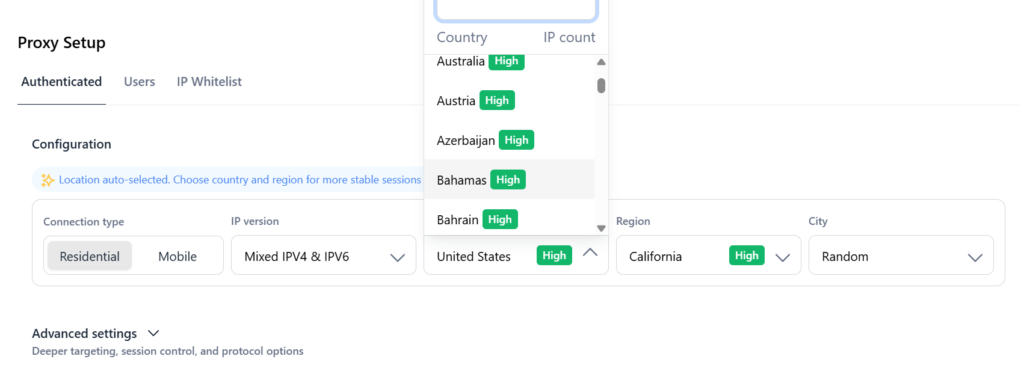
Step 1: Choose a country
Pick the country that matches your real operating location, your billing details, and your client base. Consistency here prevents most future flags.
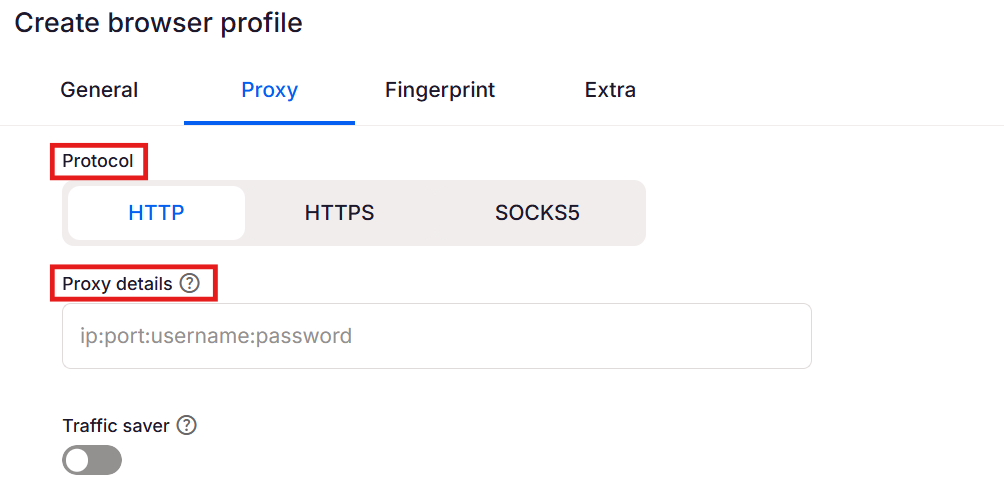
Step 2: Configure the proxy
Set up your proxy credentials in your browser, antidetect browser, or system network settings, using HTTP or SOCKS5 as supported. For account work, use a sticky or static session rather than a fast-rotating one.
Need help setting up your proxy?
NodeMaven provides step-by-step setup guides for the most popular devices and operating systems:
- Windows 10/11 setup guide: Windows proxy Settings: how to set up and use a proxy on Windows 10/11
- iPhone setup guide: How to set up a proxy on iPhone (step-by-step guide)
- General NodeMaven proxy setup guide: How to use residential proxies: complete NodeMaven setup & best practices guide
- Android setup guide: Android proxy settings: how to set up a proxy on Android
- Browse all tutorials: NodeMaven Blog Guides & Tutorials
Most users can complete their setup in just a few minutes by following the relevant guide for their device and preferred proxy type.
Step 3: Verify browser settings
Match your browser’s timezone, language, and locale settings to the proxy’s country. A mismatch here is one of the most common causes of unnecessary scrutiny.
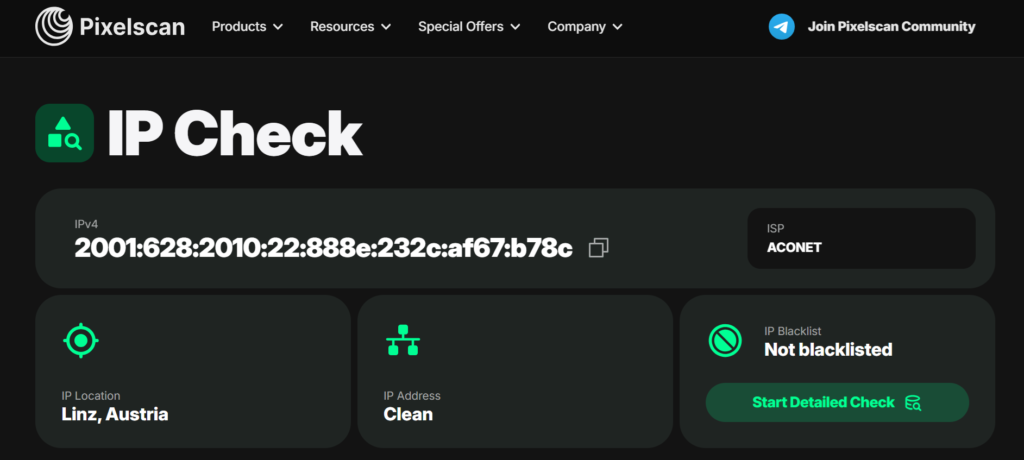
Step 4: Check IP reputation
Before logging into your account, check the proxy IP against a reputation or fraud-score checker to confirm it isn’t already blacklisted. You may use pixelscan.net to receive results.
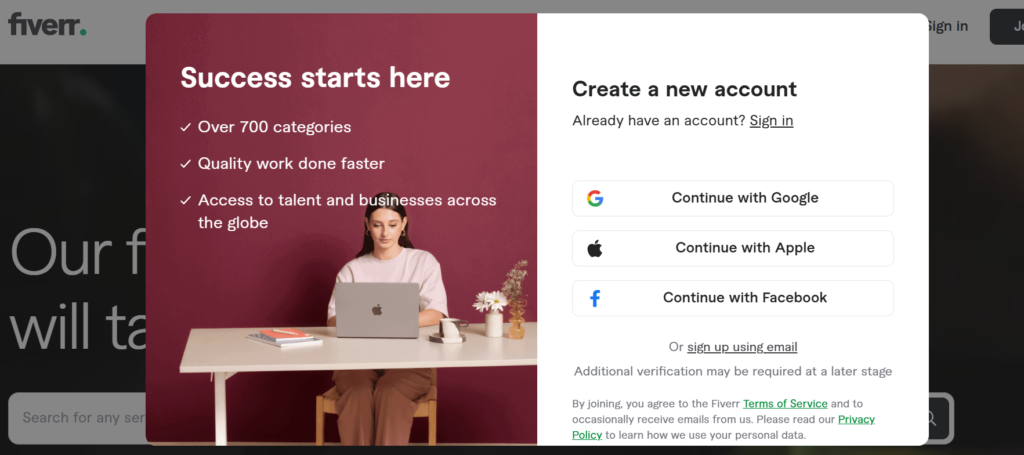
Step 5: Log in safely
Log in once, complete any verification steps fully, and avoid switching proxies or locations during the session. Let the account “settle” with the new connection before making major changes like updating your profile or payment details.
Why NodeMaven is a strong choice for freelancers
When working on Upwork, Fiverr, or other freelance platforms, the goal isn’t simply to get a different IP address. You need a connection that stays consistent, looks trustworthy, and supports long-term account management.
Here’s where NodeMaven stands out.
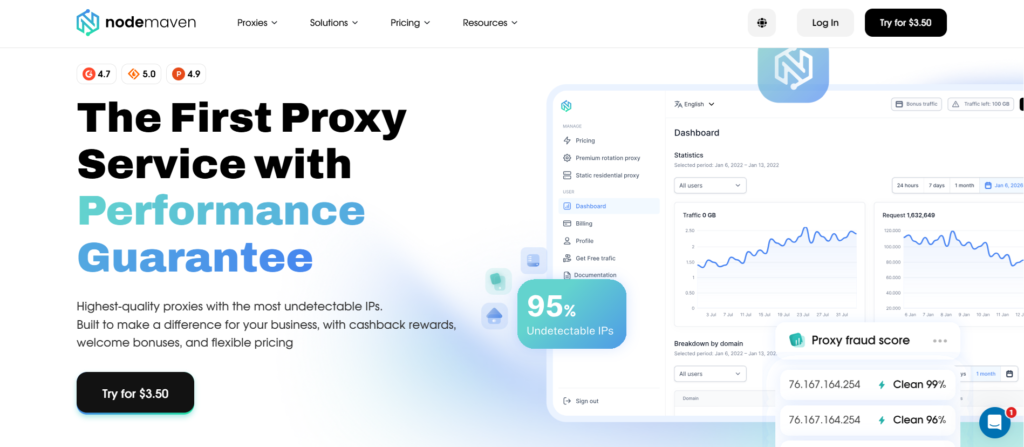
Large pool of quality-filtered residential IPs
30M+ residential IPs across 190+ countries
Many providers focus on network size. NodeMaven focuses on IP quality.
Before entering the network, IPs are screened for reputation issues, helping reduce the risk of receiving addresses associated with spam, fraud, or previous abuse.
Static ISP proxies for long-term account stability
Residential trust + datacenter speed
NodeMaven’s ISP proxies provide a fixed IP address that remains consistent over time. This makes them ideal for freelancers who want to access the same account from the same location day after day.
Unlike rotating connections, static ISP proxies create a more predictable account environment.
Sticky sessions up to 24 hours
Stay on the same IP throughout the week
A freelancer’s workflow often includes messaging clients, submitting proposals, reviewing contracts, and updating projects.
NodeMaven supports sticky sessions lasting up to 24 hours, allowing you to maintain the same IP during extended sessions.
Quality-filtered IP assignment
Not all IPs are equal
One of the biggest causes of proxy-related issues is poor IP reputation.
NodeMaven evaluates IP quality before assignment, helping filter out addresses with known blacklist history or suspicious activity records.
Residential, ISP, and mobile proxies in one platform
Different situations require different proxy types.
Affordable pricing for freelancers
Many proxy providers primarily target enterprise customers.
NodeMaven offers:
- Residential proxies from $2.20/GB
- ISP proxies from $2.99/IP
- Cashback rewards on eligible traffic
- Quality guarantee on assigned IPs
Quick summary
- 30M+ filtered residential IPs
- 190+ supported countries
- ISP proxies from $2.99/IP
- Mobile proxy options available
- Sticky sessions up to 24 hours
- Cashback program
- Quality guarantee
- Freelancer-friendly pricing
For freelancers who value account stability, clean IPs, and predictable costs, NodeMaven offers one of the strongest overall proxy packages available today.
How to maintain account safety long term
Account safety isn’t a one-time setup, so keep these principles in mind:
- One account, one environment
Use the same proxy location and browser setup for that account every time.
- Maintain a consistent location
If you genuinely relocate, transition gradually rather than switching overnight.
- Verify accounts fully
Complete Upwork account verification or Fiverr account verification in one sitting whenever possible.
- Avoid suspicious behavior patterns
Don’t dramatically change your activity hours, message volume, or proposal pace overnight.
- Keep a backup connection
Have a second clean residential or ISP proxy ready in case your primary IP needs replacing, so you’re not forced into a sudden, risky switch.
Need a trusted IP for account verification? Get residential and mobile proxies with flexible plans starting at $3.50 with 750 MB included
Conclusion
For most freelancers, the safest path on Upwork and Fiverr comes down to a few consistent habits: pick one proxy type that matches your real working situation, keep your location and browser settings aligned, and avoid the temptation to run duplicate accounts no matter how tempting the upside looks.
NodeMaven’s combination of filtered residential, static ISP, and mobile proxies makes it a practical option for freelancers and agencies who want a stable setup without enterprise-level cost or complexity. If you want to test it on your own workflow, NodeMaven’s trial plan is a low-commitment way to see how a clean, filtered IP performs on your actual day-to-day marketplace work.


