
Что такое веб-скрапинг? Пошаговое руководство на Python



Веб-скрейпинг — это автоматизированный сбор информации с веб-сайтов. В этом руководстве вы создадите на Python скрапер, который извлекает 20 названий книг, цен, сведений о наличии и ссылок на товары, а затем сохраняет их в файл CSV. Базовое знание Python будет полезно, но предыдущий опыт скрапинга не требуется.
В 2025 году автоматизированные системы сгенерировали более 53% веб-трафика, согласно данным Отчет Imperva о плохих ботах 2026. Многие сайты теперь отвечают на автоматизированные запросы ограничением частоты, CAPTCHA, проверками браузера и контролем репутации IP.
Чистые прокси помогают, когда скрапер переходит от учебного сайта к более крупным или привязанным к локации проектам. Нодемавен веб-скрейпинг прокси предоставляют предварительно отфильтрованные резидентные IP, гибкую ротацию, sticky-сессии и точный геотаргетинг, чтобы снизить число неудачных запросов и собирать более стабильные результаты. В руководстве показано, где именно прокси встраиваются в скрапер, без добавления их раньше, чем это действительно необходимо.

Сократите число CAPTCHA и неудачных запросов благодаря предварительно отфильтрованным резидентским IP. Протестируйте NodeMaven за $3.50 — 750 MB включены.
Что такое веб-скрейпинг и как он работает?
Веб-скрапер заходит на страницу и извлекает выбранную информацию из её HTML. Вместо того чтобы вручную копировать цены товаров или заголовки статей, скрапер находит каждое поле и сохраняет его автоматически.
Базовый процесс скрапинга состоит из шести этапов:
- Отправка HTTP-запроса на URL.
- Загрузка HTML страницы.
- Разбор HTML в структуру, пригодную для поиска.
- Поиск нужных элементов с помощью CSS-селекторов или XPath.
- Извлечение и очистка их содержимого.
- Сохранение записей в CSV, JSON или базу данных.
Вкратце: URL сайта -> HTTP-запрос -> HTML-ответ -> CSS-селекторы -> выбранные данные -> файл CSV.
Предположим, что интернет-магазин размещает название товара внутри элемента h2, а цену — внутри элемента с классом .price. Скрапер может находить эти элементы на каждой странице товара и превращать их в строки таблицы.
Веб-скрапинг, краулинг и интеллектуальный анализ данных
Веб-краулинг и веб-скрапинг часто встречаются в одном проекте, но выполняют разные задачи. Краулер находит страницы. Скрапер извлекает из них выбранные поля.
Например, краулер может найти 10 000 URL-адресов товаров. Затем скрапер собирает с каждой страницы название, цену, продавца, рейтинг и статус наличия.
Data mining анализирует собранный набор данных в поисках закономерностей, аномалий или прогнозов. Это сравнение интеллектуальный анализ данных и веб-скрапинг объясняет, где применяется каждый из процессов.
Статические и страницы с JavaScript-рендерингом
Статические страницы содержат нужную информацию в HTML, который возвращает сервер. Python-библиотеки, такие как Requests и BeautifulSoup, обычно легко с ними справляются.
Страницы с JavaScript-рендерингом загружают контент уже после первоначального запроса. Requests может получить HTML без товаров, отзывов или списков, которые видны в браузере. Playwright и Selenium решают эту проблему, открывая браузер, выполняя скрипты страницы и извлекая данные из отрендеренной страницы.
Начните с обычного HTTP-запроса и изучите ответ. Если он уже содержит нужные поля, браузер добавит лишний расход памяти и замедлит загрузку страниц. Переходите к автоматизации браузера, когда контент появляется только после выполнения JavaScript, прокрутки страницы или действия пользователя.
Разработчики дают ту же рекомендацию в этом обсуждении перехода от скрипта к инфраструктуре для скрапинга: начните с Requests и BeautifulSoup, а Playwright добавляйте только тогда, когда этого требует целевой сайт.
Как спарсить сайт с помощью Python
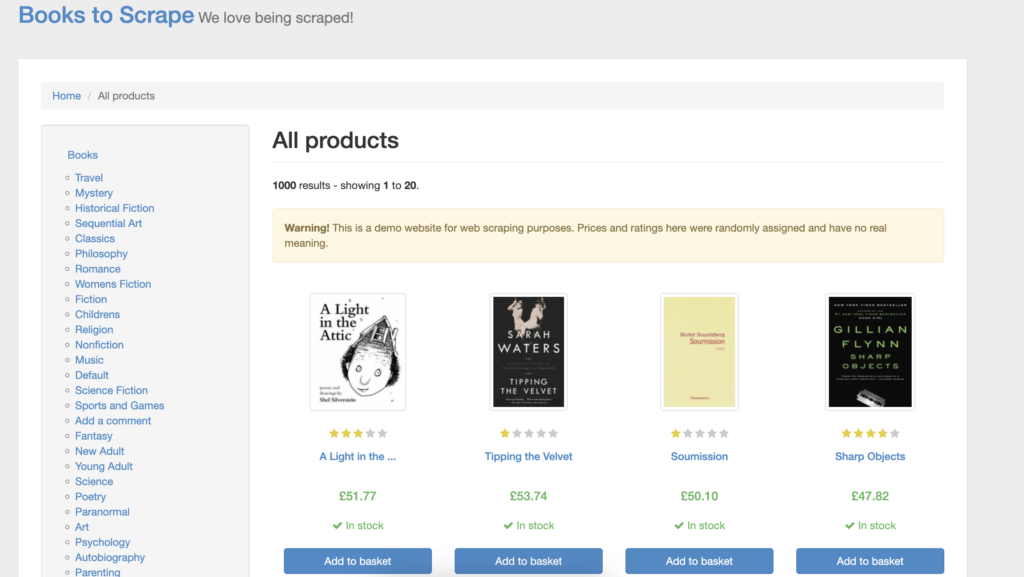
В этом примере используется Books to Scrape— демонстрационный сайт электронной коммерции, созданный для отработки скрапинга. Скрапер собирает:
- Название книги
- Цена
- наличие
- ссылка на товар
Готовые записи сохраняются в books_to_scrape_products.csv. Тот же процесс можно адаптировать к другому статическому сайту, изменив URL и CSS-селекторы.
Шаг 1. Определите, какие данные собирать
Откройте Books to Scrape и изучите одну карточку товара. Определите нужные поля до того, как писать скрапер.
Для другого сайта поля могут включать название товара, SKU, цену со скидкой, продавца, рейтинг или количество отзывов. Составление этого списка заранее не даёт скрипту собирать поля, которые проекту не нужны.
Шаг 2. Найдите CSS-селекторы
Открыть Books to Scrape в Chrome. Кликните правой кнопкой по названию первой книги и выберите Проверить.
Chrome DevTools подсвечивает у заголовка <a> элемент. Этот элемент содержит оба значения, необходимые скраперу:
заголовоксодержит полное название книги.hrefсодержит ссылку на товар.
Чтобы скопировать его селектор:
- Кликните правой кнопкой по подсвеченному
aэлемент. - Открыть копировать.
- Выберите Скопировать селектор.
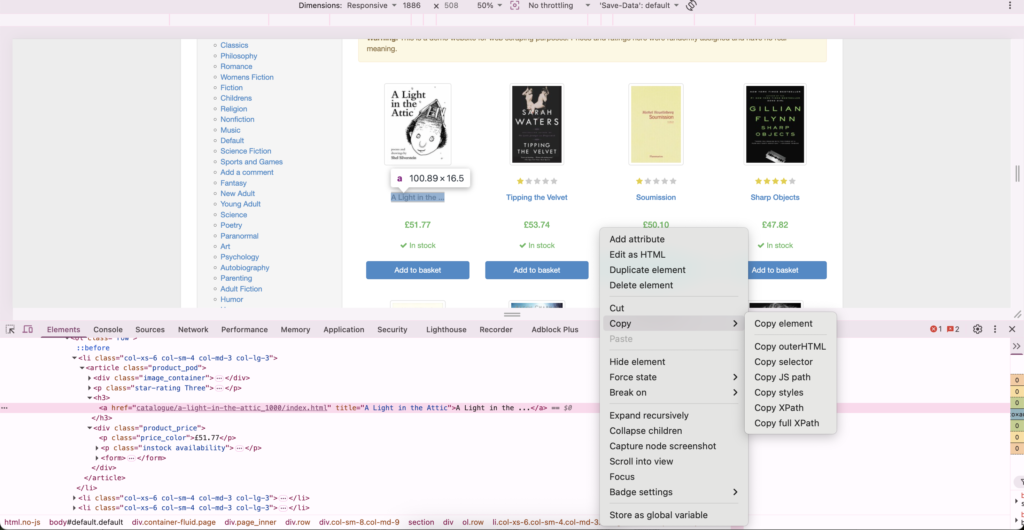
- Повторите этот процесс для цены и наличия.
Chrome может вернуть длинный селектор, который указывает только на первую книгу. Вместо этого скрапер сначала выберет каждую повторяющуюся карточку книги, а затем найдёт нужные поля внутри каждой карточки.
Используйте эти селекторы:
| Данные | CSS-селектор |
|---|---|
| Карточка товара | article.product_pod |
| Название книги | h3 a |
| Цена | .price_color |
| наличие | .availability |
| ссылка на товар | h3 a |
Скрипт использует article.product_pod чтобы найти все 20 карточек книг. Внутри каждой карточки h3 a находит заголовок и ссылку, тогда как .price_color и .availability находят остальные поля.
Шаг 3: Настройка проекта на Python
Создайте папку проекта:
На macOS или Linux создайте и активируйте виртуальное окружение:
В Windows PowerShell используйте:
Установите необходимые пакеты:
Requests загружает HTML. BeautifulSoup разбирает его и ищет элементы с помощью CSS-селекторов.
Создайте пустой файл с именем books_scraper.py внутри папки проекта.
В macOS:
Для Linux:
В Windows PowerShell:
Оставьте пустой файл открытым. Шаги с 4 по 8 построят внутри него скрапер.
Шаг 4: Скачайте страницу
Вставьте следующий код в начало пустого books_scraper.py файл:
requests.get() скачивает страницу. Тайм-аут не даёт скрипту ждать бесконечно, а raise_for_status() сообщает об ошибках HTTP.
Настройка UTF-8 подходит для Books to Scrape и предотвращает некорректное декодирование символа фунта. Не копируйте эту настройку бездумно в каждый проект. Проверьте объявленную кодировку целевого сайта, прежде чем переопределять значение, определённое библиотекой Requests.
Чтобы собрать данные с другого сайта, замените URL на адрес его страницы.
Оставьте файл открытым и переходите к Шагу 5. Скрапер ещё не готов.
Шаг 5: Разберите HTML
Прямо под кодом из Шага 4 преобразуйте ответ в объект BeautifulSoup:
Найдите каждую карточку книги:
select() возвращает каждый элемент, соответствующий CSS-селектору. Books to Scrape должен вернуть 20 карточек на первой странице.
Если результат равен 0, изучите HTML ответа и проверьте селектор. Сайт также может загружать свои товары через JavaScript.
Шаг 6: Извлеките поля товара
Прямо под кодом Шага 5 создайте пустой список и пройдите циклом по карточкам:
Сохраняйте отступ в четыре пробела внутри цикла на . Python использует отступы, чтобы определить, какие инструкции должны выполняться для каждой книги.
Скрапер использует get("title") , потому что название книги хранится в HTML-атрибуте. Цена и наличие отображаются как текст между тегами, поэтому скрипт использует get_text().
Резервные значения не позволяют одному отсутствующему полю остановить задачу. Они также делают отсутствующие данные заметными в CSV.
Шаг 7: формируем полные ссылки на товары
Books to Scrape использует относительные ссылки, например:
Добавьте этот код сразу под кодом наличия. Сохраните отступ в четыре пробела, потому что он относится к тому же на loop:
Получившийся URL выглядит так:
Всё ещё внутри цикла добавьте готовую запись в список:
Каждый словарь становится одной строкой в CSV.
Шаг 8: сохраняем данные в CSV
Добавьте следующий код после цикла. Начните fieldnames от левого края без отступа, чтобы Python понял, что цикл завершён:
Python’s Документация CSV рекомендует открывать CSV-файлы с newline="". Там utf-8-sig кодировка помогает Excel и подобным приложениям корректно отображать символ фунта.
Файл скрапера теперь готов. Сохраните books_scraper.py перед его запуском.
Шаг 9: Запустите и проверьте скрапер
Вернитесь в терминал, пока виртуальное окружение всё ещё активно. Запустите файл:
В терминале должно отобразиться:
Проверьте, что:
- CSV содержит 20 товаров.
- Названия и цены отображаются в правильных столбцах.
- Символы валют отображаются корректно.
- Ссылки на товары открывают ожидаемые страницы.
В macOS откройте CSV с помощью:
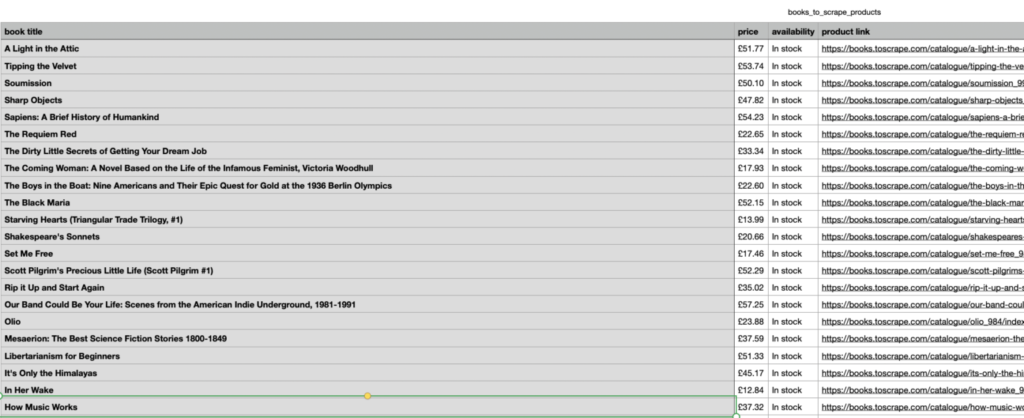
В Windows откройте books_scraper папку и дважды щёлкните books_to_scrape_products.csv.
Шаг 10: добавьте прокси, когда целевой сайт этого требует
Для Books to Scrape прокси не нужен. Прокси становится полезен, когда согласованный проект скрапинга требует региональных результатов, непрерывности сессии или большего числа запросов, чем один IP может надёжно обработать.
Для этого примера создайте резидентный прокси NodeMaven с нужной локацией в Личный кабинет. Выберите ротацию для независимых страниц или закреплённую (sticky) сессию, когда пагинация, cookie или связанные запросы должны оставаться вместе. Выберите HTTP и скопируйте сгенерированные имя пользователя и пароль.
Храните учётные данные в переменных окружения, а не размещайте их в файле Python.
На macOS или Linux:
В Windows PowerShell:
Добавить os к импортам и включите quote в утилитах для работы с URL:
Замените исходный запрос на:
Requests поддерживает этот формат прокси с аутентификацией в своей официальной документации по прокси. Кодирование учётных данных предотвращает ситуацию, когда такие символы, как @ нарушают URL прокси.
Сохраните обновлённый файл и снова запустите его командой python books_scraper.py. Теперь скрапер будет отправлять свой запрос через выбранный прокси NodeMaven.
Используйте прокси только там, где автоматизированный доступ разрешён. Прокси не чинит сломанные селекторы, не рендерит JavaScript и не оправдывает чрезмерную частоту запросов.
Сократите число CAPTCHA и неудачных запросов благодаря предварительно отфильтрованным резидентским IP. Протестируйте NodeMaven за $3.50 — 750 MB включены.
Как адаптировать скрапер к другому сайту
Чтобы повторно использовать скрапер:
- Замените URL страницы.
- Найдите повторяющуюся карточку товара или объявления.
- Замените селекторы карточки и полей.
- Проверьте, отображается ли каждое значение как текст или как HTML-атрибут.
- Обновите названия столбцов CSV.
- Запустите скрипт и сравните его вывод с видимой страницей.
Requests и BeautifulSoup работают, когда нужные данные присутствуют в загруженном HTML. Для сайтов с рендерингом на JavaScript может потребоваться Playwright или Selenium.
Зона Руководство по веб-скрапингу с ChatGPT дополняет этот пример пагинацией, повторными попытками, отладкой и рендерингом в браузере.
Техники и инструменты веб-скрапинга
Подходящий метод зависит от того, как сайт загружает свои данные, сколько страниц задействовано и какой объём поддержки может обеспечить проект.
| Метод | Лучшее для | Основное ограничение |
| Ручной сбор | Несколько записей с одной страницы | Медленно и сложно повторить |
| Браузерное расширение | Небольшие задачи визуального скрапинга | Ограниченный контроль и автоматизация |
| Requests и BeautifulSoup | Статические HTML-страницы | Не может рендерить JavaScript |
| Scrapy | Более крупные обходы и запланированные задачи | Требует больше настройки |
| Playwright или Selenium | JavaScript и взаимодействия в браузере | Потребляет больше ресурсов |
| API для скрейпинга | Управляемый рендеринг и обработка запросов | Дополнительные затраты и меньше индивидуального контроля |
Requests и BeautifulSoup - разумная отправная точка, поскольку код легко анализировать. Scrapy добавляет очереди запросов, управление параллелизмом, конвейеры и планирование для более крупных задач.
Playwright полезен, когда данные появляются только после выполнения JavaScript, прокрутки страницы или клика пользователя по элементу управления. No-code инструменты и API для скрапинга могут сэкономить время, когда поддержка собственного скрапера обойдётся дороже, чем сервис. Это руководство по Инструменты веб-скрейпинга сравнивает основные варианты.
Для чего используется веб-скрапинг?
Веб-скрапинг полезен, когда информацию нужно собирать многократно или по большему числу страниц, чем человек мог бы разумно обработать вручную.
Электронная коммерция и мониторинг цен
Ритейлеры собирают публичные цены, скидки, статус наличия, оценки сроков доставки, рейтинги и запуски продуктов. Ежедневный скрапер может фиксировать изменения цен конкурентов и поддерживать анализ ценообразования, планирование запасов или отслеживание акций.
Зона руководство по скрапингу цен объясняет, как эти системы организуют данные о ценах. Amazon требует дополнительной подготовки, поскольку цены, наличие и условия доставки могут меняться в зависимости от местоположения; руководство по парсинг Amazon описывает этот рабочий процесс.
Мониторинг новостей и поисковой выдачи
Новостные скраперы собирают заголовки, даты публикации, категории, авторов и URL статей. Они могут применяться для медиамониторинга и исследования рынка. Скрапер, работающий по расписанию, может обращаться к архиву каждый час и сохранять только недавно опубликованные статьи. Это руководство объясняет, как выполнять скрапинг новостных сайтов не собирая одни и те же статьи повторно.
Мониторинг поисковой выдачи использует похожий процесс для сбора позиций, featured snippets, локальных результатов и конкурирующих доменов. Поскольку результаты поиска различаются в зависимости от местоположения, скраперу нужно запрашивать тот рынок, который измеряется, а не полагаться на местоположение своего сервера.
Исследование социальных сетей и сообществ
Публичные данные социальных сетей могут применяться для отслеживания трендов, исследования аудитории и мониторинга бренда. Эти платформы часто используют JavaScript, аутентификацию, ограничения частоты запросов и другие механизмы контроля доступа, поэтому базовый скрапер на Requests может получить страницу входа или неполный ответ.
Практические требования различаются в зависимости от платформы. У NodeMaven есть отдельные руководства по парсинг Twitter и созданию Парсер Reddit.
Является ли веб-скрейпинг законным?
Веб-скрапинг не является автоматически законным или незаконным. Ответ зависит от юрисдикции, собираемой информации, метода доступа и того, как будут использоваться данные.
Перед скрапингом сайта:
- Проверьте, предоставляет ли он официальный API.
- Изучите его условия использования.
- Прочитайте его файл robots.txt.
- Избегайте закрытой или защищённой авторизацией информации без разрешения.
- Учитывайте авторское право, права на базы данных и законодательство о конфиденциальности.
- Держите частоту запросов достаточно низкой, чтобы не нарушать работу сервиса.
- Обращайтесь за юридической консультацией для коммерческих или высокорисковых проектов.
Зона Протокол исключения роботов (Robots Exclusion Protocol) определяет, как сайты публикуют инструкции для сканирования в robots.txt. Он также гласит, что эти правила не являются разрешением на доступ. Разрешённый путь не решает вопросы, связанные с авторским правом, конфиденциальностью, договорами или законами о доступе к компьютерным системам.
Руководство по законность веб-скрапинга рассматривает эти проблемы более подробно.
Как сохранить надежность скрапера
Успешный HTTP-ответ не доказывает, что скрапер собрал правильную информацию. Реальные сайты меняют свою верстку, возвращают страницы с блокировкой со статусом 200 OK и иногда вообще не отвечают.
Проверяйте извлеченные поля
Определите поля, которые должна содержать каждая корректная запись. Запись о товаре может требовать название, цену, ID товара и канонический URL. Если одно из этих полей отсутствует, запишите URL в лог вместо того, чтобы сохранять неполную строку.
Также проверяйте ответы на наличие текста CAPTCHA, сообщений об отказе в доступе, страниц входа и пустых сеток товаров.
Повторяйте временные сбои осторожно
Таймауты и ответы 429, 502 или 503 могут быть временными. Повторяйте их два или три раза с увеличением задержки после каждой попытки. Перемещайте URL, которые все равно не удаются, в отдельную очередь, а не загоняйте скрапер в бесконечный цикл.
A Научная статья 2025 года о веб-скрапинге объясняет, что таймауты и лимиты частоты запросов могут создавать неслучайные пробелы в собранных данных. Если скрапер цен пропускает одну категорию чаще, чем другую, его итоговые средние значения могут вводить в заблуждение, даже если каждая сохраненная строка корректна.
Отслеживайте каждый запуск
Отслеживайте количество собранных записей, долю отсутствующих полей, число дубликатов, повторные попытки, обнаружения страниц с блокировкой и время отклика. Если задача обычно возвращает 500 товаров, а вдруг возвращает 12, остановите экспорт и проверьте страницы, которые не удалось обработать.
Сохраняйте HTML ответа, а для задач в браузере — скриншот в момент сбоя извлечения. Эти файлы помогают отличить сломанный селектор от страницы блокировки или проблемы с JavaScript.
Когда прокси полезны для веб-скрапинга
Учебному скраперу или небольшой задаче на открытом сайте прокси могут и не понадобиться. Они становятся полезны, когда проекту нужны результаты по конкретному региону, стабильная сессия или столько запросов, что один IP начинает получать ограничения по частоте.
Документация Apify по резидентным прокси объясняет, что резидентный трафик труднее отличить от обычного пользовательского трафика. Их руководство по прокси дата-центров рекомендует начинать с более быстрых и дешёвых прокси дата-центров и переходить на резидентные адреса, когда целевой сайт активно блокирует хостинговые сети.
Подобная проблема возникает и в этом обсуждение среди разработчиков веб-скрапинга. Один скрапер работал локально, но после переноса на VPS сразу же начал получать баны. Комментаторы назвали центр обработки данных ASN, отпечаток браузера и шаблон автоматических запросов возможными причинами. Они посоветовали использовать резидентные IP вместе с более медленными запросами и более качественной настройкой браузера.
Выберите Вращение для независимых URL. Используйте закреплённая сессия когда запросы разделяют cookies, состояние пагинации или настройки местоположения.
Сократите число CAPTCHA и неудачных запросов благодаря предварительно отфильтрованным резидентским IP. Протестируйте NodeMaven за $3.50 — 750 MB включены.
Почему стоит выбрать NodeMaven для веб-скрапинга
Дешёвый прокси, который постоянно возвращает CAPTCHA или страницы блокировки, создаёт больше повторных попыток и оставляет пробелы в наборе данных.
NodeMaven предварительно фильтрует резидентные IP и предлагает чистые прокси для сайтов со строгими проверками репутации IP. Его возможности напрямую соответствуют типовым задачам скрапинга:
- Вращение распределяет страницы товаров, списки или поисковые запросы по разным IP.
- сессии с привязкой к серверу, длящиеся до 24 часов сохраняет cookie, состояние пагинации и региональные настройки.
- страна, город, интернет-провайдер и почтовый индекс поддерживает сбор региональных цен, данных о наличии и результатов поиска.
- Поддержка HTTP и SOCKS5 работает с Requests, Scrapy, Playwright и другими инструментами скрапинга.
- Резидентный и мобильный трафик в одном тарифе позволяет тестировать на обоих типах сетей.
Например, скрапер цен может ротировать IP по независимым URL товаров, при этом привязывая каждый запрос к нужному городу или ZIP-коду. Подходящие проблемы с прокси также покрываются гарантией качества NodeMaven и условиями кэшбэка.
Запустите Пробный период прокси NodeMaven чтобы протестировать настройки цели, локации и сессии перед масштабированием скрапера.
Сократите число CAPTCHA и неудачных запросов благодаря предварительно отфильтрованным резидентским IP. Протестируйте NodeMaven за $3.50 — 750 MB включены.
Практическая отправная точка
Для первого проекта используйте Requests и BeautifulSoup на тренировочном сайте, например Books to Scrape. Убедитесь, что селекторы возвращают ожидаемые записи, прежде чем добавлять пагинацию, повторные попытки, рендеринг в браузере или прокси. Используйте Playwright, когда нужный контент зависит от JavaScript, и подключайте прокси только тогда, когда у проекта есть обоснованная необходимость в региональном тестировании, непрерывности сессии или сборе большего объёма данных. Изучите правила сайта и проверяйте извлечённые данные, а не считайте успешный запрос доказательством того, что скрапер сработал.


