Драматург прокси
Learn how to use NodeMaven proxies with Playwright.
Run automation using residential, mobile, and ISP IPs.
Fully supports HTTP and SOCKS5, with built-in authentication and easy scaling
Первый
кешбэк
на прокси-рынке
Превращайте использованный трафик в прокси-кредиты
для дальнейшего
использования


Приветственный
подарок на $100+
- Фильтры качества и скорости
- ZIP-таргетинг
- Персональный прокси-эксперт
Эксклюзивная гарантия качества
Получайте $1 каждый раз, когда наш прокси не работает так, как
обещано

Что такое Playwright?
Playwright is a browser automation framework built for running reliable scripts at scale. It allows you to control Chromium, Firefox, and WebKit, making it suitable for tasks like web scraping, testing, and automated workflows
It supports multiple languages, including JavaScript, Python, and C#, and provides full control over browser behavior, including network requests, sessions, and proxy configuration
With built-in support for proxy settings and authentication, Playwright makes it easy to run automation with different IPs and environments without breaking workflows
How to use NodeMaven proxies
with Playwright
Install Playwright and configure your proxy directly in your script using HTTP or SOCKS5 with authentication
Check or install Node.js
Open your terminal and run:
If you see a version number, Node.js is already installed.
If not:
- Go to the official Node.js website
- Download the LTS version
- Run the installer and complete the setup

Install Playwright
Run this command:
Follow the prompts:
- Choose JavaScript or TypeScript
- Select test folder (default is fine)
- Install browsers when asked
Once finished, Playwright is ready.

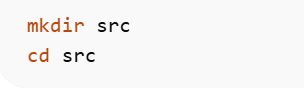
Create your project folder
In your terminal:
cd playwright_nodemaven_project

Create a script folder
Create a separate folder for your Playwright scripts and move into it:
cd src

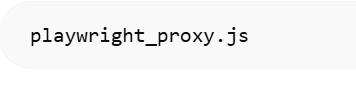
Create your Playwright script
Create a file named:

Add proxy configuration
Paste this code:
const { chromium } = require('playwright');
(async () => {
const browser = await chromium.launch({
proxy: {
server: 'http://gate.nodemaven.com:8080',
username: 'YOUR_USERNAME',
password: 'YOUR_PASSWORD'
}
});
const context = await browser.newContext();
const page = await context.newPage();
await page.goto('https://example.com');
console.log(await page.title());
await browser.close();
})();

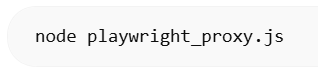
Run the script
From the src folder:
If everything is set up correctly, you’ll see the page title printed in your terminal.

Попробуйте прокси-серверы Nodemaven для $3.50 и получите 750 МБ пропускной способности
Легко интеграции
Бесшовно интегрируйте наш премиум
прокси со всеми основными сторонними инструментами
Выберите премиум-прокси
для вашего рабочего процесса
Испытайте бесперебойное соединение с высоким качеством
IP-адреса прокси от NodeMaven
Резидентские прокси
Реальные домашние IP-адреса с вращающимися и фиксированными сессиями. Поддержка HTTP(S) и SOCKS5 с гибким ценообразованием на основе ГБ для масштабируемых прокси-решений.
Мобильные прокси
Мобильные IP-адреса с вращающимися и «липкими» сессиями для автоматизации и рабочих процессов учетных записей. Поддержка HTTP(S) и SOCKS5 с оплатой по ГБ
Отзывы от наших
клиентов и партнеров
Честная обратная связь от тех, кто пользуется NodeMaven и доверяет нам
Часто заданные вопросы
To use a Playwright proxy, define proxy settings when launching the browser. You can pass a proxy server, along with authentication credentials, directly in your script. NodeMaven proxies support both HTTP and SOCKS5, making integration straightforward.
Playwright proxy settings are configured at browser launch using the proxy option. This includes the server address, protocol, and optional username/password for authentication. This allows full control over how requests are routed.
Yes, Playwright proxy authentication is supported natively. You can provide a username and password inside the proxy configuration. This works with NodeMaven proxies for secure and stable connections.
Yes, Playwright supports SOCKS5 proxy connections. NodeMaven offers SOCKS5 proxies that work seamlessly with Playwright, giving you flexibility depending on your use case.
A Playwright HTTP proxy handles web traffic at the protocol level, while a SOCKS5 proxy works at a lower level and supports more types of traffic. NodeMaven provides both options, so you can choose based on performance and compatibility needs.
To set a Playwright proxy server, pass the proxy configuration when launching the browser instance. This includes the server URL and optional credentials. NodeMaven makes this process simple with ready-to-use proxy formats.
The best proxy for Playwright depends on your use case, but residential and mobile proxies are ideal for avoiding detection. NodeMaven provides high-quality rotating proxies designed for automation, scraping, and multi-session workflows.
Купите прокси-сервер за$3,50 и получите 750 МБ трафика