E-Commerce Data Scraping: Full Guide to Methods, Tools, and a Python Tutorial



E-commerce data scraping helps pricing teams, marketplace sellers, and catalogue managers collect public product information across competitor stores. A dependable workflow captures product identity, price, sale state, variant, location, and timestamp rather than saving one visible price.
Start with an official API or product feed when it provides the required fields. For dynamic stores, inspect permitted public JSON responses. Use браузер для скрапинга NodeMaven when the workflow requires rendered pages, browser interaction, location-specific offers, or a no-code setup.
Согласно данным U.S. Census Bureau’s Q2 2026 Quarterly Retail E-Commerce Sales release, U.S. retail e-commerce sales reached $340.2 billion during the quarter and represented 17.1% of total retail sales. Product prices, promotions, variants, and regional offers can change quickly, so every observation needs clear comparison rules.
Ключевые выводы
- Начните с инструмента official source, then test permitted public JSON responses.
- Совмещать product-listing and size-level variant data into one validated offer record.
- Сохранять price, sale state, product ID, size, market, and timestamp with every captured offer.
- Использовать managed browser workflow for rendered pages, profile continuity, visual review, or cloud execution.
Choose an E-Commerce Data Collection Method
Начните с браузер для скрапинга NodeMaven when you need a no-code workflow, rendered pages, product filters, variant selection, location-aware offers, or recurring browser automation. Build the workflow with a ready-made template, a plain-language AI prompt, or code, without setting up a local browser.
Scraping Browser includes NodeMaven proxies, managed anti-detection, automatic CAPTCHA solving, reusable profiles, Live Browser, and session recordings. There is no separate browser fee. You pay for the rotating proxy traffic used during sessions.

Try NodeMaven Scraping Browser with the $3.50 paid trial, including 750 MB of residential and mobile proxy traffic. Scraping Browser has no separate browser fee: browser runtime, templates, AI prompts, CAPTCHA solving, Live Browser, and session recordings are included with eligible proxy traffic.
The right method still depends on the retailer and the fields required for the collection.
| Метод | Наилучшее соответствие | NodeMaven role |
|---|---|---|
| Браузер для скрейпинга | No-code collection, JavaScript-heavy stores, filters, pagination, selected variants, location-sensitive offers, and recurring workflows | Built-in proxies, CAPTCHA solving, AI prompts, templates, Live Browser, session recordings, and reusable profiles |
| Official API or feed | A retailer or supplier provides documented access and the required product fields | Proxy configuration is usually unnecessary |
| Permitted public JSON | A validated frontend response contains product data and remains stable enough to monitor | Use NodeMaven proxies for regional results or repeated requests |
| HTML-парсинг | Required fields appear in the initial page source | Use proxies when location or request continuity affects the displayed result |
Choose the lightest method that returns the required fields reliably. Validate one product and one location before scaling to a full category. For a technical comparison of direct requests and browser collection, see NodeMaven’s web scraping vs. API guide.
Configure Proxy Context for Regional and Repeated Collection
A product offer can change by country, city, ZIP code, currency, delivery location, or session state. Set the collection location before comparing offers, then keep that context with every saved record.
For repeated permitted requests, NodeMaven резидентские прокси предоставлять таргетинг на уровне страны, города, ISP и ZIP. Sticky sessions can preserve the same IP across a connected browsing flow. Rotating sessions suit independent product requests that do not need shared browser state.
Use the same market context when validating the browser page, public response, and exported record. A price from one location should not be compared directly with an offer collected from another.
Start with NodeMaven’s платный пробный период за $3.50, which includes 750 MB of residential and mobile proxy traffic. Test location-aware requests, sticky sessions, and your Python integration before moving to a larger plan.
Define Product and Offer Data Before Collecting Pages
A product record describes the item itself:
- Name
- Бренд
- Retailer product ID
- Catalogue ID
- Colour
- Variant
- Size
- GTIN
Ан offer observation describes the offer shown for that item at a stated time and location:
- Текущая цена
- Sale status
- Currency
- Market country
- Source URL
- Session or location context
- Capture timestamp
For example, “Nike Shox Z, colour HQ7540-011, women’s size 7” is a product variant. A $78.97 sale offer for that variant on a U.S. storefront at 09:00 UTC is an offer observation.
Compare Equivalent Offers
A listed price needs product context. Two products with the same name can differ by size, colour, pack size, condition, seller, delivery terms, or market.
Before comparing competitors, confirm:
- Product identity: retailer product ID, brand, title, and model
- Variant identity: size, colour, SKU, and GTIN where available
- Price type: regular price, sale price, member price, or marketplace offer
- Местоположение: country, city, ZIP code, currency, and delivery context
- Time: capture timestamp and collection frequency
Зона National Academies’ review of web-scraped price data discusses risks such as outliers, seller relevance, changing websites, and location-specific results. Those checks belong in any pricing or stock-monitoring workflow.
Build a Python Workflow for Public Product Data
This tutorial uses a public Nike women’s-sneakers results page to show how to identify a product-data response and map its fields. The Python example uses generic placeholder URLs. Replace them only after validating an official source or permitted public response for the retailer you are collecting from.
The workflow follows this sequence:
Product-listing response → product identity and price → size-level SKU and GTIN data → validated offer record → CSV or SQL history
Step 1: Find the Product Search Request
Open a public product-search or category page. In this example, the page displays Nike women’s sneakers.
Открыть Chrome DevTools, выбрать Сеть, а затем выбрать Fetch/XHR. Reload the page or run a search. The Network panel will show requests triggered by the listing page.
Look for the request that returns the products shown on the page. On the Nike results page, the relevant request is named Продукты.
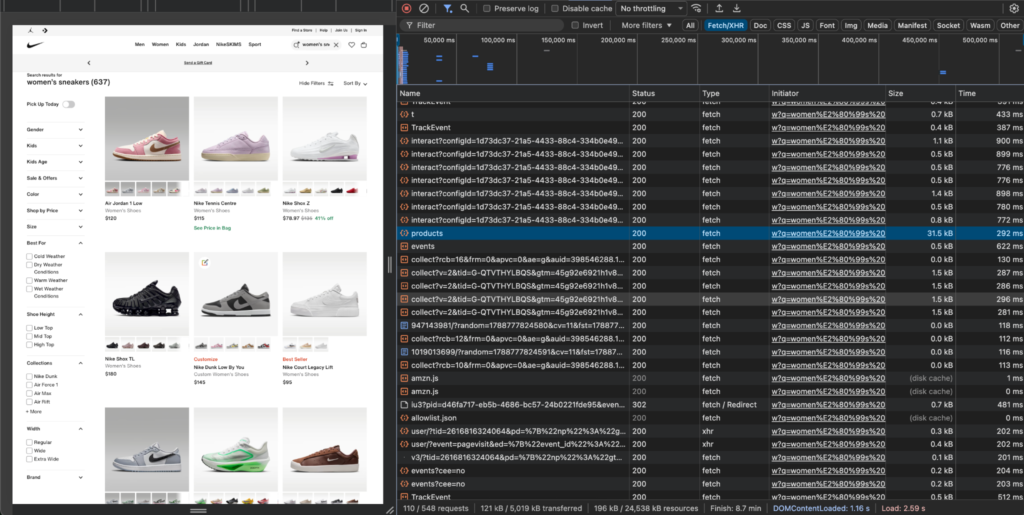
The request list may also include analytics, event tracking, and recommendation calls. Select the request connected to the visible product cards before opening its response.
Step 2: Map the Response Fields
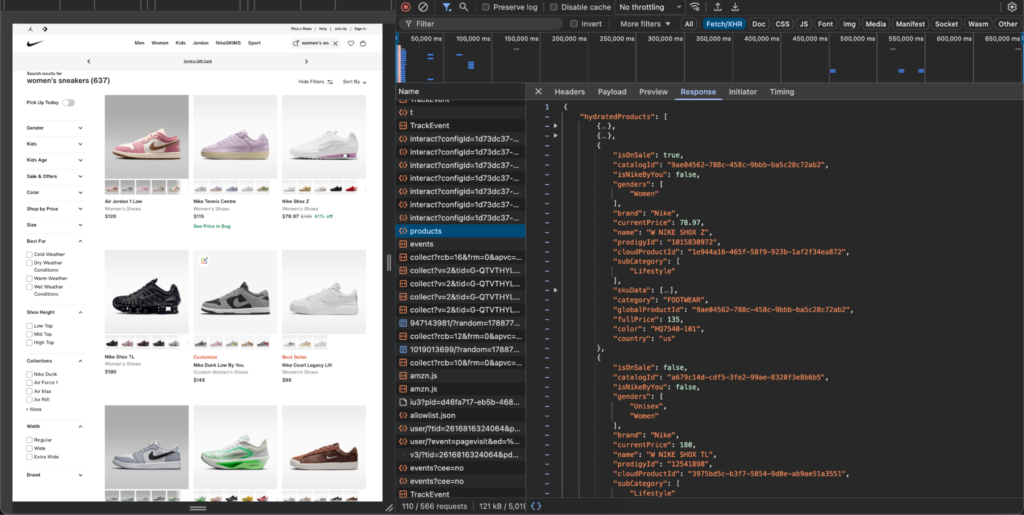
The Nike Продукты response contains an array named hydratedProducts. Each product object includes a retailer product ID, title, current price, sale status, colour code, and market country.
Map the fields into an offer record as follows:
| Nike JSON field | Output field |
|---|---|
hydratedProducts[].productId | retailer_product_id |
hydratedProducts[].catalogId | catalog_id |
hydratedProducts[].name | имя |
hydratedProducts[].currentPrice | current_price |
hydratedProducts[].isOnSale | is_on_sale |
hydratedProducts[].color | colour_code |
hydratedProducts[].country | market_country |
hydratedProducts[].cloudProductId | cloud_product_id |
Check the price against the visible product card before adding it to a dataset. In this example, the Nike Shox Z card displays $78.97, matching currentPrice: 78.97 in the response.
Step 3: Test One Product Before Collecting a Category
Validate one product before collecting an entire category.
For the Nike Shox Z example, confirm the following:
- The visible product card matches
hydratedProducts[].name. - The card price matches
hydratedProducts[].currentPrice. - The record includes
productId,catalogId, иcolor. - The response’s
Странаmatches the market being monitored. - The price is marked correctly as regular or sale pricing through
isOnSale. - One size shown on the product page matches a
skuData[].sizevalue in the response.
A product ID match alone does not prove that a price is ready for comparison. The product name, price, colour, market, sale state, and selected size must refer to the same offer.
If a price or selected size differs from the page, check the chosen colour, size, currency, country, tax display, promotion state, and cached-response context before storing the record.
Step 4: Set Up Python
Create a virtual environment and install the packages used in the example.
The code below uses a generic endpoint placeholder and the Nike response shape demonstrated in the screenshots. Do not copy an endpoint URL from this article into a live collection script.
Configure the Session Before Sending Requests
For a permitted workflow that requires a specific market or repeated collection, configure the proxy session before requesting product data. Add your NodeMaven credentials from the dashboard rather than copying them into a shared script.
Use a location that matches the market being monitored. For a multi-step browser flow, use a sticky session when the same location and session context must remain consistent. For independent product requests, rotating residential proxies can provide fresh IPs without carrying browser state between products.
Start with NodeMaven’s платный пробный период за $3.50, which includes 750 MB of residential and mobile proxy traffic. Test location-aware requests, sticky sessions, and your Python integration before moving to a larger plan.
Step 5: Create a Product Data Model and Request Helpers
The Nike response establishes a product-listing data structure, but the screenshots do not establish a pagination parameter. Start with one validated response.
Some retailers use страница, offset, start, cursor, или limit for pagination. Add a pagination loop only after inspecting the listing request and confirming the relevant parameter.
This model keeps the retailer product ID, current price, sale state, colour, market, and capture time together. Those fields support later comparisons without losing the context behind a price.
Step 6: Add Variant Data From the Product Response
The Nike product response contains a skuData array for size-level product variants. Each entry includes a displayed size, a retailer SKU, and a GTIN.
Map the size-level fields into the collection record as follows:
| Nike JSON field | Output field |
|---|---|
hydratedProducts[].skuData[].size | variant_size |
hydratedProducts[].skuData[].sku | variant_sku |
hydratedProducts[].skuData[].gtin | variant_gtin |
Use the selected product page to validate one record. For example, confirm that the size button W 5 / M 3.5 on the page matches the size field in the JSON response.
Each exported row can now represent one product-size combination. This supports product matching across retailers and lets a monitoring workflow distinguish between two offers for the same shoe in different sizes.
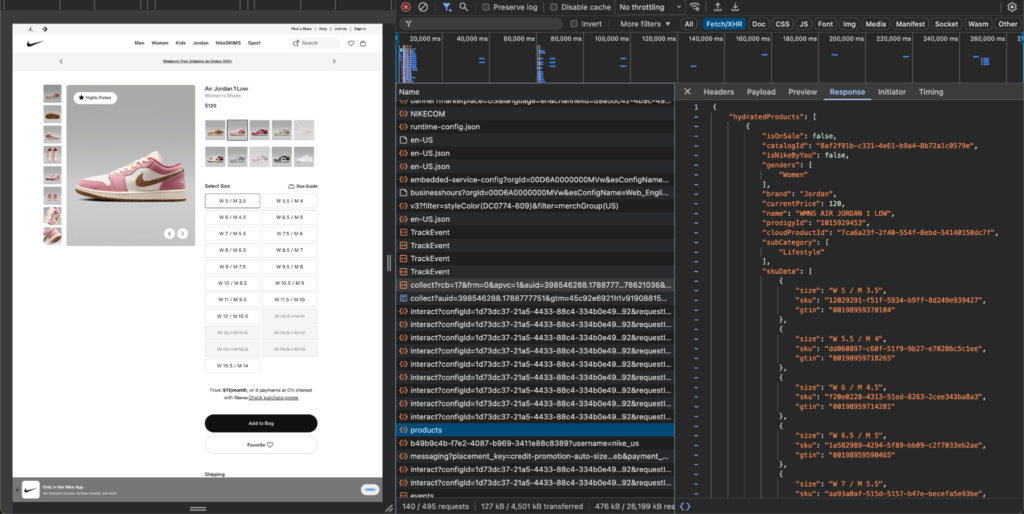
The response shown here does not provide an explicit availability or stock-status field. Do not infer stock from the presence of a size in skuData. Add stock data only when a permitted response provides a clear field, such as inStock, наличие, inventory, или availability_status.
Step 7: Run the Complete Collection Flow and Export a CSV
After validating the field map, request the permitted product-listing response, extract product records, and export valid observations to a CSV file.
Expected terminal output:
Example CSV output:
The CSV provides a simple validation layer before building a larger monitoring pipeline. Review rows with missing product IDs, prices, market data, or unexpected response shapes before using them in pricing analysis.
Step 8: Store Observations in SQL
A CSV works well during early validation. A SQL database supports price history, retailer comparisons, category analysis, and location-specific reporting.
Keep product identity separate from individual observations as the system grows. One product can produce many price records over time across colours, sizes, countries, and retailers.
Store a raw-response reference or a small audit sample with each collection run. When a retailer changes its response structure, those records help the team update field mappings without confusing a format change with a real price movement.
After the single-request workflow is validated, Python async requests can support controlled scaling.
Validate Every Offer Observation
A 200 response confirms that the server answered the request. A comparable offer observation needs matching product identity, variant, price type, currency, location, and timestamp.
For marketplace offers, add seller, item condition, fulfillment method, and shipping data. For products sold in different quantities, calculate the price per unit before comparing offers.
When a workflow uses a connected browser session, location continuity affects results. Independent product requests can use rotation. Multi-step browsing often needs one stable session until the workflow ends. Read NodeMaven’s proxy rotation guide before selecting session behavior.
Use NodeMaven Scraping Browser for Browser-Based E-Commerce Collection
NodeMaven Scraping Browser supports far more than pages requiring clicks or ZIP-code entry. It gives e-commerce teams a managed cloud browser for collecting public product data through rendered pages, browser profiles, scheduled automation, location-aware sessions, and visual debugging.
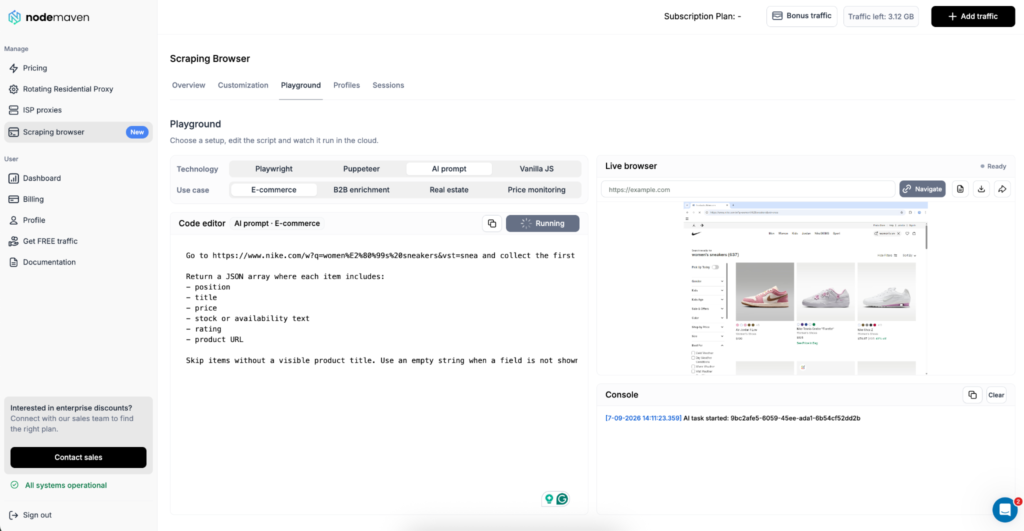
Use Scraping Browser when the workflow requires:
- JavaScript-rendered category and product pages
- Product search, filters, and pagination
- Variant, size, colour, or quantity selection
- ZIP code, city, country, currency, or delivery-location settings
- Recurring price, catalogue, launch, or stock monitoring
- Reusable browser profiles that preserve cookies and local settings
- Live Browser, console output, screenshots, and recordings for troubleshooting
- Playwright, Puppeteer, Vanilla JavaScript, or plain-language AI prompts
A public JSON response can be the leanest route for a stable permitted endpoint. Scraping Browser also fits teams that prefer a complete browser workflow for the target, particularly when catalogue pages change, location affects the offer, or the team needs visual review before sending the workflow into production.
A practical setup looks like this:
- Select an e-commerce or price-monitoring template.
- Set proxy type, location, session behavior, and browser settings.
- Test category, search, or product-page collection in Playground.
- Review the rendered output in Live Browser.
- Confirm product ID, selected variant, price, source URL, and location context.
- Save the workflow as a reusable profile or connect through CDP from Playwright or Puppeteer.
- Schedule it from a backend, queue, or monitoring system.
Зона NodeMaven Scraping Browser guide covers templates, profiles, location settings, sessions, Live Browser, and CDP connections.
Prefer to collect e-commerce data without building the browser stack yourself? Try NodeMaven Scraping Browser with the платный пробный период за $3.50, включая 750 MB of residential and mobile proxy traffic. Browser runtime, templates, AI prompts, CAPTCHA solving, Live Browser, and session recordings are included with eligible proxy traffic. Try Scraping Browser for $3.50
Conclusion: Choose the Lightest Reliable Workflow
Choose the collection method that returns the required product fields with the least maintenance. Start with an official feed when one is available. Use a permitted public JSON response when the request exposes a stable field map. Add HTML parsing when the fields are present in the initial page source.
For teams that need a no-code route, rendered pages, browser interaction, regional product offers, or recurring workflows, NodeMaven Scraping Browser combines browser automation with built-in proxy handling and visual debugging. For Python-based collection, NodeMaven residential proxies give the workflow a consistent market context and stable sessions where the retailer experience requires them.
Validate one product, one variant, and one location before adding a full category or another retailer. Store the product ID, price, colour, size, market, source URL, and timestamp with every observation.
Try NodeMaven Scraping Browser with the $3.50 paid trial, including 750 MB of residential and mobile proxy traffic. Scraping Browser has no separate browser fee: browser runtime, templates, AI prompts, CAPTCHA solving, Live Browser, and session recordings are included with eligible proxy traffic.