Try for $3.50

Proxies for MoreLogin

Integrate NodeMaven proxies with MoreLogin in minutes.
Use residential, mobile, and ISP IPs with full HTTP
and SOCKS5 support for fast setup and stable performance

The first proxy
cashback
on the market

Get rewarded every month by
turning used traffic into reusable
proxy credits

Welcome gift
valued at $100+

  • Quality & speed filters
  • ZIP-Level targeting
  • Personal proxy expert

Exclusive quality guarantee

Earn $1 in bonus traffic every time
a proxy fails to perform

Learn more

What is MoreLogin?

MoreLogin is a robust solution for managing multiple online accounts securely and seamlessly, making it an essential tool
for digital marketers, social media managers, and professionals who juggle several accounts on a single platform.
With integrated proxy support, each browser profile in MoreLogin simulates a unique IP address, helping
to bypass security checks that might otherwise flag accounts as suspicious

95% clean IP rate, guaranteed
Residential, mobile & ISP proxies
24/7 expert support

How to use Nodemaven
proxies with MoreLogin

To get started, download the MoreLogin app from their website

Step 1

Create a new browser profile

To use our proxies in MoreLogin, first start by creating a browser profile. Click New Profile on the left-side bar menu.

You can tap the “Quick Create” to select your configured browser

Step 2

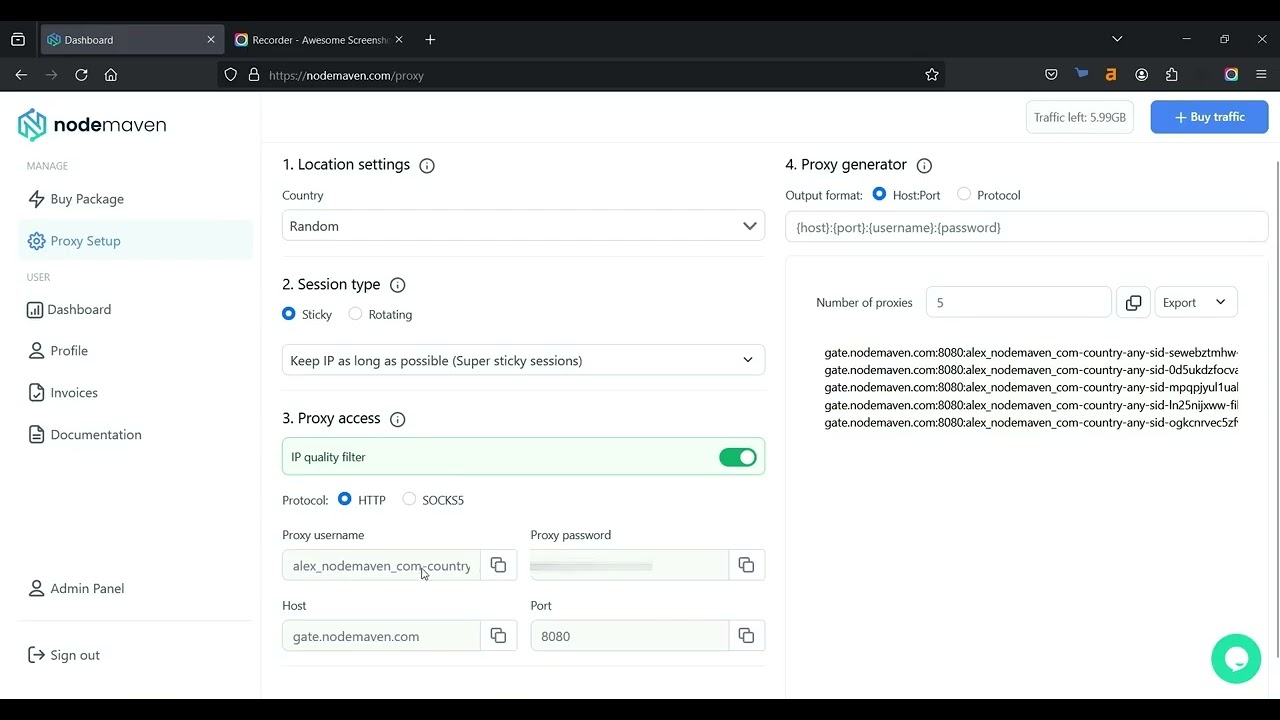
Copy your proxy details

You can find your Proxy username and Proxy password in NodeMaven's dashboard.

Step 3

Setting up proxy in MoreLogin dashboard

Click “Advanced create”, select the HTTP proxy, and set the proxy manually:

New address (IP or host): gate.nodemaven.com

Port: 8080

Login: ProxyUser-country-ProxyCountry-sid-Proxy UniqueID-filter-medium

Password: ProxyPassword

Set up NodeMaven proxies in MoreLogin

Watch a quick tutorial to integrate proxies
and start using them in minutes

Try Nodemaven’s proxy servers for $3.50 and get 750MB of bandwidth

Try Nodemaven’s proxy servers for $3.50 and get 750MB of bandwidth

Easy integrations

Effortlessly integrate our premium
proxies with all major third-party tools

Multilogin
Dolphin Anty
Morelogin
Gologin
Multilogin
Dolphin Anty
Morelogin
Gologin
Multilogin
Dolphin Anty
Morelogin
Gologin
Multilogin
Dolphin Anty
Morelogin
Gologin

Choose premium proxies
for your workflow

Experience uninterrupted connection with high-quality
proxy IPs from NodeMaven

Residential Proxies

Residential Proxies

Real household IPs with rotating and sticky sessions. HTTP(S) and SOCKS5 support with flexible GB-based pricing for scalable proxy workflows

Recommended for:
Mobile Proxies

Mobile Proxies

Mobile IPs with rotating and sticky sessions for automation and account workflows. HTTP(S) and SOCKS5 support with GB-based pricing


Recommended for:
ISP proxies

ISP proxies

Static proxy server IPs with long sessions and consistent identity. HTTP(S) and SOCKS5 support with IP-based pricing and unlimited traffic

Recommended for:
Not sure which proxy type to choose?

Reviews from our
clients and partners

Honest feedback from the people who use and trust NodeMaven

A unique antidetect phone solution built for managing mobile accounts at scale
"NodeMaven works closely with Geelark to support reliable mobile multi-account workflows, tested and proven in daily use"
The market’s first antidetect browser built for professional multi-accounting
"The only high-quality proxy provider we’ve chosen to integrate with. Nodemaven provides clean, stable traffic to power our workflows"
A leading antidetect browser trusted by users around the world
"We recommend NodeMaven as the #1 proxy service for multi-accounting. 
It integrates closely with Dolphin Anty to ensure smooth setup"

Frequently asked questions

To set up NodeMaven proxies in MoreLogin, begin by creating a new browser profile. Then, use the “Advanced create” option to manually input your proxy settings. Enter link as the IP/host, set the port (specified above), and use your specific NodeMaven Proxy username and password, which you can find in your Proxy Setup section on the NodeMaven dashboard.

NodeMaven proxies allow you to assign a unique IP address to each browser profile in MoreLogin, making it easier to operate multiple accounts without triggering security alerts. This is especially useful for digital marketers, social media managers, and eCommerce professionals who need to manage multiple accounts on the same platform securely.


You can locate your NodeMaven Proxy username and password by logging into your NodeMaven account and navigating to the Proxy Setup section. Use these credentials to configure each MoreLogin browser profile with a unique IP, ensuring smooth and secure multi-account management.

The best proxies for MoreLogin depend on your workflow:

  1. Residential proxies are for flexible rotation and geo-targeting
  2. Mobile proxies are real-device IPs for mobile-first platforms
  3. ISP proxies are for stable sessions with a consistent identity

NodeMaven offers all three types with clean IPs and high success rates for reliable performance.

Yes, MoreLogin proxy settings support both HTTP and SOCKS5 protocols. NodeMaven proxies are fully compatible, allowing flexible integration depending on your setup.

Using proxies with MoreLogin helps:

  • Assign a unique IP to each profile
  • Maintain stable sessions
  • Run multiple workflows in parallel
  • Improve consistency across automation and account tasks

High-quality proxies ensure fewer interruptions and more predictable performance.

NodeMaven provides both options depending on your needs.

You can test NodeMaven proxies with MoreLogin by starting with a 750MB for $3.50 proxy trial plan.

If your proxy for MoreLogin is not working, it’s usually related to setup or configuration issues.

Check the following:

  • Incorrect credentials
    Make sure the host, port, username, and password are entered correctly
  • Wrong protocol selected
    Ensure you’re using the correct type (HTTP or SOCKS5) based on your proxy
  • Connection test failed
    Use the built-in test in MoreLogin to verify if the proxy is active
  • Session or IP issues
    Try generating a new session or switching to a different IP
  • Network or firewall restrictions
    Local settings or antivirus software may block proxy connections

With NodeMaven, proxies are pre-filtered for quality and stability, so most issues can be resolved quickly by adjusting the setup or switching sessions.

If the issue persists, you can always contact NodeMaven’s 24/7 support team for assistance with setup and troubleshooting.

Buy proxy server for $3.50 and get 750MB of bandwidth

Buy ISP proxies with guaranteed quality
This site uses cookies to enhance your experience. By continuing, you agree to our use of cookies.