Прокси for MoreLogin
Integrate NodeMaven proxies with MoreLogin in minutes.
Use residential, mobile, and ISP IPs with full HTTP
and SOCKS5 support for fast setup and stable performance
Первый
кешбэк
на прокси-рынке
Превращайте использованный трафик в прокси-кредиты
для дальнейшего
использования


Приветственный
подарок на $100+
- Фильтры качества и скорости
- ZIP-таргетинг
- Персональный прокси-эксперт
Эксклюзивная гарантия качества
Получайте $1 каждый раз, когда наш прокси не работает так, как
обещано

Что такое MoreLogin?
MoreLogin is a robust solution for managing multiple online accounts securely and seamlessly, making it an essential tool
for digital marketers, social media managers, and professionals who juggle several accounts on a single platform.
With integrated proxy support, each browser profile in MoreLogin simulates a unique IP address, helping
to bypass security checks that might otherwise flag accounts as suspicious
Как использовать Nodemaven
proxies with MoreLogin
To get started, download the MoreLogin app from their website
Создать новый профиль браузера
To use our proxies in MoreLogin, first start by creating a browser profile. Click Новый профиль on the left-side bar menu.

You can tap the “Quick Create” to select your configured browser

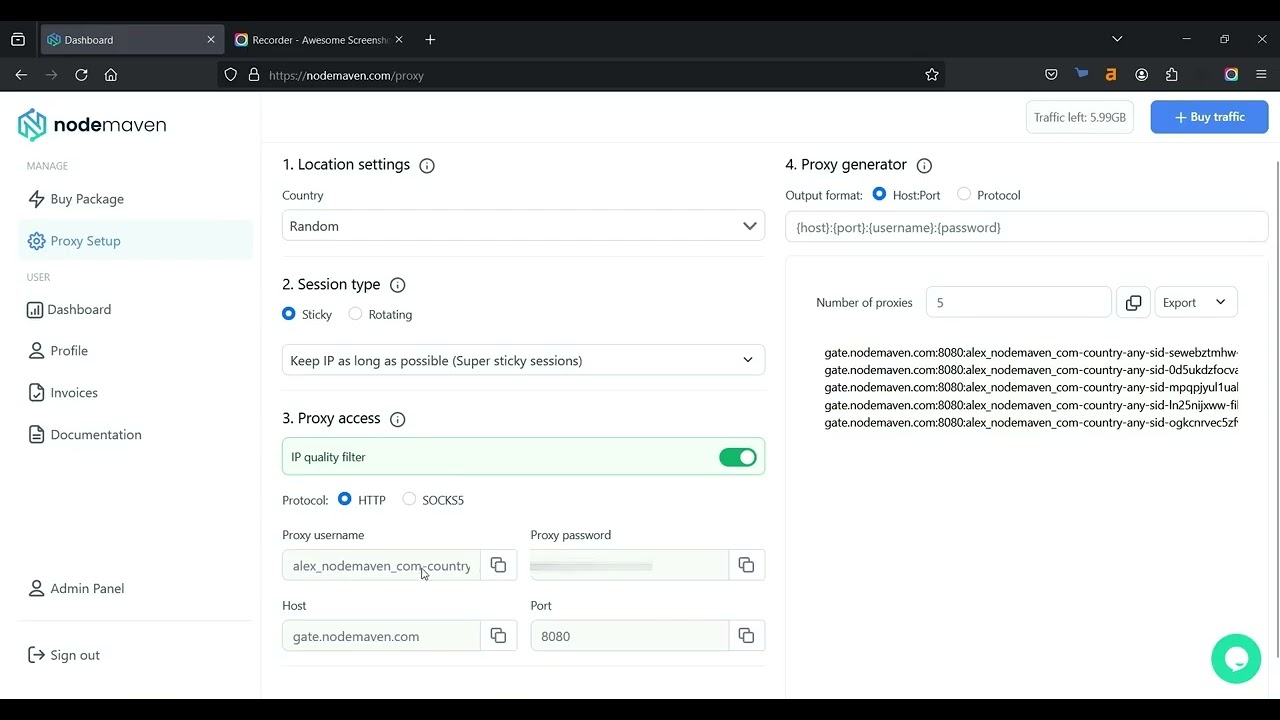
Copy your proxy details
You can find your Proxy username и Proxy password в NodeMaven's dashboard.

Setting up proxy in MoreLogin dashboard
Click “Advanced create”, select the HTTP proxy, and set the proxy manually:
New address (IP or host): gate.nodemaven.com
Порт: 8080
Login: ProxyUser-country-ProxyCountry-sid-Proxy UniqueID-filter-medium
Password: ProxyPassword

Set up NodeMaven proxies in MoreLogin
Watch a quick tutorial to integrate proxies
and start using them in minutes
Попробуйте прокси-серверы Nodemaven для $3.50 и получите 750 МБ пропускной способности
Легко интеграции
Бесшовно интегрируйте наш премиум
прокси со всеми основными сторонними инструментами
Выберите премиум-прокси
для вашего рабочего процесса
Испытайте бесперебойное соединение с высоким качеством
IP-адреса прокси от NodeMaven
Резидентские прокси
Реальные домашние IP-адреса с вращающимися и фиксированными сессиями. Поддержка HTTP(S) и SOCKS5 с гибким ценообразованием на основе ГБ для масштабируемых прокси-решений.
Мобильные прокси
Мобильные IP-адреса с вращающимися и «липкими» сессиями для автоматизации и рабочих процессов учетных записей. Поддержка HTTP(S) и SOCKS5 с оплатой по ГБ
Отзывы от наших
клиентов и партнеров
Честная обратная связь от тех, кто пользуется NodeMaven и доверяет нам
Часто заданные вопросы
To set up NodeMaven proxies in MoreLogin, begin by creating a new browser profile. Then, use the “Advanced create” option to manually input your proxy settings. Enter link as the IP/host, set the port (specified above), and use your specific NodeMaven Proxy username and password, which you can find in your Proxy Setup section on the NodeMaven dashboard.
NodeMaven proxies allow you to assign a unique IP address to each browser profile in MoreLogin, making it easier to operate multiple accounts without triggering security alerts. This is especially useful for digital marketers, social media managers, and eCommerce professionals who need to manage multiple accounts on the same platform securely.
You can locate your NodeMaven Proxy username and password by logging into your NodeMaven account and navigating to the Proxy Setup section. Use these credentials to configure each MoreLogin browser profile with a unique IP, ensuring smooth and secure multi-account management.
The best proxies for MoreLogin depend on your workflow:
- Residential proxies are for flexible rotation and geo-targeting
- Mobile proxies are real-device IPs for mobile-first platforms
- ISP proxies are for stable sessions with a consistent identity
NodeMaven offers all three types with clean IPs and high success rates for reliable performance.
Yes, MoreLogin proxy settings support both HTTP and SOCKS5 protocols. NodeMaven proxies are fully compatible, allowing flexible integration depending on your setup.
Using proxies with MoreLogin helps:
- Assign a unique IP to each profile
- Maintain stable sessions
- Run multiple workflows in parallel
- Improve consistency across automation and account tasks
High-quality proxies ensure fewer interruptions and more predictable performance.
- Ротационные прокси change IPs automatically or on request, useful for scaling workflows
- Static proxies (ISP) keep the same IP for long sessions, useful for consistent identity
NodeMaven provides both options depending on your needs.
You can test NodeMaven proxies with MoreLogin by starting with a 750MB for $3.50 proxy trial plan.
If your proxy for MoreLogin is not working, it’s usually related to setup or configuration issues.
Check the following:
- Incorrect credentials
Make sure the host, port, username, and password are entered correctly - Wrong protocol selected
Ensure you’re using the correct type (HTTP or SOCKS5) based on your proxy - Connection test failed
Use the built-in test in MoreLogin to verify if the proxy is active - Session or IP issues
Try generating a new session or switching to a different IP - Network or firewall restrictions
Local settings or antivirus software may block proxy connections
With NodeMaven, proxies are pre-filtered for quality and stability, so most issues can be resolved quickly by adjusting the setup or switching sessions.
If the issue persists, you can always contact NodeMaven’s 24/7 support team for assistance with setup and troubleshooting.
Купите прокси-сервер за$3,50 и получите 750 МБ трафика