
What Is a Mobile Proxy? How It Works and When to Use One



A mobile proxy routes internet traffic through an IP address assigned by a cellular carrier. The destination sees a 4G, LTE, or 5G carrier IP instead of the user’s original address. You can connect from a laptop, server, or phone. The exit network, not the device in your hand, makes the proxy mobile.
Mobile carrier networks operate at enormous scale. In 2025, the International Telecommunication Union counted 9.2 billion mobile-cellular subscriptions and 99 active mobile-broadband subscriptions for every 100 people. Those totals include people with multiple subscriptions and connected devices, but they show how common carrier traffic has become.
That scale gives carrier IPs a different network profile from hosting-provider and home-broadband addresses. It has high-trust, but it does not make a user invisible. Websites can still examine cookies, account history, browser fingerprints, request patterns, and abrupt location changes.
Quick answer
- Mobile proxies use carrier IPs, commonly associated with 3G, 4G/LTE, or 5G networks.
- CGNAT sharing can place many subscribers behind one public IP, which makes broad IP-only blocks less precise.
- Rotating sessions suit independent requests; sticky sessions suit multi-step flows.
- Residential proxies are usually cheaper when a carrier network is not required.
- Compare cost per completed task, not price per gigabyte alone.
If proxy terminology is new, start with how a proxy server works. This guide focuses on the carrier-specific mechanics and trade-offs that separate mobile proxies from other routes.

Try NodeMaven Mobile Proxies with the $3.50 paid trial, including 750 MB of mobile and residential proxy traffic.
What is a mobile proxy?
In technical terms, a mobile proxy is a forward proxy with a cellular-network exit IP. Your request reaches the provider’s gateway, then leaves through carrier-connected infrastructure. The destination records the carrier IP and its autonomous system number, usually shortened to ASN.
One common mix-up comes from the name. Configuring a proxy on a smartphone does not make it mobile. Home Wi-Fi may give that phone a residential broadband IP, while a desktop computer can send traffic through a genuine mobile carrier exit.
Use three verification signals to check a mobile route:
- Carrier ownership: the public IP is associated with a mobile network operator.
- Cellular classification: reputable IP databases classify the route as mobile rather than hosting or fixed broadband.
- Consistent network details: the ASN, carrier, location, and connection behavior agree with the product description.
You can inspect these fields with NodeMaven’s IP lookup tool. Check the IP and carrier details after connecting, including the ASN, country, and city. Database labels can be stale, so treat them as verification signals rather than conclusive proof of sourcing or ownership.
What do 3G, 4G, LTE, and 5G labels tell you?
These labels describe the cellular network generation behind the exit. They can affect speed, latency, and local availability, but they do not prove that an IP is clean, ethically sourced, or suitable for a particular target.
In 2025, 4G covered 93% of the world’s population, while 5G covered 55%, according to ITU mobile-network coverage data. A broad 4G pool may therefore offer more locations than a smaller 5G pool. For most workflows, carrier, location, session control, and observed performance say more than the generation badge.
| Term | Plain-language meaning |
| Mobile IP | A public IP associated with a cellular carrier |
| Proxy gateway | The host and port the client connects to |
| Carrier ASN | The network identifier associated with the operator |
| Exit node | The carrier-connected endpoint that sends the request onward |
| Mobile proxy pool | The collection of mobile exits available through a provider |
How does a mobile proxy work?
Mobile proxy infrastructure changes the public exit IP seen by the destination. Its gateway authenticates the user and applies location and session rules. Carrier-connected infrastructure then sends the request onward, often through CGNAT.
Requests usually follow this six-step path:
- Connect: a browser, script, or application connects to the proxy gateway.
- Authenticate: the gateway checks the credentials and requested location.
- Assign an exit: the proxy network selects an eligible mobile route.
- Enter the carrier network: the carrier routes the connection, often through CGNAT.
- Reach the destination: the website receives the request from the carrier IP.
- Return the response: data travels back through the exit and gateway.
For a request that is successfully routed through the proxy, the destination normally sees the exit IP rather than the client’s original public IP. Poor configuration can still expose other network information through direct connections, DNS behavior, or WebRTC. The WebRTC leak test can help confirm that a browser is not revealing an unexpected address.
What is carrier-grade NAT?
Carrier-grade network address translation, or CGNAT, lets a network place many subscriber connections behind a smaller set of public IPv4 addresses. Each device receives a private or shared internal address. The carrier keeps translation records so replies return to the correct connection.
The Internet Engineering Task Force documented CGN requirements in RFC 6888. It reserved the shared address block 100.64.0.0/10 for service-provider NAT deployments in RFC 6598. That block contains 4,194,304 IPv4 addresses, although carriers can use other internal designs.
CGNAT became common because public IPv4 space is limited. A carrier may serve far more active devices than it has public IPv4 addresses. Translation lets those devices connect without assigning one public address to each subscriber.
Why does CGNAT affect IP blocking?
Because many connections can share one address, an IP-only block may affect unrelated subscribers. A website risks challenging ordinary customers when it applies broad bans to an active carrier IP. That makes carrier ranges less prone and convenient to block than many hosting ranges. That make mobile proxies well-suited for workflows that needs high trust like account management, ticketing and sneaker bots.
However, CGNAT does not create automatic trust. A website can still react to browser and account signals, including high request volume, inconsistent settings, old cookies, account history, or unusual TLS behavior. CGNAT changes the cost of an IP-only decision; it does not remove the rest of the detection stack.
How do mobile proxies compare with residential and datacenter proxies?
Network ownership creates the practical difference between proxy types. Mobile IPs belong to cellular carriers, residential IPs come from household broadband connections, and datacenter IPs belong to hosting or cloud networks. ISP proxies, also called static residential proxies, use ISP-registered addresses hosted on server infrastructure.
| Factor | Mobile proxy | Residential proxy | ISP proxy (static residential) | Datacenter proxy |
| Network identity | Cellular carrier ASN | Home broadband ISP ASN | ISP-registered IP hosted on server infrastructure | Hosting or cloud ASN |
| Common strength | Carrier-specific and mobile-web workflows | Broad location coverage and general data work | Stable, long-lived identity with ISP classification | Speed, scale, and lower cost |
| Session options | Rotating or sticky | Rotating or sticky | Static, usually dedicated | Static or rotating |
| Typical price | Highest | Mid-range | Mid-range, often billed per IP | Lowest |
| Main drawback | Cost and variable cellular performance | Pool quality varies | Smaller location coverage and limited rotation | Easy to classify as hosted traffic |
An ISP proxy fits workflows that need one stable high-trust IP for days or weeks, such as IP allowlisting or an authorized long-lived session. It cannot replace a mobile proxy for carrier-specific testing because its traffic does not originate from a cellular ASN.
Mobile proxy vs residential proxy
With a residential proxy, the exit IP belongs to a household broadband connection. Residential pools usually offer broader location coverage and lower bandwidth prices than mobile traffic, which makes them a sensible first test for public web data, search monitoring, price checks, and general localization.
Move to mobile when the target experience depends on a carrier network or when a controlled test shows a measurable improvement. The difference should appear in completed tasks, challenge rate, geo accuracy, or session stability. A vague belief that mobile is safer does not justify the premium.
For more detail, the mobile, residential, and datacenter comparison covers pool size, speed, cost, and workload fit.
Mobile proxy vs datacenter proxy
By contrast, a datacenter proxy runs on infrastructure associated with a hosting provider. These proxies can be fast and inexpensive, and they work well for targets that accept automated requests or internal systems that allowlist known addresses.
Datacenter traffic is a poor fit when the target serves a carrier-specific result or applies stricter rules to hosting ASNs. Buying mobile traffic for every request is the opposite mistake. If a cheaper datacenter route completes the job reliably, a carrier exit adds cost without changing the output.
Mobile proxy vs VPN
With a mobile proxy, selected application traffic travels through a carrier IP. A VPN usually encrypts and routes most device traffic through one tunnel. Some VPN servers may use mobile IPs, but the product categories solve different problems.
Choose a proxy when you need per-request control, session rotation, or application-level configuration. Choose a VPN when the goal is device-wide tunneling on an untrusted network. Neither tool grants permission to access restricted systems or ignore a site’s terms.
Try NodeMaven Mobile Proxies with the $3.50 paid trial, including 750 MB of mobile and residential proxy traffic.
Should you use rotating or sticky mobile sessions?
Use rotation for independent requests and a sticky session when several steps must remain on one IP. Login flows, forms, carts, and account dashboards generally need continuity. A list of unrelated public pages often does not.
Rotating mobile sessions
Depending on the provider, rotating mobile proxies can assign a new IP per request, per connection, or after a timer. Rotation distributes independent traffic across the available pool and reduces reliance on one address.
Aggressive rotation can break stateful workflows. If the IP changes between a login page and the next authenticated request, the site may request verification or end the session. A 2026 practitioner discussion reached the same conclusion: per-request rotation sounded attractive, but session consistency worked better on stateful targets.
Sticky mobile sessions
Under a sticky session, the gateway tries to keep the same exit for a defined period. “Sticky” is more accurate than “static” because the exit can still disappear when a device disconnects or a carrier reassigns the address.
Published limits vary. SOAX mobile proxies support sessions up to 60 minutes, DataImpulse mobile proxies list 120 minutes, and NodeMaven mobile proxies provide sticky sessions up to 24 hours. These are maximum session controls, not promises that every carrier connection will survive for the full period.
| Workflow | Better starting mode | Reason |
| Independent search-result checks | Rotating | Each request can stand alone |
| Multi-page QA scenario | Sticky | The test needs one continuous identity |
| Regional ad verification | Sticky per scenario | Carrier and location should remain stable during the check |
| Large set of public pages | Rotating with rate controls | Requests do not depend on shared state |
| Authorized account management | Sticky | Sudden IP changes can trigger security checks |
Our rotating proxy guide explains session IDs, timed rotation, per-request changes, and failure handling beyond mobile networks.
Why are mobile proxies more expensive?
The mobile supply chain includes carrier data, SIMs or participating devices, local infrastructure, routing, monitoring, and replacement. Supply may also be thin for a specific carrier or city. Datacenter capacity is much easier to provision in bulk.
Public prices make the gap easy to see. Currently, Decodo’s mobile pricing lists pay-as-you-go traffic at $4 per GB after its displayed discount, while its datacenter traffic starts at $0.60 per GB for a 10 GB plan. These products serve different jobs, but the difference shows why mobile might be pricy choice for every request.
Mobile proxy pricing snapshot
The figures below come from public self-service pages checked on October 1, 2026. Taxes, promotions, location tiers, and enterprise contracts can change the final rate. Recheck every price before making a purchase decision.
| Provider | Smallest public entry shown | Published mobile rate | Session information | Traffic treatment |
| NodeMaven | $3.50 for a 750 MB trial | Monthly plans from $2.20/GB | Sticky sessions up to 24 hours | Residential and mobile share one allowance; unused traffic rolls over |
| Decodo | Pay as you go from $4 | $4/GB PAYG; listed volume rates from $2.25/GB | Rotating and sticky sessions | Mobile purchased separately from residential |
| Oxylabs | $30 for 4 GB | $7.50/GB on Starter | Sticky sessions up to 24 hours | Monthly mobile plan |
| SOAX | Tier 1: $5/GB on Sandbox; | Tier 1: $5/GB on Sandbox; $3/GB on the $200/month Builder plan | Sticky sessions up to 60 minutes | One rate across residential and mobile; rates vary by plan and geo tier |
| IPRoyal | $13.60 for 2 GB | $6.80/GB on the 2 GB rotating plan | Rotating plans and dedicated mobile options | Dedicated access starts at $10.11 per day |
| DataImpulse | $5 for 2.5 GB | $2/GB on Intro and Basic | Sticky sessions up to 120 minutes | Purchased traffic does not expire |
Pricing sources: NodeMaven, Decodo, Oxylabs, SOAX, IPRoyal, and DataImpulse.
This is not a simple cheapest-to-most-expensive ranking. NodeMaven and SOAX combine access to more than one proxy type. Decodo sells its pools separately. DataImpulse and NodeMaven traffic does not expire. Those terms can outweigh the headline rate.
For a broader explanation of bandwidth, per-IP billing, retries, and rollover, see the proxy-service cost guide.
Calculate cost per completed task
Price per gigabyte ignores failed requests. A more revealing formula is:
- Effective cost per completed task = total proxy spend / valid completed tasks
Suppose a $2-per-GB route needs enough retries to consume 30 GB for 800 completed checks. The proxy spend is $60, or $0.075 per completed check. A $4-per-GB route that consumes 18 GB for 950 completed checks costs $72, or about $0.076 per completion. After retries, the two routes cost almost the same.
Try NodeMaven Mobile Proxies with the $3.50 paid trial, including 750 MB of mobile and residential proxy traffic.
How do websites detect mobile proxies?
Websites can combine network, browser, account, and behavior signals into a risk score. The response may be a lower rate limit, CAPTCHA, verification request, or block.
Network and IP signals
Common network checks include:
- ASN and carrier classification
- IP geolocation and abrupt country changes
- Address reputation and prior abuse reports
- Concurrent requests from one public IP
- Repeated paths, timing, and error patterns
- DNS or connection details that conflict with the claimed location
Carrier IPs are still visible to measurement systems. The 2021 NDSS paper “Your Phone is My Proxy” captured 625,000 cellular proxy IPs while studying mobile proxy software. It also identified 1,701 Android packages tied to 963 apps. The study demonstrates that large sets of cellular proxy exits can be identified and analyzed.
The same researchers found that the analyzed apps had at least 300 million installations in total. They also raised consent and security concerns around proxy SDKs. The findings describe the software ecosystem they studied, not every commercial mobile network, but they show why buyers should ask how devices join a pool and how consent is recorded.
Signals beyond the IP
An IP is only one input. A site may also inspect signals beyond the IP, including cookies, browser fingerprints, TLS behavior, account history, language, timezone, screen settings, navigation order, and interaction timing. A desktop browser presenting a mobile ASN can still look inconsistent.
In a 2026 community thread, one practitioner described testing residential rotation, mobile sticky sessions, ISP proxies, and browser tools while still receiving fast challenges. The poster concluded that session history and browsing behavior sometimes outweighed proxy category. That is one person’s experience, not a controlled benchmark.
Proxy safety and sourcing
With an unknown free proxy, the operator controls an intermediary in the traffic path. During a 30-month academic study, researchers collected more than 640,600 free proxies. Only 34.5% were active at least once, and the team reported 4,452 vulnerabilities plus 16,923 cases of manipulated content.
The study covered open proxies in general, not mobile services alone. The purchasing lesson still transfers: review sourcing, authentication, logging, abuse controls, and support before sending business traffic through any provider. The proxy-safety guide covers encryption and operator risk in more detail. For business use, choose quality-verified paid proxies, such as NodeMaven’s mobile proxies, rather than a free proxy whose operator and sourcing you cannot verify.
When should you use a mobile proxy?
Use a mobile proxy when the carrier network changes the result you need to observe. Carrier-specific ads, mobile-web behavior, and checks against a real cellular ASN fit that rule. Bulk downloads and fixed allowlists usually call for another route.
Global mobile traffic exceeded 220 exabytes per month in Q2 2026, up 23% year over year. Video accounted for about 75% of mobile data traffic at the end of 2025 (Ericsson, Mobile network traffic Q2 2026, 2026). Carrier delivery is large enough to deserve its own test path when the product or campaign depends on it.
Mobile ad verification
Ad delivery can vary by country, device, app, campaign, and network. For verification, a carrier exit lets the team inspect a placement through the intended network path. Keep carrier and location stable for each scenario, then save the screenshot, observed IP, page URL, and timestamp.
App and mobile-web QA
Mobile proxies help teams inspect carrier-routed web flows, regional redirects, content, and network-dependent responses. They cannot reproduce GPS behavior, radio conditions, battery state, push delivery, or every property of a physical handset.
Use the proxy as one layer in a test plan. Android’s documentation separates location-workflow testing, network testing, and UI behavior tests. A carrier IP reproduces the network view; an emulator or physical device handles the remaining device conditions.
Market research and localized checks
Researchers can compare public pages, search results, offers, and mobile storefronts across supported regions. Define the market before collection: country, city, language, currency, carrier, and time. Store those settings with each result so another analyst can reproduce the check.
Public web data collection
Mobile exits can help when a target’s public mobile experience differs from its desktop or broadband version. They may also improve completion on some protected pages. Start with the cheaper route, record the failures, and move only the affected step to mobile.
Authorized social media operations
Mobile proxies can reproduce a carrier-network session for a company or client account. They do not grant permission to automate a platform or operate accounts deceptively. Review platform rules, client authorization, and local law before connecting.
For a small agency, mobile may be unnecessary. A 2026 SocialMediaMarketing discussion about fewer than 20 client accounts leaned toward stable residential IPs in the client’s country rather than mobile routes. The concern was avoiding unexplained location changes.
Try NodeMaven Mobile Proxies with the $3.50 paid trial, including 750 MB of mobile and residential proxy traffic.
How to test a mobile proxy
Test a mobile proxy in two passes: verify the endpoint and browser configuration, then compare it with a residential pool on the same approved workflow. NodeMaven’s tools are free, require no account, and work with proxies from other providers.
1. Confirm that the proxy connects and transfers data
Paste the endpoint into the Proxy Checker and run a 10 MB or 50 MB payload. Check authentication, HTTP status, bytes transferred, and duration. For a fair comparison, use the same payload and test window for each proxy type. Compare the measured transfer with the provider dashboard if you also want to audit bandwidth billing.
2. Verify the mobile IP, carrier, and location
Open the IP Lookup in the proxied browser and select Look up my IP, or paste the exit IP from your client. Confirm the country, ISP, ASN, usage type, and detection flags. A mobile endpoint should resolve to the expected carrier network rather than a hosting company. City results may be less precise because carriers use regional gateways.
3. Check for WebRTC, DNS, and UDP inconsistencies
A good IP can still be undermined by a browser leak. Use the WebRTC Leak Test to check whether WebRTC exposes a public IP different from the HTTP exit. Run the DNS Leak Test to identify resolvers tied to your usual ISP or country.
Finally, the Connection Checker compares HTTP, HTTP/3, STUN, and TURN observations. Conflicting addresses usually require a configuration review before you judge the proxy itself.
4. Compare mobile and residential performance
Once the setup passes, change one variable at a time. Keep the client, target category, country, request rate, retry policy, and test window consistent across residential and mobile pools.
Record the same eight fields for both pools:
| Metric | Why record it |
| Valid completed tasks | Measures usable output, not raw responses |
| Challenge or CAPTCHA rate | Shows workflow friction |
| HTTP error rate | Separates access failure from invalid output |
| Median latency | Describes normal response time |
| 95th-percentile latency | Exposes slow-tail behavior |
| Session interruptions | Measures continuity in multi-step flows |
| Bandwidth consumed | Connects retries to traffic cost |
| Cost per completed task | Gives the economic result |
Start with a small pilot and increase the sample if failures are rare or the difference is narrow. Repeat the test at several times if the target changes during the day. Record the date, country, sample size, client, request rate, and retry policy with the result. If mobile loses, keep the finding rather than claiming one proxy type always performs better.
How to configure a NodeMaven mobile proxy
NodeMaven uses one traffic balance for residential and mobile pools. Monthly pricing starts from $2.20 per GB and a $3.50 trial with 750 MB. All packages give access to more than 30 million residential IPs, 295,000 mobile IPs, and sticky sessions up to 24 hours.
The setup takes six steps:
- Choose a plan or trial that includes residential and mobile traffic.
- Open the proxy configurator in the NodeMaven dashboard.
- Select the mobile pool for the current endpoint.
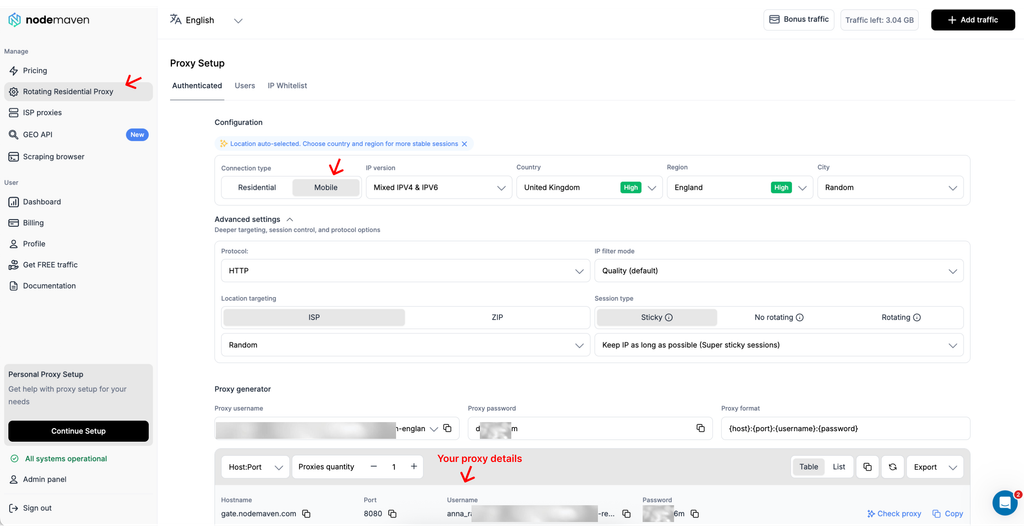
- Set the location and carrier options available for the job.
- Choose rotation or a sticky session based on whether the workflow needs continuity.
- Add the generated HTTP(S) or SOCKS5 credentials to the approved tool, then verify the exit IP, ASN, carrier, and location.
You can use our integrations guides or blog posts like SOCKS proxy configuration, Chrome proxy setup to learn how to add proxies step by step.For browser-profile configuration, use the antidetect browser and mobile proxy setup guide.
How to read the result
Keep residential when both pools complete the workflow at similar rates and residential costs less. Reserve mobile for the targets or individual steps where it produces a measurable gain. A mixed route often works well: residential handles broad collection, while mobile handles a smaller carrier-specific check.
NodeMaven’s combined allowance supports that split without requiring a separate mobile subscription. Test both routes from one plan, compare the result, and keep the cheaper route that meets the completion target.
How to choose a mobile proxy provider
The best provider is the one that produces reliable completed work at an acceptable cost. Large advertised pools do not compensate for poor geo accuracy, unstable sessions, unclear sourcing, or slow support.
Check six areas before committing:
- Network verification: confirm the observed ASN, carrier, country, and city rather than trusting the product label.
- Session controls: test whether rotation and sticky-session behavior match the workflow.
- Sourcing and consent: ask how devices or connections enter the pool and how consent is recorded.
- Measured performance: compare completion rate, challenge rate, p95 latency, interruptions, and cost per completed task.
- Commercial terms: check traffic expiry, rollover, targeting fees, refund terms, and overage rules.
- Operational support: confirm that someone can help with failed authentication, targeting errors, and unstable sessions.
NodeMaven mobile proxies are a strong option to shortlist because one traffic balance covers both mobile and residential pools, making side-by-side testing simpler and less expensive. IP quality filtering, carrier and ZIP targeting, sticky sessions up to 24 hours, traffic rollover, and proxy expert support map directly to the quality, session, cost, and support criteria above. Test the service against your own targets before scaling.
Avoid providers that promise zero detection, guaranteed account safety, or universal bypass. Those claims ignore browser state, behavior, target-specific rules, and carrier instability. A credible provider explains both the capability and the limit.
Try NodeMaven Mobile Proxies with the $3.50 paid trial, including 750 MB of mobile and residential proxy traffic.


