
How to Buy a TikTok Account Safely: Where to Buy, What to Check, and a Step-by-Step AccsZone Walkthrough



If you want to buy a TikTok account, there are two places to buy one. Escrow marketplaces list one established account at a time, with a stated follower count, and hold the payment until the buyer has inspected the handover. Automated catalog stores list fresh and aged accounts in quantity, with a title that states the attributes, and deliver a credentials file to your dashboard after payment. The check that matters most on either route is whether the mailbox the account was verified with is delivered to you; every later recovery and verification step runs through it.
Before anything else: TikTok’s Terms of Service say “Do not give others access to your account, or transfer your account to anyone else, without our permission” (TikTok Terms of Service, US). A purchased account sits outside those terms from the moment it changes hands. No seller label changes that, and buying is not a way around a restriction, a lost login or an identity check. Where a check needs the original owner, the answer is a claim with the seller, not a workaround.
What types of TikTok accounts are for sale: fresh, aged, with followers
To see how sellers describe TikTok accounts, we read all 109 listing titles in the AccsZone TikTok category on 2 October 2026 (subcategories: accounts, follower accounts, advertising accounts), plus the TikTok vocabulary on Fameswap, PlayerUp, G2G and AccsMarket. Prices and stock were not recorded.
Most titles state a registration country or IP (89 of 109), the United States most often (52); 24 say the IPs are mixed. Email verification appears in 76 titles and the mailbox is delivered in 78; five follower listings say “Mail Not Included”. A 2FA key is included in 23. A follower tier appears in 32, always approximate or minimum (“About 50 followers”, “15,500+ Real Followers”). A registration year appears in 12, “Fresh” in two, “Live” in five. “Warmed up” and “Shop” appear in none, though both are common elsewhere.
| Listing term | What the seller states | What you can check on delivery | What the label does not establish |
| Fresh / softreg / “Auto-Reg” | A recently created account with little or no activity. | Profile state as stated; every promised field present. | Any history, or any platform treatment of a new account. |
| Aged / “Created 2025” / “Aged 2020-2025” / “2022 Registration” | The year or range in which the seller says the account was registered. | The oldest visible activity, which cannot predate creation; consistency across a batch. | Continuous use, or any TikTok treatment based on age. |
| “USA IP Registered”, “Germany IP”, “Mixed IPs” | The IP country the seller says was used at sign-up; “Mixed” means none specified. | Nothing directly; only that your session location can match it. | That TikTok recognizes a country, or that a match avoids a prompt. |
| “Email Verified”, “Email Included”, “Mail Not Included” | A mailbox verified the account; whether its login is in the file. | The email column is populated and the mailbox opens. | Who else can reach that mailbox, or that a code will not go elsewhere. |
| “2FA Included” / “2FA key” | A TOTP secret is delivered for TikTok’s Authenticator method. | The key produces a code TikTok accepts; present on every line. | That Phone or Email methods are not also enabled with contacts you do not hold. |
| Follower tier (“About 500 followers”, “10K+ Followers”) | An approximate or minimum count at listing time; sometimes “Real” or “Original”. | The public count on delivery; likes and views per post against it. | Audience country, engagement, or survival of TikTok’s removal of inauthentic metrics. |
| “Live Streaming Access” / “Live Studio Active” | The account met the LIVE threshold at listing time, as the seller read it. | Whether LIVE appears in the app after your first login. | That LIVE stays available; TikTok documents an age and follower requirement that varies by region. |
| “Shop Enabled”, “Shop Account (US)” (seen on other marketplaces) | A Shop seller or affiliate feature was active at listing time. | Whether Shop features are present after login. | That you can keep or re-verify the shop; registration asks for the registrant’s identity and residence documents. |
| “Warmed up” / “Ready to Use” (undefined) | Some activity after registration; defined on none of the pages we read. | Visible prior activity, if any. | Anything measurable about activity or platform treatment. |
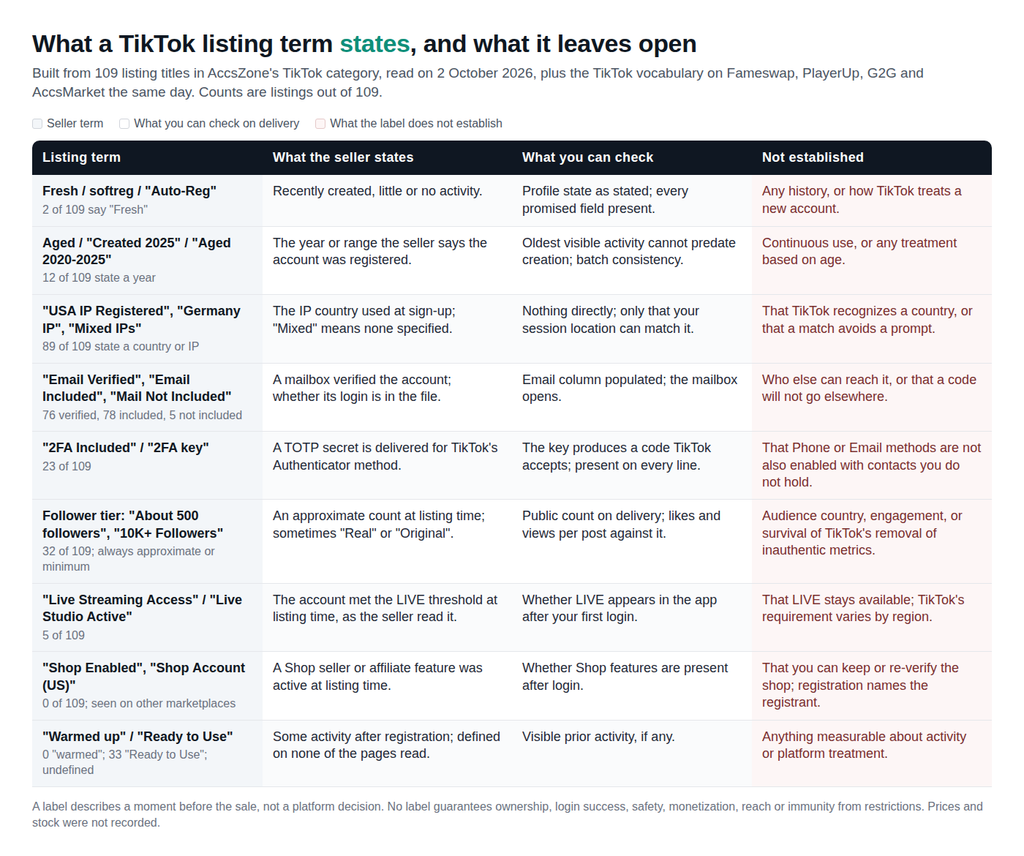
A label describes a moment before the sale, not a platform decision. “Verified”, “aged”, “real followers” or “ready to use” in a title never guarantees ownership, login success, safety, monetization, reach or immunity from restrictions. TikTok’s account-type page defines Personal, Business, Verified Business and Organization accounts, each “Accessed by an individual or business entity” (Types of TikTok accounts). For a seller’s explanation of the categories it lists, read AccsZone’s own guide to TikTok account types, remembering that any seller guide describes its own inventory and that its prices change.
Where to buy TikTok accounts: escrow marketplaces vs automated catalog stores
Five sellers come up repeatedly when people ask search engines and AI assistants where to buy a TikTok account. The table reports only what each seller’s own pages said on 2 October 2026; “not stated” means the pages we could read were silent. No links, no ranking: the order is by model, then alphabetical.
| Seller | Model | What it lists for TikTok | Payment stated | Delivery | Dispute or replacement policy as written | Seller verification stated |
| Fameswap | Escrow marketplace: offers on individual listings, then “Fameswap Escrow” via Payoneer Escrow. | Established accounts with stated follower counts; filters for audience size, niche, “Escrow Accepted”, “Original Email Included”. | Escrow funded by wire transfer or crypto; percentage fee with a stated minimum. | Seller hands credentials to Fameswap, which checks and passes them on; buyer inspects, then releases payment. | A dispute step inside escrow. No replacement window after release stated. | “users pass verification checks before transactions can proceed”; listings reviewed before going live; ID documents on request. |
| G2G | Multi-seller marketplace with automated escrow (“GamerProtect”): payment held until delivery is verified. | Offer groups: “TikTok New Account (Global)”, follower tiers 100 to 10,000, “Live Access Account”, “Shop Account (US)” and “(UK)”. | Cards, e-wallets, cryptocurrency, online banking. | Seller delivers; buyer confirms or the 72-hour window passes. | “72-Hour Inspection”; “an extended 14-day warranty period” for account services; “Developer/Publisher Enforcement” not covered. | “We vet our sellers so you don’t have to.” No process described. |
| PlayerUp | Forum marketplace with an optional middleman: a three-way conversation between buyer, seller and staff. | Forum threads filtered by follower and like bands, “Verified Account” and “Instant Delivery” flags; titles claim “Live Enabled”, “Shop Enabled”. | “over 50+ payment providers”; one page says both that buyers pay no middleman fee and that middleman buyers pay 2% to 4%. | “typically takes around 1 to 48 hours”. | Cancel if undelivered (“refund fee may apply”); “partially guaranteed after the transaction”; paid insurance for full cover. | “We verify the seller”. No process described. |
| AccsMarket | Automated catalog store, multi-seller: “an intermediary between account sellers and buyers”. | Subcategories softreg, aged, with followers, ads; titles state email, gender, profile fill, 2FA, cookies, registration IP. | “Current payment methods are listed in your personal cabinet”; crypto through an order. | Download “immediately after successful payment. Usually no more than 5–10 minutes”; expires after 30 days. | “warranty on account functionality for exactly 48 hours” from receipt; void if usage rules are broken. | Not stated on the pages we could read. |
| AccsZone | Automated catalog store: own-produced inventory plus registered suppliers; titles disclose attributes. | Subcategories accounts (fresh and aged, by country), followers, advertising; titles state email, 2FA, country, profile fill, follower tier. | Cryptocurrency, per the FAQ. | “accounts appear in your dashboard within seconds”; a credentials file in the format stated on the product page. | §4.2: replacement or refund “only if” “non-functional or suspended before initial login”, “Claims are submitted within 24 hours of purchase”; store credit. | Buyer side: not stated. Suppliers: identity verification before approval. |
The difference is what you are buying. On an escrow marketplace you buy one specific account with a history, you negotiate, and the marketplace stops either side leaving with both the money and the account. On a catalog store you buy a specification in quantity, nobody negotiates, and the store delivers the file and honors a short pre-login window. Neither changes TikTok’s position on the transfer.
What is AccsZone?
AccsZone (accszone.com) is a marketplace for ready-made social media and email accounts that has operated since 2023, where every listing title discloses the account’s attributes: registration country or IP, verification method, whether the mailbox and 2FA key are included, profile state and, where relevant, a follower tier. Its FAQ describes account creation as manual work by its own team with real phone verification, and delivery as automated: after a cryptocurrency payment confirms, the credentials file appears in the buyer’s dashboard. Its terms promise replacement or refund only for accounts “non-functional or suspended before initial login”, claimed “within 24 hours of purchase”, settled as store credit; the site says live chat runs around the clock.
Two qualifications. AccsZone also runs a supplier program, so judge each listing on its own title rather than assuming one production method for the whole catalog. And it sits next to the escrow marketplaces, not instead of them: it is where you buy fresh or aged TikTok accounts to a specification, one or a hundred at a time; Fameswap, G2G or PlayerUp are where you buy a single account with an existing audience.
What should you check before paying?
Every check below runs from the listing, the seller’s policy pages and one support conversation, before money moves. None is a way around a TikTok control; each tells you what you will hold after delivery and what you will not.
| Evidence to look for | What it establishes | What it does not establish |
| Original email access: the title says the mailbox is included and the format line has email and email-password fields. | You hold the channel TikTok uses for email codes and password resets. | That the Phone method is off. A code may go to a phone you do not hold. |
| Registration country vs operating country: the stated IP country matches where the account will run from. | Your session location can agree with the listing. | That TikTok reads location as the seller implies, or that a match prevents a prompt. |
| 2FA secret delivered: a 2FA key field in the format line, not just “2FA enabled”. | You can generate the Authenticator code; a free TOTP tool such as 2FaGen turns the key into the six-digit code. | That no phone or email method is also enabled with contacts you do not control. |
| Creation-date signals: a stated year plus visible posts or activity consistent with it. | A floor on the account’s age; a batch that is internally consistent. | Continuous use, or any specific treatment by TikTok. |
| Follower authenticity signals: likes and views per post against the follower figure, posting history, audience country if shown. | Whether the count looks earned or bought at listing time. | Durability: TikTok removes “fake likes, followers, or other inflated signals” (Community Guidelines). |
| Shop or LIVE eligibility claims: the seller’s words, against TikTok’s own pages. | LIVE: TikTok documents “at least 18 years old” and “1,000 followers to go LIVE (may vary across regions)” (TikTok LIVE). Shop: registration asks for identity documents and residence in the shop’s country (Shop seller requirements). | That you can re-verify a shop or keep LIVE after the handover; those checks name the registrant. |
| The seller’s written window: hours, start point (purchase or receipt) and refund form. | How long you have, and whether a successful first login ends coverage (on AccsZone it does). | Coverage beyond the clause; a chat promise is worth the screenshot you keep. |
A seller page that promises purchased accounts are permitted or immune from checks is a reason to leave, not a reassurance. The sellers in the table publish windows and exclusions instead, which is what you can plan around.
How does a purchase run on AccsZone? A worked example
The sequence on an automated catalog store, using AccsZone’s TikTok accounts category as read on 2 October 2026. The titles are real listing titles from that day; prices and stock are left out because both vary by listing and by day.
- Open the category and subcategory. The TikTok category splits into accounts, follower accounts and advertising accounts. A fresh batch for content testing lives in the first; a LIVE-threshold account in the second.
- Read the whole title, then the description. “USA TikTok Accounts | Female | Email Verified & Included | 2FA Included | Profile Photo Added | USA IP Registered | Ready to Use” gives country, mailbox, 2FA and profile state. “TikTok Accounts | Aged 2020-2025 | Real iOS Registered | Email + 2FA Added | Europe IP” gives a registration range and region. “TikTok Accounts | 200+ Original Followers | Verified by Email (Mail Not Included) | Profile Information Fully Filled | 2FA Included | Accounts Registered in IP addresses of Bangladesh” says the mailbox will not come with it. The product page states the delivery format, for example “TikTok Username : TikTok Pass : 2FA : Mail : Mail Pass : Profile Link” on one listing and “username:password:2fa key” on another.
- Set the quantity. Every product page has a quantity field. Buy a small batch first; the window is short and counts from purchase.
- Pay. Payment is from a balance funded in cryptocurrency, per the FAQ. Delivery is automatic once payment confirms.
- Download the file from the dashboard. Before any login, reconcile it against the format line: line count equals quantity, fields in the stated order, no blank email or 2FA columns where the title promised them. The terms warn that orders older than 30 days cannot be restored, so keep the file.
- Run the first login in a prepared environment (next section). Log in once, confirm the mailbox opens and the 2FA key produces an accepted code, and change nothing else that session.
- Claim inside the window. An account dead or suspended before that first login is covered: open a support ticket within 24 hours of purchase with the exact line and a screenshot. After a successful login, the terms place the risk with you.
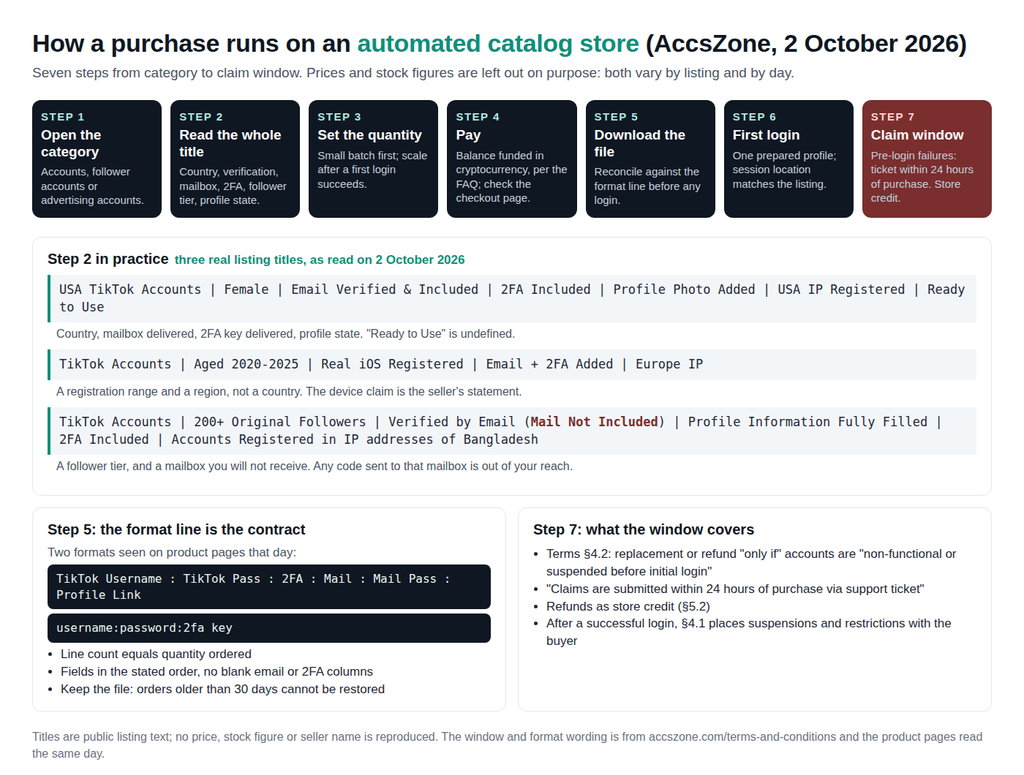
The run from category to file takes minutes; the title takes judgement. A seller that writes “Mail Not Included” is telling you something you need to know, and a buyer who reads only the follower figure misses it.
First login: proxy location, browser profile and the stop rule
TikTok documents two things that matter here. First: “Any time you log in to TikTok using an unrecognized device or a third-party application, you’ll be asked to enter your password and a one-time verification code (sent via SMS or email)” (Account safety). Second, 2-step verification requires “at least two verification methods” from Phone, Email, Authenticator and Password, and applies “when you log in from a new or unfamiliar device”. Your first login is a new-device login, and the code goes to whichever methods are enabled on that account.
That is why the delivered mailbox and the 2FA key matter more than any other field. If the code goes to the delivered email, you can read it; if the key is in your file, you can generate the Authenticator code. If the code goes to a phone number you do not hold, that check belongs to the person who registered the account. Stop, screenshot the prompt, and file the claim inside the seller’s window. There is no step after that in this guide.
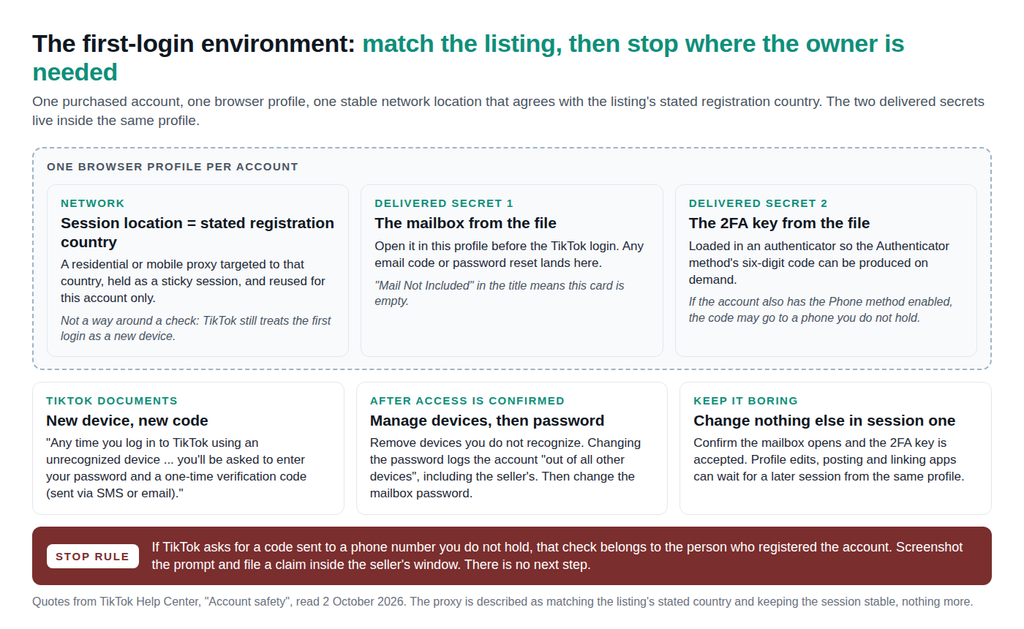
The rest of the environment is consistency, not evasion. Give each account its own browser profile, so cookies, sessions and the delivered mailbox never mix between accounts (NodeMaven’s TikTok multi-account management guide covers the profile setup); TikTok allows multiple accounts “but not to deceive others or break the rules” (Community Guidelines). Give each profile one network location that agrees with the listing’s stated registration country, and keep it stable. NodeMaven’s product pages describe the tooling. Its residential proxies offer “Country, city & ISP targeting”, ZIP-level targeting and “Sticky sessions up to 24 hours”; its mobile proxies route “through real 4G, 5G, and LTE mobile carrier networks” with the same options. Which type suits which workflow is in the proxy for TikTok guide; running several accounts side by side is in the multiple TikTok accounts guide. The point here is narrower: the session location should match what the listing states, and stay put.

Try NodeMaven Mobile Proxies with the $3.50 paid trial, including 750 MB of mobile and residential proxy traffic
Two habits from TikTok’s own pages. After the first login, review “Manage devices” and remove any you do not recognize. Then change the password, which logs the account “out of all other devices”, including the seller’s; change the delivered mailbox’s password too.
Risks and limits
- The transfer itself. TikTok’s terms prohibit giving others access to an account or transferring it “without our permission” (Terms of Service). A purchased account is outside those terms, and TikTok may act on that at any time.
- Fake engagement and enforcement. The Community Guidelines, effective 24 September 2026, do not allow “the trade of services that artificially boost engagement” and say TikTok will “remove fake likes, followers, or other inflated signals” (Integrity and Authenticity). The same page lists the consequences for deceptive account behavior: a ban, bans on “additional or new accounts you create”, and restrictions on posting, search and the For You feed. Buying another account is not a remedy for enforcement.
- Shop and LIVE eligibility. TikTok’s LIVE page states an age requirement and a follower threshold that “may vary across regions” (TikTok LIVE). Shop seller registration asks for identity documents, residence in the shop’s country and, for US sellers, tax identifiers (Shop seller requirements). “Shop Enabled” describes the registrant’s paperwork, not yours.
- Who carries the risk. On every seller in the table, the buyer carries the platform risk once the account is delivered or logged in. AccsZone’s §4.1 disclaims restrictions “after login credentials are accessed by the Buyer”; G2G excludes “Developer/Publisher Enforcement”; AccsMarket’s warranty ends at 48 hours; PlayerUp’s cover is partial unless you buy insurance. No seller promises immunity, and none could keep that promise.


