

Утечка WebRTC: раскрывает ли прокси ваш реальный IP?



A Утечка WebRTC может раскрыть публичный IP-адрес, который отличается от IP, используемого для обычного HTTP-трафика. Несовпадение часто связано с UDP-трафиком: WebRTC может отправлять проверки соединения STUN или TURN по маршруту, который не совпадает с настроенным прокси.
В этом руководстве объясняется, как связаны между собой WebRTC, UDP, STUN, TURN и HTTP/3, как проверить, раскрывает ли ваш браузер второй публичный IP, как читать результаты и как исправить несовпадение маршрутизации, не отключая вслепую функции браузера.
Краткий ответ: Подключите прокси именно в том профиле браузера, который планируете использовать, а затем запустите NodeMaven Connection Checker. Сравните HTTP-выход с результатами WebRTC, STUN и TURN. Разные публичные IP указывают на проблему с браузером, профилем или маршрутизацией сети, которую нужно изучить до запуска чувствительного к геолокации скрапинга, автоматизации или согласованных рабочих процессов с аккаунтами.
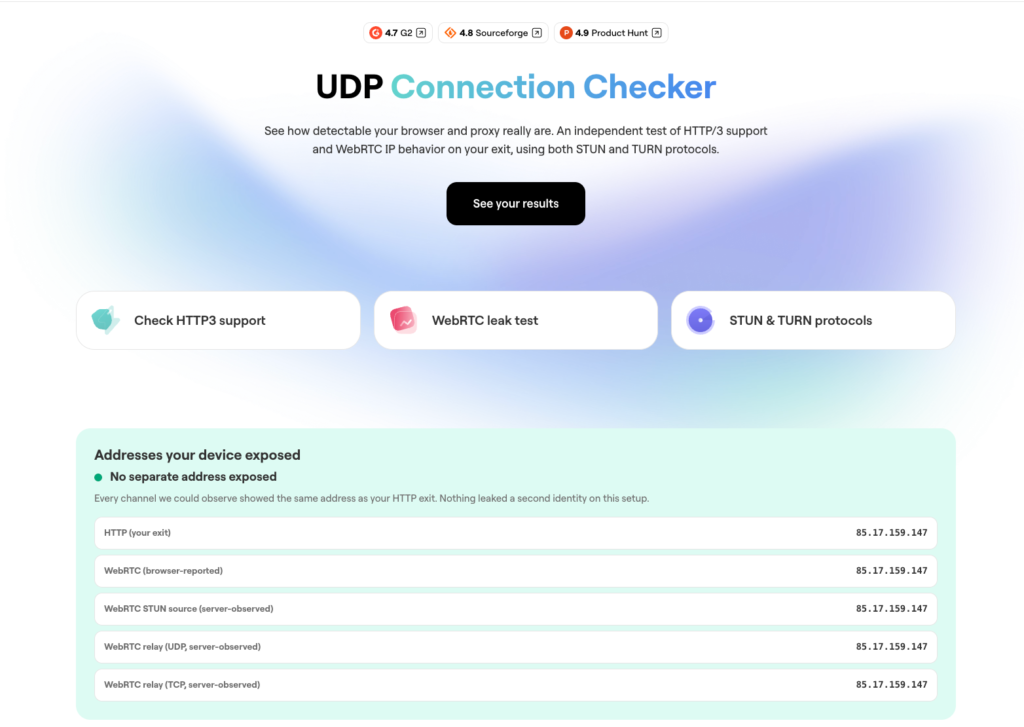
Обычный IP-чекер лишь подтверждает адрес, который сайты видят через HTTP. Connection Checker также проверяет WebRTC-адрес, сообщаемый браузером, наблюдаемые сервером маршруты STUN и TURN по UDP и TCP, а также статус HTTP/3.

Используйте поддерживающие UDP ISP прокси NodeMaven для постоянных профилей браузера и длительных рабочих процессов. Используйте код ISP25 получить 25% off your first order with 2+ IPs.
Что такое утечка WebRTC?
WebRTC – это браузерная технология для видеозвонков, голосовых вызовов, демонстрации экрана и прямых соединений между браузерами. Перед установкой соединения браузер проверяет, какие сетевые маршруты он может использовать.
Этот процесс может раскрыть больше сетевой информации, чем обычный запрос страницы. Сайт может видеть IP прокси через HTTP, тогда как связанное с WebRTC соединение раскрывает другой публичный IP через отдельный маршрут.
Как браузер может раскрыть два публичных IP-адреса
При согласованной настройке и запросы страниц, и трафик, связанный с WebRTC, выходят через выбранный прокси:
Browser -> Proxy -> Website

Browser -> Proxy -> STUN/TURN service
Возможное несовпадение маршрутов выглядит так:
Browser -> Proxy -> Website

Browser -> Local network -> STUN/TURN service
Сайт видит IP прокси через HTTP, а сервис STUN или TURN видит публичный IP локальной сети. Этот второй публичный адрес и есть потенциальная утечка.
Несовпадение не означает автоматически, что прокси не сработал. На маршрут могут влиять браузер, протокол прокси, операционная система, файрвол, сетевая политика и профиль антидетект-браузера.
Что делают STUN и TURN
STUN помогает браузеру определить публичный IP-адрес и порт, которые видит внешний сервер. STUN-сервер фиксирует адрес, с которого получает запрос браузера, и возвращает его как возможный маршрут соединения.
TURN ретранслирует трафик, когда прямое peer-to-peer-соединение недоступно. TURN-ретранслятор может наблюдать соединение браузера по UDP или TCP.
Кандидаты WebRTC, о которых сообщает браузер, и адреса, наблюдаемые сервером, могут различаться. Сравнение обоих даёт более полную картину проверяемого пути соединения.
Утечки прокси через UDP, HTTP/3 и WebRTC
Что такое UDP и как его использует HTTP/3?
Традиционно браузеры загружают сайты по HTTP/1.1 или HTTP/2, которые используют TCP. HTTP/3 использует QUIC, а QUIC работает поверх UDP.
По данным W3Techs , около 40% сайтов используют HTTP/3, поэтому браузерный трафик регулярно может включать QUIC-соединения на основе UDP.
Проверка соединения показывает, какой протокол использовала его HTTP-проверка:
- h3 означает, что тестовое соединение использовало HTTP/3 через QUIC поверх UDP.
- h2 означает, что тестовое соединение использовало HTTP/2 поверх TCP.
Ан h2 результат показывает, что для этого тестового соединения HTTP/3 не был согласован. Причиной такого отката могут быть файрвол, маршрут через прокси, настройка браузера, конфигурация сайта или локальная сеть.
Connection Checker также может показать «Не удалось измерить». Это означает, что инструмент не смог определить маршрут HTTP/3 для данной конфигурации. Такое часто происходит, когда QUIC или UDP недоступны, в том числе в некоторых конфигурациях с HTTP-прокси и SOCKS5. Это не означает, что прокси не работает или что через WebRTC утёк реальный IP.
Как WebRTC использует UDP
WebRTC тоже часто использует UDP, но с другой целью. Он выполняет проверки соединения STUN и TURN, чтобы обнаружить или ретранслировать сетевые маршруты для функций реального времени, таких как видеозвонки, голосовые вызовы и демонстрация экрана.
Поэтому браузер может создавать несколько типов UDP-соединений:
HTTP/3 -> QUIC -> UDP -> Website or CDN

WebRTC -> STUN/TURN -> UDP -> Connection service
HTTP/3 и WebRTC — это независимые механизмы браузера. Браузер может использовать HTTP/3 для сайта, в то время как WebRTC идёт другим маршрутом, откатывается на TCP или вообще не может установить UDP-соединение.
Как UDP может раскрыть другой публичный IP
Обычный запрос страницы может уходить через прокси:
Browser -> Proxy -> Website
Проверка WebRTC через STUN или TURN может пойти другим путём:
Browser -> Local network -> STUN/TURN service
Если эти два маршрута раскрывают разные публичные IP-адреса, в браузере возникает утечка прокси через WebRTC. IP-чекер, работающий только по HTTP, может это пропустить, поскольку видит только первый маршрут.
Почему UDP-трафик браузера может идти другим маршрутом
Прокси может поддерживать UDP, но браузер при этом всё равно отправляет WebRTC-трафик по отдельному пути.
Документация Chromium документация прокси указывает, что поддержка SOCKS5 в Chrome для URL-запросов работает поверх TCP и не может ретранслировать UDP-трафик. Поэтому поведение браузера и сетевые возможности прокси нужно проверять вместе.
ISP-прокси NodeMaven Поддержка TCP и UDP и предоставляют стабильный статический резидентный IP для одобренных долгоживущих профилей браузера, регулярно используемых дашбордов и автоматизированных рабочих процессов.
Зона h3 и h2 сами по себе не подтверждают и не исключают утечку WebRTC. Сравните публичный IP, который отображается для HTTP, WebRTC, STUN и TURN, чтобы выявить несоответствие маршрутов.
Используйте поддерживающие UDP ISP прокси NodeMaven для постоянных профилей браузера и длительных рабочих процессов. Используйте код ISP25 получить 25% off your first order with 2+ IPs.
Почему утечки WebRTC влияют на скрапинг и автоматизацию
Обычный скрипт на Python Requests, команда cURL или API-клиент для взаимодействия между серверами, как правило, не создают браузерный WebRTC-трафик. Вопрос утечки WebRTC касается рабочих процессов на основе браузера, включая Playwright, Puppeteer, Selenium, антидетект-браузеры, удалённые профили браузера и ручные сессии в браузере.
Несоответствие маршрутов может создавать противоречивые сигналы:
- Профиль браузера настроен на Лос-Анджелес, а STUN раскрывает адрес локального интернет-провайдера из другой страны.
- Сессия мониторинга цен сохраняет файлы cookie и закреплённую сессию прокси, а WebRTC-трафик идёт по другому публичному маршруту.
- Облачный браузер использует ожидаемый прокси для запросов страниц, но раскрывает другой адрес при проверке UDP-соединения.
- Рабочий процесс с аккаунтом сохраняет файлы cookie и хранилище браузера, при этом выбранная локация не совпадает с наблюдаемым маршрутом WebRTC.
A 2017 кроссбраузерное исследование WebRTC показало, что раскрытие IP различалось в зависимости от конфигурации браузера и VPN. С тех пор настройки приватности браузеров по умолчанию изменились, но исследование по-прежнему демонстрирует, почему связку браузера и сети необходимо тестировать напрямую.
Одна обсуждение в сообществе OPNsense описывает несоответствие WebRTC, которое проявилось в одной среде, но не в другой при одинаковой конфигурации WireGuard. Рассматривайте это как пример диагностики, а не как эталон производительности.
Тест на утечку WebRTC: как обнаружить несовпадение IP с прокси
Тестируйте тот профиль браузера, который будете использовать на практике. Проверка в личном браузере не подтверждает поведение облачного браузера, профиля антидетект-браузера, виртуальной машины или рабочей среды автоматизации.
Начните с NodeMaven IP Lookup , чтобы убедиться в ожидаемом HTTP-выходе. Затем откройте NodeMaven Connection Checker в том же профиле браузера и с той же конфигурацией прокси.
- Подключите прокси и откройте нужный профиль браузера.
- Убедитесь, что страна, город, ISP и выходной HTTP IP соответствуют ожидаемым.
- Запустите Connection Checker.
- Сравните результаты HTTP, WebRTC, STUN и TURN.
- Сохраните отчёт.
- Повторите тест после изменения настроек браузера, типа прокси, сети, операционной системы или профиля антидетект-браузера.
Что проверяет Connection Checker
Connection Checker выполняет проверку UDP-соединения на уровне браузера , проверяя, видит ли его TURN-релей по UDP тот же публичный IP, что и HTTP-выход. Он не проверяет, открыт ли произвольный UDP-порт на сервере. Цель состоит в том, чтобы выявить несоответствие маршрутизации между браузером и прокси, которое может раскрыть второй публичный IP.
| Проверить | Что он проверяет |
| HTTP-выход | Публичный IP, который сайты видят при обычных веб-запросах |
| WebRTC по данным браузера | Кандидаты адресов, которые раскрывает браузер |
| Источник STUN | Публичный адрес, который видит STUN-сервер NodeMaven |
| TURN-релей по UDP | Публичный адрес, который relay-сервер NodeMaven видит через UDP |
| TURN-relay по TCP | Публичный адрес, который relay-сервер NodeMaven видит через TCP |
| HTTP/3 / QUIC | Было ли тестовое соединение установлено по HTTP/3 через UDP или использовало HTTP/2 через TCP |
Зачем тестировать UDP и TCP отдельно?
Браузер может подключиться к TURN-relay по UDP или переключиться на TCP. Проверка обоих путей показывает, остаётся ли публичный адрес неизменным при смене транспорта.
Совпадающий результат по TCP не подтверждает, что UDP маршрутизируется корректно. Недоступный результат по UDP не является автоматическим доказательством утечки. UDP может быть заблокирован браузером, файрволом, настройками прокси или локальной сетью.
Такое различие часто встречается при автоматизации браузера с облачных серверов, из офисных сетей, через VPN или в антидетект-средах с собственными правилами маршрутизации.
Как читать результаты
| Результат | Что это обычно означает | Рекомендуемый следующий шаг |
| HTTP, WebRTC, STUN и TURN показывают один публичный IP | В проверенных маршрутах не обнаружен отдельный публичный IP | Сохраните отчёт и повторите тест после изменения настроек |
| HTTP и WebRTC показывают разные публичные IP | Возможное несоответствие маршрутизации или утечка публичного IP | Проверьте политику WebRTC в браузере, маршрутизацию прокси и настройки антидетект-браузера |
| Обнаружен только LAN-IP или кандидат .local | Это информация о локальной сети, а не автоматически утечка публичного IP | Проверьте, отличается ли какой-либо публичный IP от точки выхода HTTP |
| HTTP/3 откатывается к h2 | QUIC не был согласован для проверяемого маршрута | Зафиксируйте результат; он не доказывает утечку |
| UDP или TURN недоступны | Путь может быть заблокирован или не поддерживаться | Повторите проверку в рабочем браузере, сети и конфигурации прокси |
| Публичный адрес IPv6 появляется вне ожидаемого маршрута | Прокси только для IPv4 может не покрывать нативное IPv6-соединение | Отключите IPv6 для этого окружения браузера или используйте прокси либо туннель с поддержкой IPv6, затем повторите проверку |
Чистый результат означает, что на всех проверенных NodeMaven маршрутах наблюдался один и тот же ожидаемый публичный IP. Обновления браузера, расширения, сайты и изменения в сети могут впоследствии изменить поведение. Повторяйте проверку после значимых изменений конфигурации.
Использование Посмотреть данные отчёта или Скачать JSON , чтобы сохранить результат перед изменением настроек браузера.
Почему обычного IP-чекера недостаточно
IP-чекер отвечает на один вопрос: какой публичный IP этот сайт увидел по HTTP?
Базовый тест на утечку WebRTC может показать кандидатов, сгенерированных браузером. Проверка соединения сравнивает значения, сообщаемые браузером, с маршрутами STUN и TURN, наблюдаемыми на сервере, как по UDP, так и по TCP.
Для более широкой проверки профиля браузера используйте его вместе с Тест на утечку DNS.
Как устранить утечку WebRTC
Устраните несоответствие в маршрутизации браузера, затем запустите тот же тест ещё раз. Меняйте по одной настройке за раз, чтобы видеть, какое изменение повлияло на результат.
Выберите решение в зависимости от результата
| Проблема | Рекомендуемое действие |
| Публичные IP по HTTP и WebRTC различаются | Проверьте политику WebRTC в браузере, маршрутизацию прокси и настройки антидетект-браузера; тестируйте после каждого изменения |
| Появляется публичный IP локального интернет-провайдера | Не используйте этот профиль для чувствительных к геолокации браузерных сценариев, пока публичные маршруты не совпадут |
| Тест UDP недоступен | Проверьте рабочий браузер, файрвол, локальную сеть и настройки прокси |
| HTTP/3 откатывается к h2 | Зафиксируйте откат на резервный протокол; меняйте настройки, только если сценарий действительно требует HTTP/3 |
| Повторяющемуся браузерному сценарию нужна одна стабильная личность | Используйте постоянный профиль браузера и статический ISP-прокси в одобренной для аккаунта локации |
| Независимым публичным исследовательским запросам нужно распределение | Использование ротационные резидентские прокси без переноса состояния между несвязанными запросами |
Не отключайте функции браузера вслепую
Отключение WebRTC может нарушить работу видеозвонков, инструментов совместной работы в браузере и сервисов, которые полагаются на соединения в реальном времени. Принудительный откат на TCP также может снизить производительность или заблокировать функции, рассчитанные на UDP.
Цель — единый маршрут для всего браузерного трафика, который использует ваш рабочий процесс. Задача не в том, чтобы отключить все возможности браузера.
Направьте UDP через туннель или TUN-настройку
Флаги браузера могут ограничить WebRTC-трафик, идущий в обход прокси, но некоторым рабочим процессам нужно, чтобы WebRTC и UDP продолжали работать через выбранную точку выхода.
TUN или полнотуннельная настройка направляет трафик устройства через виртуальный сетевой интерфейс до того, как он попадёт в интернет. Когда туннель использует удалённую точку выхода, пропускающую и TCP, и UDP, UDP-трафик WebRTC может идти через ту же точку выхода, что и обычные запросы браузера.
Один из примеров — tun2proxy, который создаёт туннельный интерфейс для HTTP- и SOCKS-прокси и документирует поддержку SOCKS5 UDP. Полнотуннельная настройка в стиле WireGuard может выполнять ту же роль, если она направляет трафик браузера через удалённый шлюз.
Это решение на уровне сетевой маршрутизации, а не настройка подмены данных в браузере. После настройки запустите Connection Checker , чтобы убедиться, что HTTP, STUN и TURN через UDP показывают ожидаемый публичный IP.
Настройте Chrome и Edge
Браузеры на базе Chromium могут ограничивать WebRTC-трафик, который иначе уходил бы в обход прокси-маршрута. Один из доступных флагов запуска:
Для управляемых сред Chrome задайте корпоративную политику WebRtcIPHandling со значением:
Google описывает эту политику так: UDP разрешается только тогда, когда настроенный прокси его поддерживает; в противном случае WebRTC переключается на TCP.
В Playwright передайте флаг при запуске Chromium:
В Puppeteer:
После изменения настройки используйтеинструмент проверки утечки WebRTC от NodeMaven для быстрой проверки кандидатов на уровне браузера. Затем запустите NodeMaven Connection Checker в том же профиле браузера, чтобы сравнить HTTP-выход с маршрутами STUN и TURN, наблюдаемыми сервером по UDP и TCP.
Для стандартной настройки прокси в браузере следуйте Руководство по настройкам прокси-сервера в Chrome.
Настройте Firefox
В Firefox есть настройка WebRTC «только через прокси», которая может ограничить ICE-кандидаты настроенным прокси-маршрутом:
media.peerconnection.ice.proxy_only = true
Задайте её через about:config, затем перезапустите или повторно проверьте профиль браузера. Исходный код Firefox от Mozilla включает эту настройку как часть элементов управления WebRTC ICE.
Эта настройка может повлиять на звонки по WebRTC, если настроенный прокси не поддерживает маршрут, который нужен сайту. После её включения запустите Connection Checker.
В крайнем случае полностью отключите WebRTC:
Отключение WebRTC может нарушить работу видеозвонков, демонстрации экрана, инструментов совместной работы в браузере и других функций реального времени.
Проверьте профили антидетект-браузера
Профиль антидетект-браузера может управлять параметрами прокси, поведением WebRTC, настройками отпечатка браузера, часовым поясом, локалью и геолокацией. Противоречивые настройки могут выдать несогласованное окружение, даже если HTTP-прокси работает.
Подмены адреса WebRTC, который сообщает браузер, самой по себе недостаточно. Если реальный UDP-трафик по-прежнему уходит напрямую, серверная проверка через TURN может раскрыть локальный публичный IP, даже когда базовый тест на утечку только на уровне браузера выглядит чистым. Именно поэтому Connection Checker сравнивает значения, сообщаемые браузером, с маршрутами STUN и TURN, которые наблюдают его серверы.
Проверьте параметр WebRTC, выбранную локацию прокси, часовой пояс, локаль и отпечаток браузера как один профиль.
Проверьте IPv6, прежде чем считать настройку чистой
Прокси, работающий только по IPv4, не покрывает автоматически нативное IPv6-соединение устройства. Если браузер или операционная система может достичь целевого сайта через IPv6, часть трафика может пойти по другому маршруту, минуя выбранный IPv4-прокси.
Connection Checker показывает поле Public IPv6 в своём отчёте. Если появляется неожиданный публичный IPv6-адрес, отключите IPv6 для этого браузерного окружения или используйте прокси либо туннель с поддержкой IPv6. После изменения конфигурации запустите тест повторно.
Эти изменения устраняют противоречие с Firefox, добавляют недостающую опцию маршрутизации UDP, объясняют, почему проверки на стороне сервера выявляют подменённые значения браузера, охватывают IPv6 и уточняют состояние «Could not measure HTTP/3».
Подберите тип прокси под задачу
Резидентские прокси подходят для публичных исследований в браузере, проверки регионального контента и веб-автоматизации, где чистые IP из потребительских сетей помогают снизить число запросов на верификацию.
с поддержкой UDP ISP прокси подходят для постоянных профилей браузера, регулярно используемых дашбордов и длительных рабочих процессов с аккаунтами, которым нужен стабильный статический IP.
Правильный выбор прокси обеспечивает согласованную настройку, но маршрутизацию браузера всё равно нужно проверять.
Протестируйте браузерную автоматизацию перед запуском в продакшен
Прежде чем переводить чувствительный к геолокации рабочий процесс в продакшен, запустите Connection Checker на той конфигурации браузера, которую планируете использовать. Тест покажет, раскрывают ли маршруты HTTP, WebRTC, STUN и TURN ожидаемый публичный IP.
браузер для скрапинга NodeMaven предоставляет управляемый облачный браузер для Playwright, Puppeteer, готовых шаблонов и рабочих процессов на основе AI-промптов. Он включает маршрутизацию через прокси NodeMaven, постоянные профили, поддержку CAPTCHA, записи сессий и отладку через Live Browser.
Создавайте, тестируйте и отлаживайте рабочие процессы Playwright или Puppeteer с помощью браузер для скрапинга NodeMaven, а затем проверьте продакшен-профиль браузера с помощью Connection Checker. Среда выполнения браузера, постоянные профили и поддержка CAPTCHA не требуют отдельной оплаты. Начните с 750 МБ трафика резидентных и мобильных прокси за $3.50.
Заключение
Тест на утечку WebRTC проверяет, раскрывает ли браузер публичный IP, отличный от выходного адреса HTTP-прокси. UDP находится в центре проверки, потому что WebRTC обычно использует его для проверок соединения через STUN и TURN, при этом браузер может направлять этот трафик иначе, чем обычные запросы страниц.
Тестируйте именно тот профиль браузера, прокси, сеть и среду автоматизации, которые планируете использовать. Если HTTP, WebRTC, STUN и TURN показывают один и тот же ожидаемый публичный IP, сохраните отчёт и повторите тест после существенных изменений конфигурации. Если они различаются, исправьте маршрутизацию браузера или настройки профиля, прежде чем масштабировать браузерные сценарии.


