
SSL-прокси-сервер: что это, как он работает и когда он вам нужен



Если вы копали в прокси для парсинга, автоматизации или просто более безопасного просмотра веб-страниц, вы, вероятно, не раз сталкивались с термином “SSL-прокси-сервер”. Это звучит технически, но идея, стоящая за ним, проста, если её разбить.
В этом руководстве вы узнаете, что такое SSL-прокси-сервер, как он работает "за кулисами" и чем отличается от обычного HTTP-прокси. Мы также рассмотрим, какие типы прокси сегодня поддерживают SSL, когда бесплатный вариант может вас подвергнуть риску, и как выбрать поставщика, который не подведет вас в середине проекта.
К концу вы будете знать достаточно, чтобы принять уверенное решение.

Нужен SSL-прокси-сервер, на который можно по-настоящему положиться? Получите резидентные и мобильные прокси с поддержкой HTTPS, чистыми IP-адресами и постоянными сессиями, начиная от $3.50
SSL-прокси-сервер
SSL-прокси-сервер — это прокси-сервер, который может обрабатывать зашифрованный трафик. В частности, трафик, защищенный с помощью SSL/TLS, который является протоколом, скрывающимся за маленьким значком замка в адресной строке вашего браузера.
Каждый раз, когда вы посещаете сайт, который начинается с https://, ваше соединение зашифровано. Обычный прокси, который не понимает зашифрованный трафик, «подавится» этим соединением. SSL-прокси-сервер, с другой стороны, знает, как маршрутизировать и перенаправлять эти зашифрованные данные, не нарушая их.
Так что технически “SSL-прокси” — это не отдельная категория прокси, как дата-центр или резидентские прокси . Оно описывает способность прокси-сервера поддерживать HTTPS-соединения, а не уникальную архитектуру.
Современные “SSL-прокси” на самом деле больше не используют SSL. Они используют TLS (Transport Layer Security), который заменил SSL много лет назад по соображениям безопасности. Но “SSL-прокси” осталось общепринятым термином. Мы более подробно разберем разницу между SSL и TLS в ближайшее время.
Как работает SSL-прокси-сервер
Давайте разберем, что на самом деле происходит, когда вы подключаетесь к веб-сайту через SSL-прокси-сервер.
Ваш браузер
↓
SLL Прокси-сервер
↓
HTTPS веб-сайт
Вот пошаговая версия:
- Вы запрашиваете защищенную страницу
Ваш браузер или инструмент скрейпинга пытается подключиться к сайту, такому как https://example.com через прокси.
- SSL/TLS рукопожатие происходит
Ваше устройство и сервер назначения обмениваются цифровыми сертификатами и согласовывают ключи шифрования. Это рукопожатие создает “защищенный туннель”, о котором вы, вероятно, слышали.
- Прокси перенаправляет зашифрованный туннель
Хорошо настроенный SSL-прокси, вместо чтения ваших данных в виде обычного текста, просто пропускает зашифрованный трафик к месту назначения, подменяя ваш IP-адрес своим по пути.
- Сайт отвечает
Ответ возвращается по тому же зашифрованному туннелю, через прокси, и снова загружается в ваш браузер, будучи полностью зашифрованным на всем пути.
Распространенный миф заключается в том, что прокси-серверы “видят” все, что вы делаете, включая ваши пароли. При правильно настроенном SSL-прокси трафик остается зашифрованным от начала до конца. Прокси-сервер меняет ваш IP-адрес, а не содержимое ваших зашифрованных данных.
Это отличается от того, как работают некоторые корпоративные или защитные прокси, где трафик намеренно расшифровывается и повторно шифруется для проверки. Для большинства коммерческих прокси вам нужен прокси-сервер, который просто пересылает зашифрованный трафик, а не тот, который его перехватывает.
SSL против TLS: в чем разница?
Краткий урок, намеренно сделанный коротким:
- SSL (Secure Sockets Layer) был оригинальным протоколом шифрования, представленным в 1990-х годах.
У него были серьезные уязвимости в системе безопасности, поэтому он был официально выведен из эксплуатации.
- TLS (Transport Layer Security) заменил и прошел несколько версий с тех пор, при этом TLS 1.3 является текущим стандартом.
Другими словами, SSL устарел, а TLS — это то, что на самом деле защищает ваше соединение сегодня.
Почему же все до сих пор говорят “SSL-прокси-сервер”, а не “TLS-прокси-сервер”? В основном, по привычке. Термин “SSL” стал настолько широко распространенным на раннем этапе, что так и не исчез, даже после изменения базовой технологии. Вы постоянно увидите “SSL-сертификат”, “SSL-прокси” и “SSL-шифрование” — все они технически относятся к TLS.
Далее в этой статье мы будем использовать термин “SSL-прокси”, поскольку именно так ищут информацию люди, но знайте, что TLS — это реальный механизм, лежащий в основе всего.
SSL Proxy против HTTP Proxy
Здесь начинается много путаницы.
Вот сравнение бок о бок:
| Функции | SSL-прокси | HTTP-прокси |
| Шифрование | Поддерживает зашифрованный HTTPS-трафик | Предназначено для незашифрованного HTTP-трафика |
| Безопасность | Выше — данные остаются зашифрованными при передаче | Ниже — данные могут передаваться в открытом виде |
| Поддержка HTTPS | Да | Часто нет или только ограниченная поддержка |
| Лучшие сценарии использования | Веб-скрейпинг, безопасного просмотра, автоматизации, управления аккаунтами | Базовый просмотр устаревших или неконфиденциальных HTTP-сайтов |
| Скорость | Немного медленнее из-за шифрования SSL/TLS | Немного быстрее, но без шифрованной защиты |
| Совместимость | Работает практически со всеми современными сайтами, использующими протокол HTTPS | Становится всё более ограниченным, поскольку большинство веб-сайтов теперь требуют использования протокола HTTPS |
Поскольку подавляющее большинство веб-ресурсов в настоящее время работает по протоколу HTTPS, прокси-сервер, не поддерживающий SSL/TLS-трафик, становится всё менее полезным. Если вы занимаетесь серьёзным скрейпингом, Автоматизация, или при просмотре веб-страниц в 2026 году вам понадобится прокси-сервер с поддержкой HTTPS.
Занимаетесь парсингом сайтов по протоколу HTTPS или используете средства автоматизации браузера? Воспользуйтесь прокси-серверами из частных сетей с полной поддержкой SSL, чтобы снизить вероятность блокировок и обеспечить стабильное соединение
SSL-прокси против HTTPS-прокси
Часто можно встретить термины “SSL-прокси” и “HTTPS-прокси”, которые используются так, будто это две разные вещи. На самом деле они описывают одну и ту же функцию с двух разных точек зрения.
- SSL-прокси указывает протокол шифрования (SSL/TLS), поддерживаемый прокси-сервером.
- HTTPS прокси подчеркивает протокол, используемый для доступа к веб-сайтам (HTTP через SSL/TLS).
Поскольку HTTPS — это, по сути, просто HTTP, защищённый протоколами SSL/TLS, прокси-сервер, поддерживающий один из них, поддерживает и другой. На практике большинство провайдеров используют эти термины как синонимы, и при сравнении их на сайте провайдера не стоит ожидать каких-либо существенных технических различий.
Типы прокси, поддерживающие SSL
Вместо того чтобы углубляться в теорию о различиях между прямым и обратным прокси-серверами, давайте сосредоточимся на том, что действительно важно при покупке прокси-сервера: какие типы коммерческих прокси-серверов хорошо обрабатывают зашифрованный HTTPS-трафик и какой из них подходит именно для вашего сценария использования.
| Тип прокси | Поддержка SSL/HTTPS | Скорость | Риск обнаружения | Лучше всего подходит для |
| Резидентские | Да | От среднего до быстрого | Низкий | Извлечение данных из веб-сайтов, управление учетными записями, проверка рекламных объявлений |
| Интернет-провайдер | Да | Быстро | От низкого до среднего | Задачи, требующие оперативности и доверия, как в отношениях с частными лицами |
| Центр обработки данных | Да | Очень быстро | Выше | Массовая автоматизация, массовые запросы и задачи, в которых репутация IP-адреса не играет столь важной роли |
| мобильные | Да | Medium | Очень низкий | Автоматизация работы в социальных сетях, тестирование мобильных приложений и управление мобильными аккаунтами |
Краткие рекомендации:
- Веб-парсинг → прокси-серверы с частных адресов, желательно с ротацией IP-адресов
- Автоматизация (браузерные боты, тестирование) → частный доступ или услуги интернет-провайдера, в зависимости от требований к скорости
- Управление несколькими учётными записями → мобильные или стационарные, так как они лучше всего вписываются в окружающую обстановку
- Общий безопасный просмотр → подходит любой тип прокси, поддерживающий SSL; по умолчанию наиболее безопасным является «резидентный»
Преимущества SSL-прокси-серверов
- Зашифрованный трафик
Ваши данные остаются недоступными для чтения для тех, кто пытается перехватить соединение
- Маскировка IP-адресов
Ваш реальный IP-адрес скрыт за прокси-сервером
- Безопасная автоматизация
Боты и скрипты могут работать, не раскрывая ваш исходный сервер
- Обойти ограничения
Получите доступ к контенту, заблокированному по региональным или сетевым правилам
- Защитить конфиденциальные данные
Логины, платежная информация и отправленные формы остаются зашифрованными
- Доступ к контенту с географическими ограничениями
Похоже, вы просматриваете из другой страны или города
Типичные варианты использования
- Веб-скрейпинг
Парсинг HTTPS-сайтов в больших масштабах почти всегда требует SSL-прокси-сервера, поскольку сегодня почти каждый заслуживающий внимания сайт работает по HTTPS. Сочетание этого с ротационные резидентские прокси помогает избежать блокировки IP-адресов при извлечении больших объемов данных без перебоев.
- Анонимный просмотр веб-страниц
Если вы изучаете конкурентов или просто не хотите, чтобы ваши действия в Интернете привязывались к домашнему IP-адресу, SSL-прокси обеспечит шифрование вашего соединения, скрывая при этом ваше местоположение и личность.
- Безопасность бизнеса
Компании используют SSL-прокси для создания дополнительного уровня защиты между сотрудниками и открытым Интернетом, особенно при удаленном доступе к конфиденциальным внутренним инструментам или сторонним платформам.
- Автоматизация
Инструменты для автоматизации браузеров, такие как Selenium, Playwright и Puppeteer, обычно работают через прокси-серверы, чтобы распределять запросы по разным IP-адресам, обходить ограничения по скорости и имитировать реальный пользовательский трафик из разных регионов.
- SEO-мониторинг
Чтобы проверить позиции вашего сайта в разных странах или городах, необходимо просматривать страницы так, как будто вы физически находитесь в этих местах. SSL-прокси позволяют SEO-инструментам точно получать локализованные результаты поиска по HTTPS.
- Управление несколькими учётными записями
Чтобы использовать несколько аккаунтов на одной платформе (социальные сети, сайты электронной коммерции, рекламные платформы) без риска блокировки, обычно необходимо присвоить каждому аккаунту уникальный и стабильный IP-адрес.
Можно ли использовать бесплатный SSL-прокси-сервер?
Совершенно нормально искать бесплатный SSL-прокси-сервер, когда вы просто что-то тестируете или пытаетесь сэкономить. И, конечно, множество сайтов предлагают списки бесплатных SSL-прокси-серверов, которые можно скопировать и вставить в настройки.
Проблема в том, что слово “бесплатно” редко означает то, чего на самом деле ожидаешь. Бесплатные прокси-серверы, как правило, используются одновременно тысячами пользователей, часто отключаются без предупреждения и не предоставляют реальной поддержки, если что-то выходит из строя в середине задачи.
Если вы делаете только что-то маловажное, бесплатный прокси может быть терпимым. Для всего, что связано с реальными данными, учетными записями или деловыми операциями, риски быстро перевешивают экономию.
Готовы отказаться от ненадежных бесплатных SSL-прокси? Получите доступ к более чем 30 млн IP-адресов из частных сетей с гарантией чистоты IP-адресов 95% и стабильными HTTPS-соединениями.
Почему бесплатные SSL-прокси-серверы рискованны
| Риск | Что это значит для вас |
| Логирование | Некоторые бесплатные прокси-серверы могут отслеживать и продавать вашу активность в Интернете или личные данные. |
| Вредоносное ПО | Бесплатное программное обеспечение или веб-сайты для прокси могут внедрять рекламу, трекеры или вредоносный код в ваш трафик. |
| Ненадежная доступность | Серверы могут внезапно отключаться, прерывая вашу работу в интернете, парсинг или автоматизацию задач. |
| Медленные скорости | Производительность часто низкая, потому что тысячи пользователей совместно используют одни и те же серверы и пропускную способность. |
| Общие IP-адреса | Вы унаследуете репутацию всех других пользователей с того же IP-адреса, что увеличивает риск блокировок. |
| Заблокированные IP-адреса | Многие бесплатные IP-адреса прокси уже занесены в черный список популярных веб-сайтов и онлайн-сервисов. |
| Отсутствие поддержки | Если прокси перестанет работать или возникнут проблемы, обычно нет службы поддержки клиентов, которая могла бы помочь. |
Если прокси действительно бесплатный, кто-то, где-то, оплачивает инфраструктуру. Обычно за счет ваших данных, вашей пропускной способности или обоих.
Как выбрать SSL-прокси-сервер
Используйте этот контрольный список перед тем, как договориться с любым поставщиком:
- Поддержка HTTPS подтверждена для всех целевых сайтов
- Аутентификация прокси (имя пользователя/пароль или белый список IP-адресов)
- Сохранение сеансов для задач, требующих постоянного IP-адреса
- Ротация IP-адресов для задач, требующих частого обновления IP-адресов
- Географическая таргетировка с точностью до страны или города
- Скорость, соответствующая объему вашей задачи и временным ограничениям
- Репутация IP-адреса/чистый пул для предотвращения мгновенной блокировки
- Оперативная поддержка, когда неизбежно возникают проблемы
Если провайдер не может чётко ответить на вопросы об аутентификации, ротации или качестве IP-адресов, это, как правило, повод продолжить поиски.
Поддерживают ли резидентные прокси SSL?
Да. Резидентные прокси обычно поддерживают трафик HTTPS/SSL, и в целом они являются самым безопасным выбором для задач.
Вот как выглядят основные типы прокси именно при выполнении задач, защищенных протоколом SSL:
- Резидентские — реальные домашние IP-адреса, отлично подходят для сбора данных и управления аккаунтами, их сложнее обнаружить
- Интернет-провайдер — скорость работы дата-центра при владении IP-адресами, как у частных пользователей, — хороший компромисс
- мобильные — IP-адреса, выделенные операторами связи, идеально подходящие для тестирования приложений и социальных сетей
- Центр обработки данных — самый быстрый и дешевый, но его проще всего обнаружить и заблокировать
Если вы не знаете, что выбрать, вариант «для жилых помещений» — это самый надежный вариант общего назначения, в то время как ISP прокси стоит принять во внимание, когда скорость имеет такое же значение, как и доверие.
Почему NodeMaven — лучшая альтернатива бесплатным SSL-прокси-серверам
Бесплатные прокси подводят вас именно тогда, когда они нужны больше всего. NodeMaven построен для решения конкретных проблем, связанных с зависимостью от ненадежных, бесплатных или низкокачественных прокси-пулов.
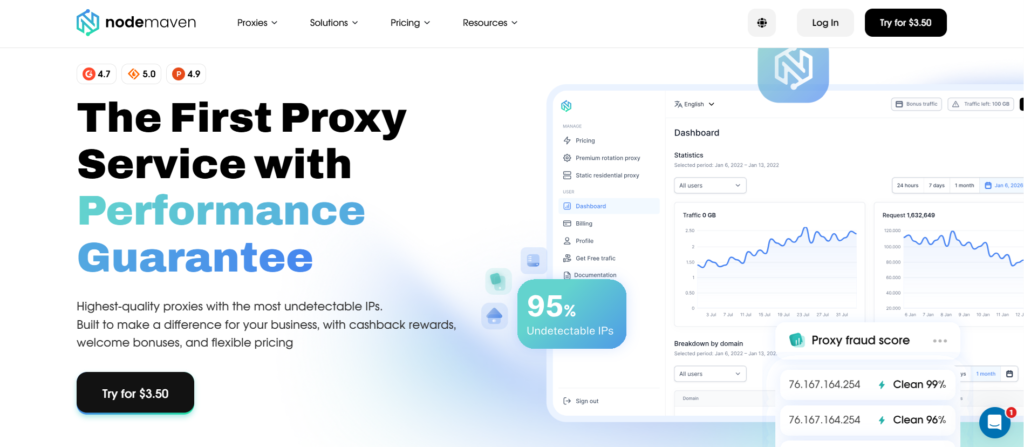
NodeMaven предоставляет:
- 30+ млн жилых IP-адресов в действительно большом, разнообразном пуле
- 190+ стран и 1400+ городов для точного таргетинга по местоположению
- Гарантия чистого IP-адреса 95%, благодаря чему вы не унаследуете чужую плохую репутацию
- Полная поддержка HTTPS/SSL по всей сети
- Липкие сессии для задач, которым нужна стабильная идентичность на протяжении времени
- Вращение сессий для задач, которым требуются постоянно свежие IP-адреса
- Стандартная аутентификация прокси для легкой интеграции в существующие инструменты скрапинга или автоматизации
- Надежные соединения, разработанные для поддержки длительных задач
Когда на кону реальные данные, учетные записи или бизнес-результаты, стоимость ненадежного соединения обычно перевешивает все, что вы сэкономили, пользуясь бесплатным.


