







Proxy Error: What It Means and How to Fix It (2026)


Кратко
- A proxy error means the request broke somewhere on the path from your device to the proxy to the website. You fix it at the link that failed.
- If the browser cannot reach the proxy at all (ERR_PROXY_CONNECTION_FAILED, “the proxy server isn’t responding”), the address, port or settings on your side are wrong.
- Code 407 almost always means a wrong username or password, or an IP that is not on the allowlist.
- Proxy error 429 means too many requests from one IP or API key. Slow down, rotate IPs and wait for the Retry-After time. A 403 means the site blocked the IP.
- Codes 502, 503 and 504 mean the proxy works but did not get a proper answer in time. Retry, switch the IP or the server.
- Proxy errors 401, 402 and 404 in Janitor AI and other AI tools come from the model provider: a bad API key, no credits or a wrong model name. Errors 520 to 524 are Cloudflare pages. They are about Cloudflare’s link to the website, and your proxy is usually not the cause.
- You can test any proxy with one command:
curl -x. The example is below.
What is a proxy error?
A proxy error appears when a request cannot travel through the proxy server to the website and back. The proxy sits in the middle: you send the request to it, it passes the request to the site and returns the answer. Any of the three links can break.
- Your device. A wrong address or port, old system settings, a browser extension, a VPN or an antivirus that intercepts traffic.
- The proxy. The server is overloaded or offline, needs authentication, or your plan ran out of traffic.
- The website. It does not like your IP, limits how often you can send requests, or is down itself.
The fix depends on where the break is. Restarting your router will not help if the site blocked the IP, and changing the IP will not help if the port has a typo.
If you want a refresher on how proxies work, see our pages on резидентские прокси и SOCKS5 прокси.
How to fix a proxy error: find what broke first
To fix a proxy error, first find which link failed. Four checks in this order take about two minutes, and each one rules out one link in the chain.
- Open the site without the proxy. If it still fails, the problem is your internet connection or the site itself. If it opens, move on.
- Open a different site through the proxy, such as our IP-поиск. If nothing opens, the connection to the proxy is broken. If everything opens except the site you need, that site is blocking your IP.
- Test the proxy with
curl(see the section below). If it works in the terminal but not in the browser, the browser settings, an extension or the profile are to blame. - Write down the exact error text or code. ERR_PROXY_CONNECTION_FAILED and 407 have different fixes, and each one is covered below.
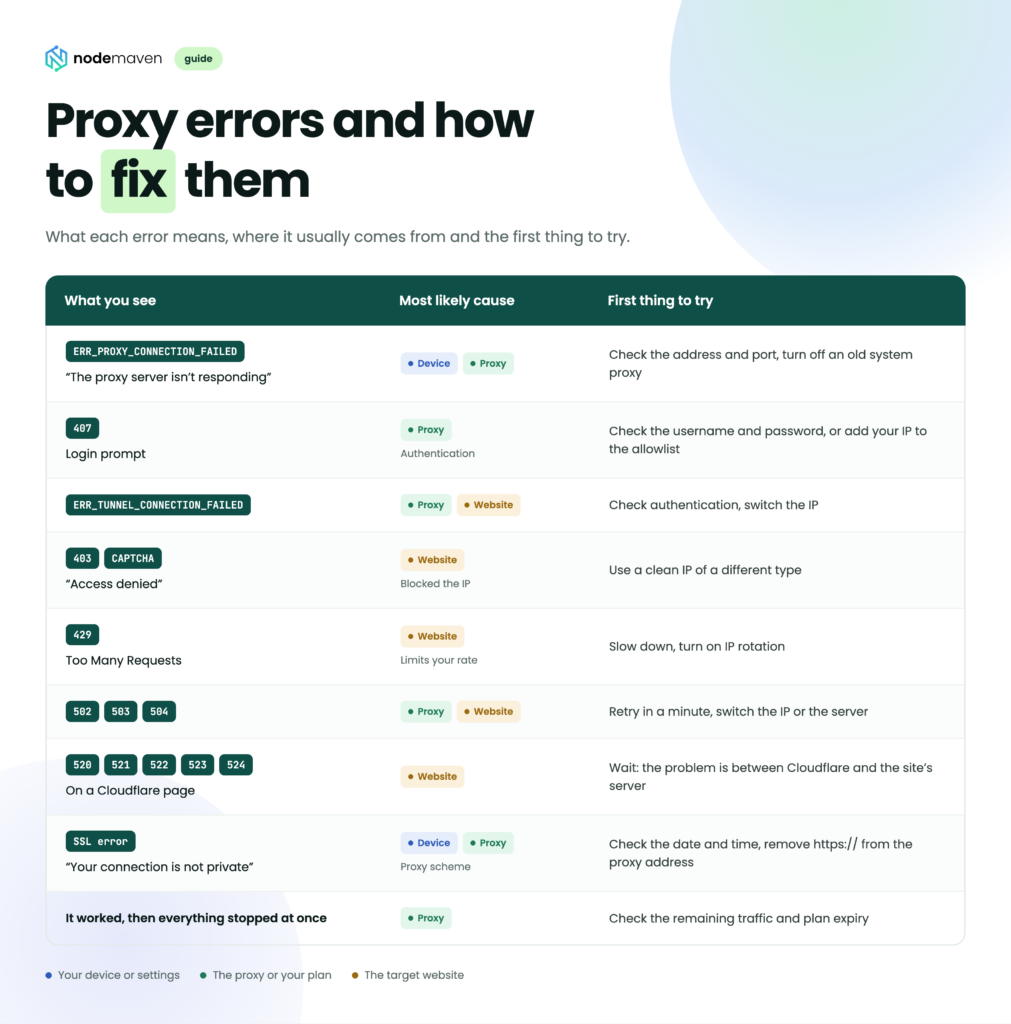
Use this table to see which side the problem is on.
| Что вы видите | Наиболее вероятная причина | First thing to try |
|---|---|---|
| ERR_PROXY_CONNECTION_FAILED, “The proxy server isn’t responding” | Your device or the proxy | Check the address and port, turn off an old system proxy |
| Login prompt, code 407 | The proxy (authentication) | Check the username and password, or add your IP to the allowlist |
| ERR_TUNNEL_CONNECTION_FAILED | The proxy or the website | Check authentication, switch the IP |
| 403, CAPTCHA, “Access denied” | The website blocked the IP | Use a clean IP of a different type |
| 429 Слишком много запросов | The website limits your rate | Slow down, turn on IP rotation |
| 502, 503, 504 | The proxy or the website | Retry in a minute, switch the IP or the server |
| 520, 521, 522, 523, 524 on a Cloudflare page | The website | Wait: the problem is between Cloudflare and the site’s server |
| SSL error, “Your connection is not private” | Your device or the proxy scheme | Check the date and time, remove https:// from the proxy address |
| It worked, then everything stopped at once | The proxy | Check the remaining traffic and plan expiry |
Proxy errors in the browser, Windows and Microsoft 365
A browser shows a proxy error when it cannot reach the proxy server or pass its authentication. Chrome, Edge and Opera use the system proxy settings, while Firefox keeps its own. A proxy you set in Windows months ago and forgot can break every Chromium browser at once.
ERR_PROXY_CONNECTION_FAILED
The browser could not even connect to the proxy. The usual causes are a wrong address or port, a proxy server that is offline, or leftover system settings.
- Compare the address and port with the ones in your provider’s dashboard. One wrong digit in the port gives exactly this error.
- If you did not mean to use a proxy, turn it off in the system settings (steps for Windows and macOS are below).
- Открыть
chrome://settings/system. If it says an extension controls your proxy, disable that extension and try again. - Test the proxy with
curl. If it fails there too, contact the provider’s support.
ERR_TUNNEL_CONNECTION_FAILED
The proxy answered but could not build a secure tunnel to the HTTPS site. This happens when authentication failed, the proxy blocks that domain, or the site dropped the connection from your IP. Check the username and password, then try another IP or location. If the error appears on one site only, the IP is the problem.
ERR_NO_SUPPORTED_PROXIES
Chrome does not support the proxy type you entered. Most often it is SOCKS5 with a username and password, because Chrome cannot authenticate to SOCKS5 proxies on its own. Use an HTTP proxy instead, switch to IP allowlist authentication, or connect the proxy through an extension or an antidetect browser.
ERR_MANDATORY_PROXY_CONFIGURATION_FAILED
The browser could not load the proxy auto-config (PAC) script. Open the script’s URL in the browser. If the file does not download, ask your system administrator, or turn off “Use setup script” in the system settings.
“The proxy server is refusing connections” in Firefox
This is Firefox’s version of ERR_PROXY_CONNECTION_FAILED, but the settings live inside Firefox: Settings → General → Network Settings → Settings. Check the address and port, or choose “No proxy”. The message “Unable to find the proxy server” means the proxy’s host name does not resolve: check for typos and your DNS.
“Windows could not automatically detect this network’s proxy settings”
The Windows network troubleshooter shows this message when automatic detection or a setup script is on, but the network does not provide one. At home you usually do not need a proxy: turn it off and reset the network settings with the commands in the Windows section below. At work, ask IT whether your company uses a corporate proxy.
Proxy authentication error 2606 in OneDrive, Outlook and Teams
Error 2606 is a Microsoft 365 error: the app cannot sign in because a proxy on the way asks for authentication or blocks the connection. It shows up most in the OneDrive sync client on Windows. Fixes that users on Microsoft Q&A report:
- Set Windows proxy settings to “Automatically detect settings” and turn off a manual proxy you do not need.
- Reset the network stack in an elevated Command Prompt with
netsh int ip resetиnetsh winsock reset, then restart. - Update your corporate VPN or security client. One user fixed it by updating Zscaler.
- Test on another network, such as a phone hotspot. If it works there, ask IT to allow Microsoft 365 traffic through the company proxy.
Proxy error codes and what they mean
Some proxy error codes come from the proxy itself, and others come from the website and only pass through the proxy to you. If you mix them up, you end up fixing the wrong thing, so the table shows who sends each code.
| Код | Sent by | Что это значит | Что делать |
|---|---|---|---|
| 400 Неверный запрос | Proxy or website | The request is malformed | Check the URL, headers and proxy string format |
| 401 Не авторизовано | Website or API | Wrong or missing login or API key | Check the key or log in again |
| 402 Payment Required | API or service | Not enough credits or an unpaid plan | Top up the balance |
| 403 Запрещено | Веб-сайт | Access denied, often because of the IP | Switch the IP or the proxy type |
| 404 Не найдено | Website or API | The page, endpoint or model does not exist | Check the URL and the model name |
| 407 Требуется аутентификация прокси | Прокси | Missing or wrong proxy credentials | Check the username, password, IP allowlist |
| 408 Request Timeout | Proxy or website | The client took too long to send the request | Check your connection and request size |
| 429 Слишком много запросов | Website, API or proxy | Rate limit reached | Slow down, rotate IPs, wait for Retry-After |
| 451 Unavailable For Legal Reasons | Веб-сайт | Blocked in that country for legal reasons | Accept it, or use content available in your region |
| 500 Internal Server Error | Website or proxy | Internal server error | Retry later, test without the proxy |
| 502 Плохой шлюз | Прокси | The proxy got an invalid response | Retry, switch the IP or the server |
| 503 Service Unavailable | Website or proxy | Overloaded or under maintenance | Wait, check the service status page |
| 504 Шлюз не отвечает | Прокси | The site did not answer the proxy in time | Retry, pick a location closer to the site |
| 520, 521, 522, 523, 524 | Cloudflare | Problem between Cloudflare and the site’s server | Wait, the site owner has to fix it |
407 Требуется аутентификация прокси
407 means the proxy did not recognize you: the request has no credentials or the wrong ones. Along with the code, the proxy sends a Proxy-Authenticate header, and the client should repeat the request with a Proxy-Authorization header (MDN). What to check:
- The username and password are copied in full, with no trailing space. Many providers put country and session parameters inside the username, and one extra character breaks the whole string.
- If the proxy uses an IP allowlist, your current IP must be on it. Home IPs often change after a router restart.
- Special characters in the password (
@,:,#) must be URL-encoded inside a connection string:@becomes%40. - Your plan still has traffic and has not expired.
Proxy error 429: Too Many Requests
Proxy error 429 means too many requests came from one IP address or one API key in a short time, and the server started refusing them. The proxy itself works. If the response has a Retry-After header, it tells you how many seconds to wait before the next try.
- Slow down: add a pause between requests and lower the number of parallel threads.
- Spread requests across several IPs. With one IP, the limit fills up fast.
- Respect
Retry-Afterand retry with a growing pause instead of hammering the server. - On AI chat sites and APIs, a 429 often means the model’s free tier is busy or your key hit its quota. See the Janitor AI section below.
Proxy error 403: Forbidden
A 403 means the site looked at the IP and decided not to serve it. Usually the address is on a blocklist, belongs to a datacenter or sits in a country the site does not serve. Switching to an IP of another type or location fixes most 403s.
The fix depends on the task. For scraping and price monitoring, ротационные резидентские прокси help: every request goes out from a new household IP, so the site’s limits do not pile up on one address. Account work needs the opposite: one stable IP per account, for example ISP-прокси. In both cases the IP’s reputation decides a lot. Our Фильтр качества IP removes addresses that already sit in spam databases, and the anti-bot checker shows how a site’s protection sees you.
Proxy error 502, 503 and 504: the proxy did not get an answer
These codes mean you reached the proxy, but the chain broke after it. A 502 means the proxy got an invalid response from the next server or none at all. A 504 means the response did not arrive in time. A 503 most often comes from an overloaded website.
- Retry in half a minute or a minute. A one-off 502 on a rotating proxy often means that one device in the pool went offline.
- Test the site without the proxy. If it fails anyway, the problem is on the site’s side.
- Pick a proxy location closer to the site’s server. The longer the route, the more timeouts.
- In scripts, raise the timeout and add retries with a pause.
We cover 502 in depth in a separate guide to the 502 Bad Gateway proxy error.
Proxy error 404: Not Found
A proxy error 404 means the request reached the server, but the address does not exist there. Through a regular proxy it is almost always a typo or a dead link: open the same URL without the proxy to confirm. In AI tools that connect through an API “proxy” (Janitor AI, SillyTavern and similar), a 404 usually means a wrong endpoint URL or a model name that the provider does not have.
Proxy error 401 and 402
A 401 means the server does not accept your login or API key. A 402 means the account has no money or credits left. Both come from the service behind the proxy, not from the proxy itself. With OpenRouter, for example, 401 means an invalid or disabled API key, and 402 means insufficient credits on the account or key (OpenRouter docs). Check the key, then the balance.
Proxy error 451: Unavailable For Legal Reasons
A 451 means the site blocks the page in your country because of a legal demand, such as a court order or sanctions (RFC 7725). The country the site sees is the country of the proxy’s IP, so a 451 can appear when the proxy exits in a region where that content is restricted. Check which location your proxy uses.
Cloudflare errors 520, 521, 522, 523 and 524
Cloudflare shows these codes when it cannot get a normal response from the website’s server (Cloudflare docs). 520 is an unknown error from the server, 521 means the server is down, 522 is a connection timeout, 523 means the server is unreachable, and 524 means the server took too long to answer. All of this happens between Cloudflare and the site, so switching proxies rarely helps. If it is your own site, check that the server’s firewall does not block Cloudflare’s IP ranges.
Netflix and Hulu proxy error
Netflix shows “You seem to be using an unblocker or proxy” (error M7111-5059) when it thinks your IP belongs to a VPN, a proxy or a datacenter. Streaming services license content by country and block addresses they link to location spoofing, so this one is a deliberate block, not a broken connection. If you use a VPN or proxy, turn it off and reload. If you do not, restart the router to get a new IP, turn off IPv6 tunnels or Smart DNS settings, and ask your ISP whether your address is shared with many users. Getting around the block breaks the service’s terms, so we do not recommend it.
Janitor AI proxy errors: 429, 401, 404 and 502
In Janitor AI, a “proxy” is not an IP proxy. It is an API connection to a model provider such as OpenRouter, Chutes or DeepSeek, so the error codes come from that provider. The Janitor AI help center advises checking your own setup first: the proxy URL, the model name and the API key, with no extra spaces.
| Error in Janitor AI | Что это обычно означает | Исправить |
|---|---|---|
| Proxy error 429 | The model is rate limited or your free quota ran out | Wait, switch to another model or provider, add credits |
| Proxy error 401 | The API key is wrong, expired or disabled | Paste the key again exactly, with no spaces |
| Proxy error 402 | No credits left on the provider account | Top up the balance |
| Proxy error 404 | Wrong proxy URL or a model name the provider does not have | Copy the endpoint and model name from the provider’s docs |
| Proxy error 400 | Wrong settings in the request, such as the model name or format | Check the model name, URL and key for typos |
| Proxy error 502 | The model is down or returned an invalid response | Wait a few minutes or pick another model |
A 429 on free models during busy hours is the most common case. OpenRouter may send a Retry-After header with the 429, which says how many seconds to wait (OpenRouter docs).
Proxy errors in code and tools
In scripts, scrapers and antidetect browsers, proxy errors look different from the browser, but the causes are the same. Most often the connection string itself is broken: the wrong scheme, fields in the wrong order, or special characters in the password.
curl
| Message | Что это значит | Что делать |
|---|---|---|
curl: (5) Could not resolve proxy | The proxy host name does not resolve | Check for typos and DNS |
curl: (7) Failed to connect | The proxy does not accept connections on that port | Check the port and the firewall |
curl: (56) CONNECT tunnel failed, response 407 | Ошибка аутентификации | Check the username and password |
curl: (28) Operation timed out | The proxy or the site did not answer in time | Retry, raise the timeout, switch the IP |
curl: (35) SSL connect error | TLS error, often from the wrong scheme | Используйте http:// for an HTTP proxy |
Python requests
A working setup for an HTTP proxy looks like this. Note that for both http и https the proxy address starts with http://.
import requests

proxy = "http://USERNAME:PASSWORD@HOST:PORT"
proxies = {"http": proxy, "https": proxy}

r = requests.get("https://api.ipify.org", proxies=proxies, timeout=15)
print(r.status_code, r.text)
ProxyError: Cannot connect to proxy: wrong host or port, or the proxy is unreachable.ProxyError: Tunnel connection failed: 407 Proxy Authentication Required: wrong credentials. If the password contains@или:, encode it withurllib.parse.quote(password, safe="").SSLErrorwhen connecting to the proxy: most likely the proxy address starts withhttps://while the proxy itself speaks HTTP. Change it tohttp://.ReadTimeout: the site is slow. Raiseтайм-аутand add retries.
More examples are in our guide to web scraping with Python.
SOCKS5
For SOCKS5 in Python you need the requests[socks] package, otherwise you get Missing dependencies for SOCKS support. In the connection string, prefer socks5h://: the h means the proxy resolves the domain, not your computer. That way sites blocked at the DNS level by your ISP still open, and DNS queries do not leak around the proxy. You can check this with our Тест на утечку DNS.
npm install SSL_ERROR_SYSCALL behind a corporate proxy
If npm install fails with SSL_ERROR_SYSCALL at work or in a sandboxed agent environment, a corporate or egress proxy is usually inspecting TLS traffic with its own certificate. Node.js does not trust that certificate by default. Ask IT for the proxy’s CA certificate and point Node.js to it with the NODE_EXTRA_CA_CERTS environment variable, for example export NODE_EXTRA_CA_CERTS=/path/to/corporate-ca.pem. Set the proxy for npm too with npm config set proxy и npm config set https-proxy.
Антидетект браузеры
Dolphin Anty, AdsPower, GoLogin and similar tools have a proxy check button. If the check fails, look at three things: the proxy type (HTTP or SOCKS5), whether the string is in the format the app expects, and whether the profile’s time zone matches the IP’s country. The last one does not break the connection, but sites notice the mismatch and show more CAPTCHAs. Leaks of your real IP through WebRTC are easy to catch with our Тест утечки WebRTC.
How to test a proxy with one command
The fastest way to check a proxy without a browser or extensions is curl. It ships with Windows 10 and 11, macOS and Linux. Open a terminal and paste your details:
curl -v -x http://USERNAME:PASSWORD@HOST:PORT https://api.ipify.orgFor SOCKS5:
curl -v -x socks5h://USERNAME:PASSWORD@HOST:PORT https://api.ipify.orgIf the reply is an IP address that is not yours, the proxy works and the problem is in the browser or the app. The -в flag prints the whole connection step by step, so you can see where it broke and which code the proxy returned. The NodeMaven dashboard also has a built-in proxy checker: generate a proxy and test it right away, no terminal needed.
How to check and reset proxy settings on your device
If no sites open at all and you do not need a proxy, check whether one is turned on in the system. A VPN, an old app or malware may have left it there.
Windows 10 and 11
- Open Settings → Network & Internet → Proxy.
- Turn off “Use setup script” and “Use a proxy server” under manual setup, unless you turned them on yourself.
- If that does not help, open Command Prompt as administrator, run the commands below, then restart the computer.
netsh winhttp reset proxy
ipconfig /flushdns
netsh winsock reset
The first command resets the system proxy used by Windows services, the second clears the DNS cache, and the third restores network settings to their defaults.
macOS
- Open System Settings → Network and select the active connection (Wi‑Fi or Ethernet).
- Click Details → Proxies.
- Turn off proxies you do not need, or check the address and port of the one you do.
- To clear the DNS cache, run this in Terminal:
sudo dscacheutil -flushcache; sudo killall -HUP mDNSResponder.
Андроид
Open Settings → Wi‑Fi, tap your network and find Proxy (sometimes under Advanced options). Choose None if you do not need a proxy, or Manual to check the host and port. Menu names differ between phone makers. Note that Android’s built-in Wi‑Fi proxy settings have no fields for a username and password, so a proxy with authentication needs a separate app or an IP allowlist.
iPhone и iPad
Open Settings → Wi‑Fi, tap the i next to your network and scroll to Configure Proxy. Off disables the proxy, Manual lets you set the server, port and authentication. The setting applies only to that Wi‑Fi network.
How to prevent proxy errors
Most proxy errors can be prevented before they break your work. These habits help the most:
- Match the proxy type to the task. Datacenter IPs are fast and cheap, but sites block them more often. For sites with strong protection, use резидентский или мобильные прокси..
- Do not push one IP too hard. Add pauses between requests and spread the load across several addresses. That keeps you away from 429s and CAPTCHAs.
- Keep rotation and sticky sessions apart. Scraping needs a new IP for every request. A social media account needs the same IP for days. Switching the IP in the middle of a session often ends with a forced logout.
- Watch your remaining traffic. An empty plan looks like a sudden 407 or a dropped connection. The Проверка трафика прокси helps you estimate usage in advance.
- Build retries into your code. Occasional 502s and timeouts are normal at scale. Three retries with a growing pause and a fresh IP handle most of them.
- Keep proxy credentials in one place. A password retyped by hand or an old port left in a config file is a common cause of errors, and an easy one to overlook.
- Check the IP before important work. IP-поиск shows the country, ISP and address type before you open the site.
If you use NodeMaven, part of this is already done. The IP quality filter skips addresses with a bad reputation, rotation and sticky sessions are set right in the connection string, and you can test a proxy in the dashboard as soon as you generate it.
Резюме
A proxy error is almost always quick to fix once you know where it happened. Cannot reach the proxy: check the address, port and system settings. A 407 points to authentication. A 403 or 429 means you need another IP and a slower pace. A 502, a 504 or a Cloudflare page usually clears after a wait and a retry. And curl -x tells you in half a minute whether the proxy works at all.