
Лучший веб-скрапер в 2026 году? DeepSeek + Crawl4AI



Традиционный веб-скрапинг означает написание селекторов, починку сломанных парсеров и переписывание кода каждый раз, когда сайт меняет верстку. DeepSeek предлагает другой подход к веб-скрапингу: краулер собирает исходную страницу, а AI-модель читает ее и превращает в структурированные данные.
В связке с Crawl4AI, open-source фреймворком для краулинга и извлечения данных, такой рабочий процесс стал популярен у разработчиков, которым нужен веб-скрапинг на основе AI без оплаты полностью управляемого API для скрапинга. Это один из самых доступных вариантов в современном стек AI-инструментов для веб-скрапинга. Основная идея проста:
Сайт → Crawl4AI → извлечённый контент → DeepSeek → структурированные данные
Это весь конвейер. Crawl4AI заходит на страницу и извлекает чистый контент. DeepSeek читает этот контент и возвращает именно те поля, которые вам нужны: цену, название или наличие.
В этом руководстве разбирается вся настройка: установка Crawl4AI, подключение к DeepSeek, создание реального примера извлечения данных и понимание того, во сколько это обойдётся при масштабировании.

Скрапьте эффективнее с надёжными прокси. Попробуйте NodeMaven от $3.50 и получите 750 МБ трафика
Чем DeepSeek + Crawl4AI отличаются от других решений?
Crawl4AI и DeepSeek решают две разные задачи. Если понять это разделение, остальная часть руководства будет намного понятнее.
Crawl4AI (краулер):
- Заходит на страницы и при необходимости выполняет рендеринг JavaScript
- Извлекает исходный HTML и преобразует его в чистый Markdown
- Поддерживает структурированное извлечение данных с помощью CSS- или XPath-селекторов
- Разбивает большие страницы на части, чтобы AI-модель с ними справилась
Чтобы получить больше контроля над автоматизацией браузера и страницами с большим объёмом JavaScript, вы также можете сравнить Playwright и Selenium для веб-скрапинга.
DeepSeek (AI-слой):
- Читает контент, который передаёт ему Crawl4AI
- Разбирает беспорядочный, непоследовательный или неструктурированный текст
- Извлекает те конкретные поля, которые вы запросили
- Возвращает структурированный результат, например JSON, вместо сплошной стены текста
DeepSeek не заменяет краулер. Он не может сам зайти на сайт, нажать кнопку или выполнить рендеринг JavaScript. Сначала эту работу делает Crawl4AI. Задача DeepSeek начинается уже после того, как страница собрана.
Это разделение важно, потому что оно меняет подход к отладке. Если данных нет совсем, скорее всего, сбой произошёл в краулере. Если данные есть, но плохо отформатированы, обычно дело в промпте или инструкциях по извлечению на стороне DeepSeek.
Как работает веб-скрапинг на основе AI
Весь процесс сводится к короткой последовательности шагов:
- Выберите целевые URL
- Отправьте запросы через Crawl4AI
- Crawl4AI собирает и очищает контент страницы
- Преобразуйте контент в Markdown
- Отправьте нужный контент в DeepSeek
- DeepSeek извлекает указанные вами поля
- Результат возвращается в виде структурированных данных (обычно JSON)
- Сохраните результаты в файл или базу данных
Разделение краулинга и обработки через AI делает каждую часть простой в отладке и дешёвой в работе. Вы платите за AI-модель только тогда, когда контент действительно нужно интерпретировать, а не за каждый отдельный запрос.
Пример: Допустим, страница товара содержит название, цену, признак наличия, рейтинг в звёздах и абзац описания, спрятанные в непоследовательной HTML-структуре. Crawl4AI собирает всю страницу и преобразует её в Markdown. Затем DeepSeek читает этот Markdown и возвращает ровно те четыре-пять полей, которые вы запросили, в фиксированной структуре JSON, независимо от того, насколько хаотичным был исходный HTML.
Что нужно для старта
Список требований короткий. Вам понадобится:
- Python 3.10 или новее
- Пакет Crawl4AI
- API-ключ DeepSeek
- Целевой сайт, который вам разрешено скрапить
- Прокси-инфраструктура, если сайт блокирует повторные запросы
Crawl4AI можно запускать как локальный пакет Python или через Docker. Локальная установка — более простой старт для тестирования. Docker становится полезнее, когда вы хотите запустить Crawl4AI как размещённый сервис. Всегда сверяйтесь с актуальной документацией Crawl4AI по точным командам установки, поскольку проект часто обновляется.
Как настроить Crawl4AI
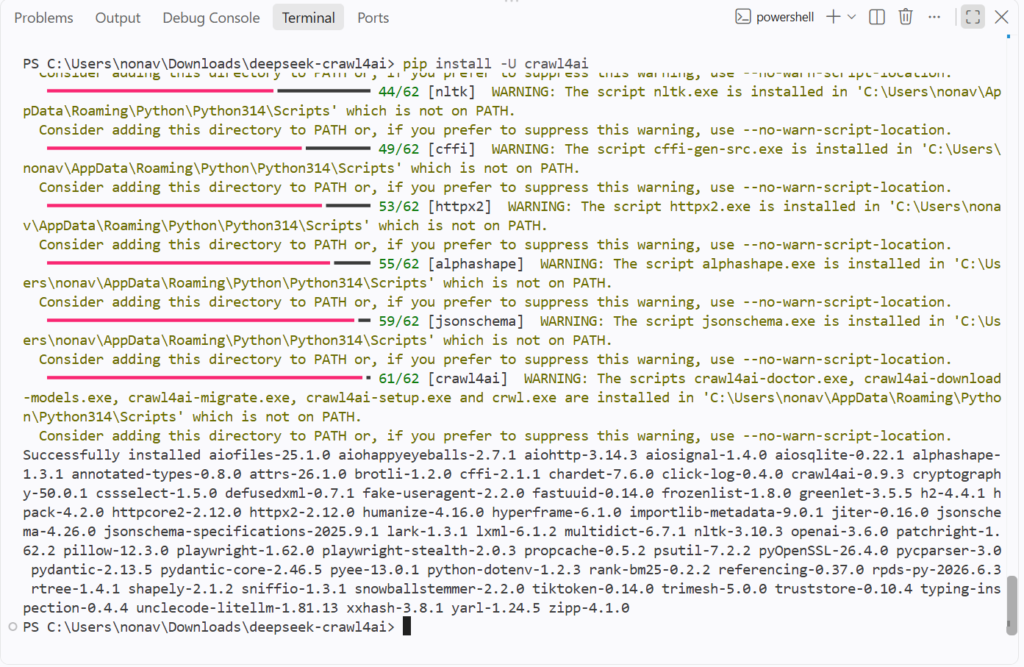
Начните с создания проекта на Python и установки Crawl4AI:
Команда установки Crawl4AI устанавливает компоненты браузера и завершает первоначальную настройку проекта. Если вы предпочитаете управляемую среду вместо самостоятельного обслуживания браузерной инфраструктуры, браузеров для скрапинга являются ещё одним вариантом.
Проверить установку можно так:
Теперь запустите минимальный краулинг, чтобы убедиться, что всё работает:
Crawl4AI возвращает содержимое страницы в формате Markdown. В нашем тесте он успешно обошёл сайт Books to Scrape и вернул содержимое страницы, включая ссылки пагинации.
Такой вывод в Markdown полезен для следующего шага, потому что даёт LLM более чистое представление страницы, чем сырой HTML. Crawl4AI также поддерживает использование Markdown в качестве входного формата для LLMExtractionStrategy.
Нужны надёжные IP для AI-скрапинга? Начните с NodeMaven за $3.50 и получите 750MB трафика
Подключение DeepSeek к Crawl4AI
API DeepSeek перешёл на поколение V4. В текущую линейку API входят DeepSeek V4 Flash и DeepSeek V4 Pro. Обе поддерживают вывод в JSON, контекстное окно на 1 миллион токенов и режим рассуждений. В текущем API используется deepseek-v4-flash и deepseek-v4-pro в качестве идентификаторов моделей.
В этом руководстве мы будем использовать DeepSeek V4 Flash. Это практичный выбор для структурированного извлечения данных с отдельных веб-страниц. Если вам нужна более продвинутая обработка, доступна версия V4 Pro.
Crawl4AI подключает модель через свой LLMConfig объект. Затем стратегия извлечения указывает модели, какую информацию найти и как структурировать результат.
Сначала сохраните ваш API-ключ DeepSeek в переменной окружения:
Не вставляйте ключ прямо в код на Python.
Затем настройте подключение к DeepSeek:
Вот что делают основные параметры:
- Поставщик указывает модель DeepSeek.
- api_token передаёт API-ключ.
- инструкция указывает модели, что нужно извлечь.
- schema определяет структуру ожидаемого результата.
- input_format указывает Crawl4AI отправлять модели Markdown.
Для структурированного извлечения Crawl4AI рекомендует использовать схему с LLMExtractionStrategy. Затем стратегия передаётся в CrawlerRunConfig, который управляет отдельным обходом.
Приведённый выше код лишь настраивает стратегию извлечения. Страницу он пока не обходит. Мы подключим его к AsyncWebCrawler на следующем шаге.
Добавьте ротацию прокси для стабильного скрапинга
Базовый краулер может отлично работать на небольшом тесте. Более крупные задачи скрапинга создают другую сложность: целевой сайт может ограничивать повторные запросы с одного IP.
Общие причины включают:
- Большой объём запросов
- Ограничения по частоте запросов на основе IP
- Географические ограничения
- Антибот-системы
- Повторяющиеся запросы с одного соединения
A ротируемый прокси меняет IP, который используется вашими запросами. Это удобно, когда ваш скрапер отправляет много независимых запросов и ему не нужно сохранять один и тот же IP на протяжении всего процесса.
NodeMaven поддерживает ротационные и «липкие» сессии резидентных прокси, а также таргетинг по стране, городу и ISP.
Более подробное объяснение того, когда использовать каждый тип сессии, смотрите в руководстве NodeMaven по ротации прокси.
Скрапинг сайта с помощью Crawl4AI
Теперь можно объединить краулер и стратегию извлечения на базе DeepSeek.
Для этого примера мы возьмём страницу товара на Books to Scrape, сайте, созданном для практики скрапинга.
Создать CrawlerRunConfig и подключите стратегию извлечения, которую мы настроили выше:
Это связывает логику извлечения DeepSeek с запросом Crawl4AI.
Crawl4AI сначала получает страницу и готовит содержимое в формате Markdown. Затем стратегия извлечения отправляет нужную часть содержимого в DeepSeek.
DeepSeek получает инструкцию и схему и пытается вернуть запрошенные поля в виде структурированных данных.
Например:
Точный результат зависит от страницы и от того, какая информация на ней есть.
Если вы запускаете тот же процесс через прокси NodeMaven, вы можете использовать инструмент IP-адрес чтобы проверить исходящий IP и его местоположение. Инструмент показывает такие данные, как местоположение IP, ISP, ASN и тип использования.
Для более крупной задачи можно поместить ту же логику обхода в цикл и обработать список URL, вместо того чтобы писать отдельный скрипт для каждой страницы.
Экспорт собранных данных в JSON, CSV или Markdown
Подходящий формат экспорта зависит от того, что происходит дальше в вашем пайплайне.
| Формат | Лучшее для |
| Markdown | Передача контента на следующий этап обработки AI или на проверку человеком |
| JSON | API, инструменты автоматизации и структурированное хранение |
| CSV | Таблицы и массовый анализ в Excel или Google Sheets |
Markdown-вывод Crawl4AI — это то, что вы обычно отправляете в DeepSeek. JSON-вывод DeepSeek — это то, что вы обычно сохраняете или передаёте в другую систему. Если ваша конечная цель — таблица, преобразование этого JSON в CSV обычно занимает одну строку кода с библиотекой вроде pandas.
Масштабируйте свои проекты на Crawl4AI с надёжными прокси. Попробуйте NodeMaven от $3.50 и получите 750MB трафика
Сколько стоит веб-скрапинг с DeepSeek?
Стоимость складывается из нескольких частей: счёт за API DeepSeek, расходы на прокси, если они нужны, и инфраструктура, на которой работают ваши скрипты.
Официальные цены DeepSeek для непиковых часов (все часы, кроме промежутков с 01:00 до 04:00 и с 06:00 до 10:00 UTC, с понедельника по пятницу) выглядят так:
| Модель | Входные токены (без кэша) | Входные токены (из кэша) | Вывод |
| DeepSeek-V4-Flash | $0,22 / 1M токенов | $0,007 / 1M токенов | $0,66 / 1M токенов |
| DeepSeek-V4-Pro | $0,66 / 1M токенов | $0,022 / 1M токенов | $1,98 / 1M токенов |
Тарифы в часы пиковой нагрузки вдвое выше непиковых. Цены на стороне DeepSeek меняются без особых предупреждений, поэтому ознакомьтесь с официальной страницей цен прежде чем планировать бюджет на крупную задачу.
Расход токенов растет быстро. Представьте, что вы скрапите 10 000 страниц товаров, где каждая очищенная Markdown-страница в среднем занимает 2000 входных токенов плюс короткий JSON-ответ. В итоге получается около 20 миллионов входных токенов на всю задачу.
По тарифу V4 Flash для cache miss во внепиковые часы входные данные обойдутся в около $4.40, без учета выходных токенов и экономии за счет кэширования промптов.
Снизить расходы можно двумя способами.
Во-первых, отправляйте меньше контента. При конвертации HTML в Markdown Crawl4AI убирает большую часть навигации и прочего мусора со страницы. Дополнительная очистка лишнего контента уменьшает число токенов, отправляемых в DeepSeek.
Во-вторых, используйте кэширование промптов. Если инструкции по извлечению данных не меняются от запроса к запросу, повторяющиеся части входных данных могут попасть под гораздо более низкий тариф cache hit.
DeepSeek + Crawl4AI: лучший веб-скрапер 2026 года?
Вернемся к вопросу из заголовка.
Эта связка интересна по конкретной причине: Crawl4AI имеет открытый исходный код, поэтому вы не привязаны к ценам и лимитам управляемой платформы. DeepSeek умеет интерпретировать и структурировать контент без написания собственной логики парсинга под каждый сайт. Добавьте прокси, и такая связка масштабируется до реальных объемов трафика без полностью управляемого сервиса скрапинга.
Честный ответ: это сильный бюджетный вариант. Подбирайте инструмент под задачу.
Пусть ваш AI-скрапинг работает без сбоев. Попробуйте NodeMaven от $3,50 и получите 750 МБ трафика


