

How to Bypass Cloudflare: Fix Blocks and Verification Loops


Cloudflare’s human check doesn’t always end after you tick the box. Sometimes it starts again on the next page. A scraper can get stuck there too, downloading verification screens instead of product data, while an AI agent waits for content it can’t use.
Cloudflare is used as a reverse proxy by 28.9% of websites, согласно W3Techs in 2026. The checks you encounter depend on the website’s settings and can involve your connection, browser, and session behavior.
A screened residential IP can help when the block follows your connection. When the task also needs JavaScript or CAPTCHA handling, NodeMaven’s Scraping Browser brings browser execution and proxies into the same workflow. We’ll explain which changes to try and how to confirm you’ve reached the content you need.
Ключевые выводы
- Check the protection first. NodeMaven Anti-Bot Checker helps identify detected systems, JavaScript requirements, and the relevance of IP reputation.
- Choose high-quality residential IPs. Overused proxies with poor reputations can trigger more checks. NodeMaven filters addresses before assignment.
- Keep the client consistent. Changing a User-Agent header doesn’t change TLS behavior, execute JavaScript, or preserve browser state.
- Give scrapers and AI agents a managed browser when the task needs one. Use managed browser settings and supported CAPTCHA solving for interactive workflows.
- Measure completed tasks and traffic. A successful connection or HTTP 200 response doesn’t prove you received the right content.

Test NodeMaven’s filtered residential and mobile proxies with a $3.50 paid trial including 750 MB. Check your target website, location, and session behavior before choosing a larger plan.
How Cloudflare detects and challenges requests
Cloudflare is used as a reverse proxy by 28.9% of websites, согласно W3Techs as of November 11, 2026. Website owners choose their protection settings, so two Cloudflare-protected sites can treat the same request differently.
| Сигнал | What it tells the website |
| IP address and network | Where the connection originates and what reputation information is associated with it |
| TLS and HTTP behavior | Characteristics of the software establishing and using the connection |
| Browser-side signals | Whether scripts run and what browser environment they encounter |
| Session and request patterns | How requests relate to earlier activity, cookies, and traffic levels |
Cloudflare’s bot-score documentation describes headers, session characteristics, and browser signals as inputs to its assessment. The exact products and rules differ by site.
These checks also affect ordinary visitors. A Hacker News discussion describes verification interrupting hosting logins and email unsubscribe pages. Your troubleshooting should therefore start with the actual response, rather than assuming every block means your scraper was detected.
Check the website’s protection first
Enter the affected URL in NodeMaven Anti-Bot Checker. Review the detected protection, response status, and guidance on plain HTTP requests, JavaScript requirements, and IP reputation.
Open the evidence behind the finding. A cookie, header, or script provides more context than the protection vendor’s name alone. Cloudflare detected as a CDN doesn’t establish that it challenged the request.
Use the result to narrow your next step:
| Checker finding | Practical next step |
| Plain HTTP requests should work | Test your existing client and validate the returned content |
| JavaScript is required | Use browser execution rather than a basic HTTP request |
| IP reputation is relevant | Compare a screened residential connection in your actual client |
| CAPTCHA or browser protection is detected | Check whether your workflow supports the encountered challenge |
| No barrier observed | Test the pages and actions you actually need |
When available, Compare IPs can show whether datacenter and residential requests receive different responses. Check that the comparison completed; an inferred difficulty rating is not the same as a measured access difference.
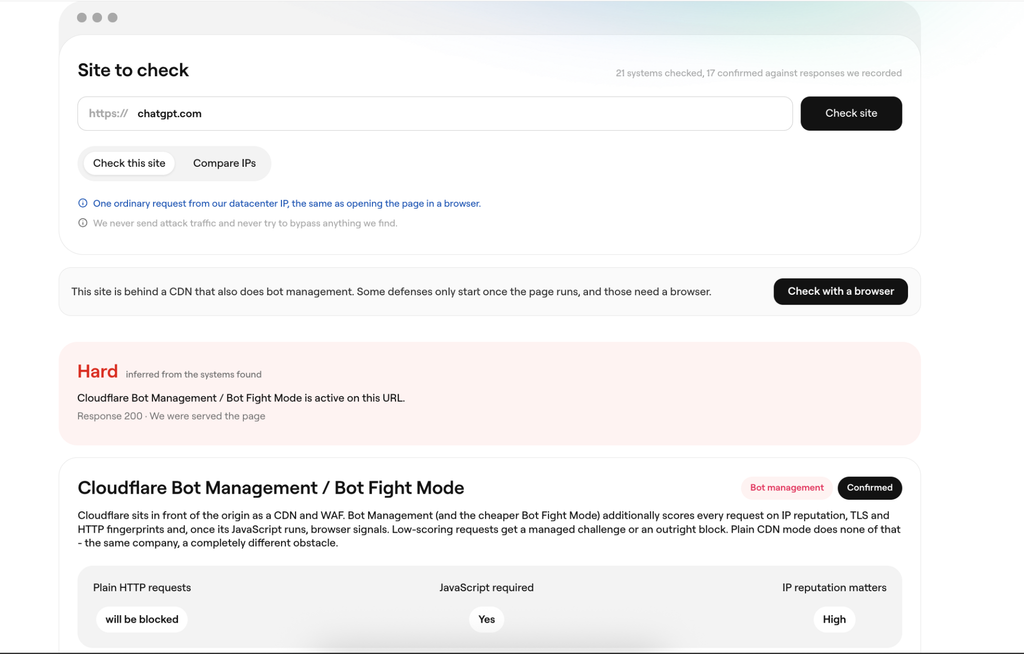
A single scanned URL doesn’t represent every login, search, checkout, or API route. If the homepage loads but the task fails later, investigate the failing step.
How to bypass Cloudflare verification and blocks
1. Use screened residential IPs when the connection is the problem
A proxy can accept your connection while the destination rejects its exit IP. An overused address or poor network reputation can make the task harder before your browser has done anything.
To check whether the connection is involved, open the same URL in the same browser through another network or proxy. Keep the other settings unchanged. Opening it on your phone also changes the device and browser, making the cause harder to isolate.
If the result changes with the connection, choose the proxy type and quality deliberately.
Residential versus datacenter proxies
Datacenter proxies use hosting infrastructure. They often offer inexpensive, fast connections, but their network origin can make them easier to distinguish from household traffic.
Резидентские прокси use residential internet connections. Their network type can suit targets that treat hosting-provider traffic more cautiously, but individual residential addresses can still be overused or have poor histories.
| Разложить на множители | Датацентровые прокси | Резидентские прокси |
| Network origin | Hosting infrastructure | Residential internet connections |
| Typical tradeoff | Lower cost and high throughput | Broader residential network diversity, often with traffic-based pricing |
| Access decision | Depends on the address, network, client, and site rules | Depends on the same factors; residential origin alone isn’t a pass |
| Когда выбирать | Your target already serves the required content reliably and you prioritize cost or throughput | Testing shows that a residential connection improves access in the required location |
IP type and IP quality are separate decisions. Buying an unfiltered residential pool doesn’t solve the problem of poor individual addresses.
Резидентские прокси NodeMaven screen exits before assignment and offer quality filters alongside location targeting. That lets you test a screened connection in the country or region your task requires.
For a first comparison:
- Select the required location and quality setting.
- Choose Sticky if the task contains connected steps.
- Copy the generated connection details into your browser or client.
- Verify the exit location, then open the target and complete a representative task.
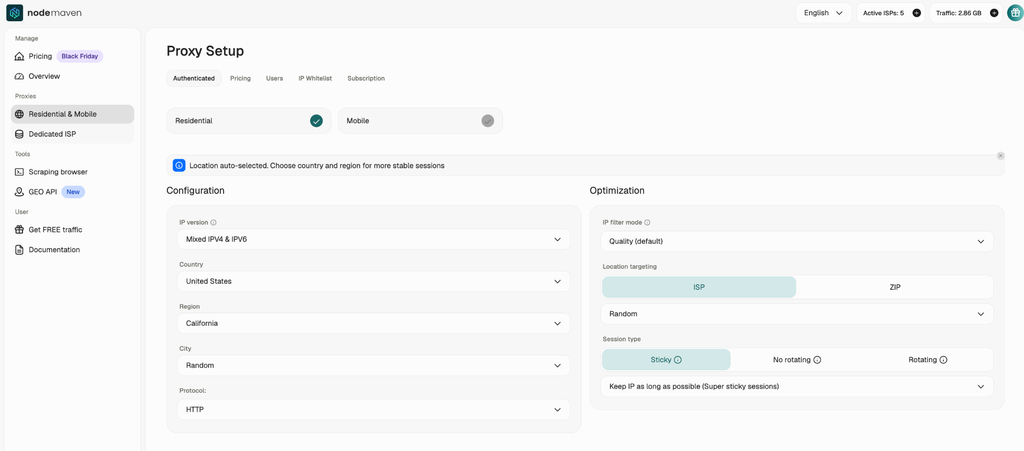
Keep targeting as broad as the task allows. Selecting a specific city or ISP unnecessarily can restrict the available pool without improving the result you need.
Test NodeMaven’s filtered residential and mobile proxies with a $3.50 paid trial including 750 MB. Check your target website, location, and session behavior before choosing a larger plan.
2. Match the client’s connection behavior, not just its User-Agent
A script can send a Chrome User-Agent header while connecting differently from Chrome. Changing that header doesn’t turn the script into a browser.
When an HTTPS connection starts, the client negotiates encryption through TLS. Different applications offer different combinations of options, creating recognizable connection characteristics. Cloudflare documents JA3 and JA4 fingerprints derived from those TLS characteristics. HTTP/2 settings can also differ between clients.
This helps explain why a page might open in your browser but fail in a script using the same proxy. The IP is only one part of the request; the software making it also matters.
Compare the clients using the same exit IP. Pin a Sticky session and verify the exit address in both your browser and application before opening the target URL. Compare whether they receive the expected content or a verification page. A difference points to the client or session setup, but doesn’t prove TLS fingerprinting alone caused the block.
For static pages, a client such as curl_cffi can reproduce supported browser connection profiles without launching a browser. It doesn’t execute JavaScript or complete page interactions.
If the task needs JavaScript or page interactions, use a managed browser rather than continuing to adjust an HTTP client.
3. Keep browser fingerprints and settings coherent
Once a page runs scripts, the browser environment becomes another part of the interaction. This is different from the TLS connection fingerprint.
Language, timezone, browser properties, and session state can all affect how the workflow behaves. Copying headers from one browser while using unrelated settings elsewhere makes the configuration harder to maintain and diagnose.
Start with a current browser and avoid unnecessary overrides. Keep its language, timezone, and location settings consistent with the task instead of changing them independently between pages.
For managed automation, браузер для скрапинга NodeMaven manages fingerprints and aligns timezone, locale, geolocation, and network properties with the selected proxy location. This reduces the configuration work across separate proxy and browser components.
Keep the environment consistent through connected steps. Randomly changing the timezone, browser identity, or location between pages can disrupt the workflow you’re trying to preserve.
For ordinary browsing, test a clean profile and temporarily disable extensions that interfere with scripts. Cloudflare’s browser-support guidance identifies content blockers, modified environments, and some proxy extensions as possible sources of challenge problems.
4. Use browser execution for JavaScript checks and interactive pages
A basic HTTP client downloads responses. A browser also executes scripts, loads dependent resources, maintains page state, and interacts with elements.
That distinction becomes visible when the response contains a verification screen or when the content appears only after scripts run. A longer timeout won’t give a non-browser client those capabilities.
Separate the protection types before choosing a remedy:
- Challenge Pages interrupt access with a verification page.
- JavaScript Detections collect browser-side signals and are a separate Cloudflare feature.
- Turnstile is an embedded verification widget that can run visibly or invisibly.
Cloudflare documents JavaScript Detections separately from Challenge Pages and Turnstile. Его Turnstile widget modes include Managed, Non-Interactive, and Invisible; a visible checkbox isn’t required in every case.
For automation, use a browser workflow that supports the scripts, interactions, and challenges your target presents. NodeMaven includes automatic handling of supported CAPTCHAs within Браузер для скрейпинга.
Don’t judge success only by the disappearance of a spinner. Wait for something the task actually needs, such as a populated search-results list, a product price, or a confirmed delivery region. Use a bounded timeout and report failure if that condition never appears.
If you maintain your own browser infrastructure, the FlareSolverr setup guide covers a self-hosted option for compatible workflows. You’ll manage browser resources, updates, and failures as the target changes.
5. Preserve cookies and IP continuity after verification
Passing a check establishes state that later requests may need. Starting a fresh cookie jar or changing the connection during the task can undo the continuity your workflow depends on.
Cloudflare’s clearance documentation describes cf_clearance as tied to the visitor and device. Treat it as part of the browser session, rather than a token you can move freely between machines or unrelated clients.
Keep the same browser context and proxy session for connected actions. If a task opens a category page, follows pagination, and checks individual products, avoid rotating the IP at each step.
NodeMaven предлагает sticky residential sessions of up to 24 hours, subject to exit availability. Reusable browser profiles preserve cookies and browser state while the website session remains valid.
Those settings serve different purposes: Sticky controls temporary IP continuity, while a profile preserves browser state. Neither guarantees that the website will keep a session valid indefinitely.
Rotate between independent tasks when appropriate. Don’t use aggressive rotation as a substitute for reducing a rate-limited workload.
6. Give AI agents a complete browser workflow
An agent that fetches HTML may still be unable to use menus, apply filters, or continue through verification. Give it a browser and define the actions and output it needs.
For example, an agent checking product availability should confirm the delivery area before reading stock status. Otherwise, it can return a plausible answer for the wrong market.
Defining failure explicitly helps prevent the agent from treating a challenge page or missing field as a completed answer.
Connect your application through supported browser interfaces such as Playwright or Puppeteer, then inspect the run before scheduling repeated tasks.
For active Rotating Residential Proxy subscribers, Браузер для скрейпинга and supported CAPTCHA solving have no separate usage fee. You pay for the proxy traffic used.
Common Cloudflare errors and how to troubleshoot them
Use the response and the point of failure to choose your next check. The same symptom can have several causes.
| Error or symptom | What to investigate | Next step |
| 403 Запрещено | Challenge response, site rule, or another access restriction | Inspect the body and headers before changing proxies |
| Cloudflare 1020 | Security-rule denial | Record error details and Ray ID; seek owner review where appropriate |
| Cloudflare 1015 or HTTP 429 | Rate limiting or excessive retries | Lower concurrency, back off, and inspect retry settings |
| Verification returns after passing | Lost browser state, connection changes, or another challenge | Keep the context and connection consistent; inspect the next failed step |
| Browser works, script fails | Different execution or connection behavior | Compare client behavior, headers, and required JavaScript |
| HTTP 200 but wrong or missing data | Unexpected page, incomplete rendering, or verification content | Validate task-specific fields and page state |
| Proxy authentication error or connection timeout | Proxy endpoint, authentication, routing, or target reachability | Confirm the proxy connection before diagnosing Cloudflare |
Cloudflare documents 1015 as a rate-limit error и 1020 as access denied by a security rule. Repeated retries aren’t the right response to either.
For developers, Challenge Pages carry cf-mitigated: challenge and use text/html. This identifies those responses specifically; its absence doesn’t prove the requested content is valid.
Этот 403 Forbidden troubleshooting guide covers additional causes beyond Cloudflare.
Choose the right setup for Cloudflare-protected websites
Repeatedly changing IPs or retrying the same request can waste traffic without resolving the block. Start by checking the website’s protection, then address the connection, browser settings, or session behavior involved.
NodeMaven brings screened residential IPs and managed browser execution into one workflow. Use filtered proxies with your existing client, or run interactive tasks through Scraping Browser with automatic handling of supported CAPTCHAs. For scrapers and AI agents, that means fewer separate components to configure and troubleshoot.
Test the pages and actions you need before scaling. The setup should carry the task through verification and return the correct result, with a consistent location and session throughout.
Test NodeMaven’s filtered residential and mobile proxies with a $3.50 paid trial including 750 MB. Check your target website, location, and session behavior before choosing a larger plan.


