
How to Check If Your IP Is Blacklisted (2026 Guide)



Your emails bounce. Websites throw CAPTCHAs at every click. A login that worked yesterday now fails. One common cause is a blacklisted IP address.
An IP blacklist check tells you if your address sits on a public blocklist. It takes about two minutes. This guide shows how to check your IP, read the results and get delisted. It also covers what to do when a “clean” IP still gets blocked.

Tired of flagged proxy IPs?
Start your NodeMaven trial for $3.50 and get 750 MB of filtered residential and mobile proxy traffic
Ключевые выводы
- An IP blacklist is a public list of addresses linked to spam or abuse. Mail servers and security tools query it in real time.
- One listing on a minor list rarely matters. A Spamhaus or Barracuda listing usually does.
- Blacklists are only half the picture. Websites also use private reputation scores that DNSBLs do not show.
- Most listings expire or can be removed once you fix the cause.
What is an IP blacklist?
An IP blacklist, also called a blocklist, DNSBL or RBL, is a database of IP addresses linked to spam, malware or abuse. Mail servers, firewalls and security tools check it before they accept traffic.
How DNS blacklists work
DNSBLs run on the DNS system. To check an IP, a server reverses its octets and adds the blacklist zone. For 203.0.113.7 checked against SpamCop, the query is 7.113.0.203.bl.spamcop.net. A listed IP returns an address like 127.0.0.2. An unlisted IP returns nothing. That is why the check is fast enough to run on every incoming email.
Listings come from spam traps, user reports and automated abuse detection. Each list has its own rules for adding and removing IPs. Some list single IPs, others whole ranges. A domain blacklist works the same way but lists domains found in spam links.
Public blacklists vs private reputation systems
Public DNSBLs are only one layer. Gmail, Microsoft, Cloudflare and most anti-fraud platforms run private reputation systems. They score IPs on connection type, abuse history, proxy or VPN detection and behavior. You cannot look these lists up directly. An IP can pass every DNSBL check and still get blocked by a website. A full check therefore includes a reputation score, not only a blacklist scan.
Signs your IP might be blacklisted
- Emails bounce with 550 or 554 errors that mention a blocklist.
- Messages that used to reach the inbox now land in spam.
- Websites show CAPTCHAs or challenge pages on every visit.
- You get “403 Запрещено” or “Access denied” errors on sites that worked before.
- Platforms flag, verify or suspend your accounts after login.
Bounce messages are the most useful clue. They often name the blacklist that blocked you.
How to check if your IP is blacklisted: step by step
Step 1. Find your public IP
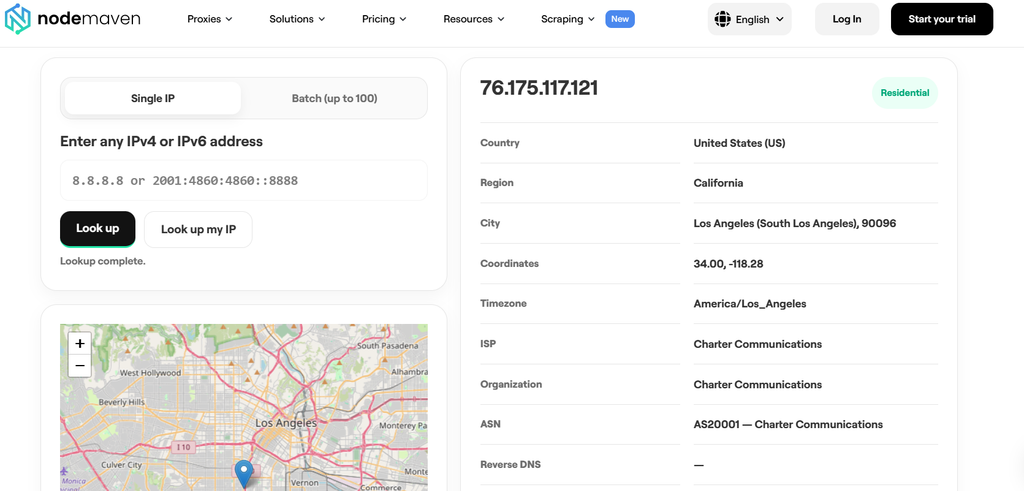
Blacklists track your public IP, not the local router address like 192.168.x.x. Open NodeMaven’s free IP Lookup. It shows the public IPv4 or IPv6 address that websites see, plus its ISP, ASN and location.
For a mail server, check the IP that actually sends mail. You can find it in the “Received” headers of an email you sent. If you use a proxy or VPN, confirm you are checking the IP that sites really see. A browser can expose a second address through WebRTC. Our guide on WebRTC leaks explains how this happens.
Step 2. Run a multi-blacklist check
Paste the IP into a checker that queries many lists at once. MXToolbox checks it against more than 100 DNS blacklists. MultiRBL and DNSChecker give a quick second opinion. Each list shows OK or LISTED.
Step 3. Confirm on Spamhaus and Barracuda
Spamhaus and Barracuda power filtering on a large share of mail servers. Check them directly on their own lookup pages. Those pages also explain why the IP was listed and how to remove it.
Step 4. Check the threat score
A clean DNSBL result does not mean a clean IP. Look at the threat score and detection flags in NodeMaven IP-адрес. The tool flags proxy, VPN, Tor, hosting and mobile traffic. A high score or a hosting flag explains why sites challenge you with zero blacklist listings.
Step 5. Read the results correctly
- One listing on a small or aggressive list rarely affects delivery. Many servers ignore those lists.
- A Spamhaus SBL or XBL listing is serious. Act on it first.
- Spamhaus PBL is different. It lists ranges that should not send email directly, such as home connections. It is not a penalty.
- False positives happen. Check the listing date and reason before you change anything.
Major IP blacklists and how to check each
Most of these lists started as spam filters. That is why an email IP blacklist check and a general IP blacklist check return the same names. Firewalls and security tools then reuse the same data.
| Blacklist | What it lists | How to check and delist |
| Spamhaus (SBL, XBL, PBL, CSS) | Spam sources, infected devices, ranges not meant to send mail | Spamhaus Checker. Self-service removal for most listings after the fix |
| Barracuda (BRBL) | IPs that sent spam to Barracuda customers | Barracuda lookup. Removal request form |
| SpamCop | IPs reported by users and spam traps | SpamCop lookup. Listings expire automatically once reports stop |
| UCEPROTECT | Single IPs (Level 1) up to whole networks (Level 3) | UCEPROTECT lookup. Level 1 expires after a clean period, express removal is paid |
| Proofpoint / Cloudmark | IPs with poor sender reputation in Proofpoint’s network | Proofpoint IP check page. Delist request form |
| FortiGuard | Spam and malicious IPs for Fortinet firewalls | FortiGuard lookup. Removal request on the same page |
SORBS shut down in 2024. If an old tool still shows a SORBS result, you can ignore it.
Best free IP blacklist checker tools in 2026
No single tool covers everything. Some check DNSBL listings. Others show the reputation and connection signals that sites use when no public list is involved. The strongest approach combines both.
| Инструмент | Что это проверяет | Лучшее для | Доступ |
| NodeMaven IP-адрес | Threat score, proxy, VPN and Tor flags, ASN, ISP, reverse DNS | Finding your IP and its reputation | No account, batch up to 100 IPs |
| MXToolbox | 100+ DNS blacklists | All-round listing check | Free lookup, paid monitoring |
| Spamhaus Checker | SBL, XBL, PBL, CSS | The list that matters most | Free lookup, free DQS key for automation |
| MultiRBL | Large set of DNSBLs, IPv4 and IPv6 | Second opinion | Бесплатно |
| NodeMaven Проверка UDP-соединения | WebRTC, STUN and TURN routes, HTTP/3 | Finding why a clean IP gets flagged | No account |
| DNSChecker | Multiple DNSBLs | Quick check | Бесплатно |
| Cisco Talos | Email and web reputation | Reputation context | Free lookup |
| NodeMaven Тест утечки и DNS Leak Tests | Real IP and DNS resolver exposure | Checking the right IP behind a proxy | No account |
| AbuseIPDB | Community abuse reports, confidence score | История злоупотреблений | Free, API with 1,000 checks per day |
How to combine them: start with IP Lookup, scan with MXToolbox or MultiRBL, then confirm on Spamhaus. If a “clean” IP still gets blocked, run the leak tests and the UDP Connection Checker to see what your browser exposes. Our roundup of WebRTC leak testing tools compares more options.
Need an IP that passes every check?
Start your NodeMaven trial for $3.50 and get 750 MB of filtered proxy traffic
How to check multiple IPs or an IP range
Checking IPs one by one gets slow when you manage a server block, a proxy list or traffic logs. NodeMaven IP Lookup includes batch lookup for up to 100 IPs.
It shows the threat score and connection type for each address in one view. For whole subnets, AbuseIPDB can check a CIDR range through its API. For regular scans of hundreds of IPs, a short script works better.
Automate blacklist checks with an API or Python
Every DNSBL lookup is a DNS query. A few lines of Python can check an IPv4 address against several lists. The script reverses the octets, queries each zone and prints the result.
Spamhaus returns 127.255.255.254 when you query through a public resolver such as Google or Cloudflare DNS. That code means “query blocked”, not “listed”. Use your own resolver or a free Spamhaus DQS key. Spamhaus explains all DNSBL return codes in its docs.
For a managed option, the AbuseIPDB API gives 1,000 free checks per day. MXToolbox offers API access on paid plans.
Why IPs get blacklisted
- Spam. Bulk email sent from the IP, including from a hacked account or contact form.
- Вредоносное ПО. An infected device on your network joins a botnet.
- Bad neighbors. On shared hosting and cloud ranges like AWS, one abusive customer can get a whole range listed.
- Dynamic residential ranges. Home connections often sit on lists like Spamhaus PBL by default.
- Recycled IPs. Server and static IPs get reassigned. The previous owner’s history may still be attached.
If your server IP is listed and you sent nothing suspicious, check the last two causes first.
What to do if your IP is blacklisted
- Fix the cause. Scan for malware, close open relays, secure forms and change compromised passwords. Delisting without a fix leads to a quick relisting.
- Request delisting. Use the removal form of each list that shows your IP. Many lists remove IPs automatically after a quiet period.
- Monitor the IP. Run the check again after a few days. Paid monitors like MXToolbox alert you to new listings.
- Get a new IP if needed. If a shared or recycled IP keeps getting listed, ask your host or ISP for a different one.
Blacklisted proxy IPs: how to get clean ones
Proxy IPs face the same problem at a larger scale. Free and cheap proxy pools are shared by thousands of users. Some of them run spam, credential stuffing or aggressive bots. As a result, many public proxy IPs sit on abuse lists or carry high fraud scores. You pay for blocks, CAPTCHAs and wasted traffic. Our guide on IP leaks shows how detection systems combine these signals.
Check every proxy before you start a workflow:
- Run the exit IP through IP Lookup to see its threat score and connection type.
- Test speed and stability with the проверка пропускной способности прокси.
- Run the Тест утечки WebRTC so your real IP stays hidden behind the proxy.
NodeMaven fixes the problem at the source. Its IP Quality Filter screens each IP in real time before you receive it. This keeps the clean IP rate at 95%. Pick the proxy type that fits your task:
- Резидентские прокси for web scraping and data collection from 30M+ real home IPs
- Мобильные прокси for social media and multi-account work that needs the highest trust
- ISP прокси for long sessions on a static IP with unlimited traffic
NodeMaven proxies are built for scraping, automation and account management. For multi-account setups, pair them with a profile tool from our antidetect browser comparison.
Заключение
An IP blacklist check takes a few minutes. Find your public IP, scan the major DNSBLs, confirm on Spamhaus and check the threat score. Fix the cause before you request removal. If you work with proxies, start with clean IPs so the problem never starts.
Ready to work with clean IPs?
Начните пробный период NodeMaven за $3.50 и получите 750 MB премиального прокси-трафика


