Как использовать Shadowrocket: настройка прокси, параметры и альтернативы



Shadowrocket — это прокси-клиент для устройств Apple. Он направляет интернет-трафик через HTTP- или SOCKS5-прокси, применяет пользовательские правила маршрутизации и позволяет управлять тем, какие соединения используют прокси. Приложение не включает прокси-серверы, поэтому вам нужно добавить собственного провайдера.
Приложение собрало значительную базу пользователей. На момент исследования официальная страница Shadowrocket в App Store показал рейтинг 4,5 примерно от 12 000 пользователей и первое место в категории «Утилиты» в США.
В этом руководстве объясняется, как настроить Shadowrocket с прокси, выбрать правильный режим маршрутизации, проверить соединение и устранить типичные ошибки. Также рассматриваются альтернативы для Android и Windows и показано, как чистые и стабильные прокси NodeMaven подходят для каждой конфигурации.

Подключите резидентные или мобильные прокси NodeMaven к Shadowrocket с поддержкой SOCKS5, точным геотаргетингом и стабильными сессиями. Начните с 750 MB трафика за $3.50.
Что такое Shadowrocket и как он работает?
Shadowrocket — это прокси-утилита на основе правил, разработанная компанией Shadow Launch Technology Limited. Официальное приложение поддерживает iPhone, iPad, совместимые компьютеры Mac и Apple TV.
После настройки соединение проходит по такому пути:
Ваше устройство → Shadowrocket → прокси-сервер → сайт или приложение
Shadowrocket отвечает за маршрутизацию. Провайдер прокси предоставляет IP-адрес, местоположение, протокол и сессию.
Простая загрузка Shadowrocket не изменит ваш IP. Вам по-прежнему нужны:
- Адрес прокси-сервера
- Порт
- Имя пользователя и пароль
- Поддерживаемый протокол, обычно HTTP или SOCKS5
Описание в App Store подтверждает поддержку HTTP, HTTPS, TCP, IPv6, локального сопоставления DNS, правил на основе доменов, правил GeoIP, перезаписи URL и измерения трафика.
Является ли Shadowrocket VPN?
Shadowrocket часто называют “Shadowrocket VPN” потому что Apple отображает значок VPN, когда приложение подключено. Приложение использует сетевой фреймворк Apple для маршрутизации трафика через локальный туннель, но это работает не так, как обычная потребительская подписка на VPN.
A VPN обычно включает как само приложение, так и доступ к удаленным серверам. Shadowrocket — это прокси-клиент, поэтому пользователи добавляют собственную конфигурацию прокси.
Это дает пользователям контроль над:
- Какой прокси-сервер и тип IP используются
- Какие сайты используют прокси
- Какие соединения остаются прямыми
- Как обрабатываются DNS-запросы
- Когда происходит ротация IP
- Как долго сессия сохраняет один и тот же адрес
Многие потребительские VPN назначают общие IP дата-центров, которыми пользуется большое число клиентов. У таких адресов уже может быть плохая репутация, а загруженные серверы могут снижать скорость соединения и провоцировать КАПЧА. На защищённых платформах, таких как Reddit, чрезмерно используемый IP может приводить к появлению большего числа CAPTCHA, проверок подлинности или ограничений доступа. Руководство NodeMaven по прокси для Reddit рассматривает эту проблему подробнее.
Shadowrocket в связке с NodeMaven даёт пользователям больше контроля, чем обычный VPN. NodeMaven предоставляет предварительно отфильтрованные резидентные, резидентский, мобильные и ISP-IP, а также геотаргетинг и залипающие или статические сессии. Пользователи прокси получают более чистый адрес и сохраняют его на нужный период вместо того, чтобы соглашаться на любой назначенный общий сервер VPN.
Shadowrocket для iOS, Android, Windows и Mac
Официальное приложение Shadowrocket относится к экосистеме Apple. Поиск APK для Shadowrocket под Android и загрузок для Windows часто приводит к приложениям с похожими названиями, но их не следует автоматически считать версиями от того же разработчика.
Shadowrocket для iPhone и iPad
Пользователи iPhone и iPad могут скачать Shadowrocket из официального Apple App Store. В американском магазине приложение сейчас стоит $2.99.
Перед покупкой убедитесь, что в качестве разработчика указана компания Shadow Launch Technology Limited. Это поможет избежать неофициальных копий и приложений с похожими названиями.
Shadowrocket для Mac
В App Store Shadowrocket указан как совместимый с поддерживаемыми компьютерами Mac. Доступность зависит от устройства, операционной системы, процессора и региона App Store.
Пользователям Mac, которым нужна детальная маршрутизация для каждого приложения, также стоит рассмотреть Proxifier. Он позволяет назначать разные правила прокси отдельным настольным приложениям.
Shadowrocket для Android
Официальный релиз Shadowrocket для Android от разработчика, указанного в Apple, подтвердить не удалось. Будьте осторожны с сайтами, предлагающими «Shadowrocket APK», особенно когда личность разработчика и источник обновлений неясны. Вы можете ознакомиться с нашим руководством по интеграции Shadowrocket, которое включает настройку приложения для Android со скриншотами.
Практичная альтернатива для Android — Happ. Он поддерживает ручную настройку SOCKS-прокси и имеет официальные загрузки для мобильных устройств. У NodeMaven есть полное руководство по настройке прокси с Happ на Android.
Настройка похожа на Shadowrocket:
- Сгенерируйте SOCKS5-прокси в Личный кабинет NodeMaven.
- Откройте ручной ввод в Happ.
- Введите сервер, порт, имя пользователя и пароль.
- Подключитесь и проверьте новый IP.
Proxifier — ещё один вариант. Его официальная информация о совместимости указывает Android 8 и новее.
Shadowrocket для Windows
Проверенного официального приложения Shadowrocket для Windows от Shadow Launch Technology Limited не существует.
Для Windows Proxifier с NodeMaven это наиболее близкая альтернатива для маршрутизации на уровне приложений. Proxifier поддерживает прокси-серверы HTTP, HTTPS и SOCKS и может маршрутизировать приложения, у которых нет встроенных настроек прокси.
Зона официальная страница загрузки Proxifier указывает поддержку Windows 7, 8, 10 и 11. A 31-дневный пробный период доступен.
Если вам нужно проксировать только трафик браузера, настройка прокси в Simple Proxy Switcher или настройка прокси в SwitchyOmega проще.
| Устройство | Рекомендуемый клиент | Подходит для |
| iPhone и iPad | Shadowrocket | Трафик устройства и правила маршрутизации |
| Mac | Shadowrocket или Proxifier | Устройства Apple и десктопные приложения |
| Андроид | Happ или Proxifier | Мобильные SOCKS5-подключения |
| Windows | Proxifier | Маршрутизация на уровне десктопа и приложений |
| Десктопный браузер | SwitchyOmega или Simple Proxy Switcher | Только трафик браузера |
Что нужно перед настройкой Shadowrocket
Shadowrocket запрашивает данные подключения, которые предоставляет ваш поставщик прокси. Для настройки NodeMaven вам понадобятся:
- Type: HTTP или SOCKS5
- Сервер (Hostname): gate.nodemaven.com
- Порт: порт, указанный в панели управления
- Username: сгенерированное имя пользователя NodeMaven
- Password: сгенерированный пароль NodeMaven
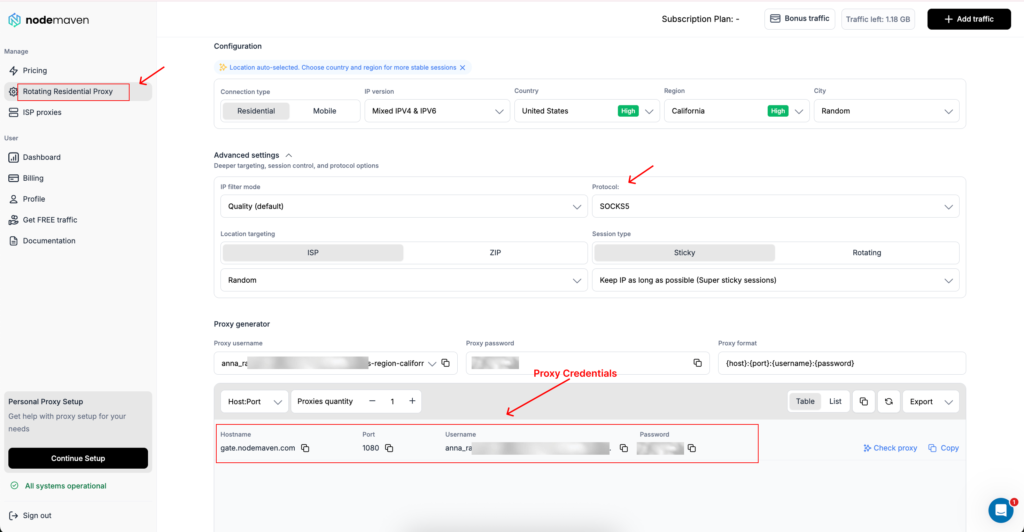
Вы можете скопировать все учетные данные в Личный кабинет. Имя пользователя может содержать выбранную страну, город, ISP, фильтр или информацию о сессии. Скопируйте значение целиком. Удаление его части может изменить конфигурацию или привести к сбою аутентификации.
Какой прокси NodeMaven выбрать?
Для обычного просмотра и доступа с привязкой к локации резидентский прокси с закреплённой сессией (sticky session) — разумная отправная точка. Он использует IP, связанный с пользовательской сетью, и может сохранять один и тот же адрес на протяжении всей сессии.
Ан ISP прокси — лучший вариант, когда вам нужен один статический IP для многократного использования. ISP-прокси NodeMaven имеют безлимитный трафик, поддержку UDP и время отклика менее 0,2 секунды.
A мобильный прокси использует IP из сети 4G, 5G или LTE. Выбирайте его, когда адрес мобильного оператора нужен для конкретной задачи, например для тестирования приложения или проверки контента в мобильной сети.
Избегайте смены IP при каждом запросе, когда используете аккаунты с выполненным входом. Закреплённый (sticky) или статический ISP-прокси-адрес обеспечивает более стабильную историю соединений.
Как использовать Shadowrocket с NodeMaven
Шаг 1: Установите Shadowrocket
Открыть магазин App Store и найдите Shadowrocket.
Перед установкой убедитесь:
- Разработчик: Shadow Launch Technology Limited
- Категория: Утилиты
- Описание: Утилита прокси на основе правил
Откройте приложение после установки. Позже в процессе настройки Apple может запросить разрешение на создание сетевой конфигурации.
Шаг 2. Создайте прокси в NodeMaven
Войдите в панель управления NodeMaven и откройте инструмент настройки прокси.
Выберите параметры для вашего соединения:
- Выберите резидентные или мобильные прокси в разделе Rotating Residential Proxy, или статический прокси в Раздел ISP-прокси.
- Выберите нужную страну.
- Добавьте таргетинг по городу, ISP или ZIP, если он поддерживается.
- Выберите sticky-сессию для резидентных или мобильных прокси, если IP должен оставаться неизменным.
- Выберите HTTP или SOCKS5.
- Выберите режим фильтрации IP.
По умолчанию Фильтр качества отдаёт приоритет более чистым адресам. Quality + Speed полезен, когда важны и репутация IP, и скорость соединения.
Скопируйте сгенерированные сервер, порт, имя пользователя и пароль.
Шаг 3: Добавьте прокси NodeMaven в Shadowrocket
Откройте Shadowrocket и выполните следующие шаги:
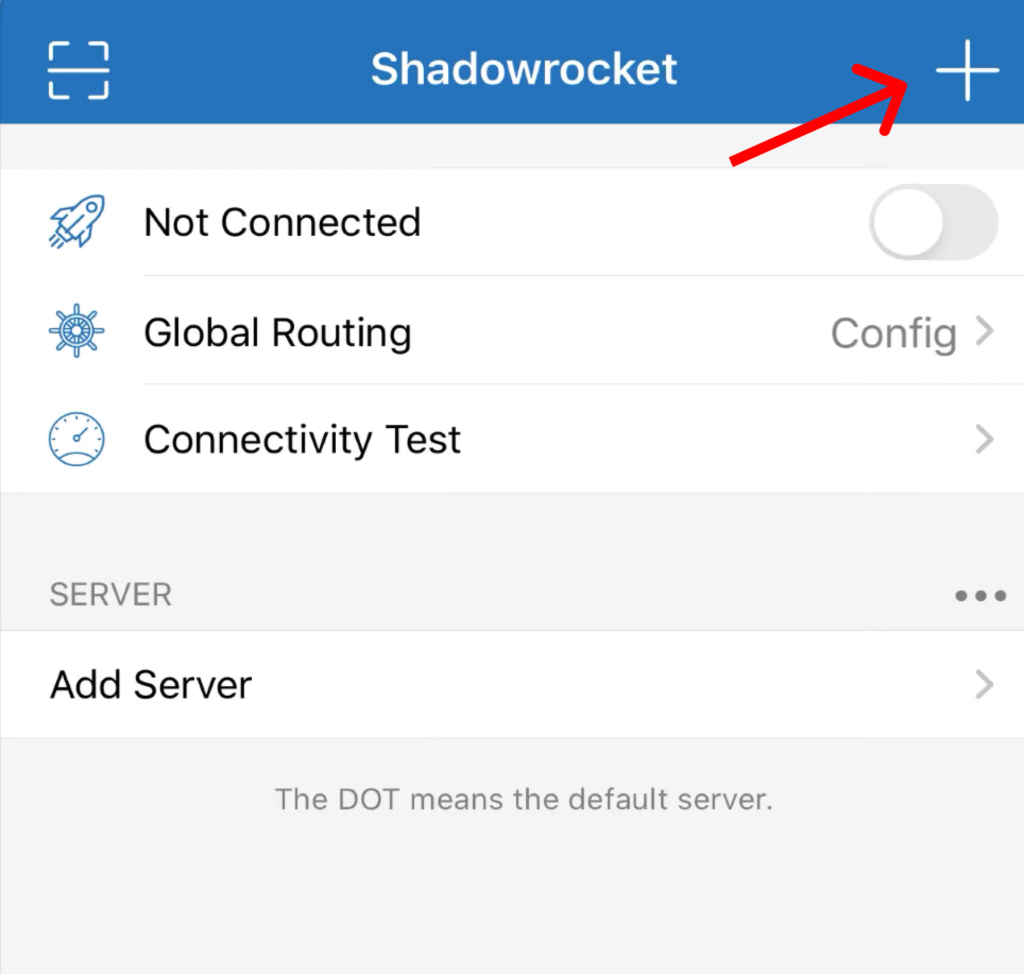
- Нажмите значок + в правом верхнем углу главного экрана.
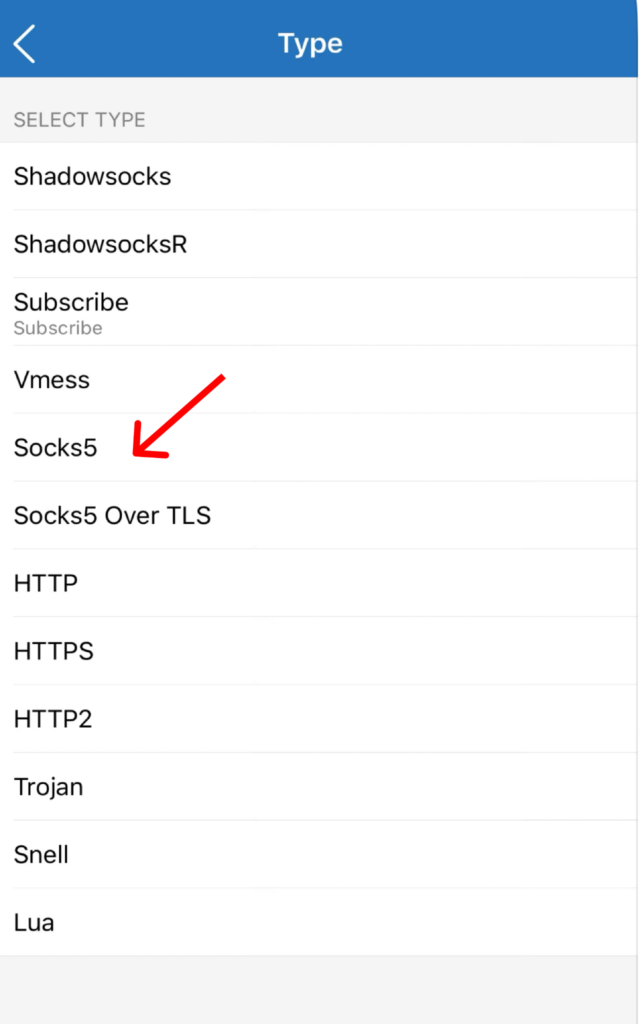
- Нажмите Тип в верхней части экрана Add Server.
- Выберите Socks5.
- Вернитесь на экран Add Server и введите:
- Адрес (хост): gate.nodemaven.com
- Порт: порт SOCKS5, сгенерированный в панели управления NodeMaven
- Пользователь: ваше полное имя пользователя прокси NodeMaven
- Password: ваш пароль прокси NodeMaven
- Примечания: необязательное имя, например «NodeMaven Germany ISP»
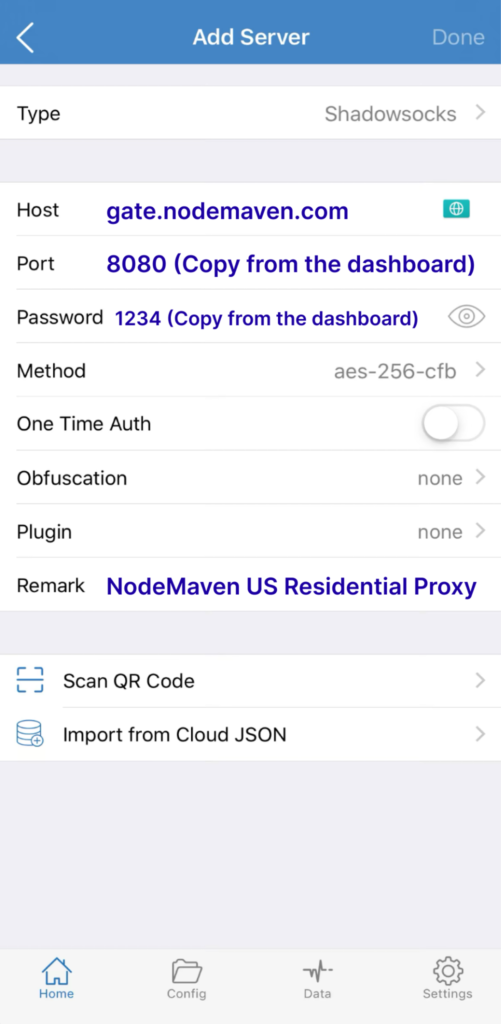
- Нажмите Done в правом верхнем углу.
Новый сервер появится в разделе Добавить сервер на главном экране Shadowrocket.
Подключите резидентные или мобильные прокси NodeMaven к Shadowrocket с поддержкой SOCKS5, точным геотаргетингом и стабильными сессиями. Начните с 750 MB трафика за $3.50.
Шаг 4. Выберите сервер и подключитесь
Нажмите на новый сервер NodeMaven, чтобы рядом с ним появился индикатор выбора.
Перед подключением откройте Глобальная маршрутизация и выбрать Прокси. Это направляет весь поддерживаемый трафик через выбранный прокси и упрощает первый тест.
Вернитесь на главный экран и переведите переключатель Нет подключения в положение «включено».
При первом подключении iOS предложит добавить Shadowrocket в конфигурации VPN устройства. Нажмите Разрешить, затем подтвердите с помощью Face ID, Touch ID или пароля устройства.
При успешном подключении:
- Переключатель меняется на Подключено
- В строке состояния iOS появляется значок VPN
- Shadowrocket может отобразить Успех сообщение
Шаг 5: Протестируйте и проверьте прокси
Нажмите Проверка соединения на главном экране. Shadowrocket должен отобразить задержку сервера в миллисекундах.
Затем откройте IP-поиск инструмент и проверьте:
- Отображаемый IP-адрес
- Страна и город
- Интернет-провайдер
- Тип соединения
Результат должен совпадать с местоположением, выбранным в NodeMaven. Если исходный IP по-прежнему виден, проверьте, что:
- Выбран сервер NodeMaven
- Для Global Routing установлено значение Прокси
- Переключатель соединения показывает Подключено
- Сервер, порт, имя пользователя и пароль указаны верно
В качестве финальной проверки запустите тест на утечку DNS. После подтверждения результатов по IP и DNS вы можете изменить Global Routing на Конфигурация если хотите, чтобы Shadowrocket применял пользовательские правила маршрутизации вместо проксирования всего трафика.
Лучшие настройки Shadowrocket и прокси для разных задач
Shadowrocket управляет тем, как маршрутизируется трафик устройства. NodeMaven управляет тем, какой IP назначается, где он расположен и как долго остаётся активным.
Выберите режим Global Routing в Shadowrocket
Зона Глобальная маршрутизация меню появляется на главном экране Shadowrocket и включает четыре варианта.
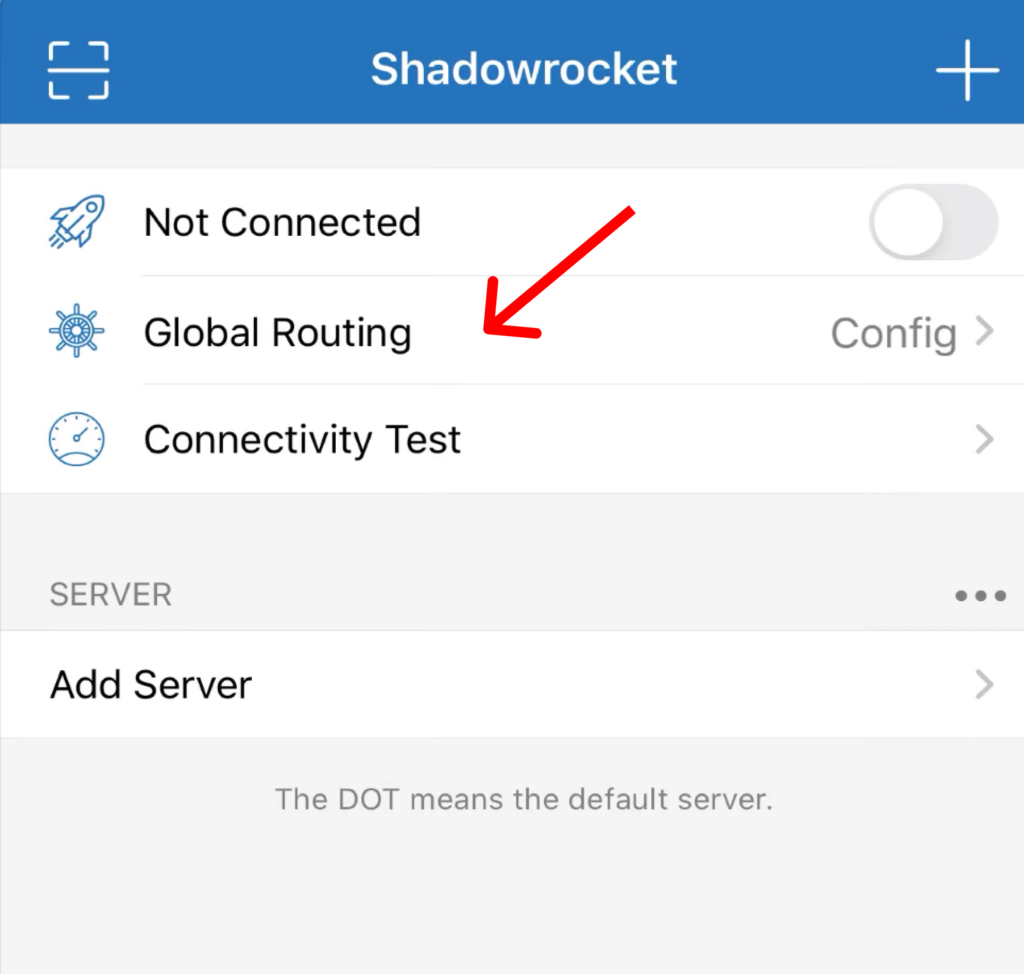
Прокси
Режим Proxy направляет весь поддерживаемый трафик устройства через выбранный прокси-сервер.
Используйте его, когда:
- Тестируете новый прокси
- Проверяете, что видимый IP меняется
- Маршрутизация трафика устройства через одну локацию
- Проверка того, не вызывает ли правило Config проблему с подключением
Proxy — лучший режим для первоначального теста настройки.
Конфигурация
Режим Config следует правилам в активном файле конфигурации. Один сайт может использовать прокси, тогда как другой подключается напрямую.
Правила могут использовать:
- Доменные имена и суффиксы
- Ключевые слова
- Диапазоны IP
- Информацию GeoIP
Выбирайте Config, когда прокси должны использовать только определённые сайты или подключения.
Напрямую
Режим Direct обходит прокси и использует обычное подключение устройства. Сайты будут видеть исходный IP.
Используйте его для сравнительных тестов или когда прокси нужно временно отключить.
Сцена
Режим Scene применяет разное поведение маршрутизации при заданных условиях, например при переключении между сетями Wi-Fi и сотовой связи.
Он полезен для продвинутых настроек, где маршрутизация должна меняться в зависимости от текущей сети. Большинству новичков можно начать с Proxy или Config.
Выберите тип сессии в NodeMaven
Поведение сессии настраивается в Личный кабинет NodeMaven перед генерацией учётных данных прокси.
Использовать привязанная сессия для входов в аккаунты, покупок, работы с учётными записями или сайтов, которые сохраняют данные о местоположении и сессии. Резидентные прокси NodeMaven могут удерживать один и тот же IP до 24 часов.
Использование Вращение для независимых запросов, которые не зависят от предыдущего соединения. Частая ротация обычно не нужна для обычного просмотра через Shadowrocket и может прерывать авторизованные сессии.
Выберите HTTP или SOCKS5
Протокол выбирается в NodeMaven и должен совпадать с Тип выбранным при добавлении сервера в Shadowrocket.
HTTP хорошо подходит для стандартного браузерного трафика.
SOCKS5 поддерживает более широкий диапазон трафика и обычно является более гибким выбором для Shadowrocket. Если приложению нужен UDP, убедитесь, что выбранный прокси-продукт его поддерживает. ISP-прокси NodeMaven поддерживают как TCP, так и UDP.
Shadowrocket не работает: типичные проблемы и способы их решения
Зелёный Подключено переключатель подтверждает, что Shadowrocket запустил свой сетевой туннель iOS. Это не подтверждает, что выбранный прокси работает или что каждое соединение следует по нужному маршруту.
Shadowrocket подключается, но IP не меняется
Убедитесь, что рядом с нужным сервером стоит индикатор выбора. Затем откройте Глобальная маршрутизация, выбрать Прокси, и снова проверьте IP.
Если IP меняется в режиме Proxy, но не в режиме Config, значит прокси работает. Скорее всего, правило в активном конфигурационном файле направляет соединение напрямую.
Shadowrocket показывает ошибку аутентификации
Откройте сохранённый сервер и проверьте:
- Type: Socks5
Адрес:
gate.nodemaven.com- Порт: порт, указанный в NodeMaven
- Пользователь: полное имя пользователя прокси
- Password: пароль прокси
Тип, выбранный в Shadowrocket, должен соответствовать протоколу, сгенерированному в NodeMaven. Проверьте скопированные учётные данные на отсутствие символов или случайные пробелы.
Тест соединения проходит, но у приложений нет интернета
Shadowrocket’s Проверка соединения проверяет, отвечает ли выбранный сервер, и показывает его задержку. Он не проверяет каждое правило маршрутизации, DNS-запрос или подключение приложения.
Один из пользователей в этом обсуждении в сообществе Shadowrocket сообщил, что проверка сервера прошла успешно, хотя приложения оставались без доступа к сети.
Попробуйте следующую последовательность действий:
- Открыть Глобальная маршрутизация и выбрать Прокси.
- Снова проверьте проблемное приложение.
- Если оно работает, проблема, скорее всего, в активных правилах Config.
- Откройте Конфигурация и восстановите или проверьте конфигурацию по умолчанию.
- Перезапустите Shadowrocket и переподключитесь.
Возвращайте пользовательские правила по одному, чтобы найти правило, вызывающее проблему.
Shadowrocket работает по Wi-Fi, но не работает через мобильный интернет
Откройте настройки iPhone или iPad и убедитесь, что Shadowrocket разрешено использовать мобильные данные. официальном описании в App Store указывает, что Shadowrocket поддерживает сотовые сети.
Если разрешение включено, переподключитесь и запустите Connectivity Test при использовании мобильного интернета. Попробуйте другой сервер NodeMaven, если выбранный адрес отвечает по Wi-Fi, но не отвечает через сеть оператора.
Старые сетевые профили также могут мешать соединению. Пользователи описывают проблемы с профилями и разрешениями на конкретных устройствах в этом обсуждении Shadowrocket для iPhone.
Соединение работает медленно
Беги Проверка соединения и проверьте время отклика, показанное в миллисекундах. Высокая задержка может означать, что расположение прокси слишком далеко или выбранный адрес отвечает медленно.
Попробуйте:
- Страну или город ближе к вашему реальному местоположению
- Нодемавен Качество + Скорость фильтр
- Другой IP в том же целевом местоположении
- ISP-прокси для быстрого статического соединения
Вы можете ненадолго сравнить результат с режимом Direct, но помните, что Direct раскрывает обычный IP устройства.
IP меняется, но DNS по-прежнему использует исходную сеть
После подключения запустите тест на утечку DNS. Если он по-прежнему показывает исходную сеть, проверьте параметры DNS в Shadowrocket и убедитесь, что в активной конфигурации указан локальный резолвер.
Другие профили VPN, приложения с приватным DNS и инструменты безопасности могут управлять DNS отдельно. Временно отключите конфликтующие сетевые профили, переподключите Shadowrocket и повторите тест.
Зачем использовать прокси NodeMaven с Shadowrocket?
Shadowrocket предоставляет пользователям детальные настройки маршрутизации, однако качество соединения зависит от прокси, стоящего за ним. Публичный бесплатный прокси с плохой репутацией может быть медленным, перегруженным или уже заблокированным популярными сайтами.
NodeMaven фильтрует свой пул прокси перед назначением адресов. Это дает пользователям Shadowrocket более чистые IP и больше контроля над локацией и длительностью сессии.
Функции, подходящие для Shadowrocket, включают:
- Резидентные прокси в более чем 190 странах
- Город, ISP и Таргетинг по ZIP-коду
- Закрепленные резидентные сессии действует до 24 часов
- Поддержка HTTP и SOCKS5
- фильтры качества и скорости
- Резидентные и мобильные доступ в рамках одного тарифного плана трафика
- Статические ISP-прокси с безлимитный трафик и поддержкой UDP
- Гарантия качества для резидентных, мобильных и ISP-продуктов
Для обычного просмотра веб-страниц начните с закреплённого резидентного прокси в нужной локации. Выберите ISP прокси когда статический адрес, более быстрое время отклика и безлимитный трафик важнее широкого покрытия локаций.
Пробный период на резидентные и мобильные прокси NodeMaven расходы $3.50 и включает 750 MB трафика. Этого достаточно, чтобы настроить Shadowrocket, проверить соединение и протестировать выбранный IP перед покупкой более крупного плана.
Подключите резидентные или мобильные прокси NodeMaven к Shadowrocket с поддержкой SOCKS5, точным геотаргетингом и стабильными сессиями. Начните с 750 MB трафика за $3.50.