


Первый
кешбэк
на прокси-рынке
Превращайте использованный трафик в прокси-кредиты
для дальнейшего
использования


Расширенные настройки
без доплаты
Каждый тариф включает инструменты, которые большинство провайдеров дают только за доплату
- Фильтры качества и скорости
- Встроенный прокси-чекер
- Таргетинг на уровне ZIP
Скрапинг веба,
мониторинг ИИ
Больше инструментов в личном кабинете:
- Scraping Browser. Автоматизируйте работу с сайтами с помощью промптов или кода Подробнее →
- LLM Visibility API. Сравнивайте ответы ИИ по моделям и странам


Установите расширение SwitchyOmega
Скачайте и установите расширение для вашего браузера. В новых руководствах по Chrome Proxy SwitchyOmega часто называют ZeroOmega / SwitchyOmega 3.
Скачать из Chrome Web Store: Интернет-магазин Chrome
Скачать из Firefox Add-ons: Дополнения Firefox
Эта настройка прокси SwitchyOmega работает для браузерных процессов, когда вам нужно направить трафик через выбранный прокси NodeMaven. После установки закрепите расширение на панели инструментов браузера, чтобы быстро переключать профили.

Откройте настройки SwitchyOmega
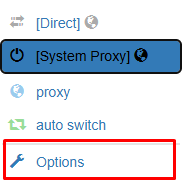
Откройте расширение SwitchyOmega в браузере и выберите Options. Откроется страница настроек прокси switchyomega, где вы можете создавать и управлять профилями прокси.
Создать новый профиль прокси
Нажмите кнопку New profile. Дайте профилю понятное имя, например NodeMaven Proxy. Выберите Proxy Profile и нажмите Create.

Добавьте данные вашего прокси NodeMaven
Выберите протокол прокси и введите данные прокси-сервера NodeMaven. Для настройки HTTP-прокси используйте протокол HTTP, сервер gate.nodemaven.com и порт из Личный кабинет. Если вы сгенерировали SOCKS5 прокси в NodeMaven, используйте протокол SOCKS5, сервер gate.nodemaven.com и порт 1080. Поскольку порты могут отличаться, для ISP-, резидентных или мобильных IP найдите точные учётные данные прокси в панель управления NodeMaven.

Добавьте имя пользователя и пароль
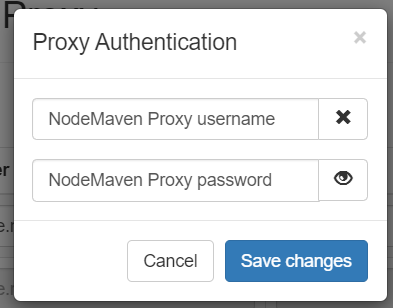
Нажмите на значок замка справа от настроек прокси. Введите ваше имя пользователя и пароль NodeMaven, затем нажмите Save changes.
Примените настройки прокси
Нажмите Apply Changes в SwitchyOmega. Это сохранит ваш профиль прокси switchyomega и сделает его доступным из меню расширения

Включите ваш профиль прокси SwitchyOmega
Нажмите на значок SwitchyOmega в браузере и выберите созданный вами профиль, например NodeMaven Proxy. После выбора трафик вашего браузера будет проходить через прокси NodeMaven.

Проверьте свой IP-адрес
Ваш прокси NodeMaven теперь настроен в SwitchyOmega. Откройте проверку IP чтобы убедиться, что ваш браузер использует выбранную локацию прокси и IP-адрес.


Резидентские прокси
Настоящие резидентские IP с ротацией и sticky sessions. Поддержка SOCKS5 и гибкая тарификация по трафику для масштабируемой работы через Happ proxy

Мобильные прокси
Реальные мобильные IP с ротацией и sticky sessions для mobile first задач в Happ VPN и Happ Proxy Utility





















