


The first proxy
cashback
on the market
Get rewarded every month by
turning used traffic into reusable
proxy credits


Advanced settings
at no extra cost
Every plan includes tools most providers keep behind a paywall
- Quality & speed filters
- Built-in proxy checker
- ZIP-level targeting
Scrape the web,
track the AI
More tools in your dashboard:
- Scraping Browser. Automate sites with prompts or code Learn more →
- LLM Visibility API. Compare AI answers across models and countries


Install the SwitchyOmega extension
Download and install the extension for your browser. In newer Chrome guides, Proxy SwitchyOmega is often referred to as ZeroOmega / SwitchyOmega 3.
Chrome Web Store download: Chrome Web Store
Firefox Add-ons download: Firefox Add-ons
This proxy SwitchyOmega setup works for browser workflows where you need to route traffic through a selected NodeMaven proxy. After installation, pin the extension to your browser toolbar so you can switch profiles quickly.

Open SwitchyOmega options
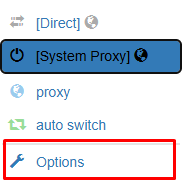
Open the SwitchyOmega extension in your browser and choose Options. This opens the proxy switchyomega settings page where you can create and manage proxy profiles.
Create a new proxy profile
Click the New profile button. Give your profile a clear name, for example NodeMaven Proxy. Select Proxy Profile and click Create.

Add your NodeMaven proxy details
Choose the proxy protocol and enter your NodeMaven proxy server details. For HTTP proxy setup, use protocol HTTP, server gate.nodemaven.com, and port from the dashboard. If you generated a SOCKS5 proxy in NodeMaven, use protocol SOCKS5, server gate.nodemaven.com, and port 1080. As ports can vary, for ISP, residential or mobile IPs, find your exact proxy credentials in the NodeMaven dashboard.

Add username and password
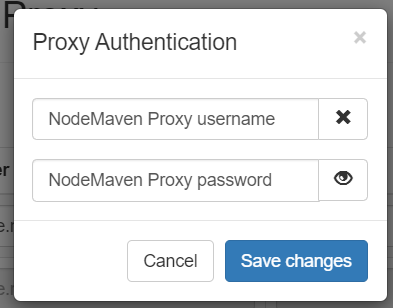
Click the lock icon on the right side of the proxy settings. Enter your NodeMaven username and password, then click Save changes.
Apply the proxy settings
Click Apply Changes in SwitchyOmega. This saves your proxy switchyomega profile and makes it available from the extension menu

Enable your SwitchyOmega proxy profile
Click the SwitchyOmega icon in your browser and select the profile you created, for example NodeMaven Proxy. Once selected, your browser traffic will run through the NodeMaven proxy.

Check your IP address
Your NodeMaven proxy is now set up in SwitchyOmega. Open an IP checker to confirm that your browser is using the selected proxy location and IP address.


Residential Proxies
Real residential IPs with rotating and sticky sessions. SOCKS5 support with flexible traffic-based pricing for scalable Happ proxy workflows

Mobile Proxies
Real mobile IPs with rotating and sticky sessions for mobile-first workflows in Happ VPN and Happ App





















