
ISP Proxies Update: Auto-Renewals, Fraud Score Checks, and Dashboard Improvements



When users choose ISP proxies, they usually care about two things first: IP quality and keeping the same IP active for as long as the workflow needs it.
That is why the latest NodeMaven ISP updates focus on the full ISP proxy flow: checking IP quality before delivery, keeping renewals easier to manage, and making the dashboard more convenient before and after the checkout.
Here is what changed:
- advanced fraud score checks before ISP IP delivery
- one free full IP pack swap from the dashboard
- auto-renewals and clearer subscription status labels
- improved order details with proxy quality checks, IP info, notes, and search

Run long-term browser profiles, automation, scraping, and testing with static ISP proxies from NodeMaven. Use ISP25 to get 25% off your first order with 2+ IPs
Advanced fraud score checks before ISP IP delivery
ISP proxies are often used for workflows where IP reputation matters from the first login or request. That includes multi-account work, automation, research, scraping, testing, and other setups where a weak IP history can create friction early.
NodeMaven now checks ISP IPs against Scamalytics data before delivery. If an IP pack does not pass our internal fraud score check, NodeMaven automatically replaces the full pack before sending the order to the user.
What this improves:
- fewer high-risk ISP IP packs reaching users
- a cleaner starting point for long-term workflows
- less manual checking after purchase
Users also get one free full IP pack replacement from the dashboard per order. If the IPs in the order do not fit their setup, they can replace the whole pack without contacting support.
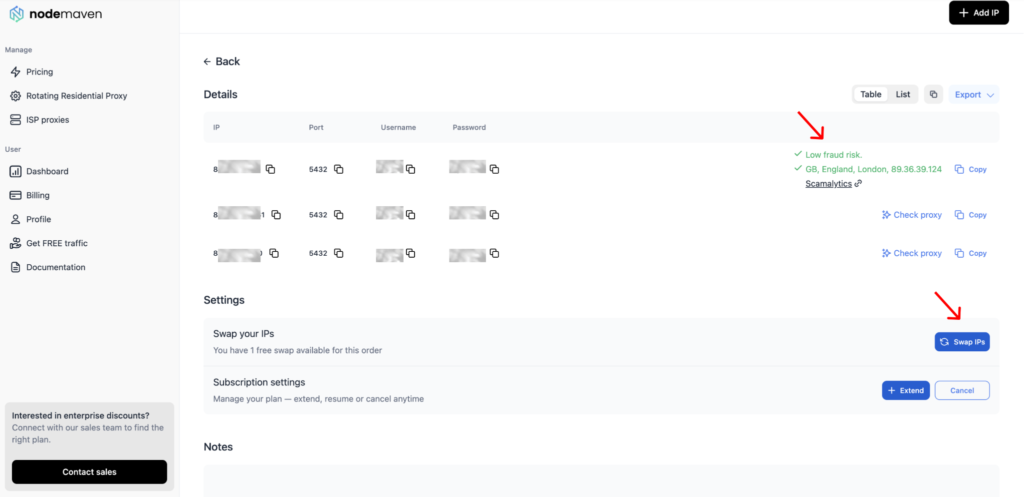
Users can also check and review proxy quality and IP details directly from the order details page. This makes it easier to check the delivered IPs, confirm their setup, and decide whether an IP swap is needed.
ISP subscriptions and auto-renewals
Every new ISP purchase now creates a subscription. This makes ISP orders easier to track, extend, cancel, or resume from the dashboard.
In the My proxies list, users can now see which ISP orders will renew automatically and which ones need manual payment. If there is no warning icon near the expiry date, the order is set to auto-charge for the next billing period.
If the warning icon appears, the order needs manual payment before the expiry date. Users can click Extend to pay for the next period in advance.
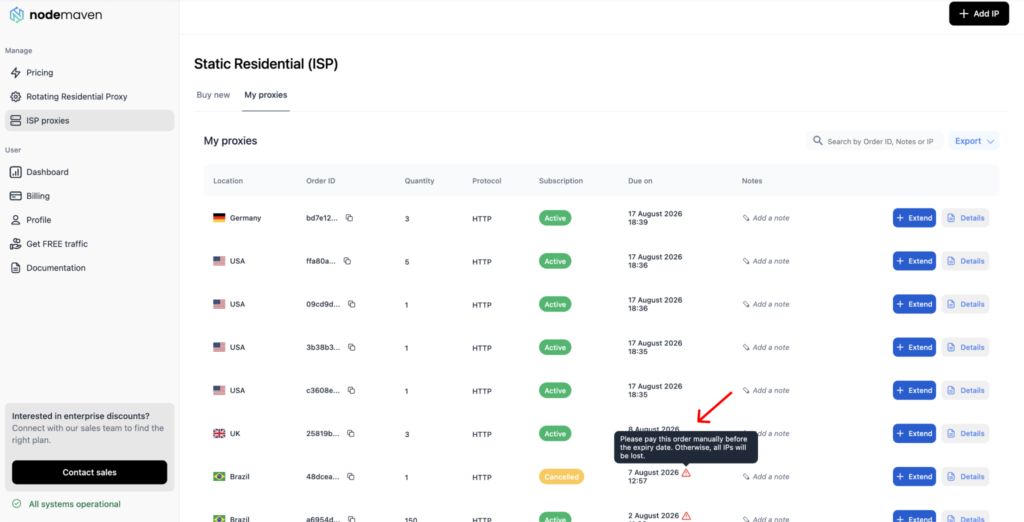
Auto-renewals use the latest payment method saved in the account, not only the card used for the original ISP order. If a user buys another product later with a different card, that card becomes the payment method for active subscriptions, including ISP proxies. Users can check or change it in the Billing section in the dashboard.
The renewal period follows the selected ISP plan:
- 30 days
- 90 days
This is useful for workflows where keeping the same IPs matters. If an ISP IP is connected to a browser profile, account, automation tool, scraper, or monitoring setup, losing the order because of a missed renewal can interrupt the workflow.
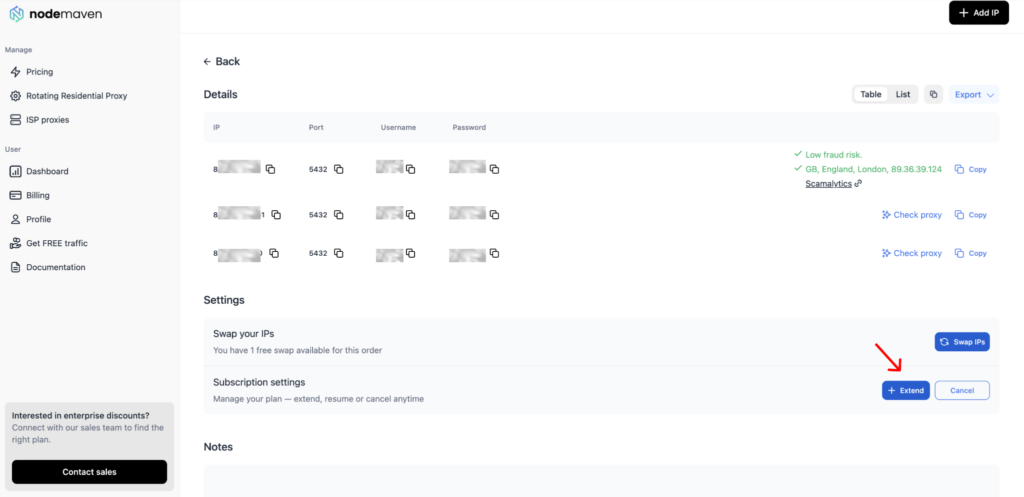
Users can manage the subscription from the order details page:
- Extend pays for the next period in advance
- Cancel stops future auto-charges
- Resume appears after cancellation and lets users reactivate the subscription before the expiry date
For easier order management, users can now add notes to each ISP order and search orders by order ID, note, or IP address. This is especially useful for teams managing multiple ISP packs across different accounts, browser profiles, or automation workflows.
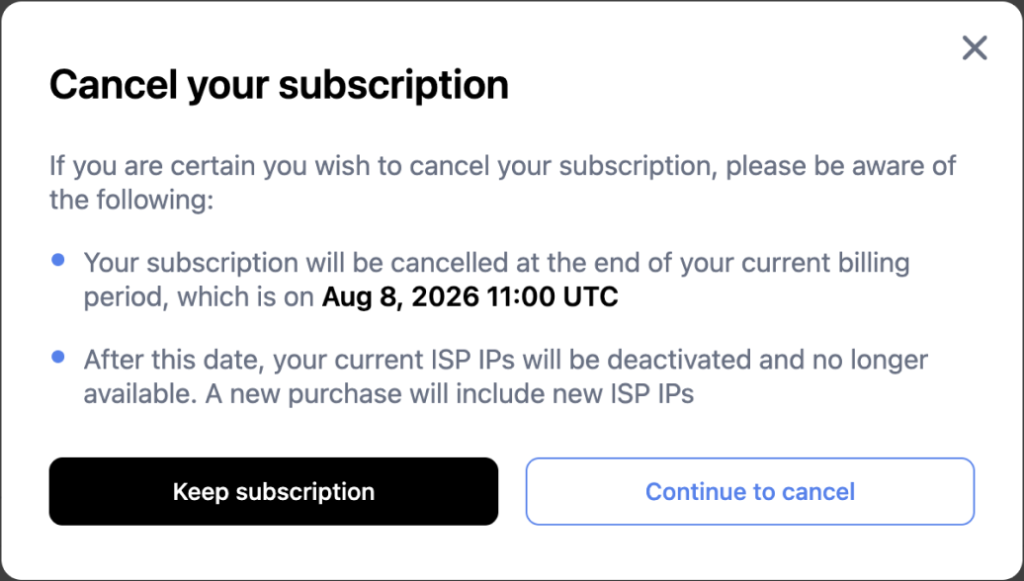
When a user cancels a subscription, the IPs stay active until the end of the current billing period. The cancellation window also shows the exact date when the subscription will end.
After that date, the current ISP IPs are deactivated. A new purchase will include new ISP IPs, so the user will not be able to restore the same order with the same IPs.
If the user changes their mind, they can click Resume or Extend before the expiry date. This keeps the same order and the same IPs active.
We also added expiration notifications. If a subscription expires, users receive a notice and have 24 hours to extend the order.
What this means for users:
- easier ISP order tracking
- automatic renewal for eligible card payments
- manual payment warnings for orders that need attention
- fewer missed renewals
- lower risk of losing active ISP IPs
- control over extending, cancelling, and resuming subscriptions
- more predictable account and automation workflows
A better flow for keeping the same ISP IPs
These updates make ISP proxies easier to buy, keep, and manage.
New orders now go through fraud score checks before delivery. Active orders are easier to renew because new ISP purchases create subscriptions, and eligible card payments can be autocharged. The updated dashboard also shows users more clearly what they are buying, when the order expires, and whether action is needed.
For users who rely on the same ISP IPs for account work, automation, scraping, or testing, that means fewer avoidable interruptions and less manual order management.
Run long-term browser profiles, automation, scraping, and testing with static ISP proxies from NodeMaven. Use ISP25 to get 25% off your first order with 2+ IPs


