
Is There a Best Time to Scrape Google? 5,000 Searches Tested



Ask how to scrape without getting blocked and you will hear the same tip again and again. Run your jobs off-peak, ideally just after midnight in the site’s main time zone. Fewer real visitors should mean less load and looser limits.
We wanted to know if that holds for the best time to scrape Google. So we went through ten weeks of data from NodeMaven’s open proxy benchmark. That is about 5,000 Google searches, typed into a real Chrome window over residential proxies, at every hour of the day.
The results did not match the advice. On paper, night was the worst time to search. Once we removed a bias hidden in the raw numbers, the hour barely mattered at all. Two other things decided the outcome: the day of the run and whether the browser had been warmed up first.
Short answer
Yes, there is a best time of day to scrape Google, but it is worth about 3 percentage points. Cold browsers did best at 16-19 UTC. The day you scrape matters far more: on the same setup, success ranged from 0% to 49%. A browser that browsed six ordinary pages before searching was served 84% of the time, at any hour.
Key findings at a glance
| Factor | What we found |
| Hour, compared within the same day | Every 4-hour block stayed within 3 points of its day’s average |
| Hour, all days pooled | 15% at 00-03 UTC vs 33% at 16-19 UTC. Most of that gap comes from which days were tested at which hours. |
| Day of the run | From 0% for a whole week in August up to 49% |
| First 5 searches of a run | All failed: the rest of the run averaged 17%. At least one success: about 30%. |
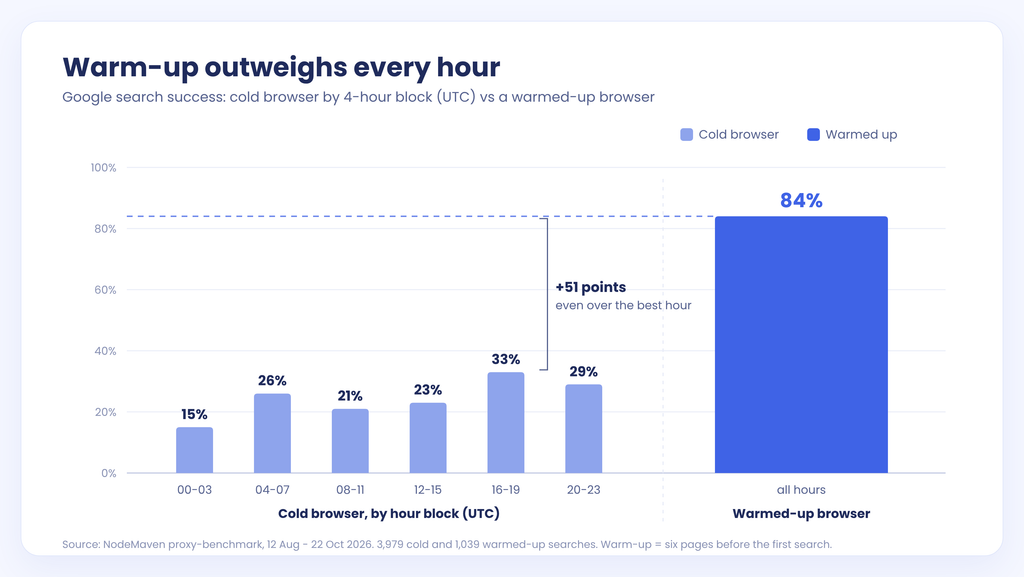
| Browser warm-up | 84% with warm-up vs 15-33% cold, at every hour |
Time of day is a weak lever. The state of Google on a given day is a strong one. You cannot schedule around it, but you can measure it. And warm-up beats any schedule we found.
Methodology: how we tested Google at every hour
Data and test period
All data comes from NodeMaven’s open-source proxy-benchmark. We used every Google run between 12 August and 22 October 2026: 104 runs and about 5,000 searches. Anyone can read the code and run the same tests.
Browser and proxy setup
Each search ran in a real Chrome window controlled by Patchright on a Windows server. Traffic went through NodeMaven residential proxies, with a new IP for every test. The browser opened google.com and typed the query into the search box, the way a person would. It did not load a ready-made search URL.
Cold and warmed-up browsers
We compared two kinds of identity:
- Cold: the first search on a fresh IP, with nothing browsed before it. This group had 3,979 searches.
- Warmed up: the browser visited six ordinary pages first, then searched. This group had 1,039 searches.
What counted as success
A search succeeded only if Google returned a real results page. A CAPTCHA, an “unusual traffic” page or a block counted as a failure, whatever the HTTP status said. Our earlier research on web scraping success explains why status codes alone mislead. Blocked pages often arrive with a 200 response.
How we compared hours fairly
Some days were good for scraping and some were bad. If we had simply averaged each hour across all days, a good day would have lifted whatever hours it happened to cover.
So we also compared each search with the average of its own day. That second view shows what the hour adds once the day is taken out. The section on pooled numbers below shows why this step changed the conclusion.
Is it better to scrape Google at night?
Most guides say yes. The usual advice is to scrape during off-peak hours, often just after midnight in the target’s main market. The reasoning comes from ordinary websites. A small shop or a regional portal has clear busy and quiet hours. At night its servers are idle, and a scraper is less likely to hit rate limits or slow things down for real users.
Google did not behave that way in our data. The night block, 00-03 UTC, had the lowest pooled success rate of the day: 15%. When we compared night searches with the rest of their own day, they came out at +0.4 points. That is average. Night was not better.
Google serves the whole world, so there is no global quiet hour. Its anti-bot systems also judge each identity, not the load on a server. A scraper does not blend in better at 2 a.m. if the browser itself looks like a bot.
The general advice on the best time to scrape websites may still help with small targets and rate limits. For Google, our data does not support it.
Google scraping success rate by time of day
Here are all six blocks for cold browsers. The middle column pools every day together. The right column shows how each block did compared with the average of its own day.
| Hours (UTC) | Success, all days pooled | Compared with the same day |
| 00-03 | 15% | +0.4 pp |
| 04-07 | 26% | -1.9 pp |
| 08-11 | 21% | +1.0 pp |
| 12-15 | 23% | -2.6 pp |
| 16-19 | 33% | +2.6 pp |
| 20-23 | 29% | -0.6 pp |
*pp = percentage points.
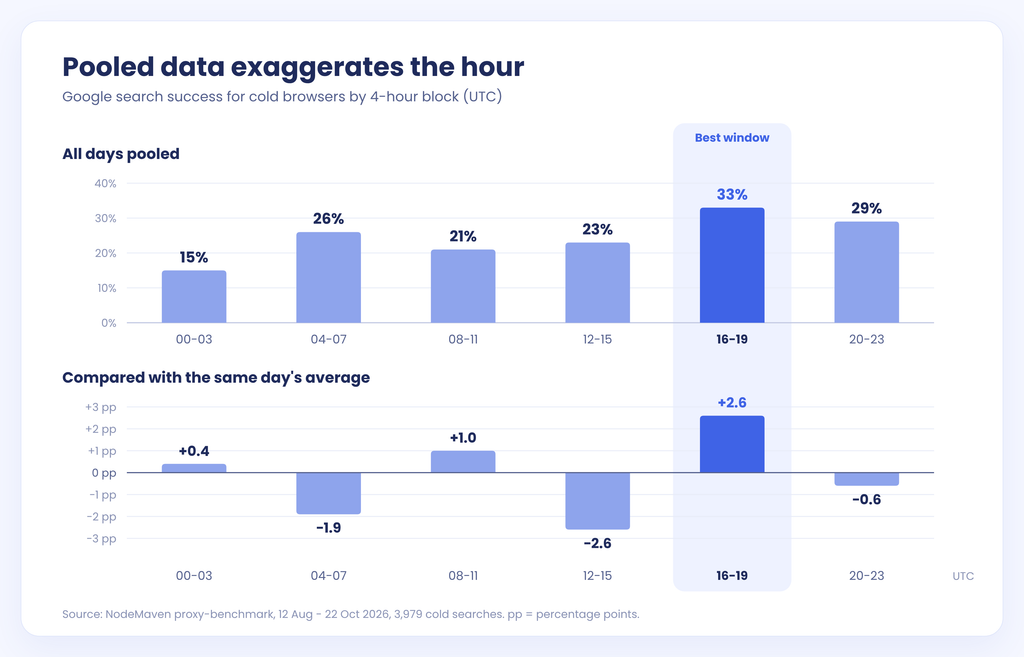
The best time of day for web scraping on Google, by this measure, was 16-19 UTC. It beat its day’s average by 2.6 points. The weakest block, 12-15 UTC, sat 2.6 points below. Every other block fell in between.
A spread of about 5 points from best to worst is small, and it may not repeat in another period. We would not build a schedule around it. If you can choose freely, 16-19 UTC is a reasonable default. If your job runs at 13:00 UTC, the hour is not what is holding it back.
Why pooled numbers make the evening look twice as good
The pooled column tells a much louder story. The evening reaches 33% and the night drops to 15%. On those numbers you would move every job to the evening and expect twice the results. The same-day column shows that most of this gap is not about the hour.
How that happens. Imagine two days. On Monday, Google serves 40% of cold searches. On Thursday, it serves 10%. Now suppose most of your evening searches ran on Monday and most of your night searches ran on Thursday. Pooled, the evening looks four times better. Yet within each day, the hour made no difference.
Our runs were not spread evenly across the clock. They started at different times and covered different hours on different days. Some blocks collected more searches from good days, and their pooled rates rose. Comparing each search with its own day removes that effect.
The same trap applies to any test. A proxy, browser or schedule can look better simply because it ran on a better day. Our web scraping success study saw this on Amazon, where all premium pools rose and fell together between test dates.
The day matters more than the hour
Across ten weeks, the setup stayed the same. The browser, server, proxy type and query method did not change. Yet daily success for cold browsers ranged from 0% to 49%. For a whole week in August, Google served none of the cold searches. On the best days, it served about half.
Compare that range with the hour effect. The best hour added about 3 points. The day moved results by almost 50.
A single bad run does not prove your setup is broken. A single good run does not prove it works. If you judge a scraper by one day, you are mostly measuring the day.
Test the day instead of picking an hour
If the day matters most, the useful question is how fast you can tell what kind of day it is. The data gave a simple answer: look at the first five cold searches of a run.
- When all five failed, the rest of the run averaged 17%
- When at least one of the five succeeded, the rest averaged about 30%
Five searches cost almost nothing and nearly split the outlook in two. A probe like this tells you more about the next few hours than any clock.
Here is how to use it when deciding when to run a web scraper:
- Start every run with five cold searches.
- If at least one returns a results page, continue the run as planned.
- If all five fail, switch to warmed-up identities, pause and probe again later, or accept a lower yield for that run.
- Log the probe result with every run. Over a few weeks, you will see your own good and bad days.
Browser warm-up beats any scraping schedule
The largest gain in the data had nothing to do with time. Browsers that visited six ordinary pages before searching were served 84% of the time. Cold browsers reached 15-33% depending on the block. That is a gap of 50-70 points, and it held at every hour of the day.
A brand-new identity whose first action is a search looks unusual. One that has already loaded other sites carries cookies and a short history, and looks more like a person. If you want to scrape Google without CAPTCHA pages on most queries, fix warm-up first, not the schedule.
What warm-up costs
Warm-up is not free. Each new identity has to load several pages before it does any useful work, which takes time and proxy traffic. In our open-source Google Browser Scraper, the first query on a new exit takes a few minutes because of the warm-up.
The way to pay for it once is to keep the identity. Use sticky residential sessions so the warmed browser keeps the same IP, then run many searches through it. Google browser scraper keeps an accepted exit for up to 50 queries by default and records CAPTCHA and block pages as failures, not as empty results.
How this compares with our earlier test
We measured warm-up before, in our comparison of Google SERP API alternatives. Across four runs and 703 searches, warm-up raised success from 20% to 87%. The new figure is 84% across 1,039 warmed searches over a longer period.
How to schedule your Google scraper
Putting the findings together, this is the order of priorities we would use:
- Warm up every new identity with a few ordinary pages before the first search.
- Keep warmed identities with sticky sessions instead of rotating to a fresh IP for every query. Rotating proxies are still useful for replacing identities that Google stops serving.
- Probe each run with five cold searches and adjust if all five fail.
- Prefer 16-19 UTC if you are free to choose, but do not delay a job for it.
- Check the returned page, not the status code. Count CAPTCHA and “unusual traffic” pages as failures.
- Compare setups within the same day when testing a new proxy, browser or schedule.
How to run this test yourself
Your setup and period may give different numbers. proxy-benchmark is open source and works with NodeMaven and other providers.
To repeat the timing test, run cold and warmed identities against Google across the full day, for at least a few weeks. For each search, record the hour, the date, the identity type and the page verdict. Then compare each hour with the average of its own day, not with the pooled total. If your best hour still beats its day by only a few points, you have the same answer we did.
Research limitations
- All runs used one Windows server and one browser setup: Patchright driving a visible Chrome window. Other browsers and hosts may give different rates.
- A difference of about 3 points is small. It may shift or disappear in another period.
- Cold success here (15-33%) is higher than the 6-12% on Google Search in our earlier study. That study mostly used headless browsers. This one used a visible Chrome window.


