
Google SERP API: Paid Options vs a Free Google SERP Scraper



A Google SERP API is the simplest way to turn a search query into structured results. You send a request and receive titles, links, snippets, ads, or other SERP elements as JSON. The provider runs the browsers, proxies, parsers, and retries behind the endpoint.
This article compares three of the best-known paid options, SerpApi, Serper, and DataForSEO, with Google Browser Scraper, NodeMaven’s free, MIT-licensed alternative. The comparison covers result fields, pricing, maintenance, proxy costs, and the type of project each option fits.
Google Browser Scraper runs locally, uses a real browser through a sticky proxy, and exposes results through Python, the command line, a local HTTP API, or MCP. The software is free, but proxy traffic, compute, and maintenance still cost money. It has built-in support for NodeMaven residential proxies and can also connect to another provider that supports sticky sessions.
Quick answer
- Choose Google Browser Scraper for a free, open-source way to collect structured Google results through Python, the command line, a local API, or MCP.
- It automatically warms each new proxy identity, classifies CAPTCHA and block pages, and keeps accepted exits for later searches.
- In four NodeMaven test runs covering 703 searches, warm-up raised delivered result pages from 20% to 87%. The underlying run data is available on GitHub.
- Choose a paid Google SERP API when you prefer managed infrastructure or need additional Google result types.
Which Google SERP API option fits your project?
Our open-source Google Browser Scraper provides free, open-source access to structured Google results with full control over the browser and proxy. Paid APIs require less setup and extract more result types.
| Option | Delivery model | Published entry price | Result coverage | Best fit |
|---|---|---|---|---|
| SerpApi | Hosted API | Free for 250 searches per month; paid plans from $25 for 1,000 searches | Broad Google verticals and special result types | Teams that want wide coverage and a managed endpoint |
| Serper | Hosted API | $50 for 50,000 credits; 2,500 free trial queries | Search plus several Google verticals | Developers who prefer prepaid credits and real-time responses |
| DataForSEO | Hosted API | From $0.0006 per SERP page in Standard Queue | Broad SEO and SERP data with live and queued modes | Rank tracking, batch jobs, and SEO platforms |
| Google Browser Scraper | Self-hosted, open source | No software license fee | Organic results, ads, related questions, related searches, and pagination | Developers who want their own browser, proxy, API, and MCP setup |
These aren’t identical products. SerpApi, Serper, and DataForSEO sell access to managed infrastructure. Google Browser Scraper is the more budget-friendly option, providing the collector at no software cost while you supply the proxy and machine.

Want to test the open-source scraper with clean residential IPs and stable sessions? Try NodeMaven for $3.50 and get 750 MB of residential and mobile proxy traffic. Connect through the built-in --nodemaven option and start testing your own Google queries.
What is a Google SERP API?
A Google SERP API turns a search query into structured fields such as title, link, snippet, and position. Your application sends a request and receives data it can process directly.
Third-party services provide this through hosted infrastructure and charge by subscription, credits, or usage. Google Browser Scraper offers a more budget-friendly, open-source route: it returns structured results through a local API while letting you choose the browser, proxy, and collection settings. It currently extracts organic results, ads, related questions, related searches, and pagination without charging a separate software fee per query.
Google also has a Custom Search JSON API, but the service is closed to new customers, while existing customers have until January 1, 2027 to move to another option.
Paid Google SERP API compared
The three services below were chosen to compare distinct buying models and published pricing. SerpApi sells monthly allowances, Serper sells prepaid credits, and DataForSEO charges per SERP page.
SerpApi for broad result coverage
SerpApi has a free plan with 250 searches per month. Its Starter plan costs $25 for 1,000 searches, Developer costs $75 for 5,000, and Production costs $150 for 15,000.
Its catalogue goes beyond standard Google Search. SerpApi lists APIs for Google Images, Maps, News, Shopping, Trends, Scholar, Jobs, Flights, and many other result types. Choose SerpApi when you need several Google result types and want to avoid building separate parsers for each one.
SerpApi does not count failed, errored, or cached requests toward the allowance. It does count a successfully processed search, even when Google returns no matching results.
Serper for prepaid Google search credits
Serper uses a top-up model instead of a monthly subscription. Its Starter package costs $50 for 50,000 credits, or $1 per 1,000 queries. Credits remain valid for six months.
The service has endpoints for Search, Images, News, Maps, Places, Videos, Shopping, Scholar, Patents, and Autocomplete. It also supports country and language settings. Serper says most responses arrive in one to two seconds, although retries can take longer.
This model suits applications with predictable query volume but uneven monthly use. You don’t have to consume a fixed allowance before the next billing cycle, but unused credits eventually expire.
DataForSEO for live and queued collection
DataForSEO separates price from delivery speed. Standard Queue costs $0.0006 per SERP page of ten results, with a listed average turnaround of five minutes. Priority Queue costs $0.0012 per page and averages up to one minute. Live Mode costs $0.002 per page and returns results in up to six seconds on average.
That split works well for rank tracking and large batch jobs. Queries that don’t need an immediate answer can use the cheaper queue, while user-facing requests can use Live Mode.
Check the request shape before estimating cost. DataForSEO’s pricing explanation notes that greater depth and some search operators increase the task price.
Can a free Google SERP scraper replace a paid API?
Google Browser Scraper provides a free, open-source alternative to paid Google SERP APIs for collecting organic results, ads, related questions, related searches, and pagination. Its SerpApi-like JSON format makes the output easy to connect to existing applications.
The scraper runs Google Search in a real browser through your own sticky residential proxy. It automatically warms each new proxy identity, opens Google’s front page, and types the query into the search box. Before parsing, it checks whether Google returned valid results, a CAPTCHA, or a block page, so failed searches are recorded accurately instead of appearing as empty results.
What Google Browser Scraper returns
Each results page is written as a JSON record. The current schema includes:
organic_resultsadsrelated_questionsrelated_searchespaginationsearch_metadataexit, including the session, query count, and traffic used
A shortened record looks like this:
The familiar field names make it easier to connect the scraper to applications built around SerpApi-style output. The parser focuses on organic results, ads, related questions, related searches, pagination, and search metadata, covering the main fields used in rank tracking, search monitoring, and AI search workflows.
How the sticky-session workflow works
Google Browser Scraper treats a proxy identity as more than an address to discard after one request:
- It creates a sticky proxy session and a fresh browser profile.
- It visits several ordinary pages, followed by Google’s home page.
- It types the query into Google’s search box and submits it.
- It labels the page as results, CAPTCHA, block, or failure before parsing.
- It keeps an accepted exit for later searches and replaces a refused one.
If Google refuses several exits in a row, the run stops. That prevents the scraper from spending traffic on an unhealthy sequence. Our guide to rotating and sticky proxy sessions explains how those two modes differ outside this tool.
For this workflow, IP quality and session stability are more useful than constant rotation. NodeMaven residential proxies filter the pool before assignment and support precise location targeting and sticky sessions. The scraper’s built-in --nodemaven option creates the required session configuration without making you assemble the proxy username manually.
Want to test the open-source scraper with clean residential IPs and stable sessions? Try NodeMaven for $3.50 and get 750 MB of residential and mobile proxy traffic. Connect through the built-in --nodemaven option and start testing your own Google queries.
How does Google Browser Scraper handle common failures?
The repository targets four problems seen in self-hosted Google collection: fresh-session CAPTCHA pages, wasteful rotation, false empty results, and hidden browser traffic. NodeMaven tested the warm-up approach across 703 cold and warmed searches using US residential sticky sessions and headful Chrome.
CAPTCHA on a fresh exit
Fresh browser sessions can be refused before the first useful query. A June 2026 CloakBrowser GitHub issue described CAPTCHA rates above 70% on fresh residential sessions in one developer’s setup. Tests documented in the issue pointed to both browser and IP-related signals.
NodeMaven tested cold and warmed exits side by side. Cold exits returned results in 46 of 232 searches, or 20%. Exits that completed the six-page warm-up returned results in 409 of 471 searches, or 87%. The warm-up ladder analysis names the four runs and explains how the totals were calculated. The raw JSONL rows are publicly published.
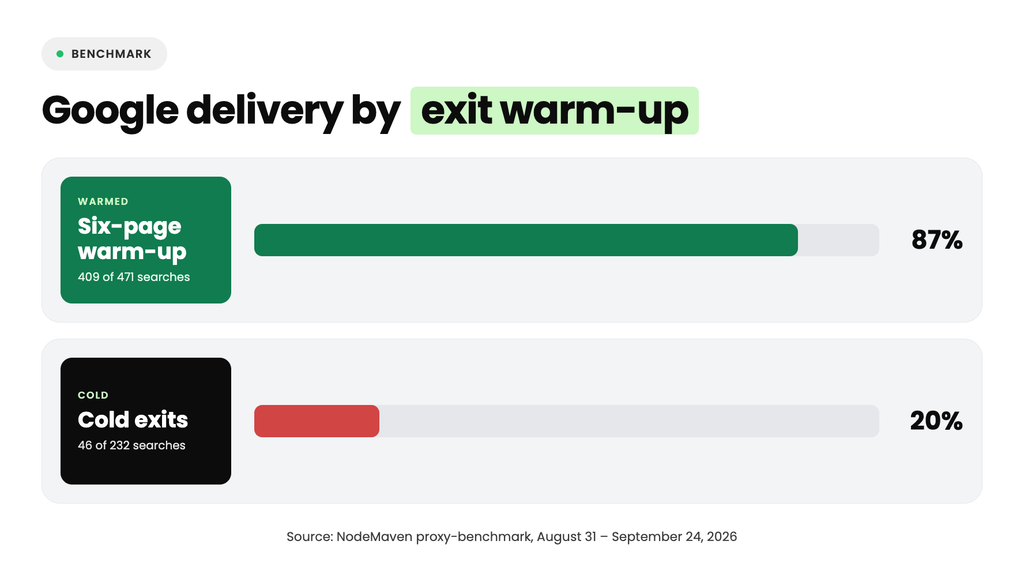
These percentages describe those test windows, not a permanent Google success rate. Google Browser Scraper reports CAPTCHA pages as failures and stops after repeated exit refusals instead of continuing to spend traffic. For more background on the response itself, see our guide to Google verification pages.
Warm-up cannot turn every refused IP into an accepted one. Starting with clean, pre-filtered residential IPs reduces the number of low-quality exits entering the workflow. NodeMaven’s quality filter is designed to remove higher-risk IPs before assignment, while sticky sessions let the scraper keep an exit after Google serves a valid page.
Rotating an accepted exit too soon
A new proxy identity repeats the slowest and most traffic-heavy part of the process. Once Google returned a valid result page, the public benchmark supported keeping that exit instead of rotating it immediately.
In the public probe-and-hold run, 108 of 109 held searches passed after Google had served the initial probe. Because each series stopped at its first refusal, this is a conditional result, not a general success rate for every new IP.
Google Browser Scraper follows that observation. It reuses an accepted exit, then drops the exit if Google refuses it. This is different from blind rotation after every request. A recent developer discussion about SERP API costs made a related point: compare usable parsed rows, not raw requests or HTTP responses.
A blocked page reported as zero results
A scraper can receive HTML and still fail to collect a SERP. Google may return a CAPTCHA, block page, or another interstitial. Parsing that page as an empty result set hides the failure, which can quietly corrupt rank-tracking or monitoring data.
Google Browser Scraper classifies the page before it extracts results. Its page_verdict distinguishes valid results from CAPTCHA and block outcomes. Failed queries also produce records with error information, so the output doesn’t silently turn a refusal into “zero results.”
This also gives a better unit for comparison. A paid API and a self-hosted scraper should be measured by the valid records your application can use, with the same query set, location, and collection window.
Hidden proxy traffic from warm-up and Chrome
Warm-up consumes bandwidth before the first search. Google Browser Scraper therefore records bytes for every page, and --price-per-gb adds an estimated cost per 1,000 pages to the run summary. This makes the traffic cost visible instead of hiding it inside a successful result.
The local relay also blocks a Chrome background download observed on fresh profiles. In the public proxy-benchmark analysis, Chrome transferred 43.2 MB of a 43.4 MB idle window to optimizationguide-pa.googleapis.com while parked on about:blank. The file wasn’t part of the requested SERP, but a metered residential proxy would still count the traffic.
How much does self-hosted Google SERP scraping cost?
Open-source software removes the API license fee, but it doesn’t make collection free. A fair estimate includes proxy traffic, compute, failed attempts, browser upkeep, and parser maintenance. Paid APIs bundle most of those costs into the query price.
| Cost or constraint | Managed Google SERP API | Google Browser Scraper |
| Software or API fee | Subscription, credits, or per-page charge | No software license fee |
| Proxy traffic | Included in the provider price | Paid by the user |
| Compute | Included | Paid and operated by the user |
| Browser and parser maintenance | Provider handles it | Your team handles it |
| Result coverage | Usually includes more special blocks | Limited to the documented parser fields |
| Infrastructure control | Provider controls the stack | You choose the proxy and host |
| Failure details | Depends on the provider | Explicit verdict and record for each page |
| Proxy quality and sessions | Managed by the API provider | Chosen and configured by your team |
At low volume, paying for an API may cost less than the engineering time needed to run a browser. At higher volume, self-hosting becomes easier to justify when your required fields fit the parser and your team already operates automation infrastructure.
Compare cost per usable result page. List price alone misses retries, refused exits, bandwidth, and records your application cannot use.
For a self-hosted setup, NodeMaven residential proxies and mobile proxies combine pre-filtered IPs, sticky sessions, location targeting, traffic rollover, and a quality guarantee. Residential and mobile plans also include cashback where the program applies. Those features can reduce wasted traffic, but the final cost still depends on how many valid result pages your own queries produce.
How to scrape Google SERPs with Google Browser Scraper
The package installs from PyPI and uses Patchright’s Chromium build. You can connect NodeMaven through the built-in option or pass a proxy template from another provider. The commands below come from the current repository README.
Install and run with NodeMaven
Install the package with the NodeMaven dependency and download Chromium:
Set the proxy credentials as environment variables, then run a search:
The first query can take a few minutes because the scraper warms the new exit. Later queries on the accepted exit take seconds. The output contains one JSON object per results page.
Want to test the open-source scraper with clean residential IPs and stable sessions? Try NodeMaven for $3.50 and get 750 MB of residential and mobile proxy traffic. Connect through the built-in --nodemaven option and start testing your own Google queries.
Connect another sticky proxy provider
The tool works with other providers that can hold the same exit across requests. Put {session} where the provider expects the session identifier:
A proxy without the placeholder is accepted with a warning. If the provider changes the exit on every request, the browser warms one IP and searches through another, so the warm-up no longer serves its intended purpose.
Run a local API
Start the local server with a prewarmed NodeMaven session:
Then query it over HTTP:
Requests run one at a time on one held identity. Without GBS_API_KEY, the server listens only on localhost.
Connect it to an AI agent through MCP
The MCP configuration starts the scraper with NodeMaven and prewarms the browser:
The server exposes google_search(query, pages). It returns SERP links and snippets, not the cleaned text of every destination page. An agent that needs full source-page content must fetch those URLs in a second stage.
The repository also contains Python examples, CSV output, Docker instructions, diagnostics, and HTML-saving options for parser debugging.
Should you choose a paid API or Google Browser Scraper?
Choose our open-source Google Browser Scraper when you want a free, open-source collector with control over the browser, proxy, and search workflow. It automatically warms new proxy identities, returns structured JSON, identifies CAPTCHA and block pages, and works through the command line, Python, a local API, or MCP.
Choose a paid API when your project needs managed infrastructure or Google result types outside the scraper’s current focus. SerpApi provides a broad catalogue, Serper uses prepaid credits, and DataForSEO offers live and queued collection.
Before deployment, run google-browser-scraper doctor on the target machine. The command checks whether the browser environment is ready by reporting details such as headless status, WebGL, and screen size without sending a request to Google.
More open-source tools from NodeMaven
Google Browser Scraper is one part of the NodeMaven GitHub organization. The other repositories cover testing, proxy configuration, and connection checks:
proxy-benchmarkcompares clients, browser engines, proxy paths, countries, providers, settings, and hosts in controlled runs. Use it when a failed request doesn’t show whether the cause follows the proxy, browser, machine, or target. Our guide to403 Client Error: Forbidden for URLshows the diagnostic workflow, while the browser automation benchmark uses the repository to compare eight browser setups across 3,816 Amazon product-search attempts.nodemaven-pythonbuilds and validates NodeMaven proxy configuration before passing it to Requests, HTTPX, aiohttp, Playwright, Patchright, or another supported client. It catches unknown gateway parameters locally instead of letting a misspelled setting pass unnoticed.nodemaven-rustprovides the same configuration and validation layer for Rust clients and browser drivers, including reqwest, ureq, curl, chromiumoxide, and thirtyfour.connection-checkercompares the exit IP with WebRTC and HTTP/3 observations. It can reveal when the measured channels expose different network identities, and the project can be self-hosted.


