How to Scrape Amazon Product Reviews & Prices with Python



Amazon holds more product data than any single research team could collect by hand. Prices shift by the hour. Reviews pile up by the thousands. If you want to track competitors, feed a sentiment model, or build a price alert tool, you need a way to pull that data automatically.
This guide covers both sides of the job: scraping current prices and scraping reviews, using nothing but Python, Requests, and BeautifulSoup. No headless browser required for most of it.
By the end, you will have a working scraper that pulls product details and review data, handles pagination, retries failed requests, and exports everything to CSV. We will also cover why raw HTTP requests get blocked on Amazon, and what actually fixes that. If you need a beginner’s guide, check out our Amazon scraping tutorial.
Technologies used: requests for HTTP calls, BeautifulSoup and lxml for parsing, and pandas for exporting clean datasets.
Most Amazon scraping tutorials pick a side. They either focus on prices and treat reviews as an afterthought, or they go deep on review text and skip pricing entirely. That split doesn’t match how the data actually gets used. A pricing dataset without review context tells you what things cost, not why buyers choose one listing over another. This guide treats both as equally important, with dedicated steps, dedicated code, and dedicated troubleshooting for each.

Scrape Amazon with fewer blocks using clean residential and mobile proxies.
Try NodeMaven for $3.50 and get 750 MB included
Why scrape Amazon product reviews and prices?
Amazon product pages are one of the richest public data sources on the internet. A single listing tells you the price, the discount history implied by the strike-through, the star rating, and what real buyers think.
Here is where that data actually gets used.
- Ecommerce pricing. Sellers track competitor prices to stay ranked in the Buy Box.
- Competitor monitoring. Brands watch how rivals price and position similar products.
- Price tracking tools. Deal sites and browser extensions rely on historical price data.
- Sentiment analysis. Reviews reveal what customers actually complain about, not what the marketing copy claims.
- Market research. Category-wide review and price data expose demand trends before they show up in sales reports.
- AI training datasets. Structured product and review text is useful for building recommendation models and NLP datasets.
Prices and reviews answer different questions. Price data tells you what the market is willing to charge. Review data tells you why customers buy, or why they return the product. You usually need both to draw a full picture.
Take a seller tracking a competitor’s listing. The price tells them whether they’re underpriced or overpriced this week. The reviews tell them whether the competitor is winning on quality, shipping speed, or packaging, none of which shows up in a price feed alone.
Pull both datasets, and you get a fuller read on why a listing is outperforming yours.
What Amazon Data Can You Extract?
Let’s split this into two datasets. Each one maps to a different part of the product page.
Product data
| Field | Description |
| Title | Full product name |
| Current price | The price shown to the buyer right now |
| Original price | List price before discount, if shown |
| Discount | Percentage off, calculated or scraped directly |
| Rating | Average star rating out of 5 |
| Review count | Total number of ratings |
| Availability | In stock, limited stock, or unavailable |
| Brand | Manufacturer or store name |
| ASIN | Amazon’s unique product identifier |
Review data
| Field | Description |
| Author | Display name of the reviewer |
| Review title | The short headline the reviewer wrote |
| Review text | The full body of the review |
| Rating | Star rating the reviewer gave |
| Verified purchase | Whether Amazon confirmed the buyer purchased the item |
| Review date | Date the review was posted |
| Images | URLs of any photos attached to the review |
Both datasets share one key, the ASIN. That’s what lets you join product and review data later in pandas.
Common challenges when scraping Amazon
Amazon is one of the hardest sites to scrape reliably, and the difficulty has grown over time. Here is what you will run into.
Changing HTML structure
Amazon runs constant A/B tests on layout. A selector that works today might return nothing next week. Build your scraper to fail loudly, not silently, when a field comes back empty.
A quick sanity check, like confirming the title field isn’t blank before saving a row, catches most of these breakages before they pollute your dataset.
CAPTCHAs and robot checks
When Amazon flags a request as automated, it swaps the product page for a “Robot Check” page. The tricky part is that this page still returns HTTP 200. Your script will think the request succeeded, then find no title, no price, and no reviews in the HTML. This is why status code checks alone aren’t enough. You also need to verify the content actually matches a real product page.
HTTP 403 and 503 responses
A 403 usually means your request was rejected outright, often due to a missing or suspicious header. A 503 means the server is refusing to serve the page, sometimes as a soft rate-limit signal rather than a hard block. Treating these two differently in your retry logic, rather than lumping every non-200 response together, gives you a clearer picture of what’s actually going wrong.
Rate limits and IP reputation
Send too many requests too fast from one IP, and Amazon throttles or blocks you. The IP’s history matters too. A residential IP that has never made a weird request gets more trust than a datacenter IP with a scraping history.
Amazon’s systems now weigh several signals together, including request velocity, header consistency, and browsing patterns, rather than relying on any single trigger to flag a session.
Dynamic and regional pricing
Prices change based on stock levels, time of day, and even the buyer’s apparent location. A price you scrape from a US-based IP might differ from what a UK-based IP would see on the same listing. If your use case depends on region-accurate pricing, this isn’t a minor detail. It can quietly skew an entire pricing dataset if you don’t control where your requests appear to originate.
Project setup
Let’s install what we need. Open a terminal and run:
Here’s why each one is in the stack:
- requests: sends HTTP requests and handles headers, cookies, and sessions.
- beautifulsoup4: parses HTML into a searchable tree so you can pull out specific tags and attributes.
- lxml: a fast parser engine that BeautifulSoup uses under the hood. It’s noticeably quicker than the default Python parser on large pages.
- pandas: turns your scraped dictionaries and lists into clean tables, then exports them to CSV.
Create a project folder with two files: scraper.py for the logic, and an empty output/ folder for your CSV exports.
Step 1. Find the product ASIN
Every Amazon product has an ASIN (Amazon Standard Identification Number). It’s a 10-character code that uniquely identifies the listing, independent of the URL slug or the marketplace domain.
You can spot it in the URL right after /dp/ or /gp/product/:
Reduce Amazon CAPTCHAs with high-quality residential and mobile proxies.
Start your NodeMaven trial for $3.50 with 750 MB included
A short helper function pulls it out with a regex:
Once you have the ASIN, you can rebuild a clean canonical URL for both the product page and the review page, which avoids issues with tracking parameters cluttering your requests.
Step 2. Send a request to Amazon
A bare requests.get(url) call will almost always fail on Amazon. You need headers that resemble a real browser, a timeout so a stuck request doesn’t hang your script forever, and a retry strategy for the requests that fail anyway.
Headers that matter
The most important header is User-Agent. Without one, Amazon can identify the request as coming from a script in milliseconds. Accept-Language and Accept round out a header set that looks closer to a real browser tab.
Timeouts and retry strategy
A request with no timeout can hang indefinitely if the server stalls. A retry loop with backoff handles transient failures like 503s without hammering the server.
Notice the random jitter added to the backoff. A fixed delay pattern is itself a bot signal. Randomizing it a bit makes your traffic harder to fingerprint.
Step 3. Scrape product prices and information
With a valid HTML response in hand, it’s time to parse it. Amazon wraps most product data in predictable element IDs, though class names shift more often.
A few notes on the selectors:
- Price is split across two spans, the whole number and the decimal fraction. Amazon does this so it can style the cents smaller than the dollars.
- Original price only appears when there’s an active discount. If the selector returns nothing, treat it as “no discount” rather than an error.
- Rating text looks like “4.5 out of 5 stars”. Splitting on “out of” is more reliable than trying to parse the number directly, since spacing varies.
Heads up: if text_or_none(“#productTitle”) comes back empty, you likely hit a Robot Check page, not a missing field. Always check for a null title before trusting the rest of the parsed data.
Scraping the current price is only the first step. To monitor price changes over time, check out our guide on building an Amazon price tracker that stores historical prices and sends price-drop alerts.
Collect Amazon prices and reviews more reliably with premium residential proxies.
Get started with NodeMaven for $3.50 and receive 750 MB included.
Step 4. Scrape Amazon product reviews
Reviews live on a separate URL pattern, usually /product-reviews/{ASIN}. Each review sits inside a repeating block, which makes it a good candidate for a loop over matched elements.
The data-hook attributes are more stable than class names here. Amazon uses them internally for analytics, so they tend to survive layout changes better than CSS classes do.
Store image_urls as a list for now. We’ll flatten it into a comma-separated string right before export, since CSV cells work better with plain strings than nested lists.
Step 5. Handle multiple review pages
A popular product can have thousands of reviews spread across dozens of pages. You need pagination logic, a delay between requests, and a clear stopping condition so the scraper doesn’t run forever.
Three things matter here:
- Stopping condition. An empty page of reviews means you’ve reached the end, not an error. Stop cleanly instead of looping forever.
- Delay between requests. A random 2 to 5 second pause between pages keeps your request pattern from looking mechanical.
- Max page cap. Even a wildly popular product doesn’t need every single review. Capping at a sane number, like 20 pages, keeps runtime predictable.
Step 6. Export everything to CSV
Pandas makes the export step almost trivial. Convert your lists of dictionaries into DataFrames, clean up the review images column, and write to CSV.
The combined file is useful when you want product context sitting next to every single review, for example when training a sentiment model that also needs to know the price point of the product being reviewed.
Complete Python scraper
Here’s everything wired together into one script. Save this as scraper.py and run it directly.
Important note
Amazon frequently updates its HTML structure, CSS selectors, and anti-bot protections. The example in this guide demonstrates the overall scraping workflow, but individual selectors or request patterns may require updates over time. If your scraper starts returning empty results or missing fields, inspect the latest page source, adjust the selectors, and verify that Amazon has not served a CAPTCHA or Robot Check page instead of the requested content.
Common errors and troubleshooting
Web scraping is not a one-time implementation. Amazon regularly changes its page layout, experiments with A/B testing, and strengthens anti-bot protection. Even a scraper that works today may require minor selector updates in the future.
| Symptom | Likely Cause | Fix |
| HTTP 403 | Missing or suspicious headers | Add a realistic User-Agent and Accept-Language header |
| HTTP 503 | Soft rate limit or overloaded route | Back off with jitter, slow down request rate |
| Page loads but fields are empty | Robot Check page, not the real listing | Check for a null title, rotate IP, add proxies |
| Missing selectors after weeks of stable scraping | Amazon changed the layout in an A/B test | Re-inspect the page, update selectors, add fallback selectors |
| Empty HTML response | Connection was dropped or blocked mid-request | Wrap requests in try/except, retry with a fresh session |
| Prices differ from what you see in the browser | Regional pricing tied to IP location | Use proxies located in the target country |
| Review count stops growing after a few pages | Hit the max_pages cap or reviews genuinely ran out | Check for an empty parsed list before assuming a bug |
How to scale Amazon Scraping
A script that works for one product on your laptop behaves very differently at 10,000 products a day. Scaling means solving for volume without tripping Amazon’s defenses.
Rotating IPs
Every request from the same IP adds to that IP’s risk score. Rotating through a large pool of IPs spreads your request volume so no single address looks suspicious.
Sticky sessions
Rotation isn’t always the right call. Paging through reviews for one product works better from a single, stable IP for the duration of that session, since jumping IPs mid-session can itself look unnatural.
Real browser headers
Keep your header set current. Browser versions in User-Agent strings age quickly, and an outdated one stands out.
Random delays and retry logic
We already covered jitter and backoff. At scale, apply the same logic across your whole request queue, not just within a single product’s review pages.
Parallel Scraping and Session Persistence
Running requests concurrently speeds things up, but each worker thread or process needs its own session and, ideally, its own IP. Mixing shared sessions across concurrent workers is a common source of accidental rate-limit triggers.
This is where proxy infrastructure becomes less optional. A datacenter IP running thousands of requests a day gets flagged fast, no matter how good your headers and retry logic are.
Scale your Python Amazon scraper with reliable residential and mobile proxies.
Try NodeMaven for $3.50 with 750 MB included
Residential proxies route your traffic through real household IP addresses, which carry a much lower risk score with Amazon’s bot detection than server-hosted IPs do.
Mobile proxies go a step further for the toughest targets, like seller profile pages or geo-locked search results, since carrier IPs are shared by thousands of real phones and rarely get blanket blocked.
The scraper code stays exactly the same either way. The only thing that changes is which IP address sits behind the requests.Session object, usually configured through a proxies dictionary passed into each request. That’s a small code change for a large jump in reliability at scale.
Why use NodeMaven for Amazon scraping?
Everything in the previous section points to the same conclusion. Your code can be flawless, and you’ll still get blocked if your IP looks wrong. NodeMaven is built around solving that specific problem.
Geo targeting. Target by country, city, or ZIP code, which matters when you need to see the exact price a buyer in a specific region would see.
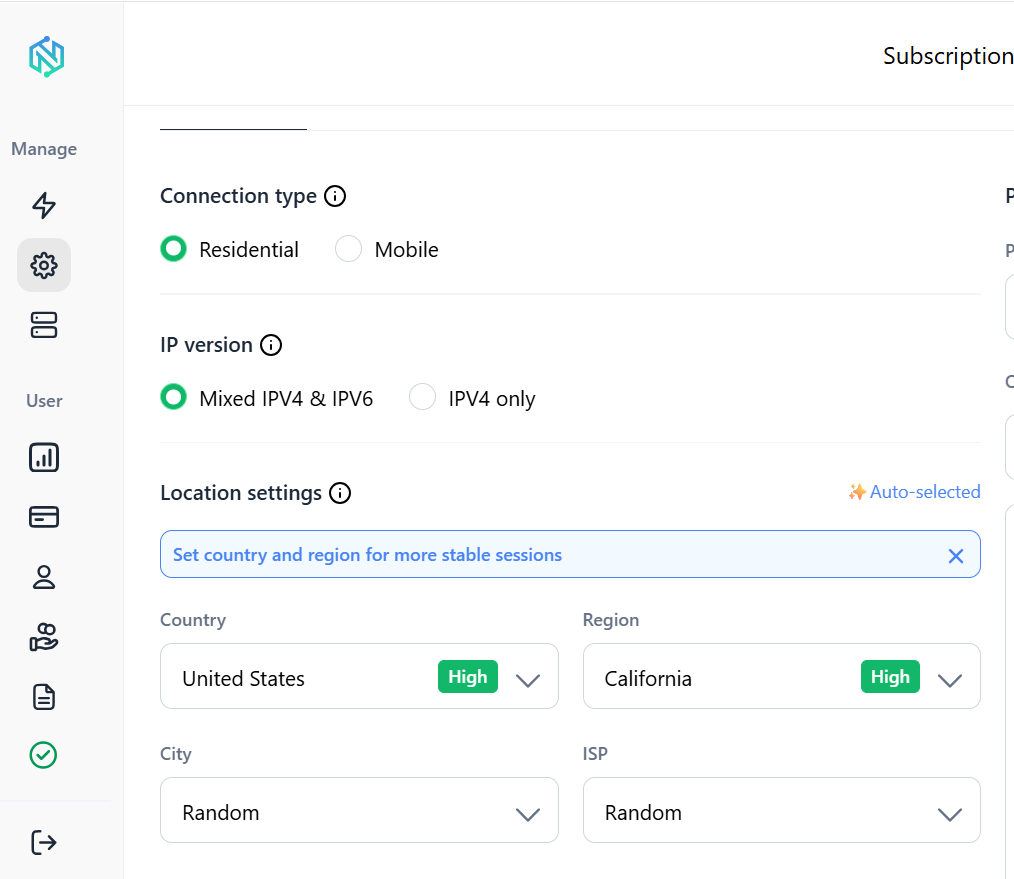
Sticky sessions. Keep the same IP for as long as a review pagination job needs, then rotate for the next product.
IP quality filtering. Every IP is checked before it’s handed to you, which cuts down on the dead or already-flagged addresses that plague cheaper proxy pools.
None of this replaces good scraper design. Retry logic, headers, and pacing still matter. But pairing solid code with a proxy pool built for scraping is what turns a script that works for an afternoon into one that runs reliably every day.
Keep your Amazon scraper running with clean residential and mobile IPs.
Start your NodeMaven trial for $3.50 and enjoy 750 MB included.