
Proxy Bandwidth Calculator: How Much Bandwidth Do You Need?




Most proxy users face the same problem: they either underestimate bandwidth and run out of traffic mid-workflow, or overbuy before they know how much their setup actually uses.
This guide works like a practical proxy bandwidth calculator. It helps you estimate how much proxy traffic you may need based on page size, request volume, media loading, retries, and browser behavior.
That matters especially for residential proxies, where traffic is often billed by GB. But estimates are only the first step. Once you start testing, NodeMaven’s Free Proxy Bandwidth Checker helps measure real proxy bandwidth usage and compare it with what your provider actually charges.
The best approach is simple: estimate, test, verify, then scale.
What Is Proxy Bandwidth and Proxy Traffic?
Proxy bandwidth is the total amount of data sent and received through your proxy connection.
In simple terms, every time your tool loads a page, sends a request, downloads an image, receives an API response, uploads a file, or retries a failed action, it adds to your proxy traffic.
So, how much bandwidth does a proxy server consume?
It depends on what you send through it. A lightweight API request may use only a small amount of data, while a browser session that loads full pages, images, scripts, and video previews can consume much more.
What counts as proxy bandwidth?
Proxy bandwidth can include:
- HTML
- CSS
- JavaScript
- Images
- Fonts
- API responses
- Video previews
- Background browser requests
- File uploads and downloads
- Failed requests and retries
According to modern page weight benchmarks, in 2025, the median home page was around 2.9 MB on desktop and 2.6 MB on mobile. Inner pages were lighter, but still measured in megabytes, not kilobytes. A modern web page is not just one HTML file. That is why proxy traffic can add up faster than expected.
For proxy users, this means one “page visit” is rarely just one request. If your scraper, browser automation tool, or account workflow loads full web pages, each action can use several megabytes of bandwidth before retries or extra background requests are counted.
How to Estimate Proxy Bandwidth Before You Buy
Before buying residential proxy traffic, estimate how much bandwidth your workflow may use.
A simple bandwidth calculator approach helps you answer questions like:
- How much bandwidth do I need?
- How many GB should I start with?
- Will 5GB be enough for testing?
- How much proxy traffic will my scraper use?
- How much bandwidth do I need for multiple accounts or automation workflows?
Simple proxy bandwidth calculator formula
To calculate bandwidth usage, start with this formula:
Monthly proxy bandwidth = average data per action × actions per day × active days
For example, if one page load uses 3 MB and your workflow opens 2,000 pages per day:
3 MB × 2,000 = 6,000 MB/day
6,000 MB ÷ 1,024 = about 5.9 GB/day
5.9 GB × 30 = about 177 GB/month
Real usage can change because of JavaScript, images, background requests, browser rendering, failed loads, and retries. That is why a bandwidth usage calculation should always include a buffer.
Add a buffer to your bandwidth estimate
Proxy workflows rarely use the same amount of traffic every day. Pages change, scripts load differently, accounts behave differently, and automation tools may retry failed requests.
Think of your proxy bandwidth estimate like a performance budget: you set a realistic limit for page size, request volume, and total traffic, then adjust it once you see real usage.
| Workflow | Suggested buffer |
| API scraping | +10–20% |
| Standard web scraping | +20–30% |
| Browser automation | +30–50% |
| Multi-account workflows | +30–50% |
| Social media workflows | +50% or more |
| AI agents | +50% or more |
| Video or media testing | Test first, then scale |
For example, if your estimate is 100 GB/month for browser automation, a safer starting point would be 130–150 GB/month.
For less predictable workflows, like AI agents or social media automation, start with a smaller test, measure real traffic, and scale only after you understand how much bandwidth your setup actually consumes.
If you are unsure, start with NodeMaven’s 750MB trial for $3.50. Run your real workflow, check how much traffic it uses, then scale with PAYG or a monthly plan.
NodeMaven residential proxies use GB-based pricing, with PAYG and monthly subscriptions starting from $2.20/GB, so you can start small and grow based on actual usage instead of guessing.

Use clean, pre-filtered proxies with 99.6% success rate for your next workflow test. Start with 750MB for $3.50.
How Much Bandwidth Do I Need for Proxies? Estimates by Workflow
The amount of proxy bandwidth you need depends on the workflow.
A lightweight scraper that sends simple HTTP requests may need only a few GB per month. A browser-based workflow that loads full pages, dashboards, media, and background requests can use much more.
Use this table as a starting point when asking, “how much bandwidth do I need for proxies?”
| Use case | Light usage | Medium usage | Heavy usage |
| API scraping | 1–10 GB/month | 10–50 GB/month | 50GB+/month |
| Browser scraping | 10–50 GB/month | 50–300 GB/month | 300GB+/month |
| Price monitoring | 5–30 GB/month | 30–200 GB/month | 200GB+/month |
| SERP tracking | 3–20 GB/month | 20–100 GB/month | 100GB+/month |
| Multi-account management | 10–50 GB/month | 50–300 GB/month | 300GB+/month |
| Social media workflows | 20–100 GB/month | 100–500 GB/month | 500GB+/month |
| AI agents and automation | 10–100 GB/month | 100–500 GB/month | 500GB+/month |
| Video or media testing | 100GB+/month | 500GB+/month | 1TB+/month |
These are planning ranges, not fixed promises.
Real proxy traffic depends on page size, asset loading, retries, media, browser rendering, session length, and how your tool behaves. A scraper that blocks images may use far less bandwidth than a browser automation setup that loads full pages.
A social media workflow that opens feeds, stories, and video previews can use much more than a simple login check. Use the table to choose a starting estimate, then test your real setup before scaling.
Price monitoring and market research bandwidth
Price monitoring and market research are usually easier to estimate because the workflow repeats similar checks.
Use this formula:
Pages × average page size × checks per day × days
Example:
1,000 product pages × 2.5 MB × 4 checks/day = 10,000 MB/day
That is about 9.8 GB/day or 294 GB/month.
Before scaling with a provider, use NodeMaven’s Free Proxy Bandwidth Checker to run a controlled test and compare real measured usage with what your provider reports.
Multi-account management bandwidth
Multi-account workflows often use more bandwidth than expected because browser profiles load dashboards, messages, notifications, media, analytics pages, and background requests.
A simple way to estimate usage is to calculate traffic per account.
If one account session uses 100 MB/day:
50 accounts = 5 GB/day
30 days = about 150 GB/month
For account workflows, bandwidth is not the only thing that matters. Session stability also affects usage. If a workflow fails and repeats logins or reloads dashboards, it can waste extra traffic.
NodeMaven residential proxies are pre-filtered for quality and support stable sessions, including long sticky sessions, which helps reduce unnecessary restarts for account-based workflows.
Social media proxy bandwidth
Social media workflows are usually more bandwidth-heavy than basic scraping.
Feeds, images, stories, reels, profile assets, comments, ads, and analytics dashboards can increase proxy traffic quickly. This is why social media workflows usually need a larger buffer than text-based scraping.
| Social media activity level | Estimated usage |
| Light profile checks | 20–50 MB/account/day |
| Regular account work (messaging, replying to comments, etc.) | 50–150 MB/account/day |
| Media-heavy browsing (media checking, media uploading/downloading, etc.) | 150MB+/account/day |
Example:
100 accounts × 75 MB/day = 7.5 GB/day
Monthly usage = about 225 GB/month
Social media workflows are usually more bandwidth-heavy than basic scraping because they load feeds, images, stories, reels, ads, profile assets, and analytics dashboards. Industry traffic reports show that video dominates internet traffic, which is why proxy workflows involving video previews or rich media need a larger bandwidth buffer.
Use clean, pre-filtered proxies with 99.6% success rate for your next workflow test. Start with 750MB for $3.50.
AI agents and web automation bandwidth
AI agents are harder to predict because they do not always follow the same path.
One task may open three pages. Another may open twenty pages, scroll, retry, take screenshots, submit forms, or load dynamic content. This makes AI agent proxy bandwidth less predictable than a fixed scraper.
| AI agent workflow | Estimated usage |
| Simple browsing task | 10–30 MB/session |
| Multi-step browser task | 30–100 MB/session |
| Research-heavy agent workflow | 100MB+/session |
Example:
1,000 AI browsing sessions/month × 50 MB = about 50 GB/month.
For AI agents and browser automation, use a bandwidth usage calculator estimate first, then test real usage with your workflow. NodeMaven residential proxies are a strong fit for AI agents, automation, web scraping, and market research because they combine pre-filtered clean IPs, session control, and flexible targeting.
Video, streaming, and gaming bandwidth
Video and media testing should be calculated by time watched, not only by pages opened.
For example, the Netflix data usage guide lists up to 1 GB/hour for SD, 3 GB/hour for HD, and 7 GB/hour for 4K. That is why video-heavy workflows can move from a few GB to hundreds of GB very quickly.
If your proxy workflow involves video previews, streaming checks, reels, stories, or media testing, start with a small test first. Measure actual usage, then scale.
For bandwidth-heavy media workflows, ISP proxy servers with unlimited traffic and high-speed connections may be a better fit than GB-based residential proxies. They are especially useful when you need stable, long-running sessions and predictable traffic costs.
Gaming bandwidth
Gaming is different from most proxy workflows.
When users ask “how much bandwidth do I need for gaming,” the answer is not only about GB. Latency, ping, connection stability, and speed usually matter more than monthly bandwidth alone.
Residential proxies are generally better suited for business workflows like scraping, automation, market research, and account management.
For gaming-related workflows where speed and continuous traffic matter, ISP proxies may be a better option. NodeMaven ISP proxies include unlimited traffic, static IPs, and fast performance, which makes them more suitable for high-bandwidth, always-on connections than GB-based proxy plans.
How to Measure Proxy Bandwidth Usage Before Scaling
Estimating proxy bandwidth is useful, but real usage can still be different once your workflow starts running.
To measure actual usage, you can check browser-level traffic, export network logs, or run a controlled proxy bandwidth test. This helps you understand how much data passes through the proxy and whether your provider reports usage accurately.
Use browser network logs for page-level usage
For browser-based workflows, the Chrome DevTools Network panel is one of the easiest ways to check proxy traffic at the page level.
This is useful when you want to see why one page uses more bandwidth than expected. For example, a product page may look simple, but the Network panel can show large images, scripts, tracking requests, or video previews loading in the background.
Export HAR files for deeper checks
For deeper testing, you can export HAR files from your browser.
HAR files record HTTP transactions during a page load, including requests, responses, timings, and resource size data. This makes them useful when you need to review proxy traffic more carefully or compare several pages.
You can use HAR files to check:
- Which requests used the most bandwidth
- Whether images or scripts are increasing traffic
- How many background requests loaded
- Whether failed requests caused extra retries
- How much data a browser session transferred
This is useful for debugging browser automation, scraping workflows, and account sessions where bandwidth usage looks higher than expected.
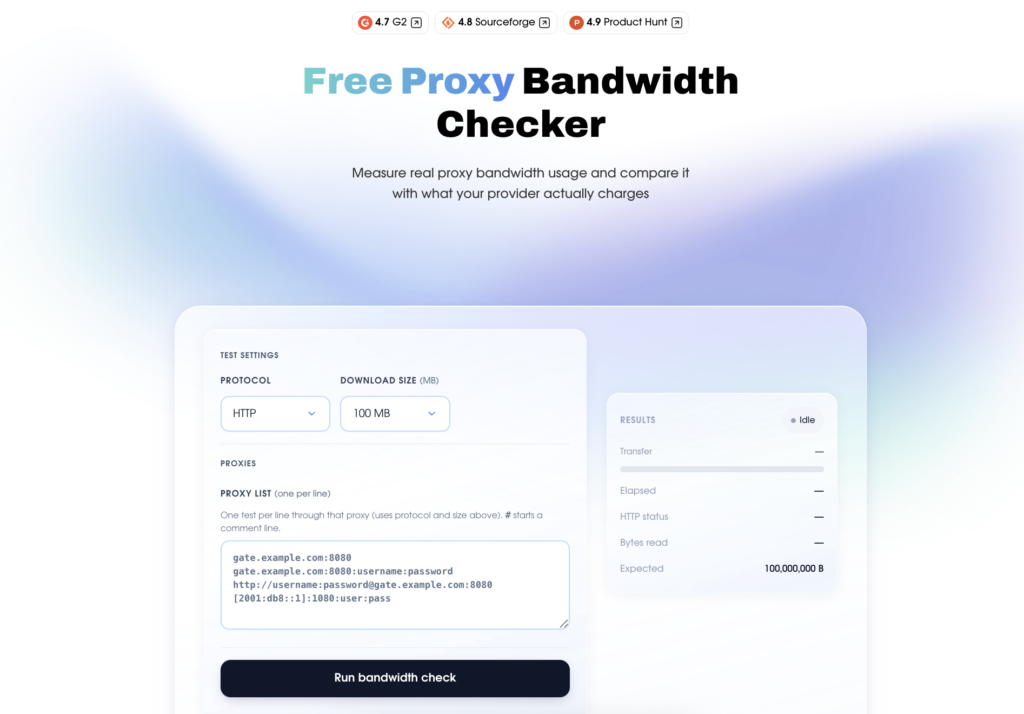
Use NodeMaven’s Free Proxy Bandwidth Checker for provider comparison
Browser logs show page-level usage. NodeMaven’s Free Proxy Bandwidth Checker gives you a controlled test through your proxy tunnel.
Use it when you want to compare:
- Measured payload size
- Real bytes transferred
- Provider-reported bandwidth consumption
The tool works by streaming a fixed-size payload through your proxy. You can choose a test size from 1 MB to 500 MB, then compare the measured result with what your provider reports for the same session.
This is especially useful before buying a larger plan from any provider. If you test a 100 MB payload but your provider reports noticeably higher usage, you can investigate the difference before scaling your workflow with the specific provider.
NodeMaven built this tool because bandwidth should be transparent. With NodeMaven residential proxies, you get clear traffic reporting, live usage statistics, and honest GB-based charging, so you can plan proxy costs with more confidence instead of guessing where your traffic went.
How to Reduce Proxy Bandwidth Usage
After you calculate bandwidth usage, look for traffic you can remove without hurting the workflow.
Small changes can save a lot of proxy traffic, especially in scraping, automation, and multi-account setups.
Block assets you do not need
If your scraper only needs text, prices, or product data, do not load everything on the page.
You can often reduce bandwidth by blocking:
- Images
- Fonts
- Videos
- Ads
- Third-party scripts
This is especially useful for large scraping jobs where every extra MB is multiplied across thousands of pages.
Use lightweight HTTP requests where possible
Browser automation uses more bandwidth because it loads scripts, images, fonts, and background requests.
If your workflow does not need a full browser, use lightweight HTTP or API requests instead. It is usually faster, cheaper, and easier to estimate.
Reduce retries with clean IPs
Retries waste traffic. If a page fails and your tool reloads it several times, your proxy bandwidth grows without getting more results.
NodeMaven uses clean, pre-filtered IPs and stable sessions to help reduce failed requests, repeated logins, and unnecessary restarts.
Use sticky sessions for account workflows
For account management, dashboards, forms, and browser automation, rotating too often can cause session restarts.
Sticky sessions help keep the same IP active during the workflow, so you do not waste traffic repeating the same steps.
Track usage with live statistics
A proxy bandwidth monitor helps you compare estimates with real usage.
NodeMaven residential and mobile proxies include live statistics, so you can see how much proxy traffic your workflow actually uses and adjust before scaling.
Use clean, pre-filtered proxies with 99.6% success rate for your next workflow test. Start with 750MB for $3.50.
Why Use NodeMaven for Your Proxy Bandwidth Provider
Estimating bandwidth is useful, but it does not tell the whole story. You also need to know whether your proxy traffic is counted fairly and whether your setup wastes bandwidth on retries, failed sessions, or poor IPs.
Free Proxy Bandwidth Checker for honest traffic checks
Your price per GB only matters if the GB is counted fairly.
NodeMaven’s Free Proxy Bandwidth Checker lets you run a fixed-size test through your proxy and compare the measured result with what your provider reports. It is a simple way to check whether the bandwidth you are charged for matches the traffic that actually passed through the proxy.
Clean residential proxies that reduce wasted retries
Poor-quality IPs can make tools retry the same page, reload sessions, or repeat logins. That traffic still counts.
NodeMaven residential proxies use clean, pre-filtered IPs and stable sessions to help reduce unnecessary retries. For workflows like scraping, automation, AI agents, and account management, that makes bandwidth usage easier to predict.
Live statistics to compare estimates with real usage
A formula gives you a starting point. Real usage shows what your workflow actually does.
With NodeMaven live statistics, you can check how much proxy traffic your setup uses during testing and adjust before scaling to a larger plan.
Traffic rollover to avoid wasting unused GBs
If your estimate is higher than your real usage, traffic rollover helps reduce waste.
With NodeMaven, unused traffic carries over to the next billing period, so you do not have to force usage just to avoid losing it.
Residential and mobile proxies in one plan
Different workflows consume bandwidth differently. Scraping, mobile-first tasks, social media workflows, and account sessions will not use traffic the same way.
NodeMaven includes residential and mobile proxies in one plan, so you can test different setups without buying separate access for each proxy type.
Quality guarantee for extra confidence
Bandwidth is only valuable when the proxies behind it perform well.
NodeMaven’s quality guarantee adds another layer of protection for your budget. If you face verified proxy quality issues, eligible cases are compensated according to NodeMaven’s policy. This helps reduce losses caused by poor IP quality and gives you more confidence when testing or scaling workflows.
Cashback that adds more value to used traffic
NodeMaven also offers cashback for residential and mobile proxy users.
This means ongoing usage can bring extra value back to your account in the form of bonus traffic. For teams running regular scraping, automation, market research, or multi-account workflows, cashback helps improve cost efficiency over time.
Use clean, pre-filtered proxies with 99.6% success rate for your next workflow test. Start with 750MB for $3.50.


