
Руководство по скрейперу Zillow: извлечение данных о недвижимости на Python



Zillow располагает одним из самых богатых наборов данных о недвижимости в интернете. Цены, Zestimates, дни на рынке, история цен, контакты агентов. Если вы работаете в сфере аналитики недвижимости, лидогенерации, маркетинговое исследование, или просто хотите отслеживать стоимость жилья в своём районе, эти данные стоит хранить в таблице, а не во вкладке браузера.
Проблема в том, что Zillow не хочет, чтобы вы получали их программным способом. Сайт создан для обнаружения автоматизированного трафика и агрессивно блокирует его. В этом руководстве вы соберёте рабочий парсер на Python, точно поймёте, почему Zillow сопротивляется, и узнаете, что на самом деле нужно, чтобы парсер продолжал работать после первых нескольких запросов.
К концу у вас будет рабочий Python-скрипт для парсинга Zillow который извлекает название объекта, адрес, цену, количество спален, санузлов, площадь и URL объявления, а затем записывает всё в CSV-файл, который можно открыть в Excel или загрузить в pandas. Если вы искали, как парсить данные Zillow, или простой пример веб-скрейпера для Zillow, этот вариант создан именно как отправная точка.

Парсите Zillow с меньшим числом CAPTCHA, используя высококачественные резидентные и мобильные прокси.
Начните пробный период NodeMaven за $3.50 с 750 MB в комплекте
Что такое парсер Zillow?
Zillow-скрейпер — это скрипт или программа, которая автоматически посещает страницы Zillow, считывает данные объявления, встроенные в страницу, и сохраняет их куда-нибудь полезное, обычно в CSV-файл, базу данных или таблицу.
Вместо того чтобы вручную копировать адреса и цены из результатов поиска, скрейпер делает это за секунды и может повторять процесс ежедневно, ежечасно или по любому заданному вами расписанию.
Люди создают скраперы для Zillow по множеству причин:
- Инвесторы в недвижимость отслеживание снижения цен и новых объявлений в конкретных ZIP-кодах
- Аналитики данных построение моделей рынка жилья или отчётов о трендах
- Агентства по лидогенерации составление списков контактов из объявлений агентов
- Стартапы в сфере proptech передачи данных объявлений в собственные приложения
- Исследователи и студенты изучение доступности жилья или динамики цен
- Разработчики создание инструментов для аренды или сравнения цен
Ни один из этих сценариев использования не требует ничего взламывать. Это общедоступные данные объявлений. Сложность здесь техническая, а не концептуальная: нужно надёжно получить содержимое страницы, чтобы антибот-системы Zillow не заблокировали вас.
Можно ли парсить Zillow?
Можно ли скрейпить Zillow и законно ли это? Эти вопросы задаёт каждый, прежде чем написать хоть одну строку кода, поэтому давайте разберём их честно.
Условия использования Zillow запрещают автоматический сбор данных со своего сайта без разрешения. Их файл robots.txt также ограничивает сканирование значительной части сайта. Это означает, что парсинг Zillow нарушает правила платформы, даже несмотря на то, что сами данные объявлений (адрес, цена, площадь) в целом считаются общедоступной информацией по законодательству США.
Законодательство о веб-скрапинге зависит от юрисдикции, того, какие данные вы собираете, как вы их используете и получаете ли вы доступ к чему-либо за логином. Если вы парсите для бизнес-задачи, особенно связанной с персональными данными, такими как контактные данные агентов, проконсультируйтесь с юристом, прежде чем масштабировать это.
Что обычно отличает разумный проект скрапинга с низким уровнем риска от безрассудного:
- Перед началом проверьте robots.txt, и понять, какие пути запрещены для краулеров
- Собирайте только публичные данные видно без входа в систему
- Не перегружайте сервер. Добавляйте задержки между запросами вместо того, чтобы отправлять сотни в минуту
- Не публикуйте повторно проприетарные данные Zillow например, Zestimate как свой собственный продукт
- Соблюдайте правила работы с персональными данными если вы собираете имена агентов, адреса электронной почты или номера телефонов, особенно с учётом GDPR или CCPA
- Используйте данные для личного анализа или внутреннего исследования а не создавать конкурирующий публичный сайт-каталог
Множество людей ежедневно парсят Zillow для личных проектов, учёбы и внутренних маркетинговых исследований.
Какие данные можно собирать с Zillow?
Страницы объявлений и результаты поиска Zillow содержат много структурированных данных. Вот что обычно доступно на фронтенде:
| Поле данных | Где это встречается | Заметки |
| Адрес | Результаты поиска, страница объявления | Обычно полный почтовый адрес |
| Цена | Результаты поиска, страница объявления | Текущая запрашиваемая цена |
| Zestimate | Страница объявления | Собственная оценка стоимости от Zillow, не то же самое, что цена в объявлении |
| Спальни / ванные комнаты | Результаты поиска, страница объявления | Числовые значения |
| Площадь | Результаты поиска, страница объявления | Жилая площадь, а не площадь участка |
| Площадь участка | Страница объявления | Иногда отсутствует для кондоминиумов/квартир |
| Статус объявления | Результаты поиска | В продаже, в ожидании, продано, снято с продажи |
| Изображения объектов недвижимости | Страница объявления | URL изображений, защищённые авторским правом |
| URL объявления | Результаты поиска | Прямая ссылка на страницу объекта |
| История цен | Страница объявления | Присутствует не всегда, зависит от объявления |
| Имя агента и брокерская компания | Страница объявления | Контактные данные считаются персональными данными |
| Дней на Zillow | Результаты поиска, страница объявления | Полезно для отслеживания устаревших объявлений |
В этом руководстве мы сосредоточимся на полях, которые действительно нужны большинству пользователей: заголовок, адрес, цена, количество спален, количество ванных комнат, площадь и URL объявления. Как только скрапер начнёт работать с этими полями, добавление ещё пары полей станет небольшим изменением, а не переписыванием с нуля. Скрапер данных о недвижимости Zillow, который справляется с этим базовым набором, обычно можно расширить до полноценного скрапера объявлений Zillow, просто добавив новые ключи на этапе парсинга.
Масштабируйте свой скрейпер Zillow с помощью надёжных резидентных и мобильных прокси.
Снижайте число блокировок и собирайте данные о недвижимости более стабильно с NodeMaven
Создание скрапера Zillow на Python
Это ядро руководства. Мы шаг за шагом пройдём путь от пустой папки до работающего скрейпера, который экспортирует CSV.
Требования
Вам понадобится:
- Python 3.9 или новее
- Базовое знакомство с терминалом
- Редактор кода (VS Code вполне подойдёт)
- Около 20 минут
Установка зависимостей
Мы делаем стек лёгким: requests для HTTP-запросов и beautifulsoup4 для парсинга. Установите обе библиотеки в виртуальном окружении, чтобы они не конфликтовали с другими проектами.
lxml необязателен, но он парсит HTML быстрее встроенного парсера Python, а страницы Zillow объёмные.
Настройка проекта
Для начала создайте один файл. Как только он заработает, вы сможете разбить его на модули.
Изучение страниц Zillow
Откройте страницу результатов поиска Zillow в браузере, щёлкните правой кнопкой мыши и выберите «View Page Source» (или Ctrl+U в Windows). Найдите __NEXT_DATA__. Вы найдете большое <script> тег, содержащий JSON-блок с теми же данными объявления, которые отображаются на странице.
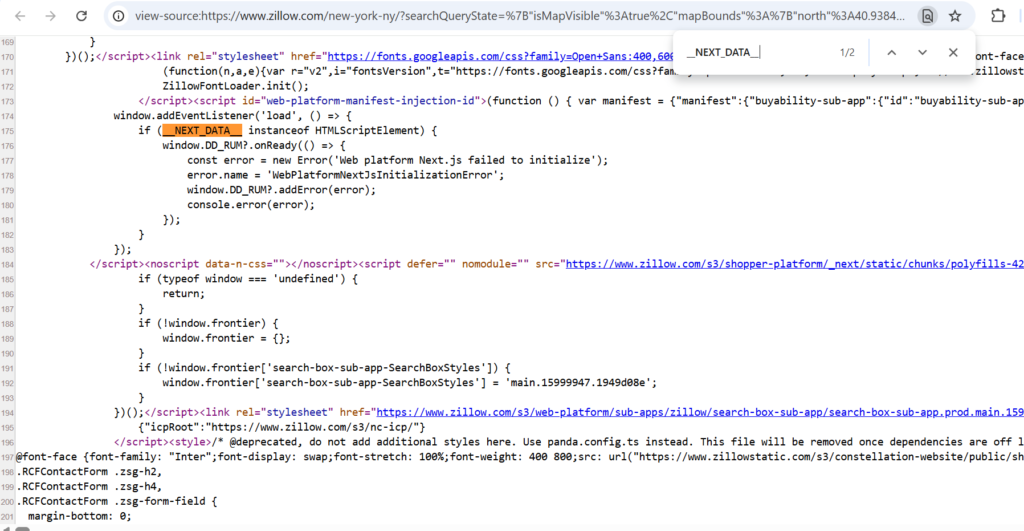
Это важно, потому что вам не нужно продираться через десятки вложенных <div> тегов с хрупкими CSS-классами. Вы можете извлечь JSON напрямую и считывать из него чистые, структурированные поля. Это распространённый паттерн на современных сайтах на базе React, и он гораздо стабильнее, чем парсинг видимого HTML, поскольку визуальная разметка меняется чаще, чем базовая структура данных.
Zillow периодически обновляет структуру своих страниц. Точный ID тега script или форма JSON, показанные здесь, со временем могут измениться. Если скрапер перестанет находить данные, повторно изучите исходный код страницы и скорректируйте логику парсинга под то, что там есть на текущий момент.
Полный скрапер на Python
Вот полный скрипт. Каждую часть мы разберём далее.
Пояснение к коду
Вот что на самом деле делает каждый фрагмент.
Заголовки. Зона build_headers() чередует небольшой набор реалистичных user-agent браузеров и задаёт стандартные заголовки, такие как Accept-Language. Запрос без user agent или с очевидно поддельным, например python-requests/2.31, это один из самых быстрых способов попасть под блокировку.
Повторные попытки с экспоненциальной задержкой. fetch_page() повторяет неудавшиеся запросы с экспоненциальной задержкой плюс небольшой случайный джиттер. Это позволяет не бомбардировать серверы Zillow повторными запросами через один и тот же интервал, что само по себе является обнаруживаемым паттерном.
Извлечение JSON-данных. extract_next_data() ищет <script id=”__NEXT_DATA__”> тег и разбирает его содержимое как JSON. Это гораздо надёжнее, чем извлекать видимый текст из стилизованного <div> элементы, поскольку имена CSS-классов постоянно меняются, тогда как структура самих данных более стабильна.
Рекурсивный поиск объявлений. parse_listings() использует рекурсивную вспомогательную функцию, find_results(), чтобы пройти по дереву JSON и найти нужные listResults массив, где бы он ни находился. JSON-структура Zillow содержит вложенное состояние поиска на несколько уровней в глубину, и жёсткое указание одного точного пути обычно ломается при первом же изменении на их стороне.
Dataclass для структуры. Зона Объявление dataclass сохраняет структуру каждой строки единообразной и позволяет тривиально преобразовать её в словарь для экспорта в CSV с помощью asdict().
Экспорт в CSV. export_to_csv() записывает каждое объявление с помощью csv.DictWriter, при этом имена полей автоматически берутся из ключей dataclass первого объявления.
Экспорт данных
Запуск скрипта создаёт zillow_listings.csv в папке вашего проекта. Каждая строка представляет одно объявление и готова к открытию в Excel, Google Sheets или загрузке в pandas DataFrame с помощью pd.read_csv(“zillow_listings.csv”) для дальнейшего анализа.
Пример вывода
Улучшения
Приведённый выше скрипт намеренно минимален, чтобы вы могли увидеть, как работает каждая его часть. После того как он заработает, вот в каком направлении его можно развивать дальше:
- Пагинация. Перебирайте страницы результатов поиска, изменяя параметр page в URL, и останавливайтесь, когда listResults возвращается пустым.
- Отдельные страницы объявлений. Расширьте парсер, чтобы он посещал каждый listing_url и извлекайте Zestimate, историю цен и данные об агенте из собственного __NEXT_DATA__ блокировка.
- Ротация прокси. Передавайте новый прокси в fetch_page() при каждом запросе вместо повторного использования одного IP на весь прогон. Мы подробно объясним почему в следующих разделах.
- Настоящий браузерный движок. Если Zillow начинает отдавать JavaScript-проверку до загрузки JSON-данных, замените requests на Playwright, который отрисовывает страницу как настоящий браузер, прежде чем вы извлечёте данные.
- Структурированное логирование. Записывайте в лог каждый неудачный запрос с его кодом статуса и URL, чтобы выявлять закономерности, например конкретный ZIP-код или диапазон страниц, которые вызывают больше блокировок, чем остальные.
Распространённые ошибки и что они означают
- 403 Запрещено
Zillow пометил запрос как автоматизированный. Обычно это отсутствующий или подозрительный user agent, либо слишком много запросов с одного IP.
- 429 Слишком много запросов
Вы достигли лимита частоты запросов. Снизьте темп и добавьте более длинные задержки между запросами.
- __NEXT_DATA__ не найден
Zillow показал CAPTCHA или страницу проверки вместо настоящей страницы объявления. Проверьте полученный необработанный HTML.
- JSONDecodeError
Тег script присутствует, но структура его содержимого изменилась. Выведите исходную строку и изучите её вручную.
Поддерживайте работу вашего скрапера Zillow с помощью премиальных резидентных и мобильных прокси.
Начните пробный период NodeMaven за $3.50 и получите 750 MB для тестирования вашего скрапера
Почему Zillow блокирует скрейперы
Zillow вкладывает значительные средства в антибот-инфраструктуру, и стоит понимать, с чем именно вы имеете дело.
Ограничение скорости
Отправьте слишком много запросов с одного IP за короткий промежуток времени, и Zillow начинает ограничивать скорость или полностью блокировать этот IP. Реальные пользователи не загружают 50 страниц объектов за 10 секунд, поэтому такой шаблон сразу бросается в глаза.
Репутация IP-адреса
Zillow проверяет репутация IP-адреса выполняющий запрос. Датацентровые IP, особенно принадлежащие известным хостинг-провайдерам вроде AWS или DigitalOcean, тесно ассоциируются с ботами и блокируются гораздо агрессивнее, чем резидентные IP.
Отпечаток браузера
Помимо IP, у Zillow антибот-уровень анализирует детали TLS-рукопожатия, порядок заголовков и поведение при выполнении JavaScript. Обычный запрос через requests имеет отпечаток, отличный от настоящего браузера Chrome, и продвинутые системы обнаружения ботов способны уловить это расхождение.
CAPTCHA-задачи
Когда трафик выглядит подозрительно, Zillow показывает страница с CAPTCHA вместо реального контента. CAPTCHA при скрапинге Zillow обычно появляется после всплеска быстрых запросов или очевидного бот-отпечатка. Если ваш скрапер не обрабатывает этот случай, он молча сохранит страницу с CAPTCHA вместо данных объявления, поэтому так важно проверять ожидаемую JSON-структуру.
Анализ шаблонов запросов
Постоянные, механические интервалы между запросами, например ровно один запрос каждые две секунды, сами по себе служат сигналом. Просмотр страниц человеком выглядит более хаотично: паузы, возвраты назад, переменная скорость прокрутки. Помогают случайные задержки, но сами по себе они не являются полным решением.
Как прокси улучшают скрапинг Zillow
Всё вышесказанное указывает на одну и ту же корневую проблему: ваш IP-адрес - это первое, что оценивает Zillow, ещё до того, как он посмотрит на ваши заголовки или поведение.
Резидентские прокси направляют ваши запросы через реальные IP-адреса, выданные интернет-провайдерами настоящим домохозяйствам. Для систем Zillow такой трафик выглядит как обычный посетитель, а не как скрапер, работающий с облачного сервера.
Резидентные прокси NodeMaven берутся из пула более 30M реальных, отфильтрованных IP в более чем 190 странах, с показателем чистых IP 95%.
Несколько способов, как это помогает скрейперу Zillow на практике:
- Ротация IP распределяет ваши запросы по тысячам разных адресов, так что ни один IP не принимает на себя достаточно трафика, чтобы попасть под подозрение
- Меньше проверок CAPTCHA поскольку чистые резидентные IP вызывают гораздо меньше подозрений, чем диапазоны дата-центров
- Sticky-сессии позволяют удерживать один и тот же IP на протяжении многоэтапного процесса, например при постраничном переборе результатов одного поиска, без смены личности в середине задачи
- геотаргетинг на уровне ZIP-кода полезен, если вы скрапите конкретный локальный рынок и хотите IP, соответствующие этому региону
- Более высокая общая доля успешных запросов, а значит меньше повторных попыток и более быстрый сбор данных от начала до конца
Для задач парсинга, которым также нужно выглядеть как мобильный трафик или которые обращаются к эндпоинтам, более чувствительным к типу устройства, мобильные прокси. тоже стоит протестировать.
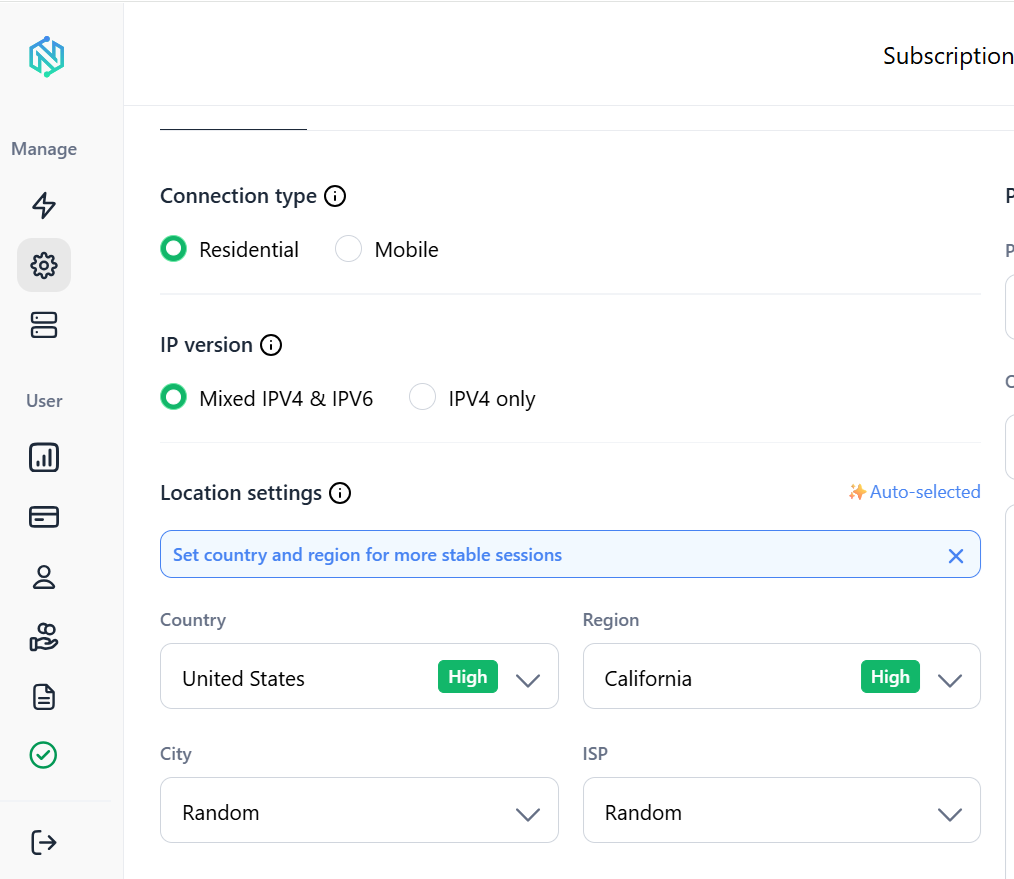
Прежде чем подключать прокси к приведённому выше скраперу, стоит убедиться, что соединение работает как ожидается. Бесплатный проверщик пропускной способности NodeMaven подтверждает, что прокси подключается корректно и работает достаточно хорошо для задач парсинга, а бесплатный инструмент проверки IP показывает, какие именно IP, местоположение и ISP увидит на другом конце сайт вроде Zillow. Оба инструмента бесплатны и не требуют учётной записи.
Масштабирование вашего скрапера Zillow
Скрипт, который работает для 50 объявлений, ведёт себя совсем иначе на 50 000. Вот что меняется по мере масштабирования.
Повторные попытки и задержки
Добавляйте случайные задержки между запросами, а не фиксированные. Что-то вроде time.sleep(random.uniform(2, 5)) между запросами страниц выглядит гораздо менее роботизированным, чем неизменный двухсекундный интервал каждый раз
ротационные IP-адреса
При масштабировании ручная смена учётных данных прокси не выдерживает нагрузки. A ротируемый прокси конфигурация, при которой новый IP назначается автоматически для каждого запроса или сессии, распределяет трафик, избавляя вас от необходимости управлять этим вручную
Параллелизм
Последовательные запросы работают медленно. Использование concurrent.futures.ThreadPoolExecutor или асинхронную библиотеку, например httpx позволяет загружать несколько страниц параллельно. Держите параллелизм умеренным: 5–10 воркеров обычно более безопасная отправная точка, чем 50
Валидация данных
Не каждое разобранное объявление будет полным. Добавьте проверки на отсутствующие поля цены или адреса перед записью строки, чтобы частично заблокированный ответ незаметно не испортил ваш набор данных
Логирование
Логируйте URL, код статуса и метку времени каждого запроса. Когда что-то сломается в 3 часа ночи при запуске по расписанию, именно это подскажет вам, был ли это блок, изменение в парсинге или сетевая проблема
Дедупликация
Объявления Zillow могут появляться на нескольких страницах поиска, особенно если новые объявления смещают пагинацию, пока вы парсите. Удаляйте дубликаты по zpid (внутреннему ID объекта Zillow, который виден в URL объявления), а не по тексту адреса, форматирование которого может различаться
Избегайте ограничений по частоте запросов и собирайте данные с Zillow надёжнее с прокси NodeMaven.
Используйте качественные резидентные и мобильные IP для стабильного сбора данных
Альтернативы созданию собственного парсера
Написание собственного скрапера — не единственный путь. В зависимости от ваших сроков и технической подготовки один из этих вариантов может подойти лучше.
| Подход | Лучшее для | Компромиссы |
| Собственный скрейпер на Python | Полный контроль, настраиваемые поля, постоянное внутреннее использование | Вы поддерживаете его, когда Zillow меняет структуру своих страниц |
| скрапер Apify для Zillow | Быстрая настройка, код не нужен | Оплата по факту использования, меньше гибкости в формате вывода |
| API данных о недвижимости | Надежные, структурированные потоки данных | Часто платные и могут покрывать не все нужные вам поля |
| Проекты с открытым исходным кодом на GitHub | Обучение, быстрые прототипы | Часто устаревают и перестают работать, когда Zillow обновляет свой сайт |
| Расширения для браузера | Разовые небольшие выгрузки вручную | Не рассчитан на масштабирование или автоматизацию |
Zillow не предоставляет публичный API для общих данных о листингах. Официальный доступ к их API ограничен утверждёнными партнёрами, поэтому большинство разработчиков в итоге парсят публичный сайт.
Заключение
Создание скрапера Zillow на Python — вполне посильный проект на выходные, как только вы разберётесь с составными частями: загрузить страницу, извлечь встроенный JSON, разобрать его в чистую структуру и экспортировать. Более сложная часть — обеспечить стабильную работу этого скрапера, а это сводится к тому, как ваши запросы выглядят для антибот-систем Zillow.
Реалистичные заголовки, разумные задержки и чистые резидентные IP решают большинство проблем со стабильностью, с которыми вы столкнётесь. Парсите ответственно, соблюдайте лимиты частоты запросов и следите за тем, чтобы использование соответствовало реальному назначению данных.
Если именно блокировки IP замедляют вас, то у NodeMaven резидентский и мобильные прокси. стоит протестировать на вашем собственном скрапере, прежде чем что-либо масштабировать.
Создайте более надёжный парсер Zillow с премиальными резидентными и мобильными прокси.
Протестируйте NodeMaven с пробным доступом за $3.50, включающим 750 MB трафика


