
Скрапинг Bing на Python: полное руководство по сбору результатов поиска Bing



Скрапинг Bing означает извлечение структурированных данных со страниц результатов поиска Bing с помощью кода, а не копирование их вручную. Разработчики скрапят Bing, чтобы отслеживать позиции, наблюдать за конкурентами, создавать исследовательские наборы данных или наполнять контент-пайплайны свежими поисковыми данными.
К тому же с Bing работать гораздо удобнее, чем с Google. Его HTML более предсказуем, его анти-бот системы менее агрессивны, а его пагинация предельно проста. Это делает его отличным местом для изучения основ скрапинга, прежде чем браться за более сложные цели.
К концу этого руководства у вас будет рабочий скрапер на Python, который отправляет запросы, парсит результаты, проходит по нескольким страницам, обрабатывает ошибки и экспортирует чистые данные в CSV или JSON. Мы также разберём, как прокси вписаться в серьёзную инфраструктуру скрапинга, как только вы выйдете за пределы пары тестовых запросов.

Масштабируйте свой Bing-скрапер с помощью чистых резидентных и мобильных прокси. Начните с NodeMaven от $3.50 и получите 750 MB в комплекте
Что такое скрапинг Bing?
Каждый раз, когда вы выполняете поиск в Bing, сервер возвращает полную HTML-страницу. Эта страница называется SERP, сокращение от search engine results page (страница результатов поисковой выдачи). Скрапинг Bing означает отправку такого же запроса программным способом и извлечение структурированных данных из сырого HTML.
Есть два способа получить эти данные:
- HTML-скрейпинг
Запросить страницу самостоятельно, разобрать разметку и извлечь всё необходимое.
- APIs
Использовать сервис, который возвращает структурированный JSON вместо HTML, чтобы полностью пропустить этап парсинга.
В этом руководстве основное внимание уделяется HTML-скрапингу, поскольку он даёт полный контроль и не стоит ничего, кроме вашей собственной инфраструктуры. Вот базовая последовательность действий:
Типичные сценарии использования включают отслеживание позиций, СЕО исследование конкурентов, анализ рынка, мониторинг новостей, Скрейпинг выдачи поисковых систем и создание обучающих данных для NLP-проектов.
Зачем скрапить Bing вместо Google?
Google получает всё внимание, но Bing зачастую оказывается более практичной целью для проектов по скрапингу. Он по-прежнему удерживает заметную долю поискового трафика, а с его страницами результатов гораздо проще работать.
| Разложить на множители | Bing | |
| HTML-структура | Простые и единообразные имена классов | Часто обфусцированные и минифицированные имена классов |
| Защита от ботов | Умеренная защита с ограничением частоты запросов | Агрессивная защита с JavaScript-проверками и CAPTCHA |
| Стабильность SERP | Верстка меняется редко | Верстка меняется часто и может ломать селекторы |
| Результаты покупок | Доступны в стандартном HTML | Часто требует отдельного API или дополнительного рендеринга |
| Результаты изображений | Легко парсятся из HTML-ответов | Часто подгружаются динамически с помощью JavaScript |
| Результаты новостей | Доступны в стандартной разметке страницы | Часто встроены внутри динамических виджетов |
Ничто из этого не означает, что Bing не защищён. Он по-прежнему ограничивает скорость агрессивного трафика и блокирует очевидные ботовые паттерны. Но порог входа ниже, что делает его более удачной отправной точкой для большинства проектов.
Какие данные можно скрапить из Bing?
Стандартная выдача SERP в Bing содержит не только синие ссылки. В зависимости от запроса вы можете извлечь:
- Заголовки органических результатов
- URL-адреса, указывающие на страницу-источник
- Сниппеты — краткое описание под каждым результатом
- Изображения из поиска по картинкам или встроенных каруселей изображений
- Товары из выдачи покупок, включая цену и продавца, если они указаны
- Новостные статьи с указанием источника и времени публикации
- Похожие запросы, полезные для расширения списка ключевых слов
Не каждое поле присутствует в каждой выдаче SERP. Запрос по локальному бизнесу возвращает иные данные, чем запрос по товару, поэтому ваш парсер должен корректно обрабатывать отсутствующие поля, а не выдавать ошибку.
Именно поэтому скрапинг данных из поисковой выдачи Bing хорошо подходит для конкурентного анализа. Один запрос может вернуть органические результаты, похожие запросы, а иногда и товары или новости сразу.
Легален ли скрапинг Bing?
Этот вопрос возникает почти в каждом проекте по скрапингу, и честный ответ таков: всё зависит от того, как именно вы это делаете.
Скрапинг общедоступных страниц, которые каждый может просмотреть без авторизации, в большинстве юрисдикций обычно считается законным. Законы различаются в зависимости от страны, и эта статья не является юридической консультацией. Больше информации по этой теме вы можете получить в нашем блоге о законности скрапинга.
Несколько моментов, которые стоит иметь в виду:
- Проверяйте robots.txt. Он показывает предпочтения владельца сайта, даже если не везде имеет юридическую силу.
- Соблюдайте ограничения по частоте запросов. Заваливание сервера запросами может перейти в злоупотребление независимо от того, что именно вы собираете.
- Прочитайте условия использования. Условия Bing ограничивают определённый автоматизированный доступ, поэтому к коммерческому использованию в больших масштабах следует подходить осторожно.
- Скрапьте ответственно. Добавляйте задержки, не перегружайте серверы и никогда не скрапьте персональные или закрытые данные.
Если ваш проект выполняет скрапинг в сколько-нибудь реальных масштабах или используется в коммерческом продукте, проконсультируйтесь с юристом, разбирающимся в законодательстве о сборе данных в вашем регионе.
Требования
Чтобы запустить работающий скрапер, вам понадобится всего несколько библиотек.
- запросы для отправки HTTP-запросов
- beautifulsoup4 для парсинга HTML
- pandas для структурирования и экспорта данных
- lxml в качестве более быстрого движка парсинга для BeautifulSoup
- Опционально: selenium если вам когда-нибудь понадобится рендерить страницы с большим количеством JavaScript
На этом базовая настройка завершена. Поддержку прокси мы добавим позже, когда перейдём к масштабированию.
Избегайте CAPTCHA и блокировок по IP при скрапинге Bing. Используйте премиальные резидентные и мобильные прокси от NodeMaven по цене от $3.50
Как скрапить результаты поиска Bing с помощью Python
Вот полный рабочий процесс, к которому мы движемся: создать сессию, отправить запрос с правильными заголовками, распарсить результаты, пройти по страницам и экспортировать всё в файл. Каждый этап опирается на предыдущий.
Создание сессии requests
Объект сессии повторно использует базовое TCP-соединение между запросами, что быстрее и реалистичнее, чем каждый раз выполнять отдельные requests.get() вызовы.
Важно задать реалистичные заголовки User-Agent и Accept-Language. Запросы без них выглядят явно автоматизированными и быстрее попадают под подозрение.
Отправка запроса
Оборачивайте каждый запрос в таймаут и обработку исключений. Промышленные скраперы постоянно сталкиваются с сетевыми ошибками, и ваш код должен это выдерживать.
Обратите внимание на экспоненциальную задержку между повторными попытками. Фиксированная задержка подходит для тестирования, но при масштабировании задержка должна увеличиваться с каждой неудачной попыткой.
Парсинг результатов поиска
Bing размещает каждый органический результат внутри предсказуемого контейнерного элемента, что позволяет легко выбирать заголовок, URL и сниппет с помощью BeautifulSoup.
Всегда защищайтесь от отсутствующих элементов. Bing иногда выдаёт результаты без сниппета, и скрипт, который предполагает, что каждое поле существует, рухнет на первом же исключении.
Обработка пагинации
Bing разбивает выдачу на страницы через параметр запроса под названием первый. На первой странице параметра нет вообще, вторая страница начинается с 11, третья — с 21 и так далее с шагом 10.
Правило двух пустых страниц здесь имеет значение. Bing иногда возвращает неполную или пустую страницу в середине набора результатов, и остановка на первой же пустой странице обрежет ваши данные раньше времени.
Надёжно собирайте результаты поиска Bing с помощью премиальных ротируемых резидентных и мобильных прокси. Начните всего от $3.50
Экспорт результатов в CSV
Как только у вас есть список словарей, pandas превращает его в аккуратный файл одной строкой.
Дедупликацию по URL здесь стоит выполнить, поскольку перекрывающиеся страницы иногда возвращают один и тот же результат дважды.
Продвинутые техники скрапинга Bing
Скрапер, который работает для десяти запросов на тестировании, часто разваливается на тысяче запросов в продакшене. Эти приёмы закрывают этот разрыв.
- Логика повторных попыток
Уже встроено в fetch_page выше, но настраивайте число повторных попыток в зависимости от того, насколько важен каждый запрос.
- Экспоненциальная задержка
Удвоение или утроение задержки после каждой неудачи не даёт вам нагружать сервер, который уже ограничивает частоту ваших запросов.
- Ротация User Agent
Перебор пула реалистичных строк браузера делает трафик менее однообразным.
- Постоянные сессии
Повторно используйте один requests.Session() на каждый воркер вместо постоянного создания новых подключений.
- Случайные задержки
Фиксированная задержка между запросами сама по себе является отпечатком. Рандомизируйте её в пределах диапазона.
- Структурированное логирование
Логируйте каждый сбой с достаточным контекстом, чтобы отладить его позже, не запуская всю задачу заново.
Ни один из этих приёмов не работает вечно сам по себе. Как только вы начинаете выполнять сотни или тысячи запросов в день, настоящим узким местом становится ваш IP-адрес, а не ваш код.
Bing search API против HTML-скрапинга
Раньше Microsoft предлагала официальный Bing Search API, однако его доступность и цены со временем менялись, поэтому стоит проверить текущие условия, прежде чем полагаться на него в продакшн-проекте.
| Разложить на множители | официальный API | HTML-скрейпинг |
| Формат данных | Чистые JSON-ответы | Сырой HTML, требующий парсинга |
| Цена | Оплата за каждый запрос | Только инфраструктурные расходы, такие как прокси и серверы |
| Надежность | Стабильный контракт API | Может сломаться, когда Bing меняет свою разметку |
| Глубина данных | Ограничена задокументированными полями | Доступ ко всему, что видно на странице |
| Ограничения скорости | Определяется вашим тарифом API | Определяется системами обнаружения ботов Bing |
| Время настройки | Быстро, достаточно просто вызвать endpoint | Медленнее, потому что вам нужно создать и поддерживать парсер |
Используйте официальный API, когда вам нужен небольшой предсказуемый объём запросов и вы не хотите поддерживать код парсинга. Используйте HTML-скрапинг, когда вам нужны поля данных, которые API не предоставляет, или когда вы скрапите в объёмах, при которых расходы на API быстро растут.
Большинство команд, ищущих API для скрапинга поиска Bing, в какой-то момент пробуют оба подхода. API быстрее настроить, а HTML-скрапинг выигрывает, как только вам нужны поля, которые API не охватывает, или когда вы работаете с большим объёмом запросов, при котором оплата за каждый запрос становится дорогой.
Создавайте готовые к продакшену скраперы для Bing с высококачественными резидентными и мобильными прокси. Начните пробный период NodeMaven за $3.50 с включёнными 750 MB
Типичные сложности
Каждый скрапер для Bing рано или поздно сталкивается с одним и тем же набором проблем.
- 403 Запрещено
Обычно означает, что ваши заголовки запросов выглядят автоматизированными или ваш IP уже был помечен.
- 429 Слишком много запросов
Вы отправляете запросы быстрее, чем позволяет ограничение частоты Bing для этого IP.
- КАПЧА
Bing показывает их, когда уверен, что запрос автоматизирован. Снижение скорости и ротация IP уменьшают частоту их появления.
- IP-баны
Повторяющиеся агрессивные запросы с одного IP могут привести к его блокировке на несколько часов и дольше.
- Гео-ограничения
Некоторые функции SERP, например локальные результаты или региональные новости, отображаются только тогда, когда запрос исходит из соответствующего региона.
- Изменения HTML
Bing периодически обновляет свою разметку. Селектор, который работает сегодня, может незаметно перестать возвращать данные уже в следующем месяце.
Большинство из этих проблем сводятся к одной первопричине: слишком много запросов с слишком малого числа IP-адресов, отправленных слишком быстро и без достаточной вариативности, чтобы выглядеть как действия человека.
Использование резидентных прокси для скрапинга Bing
Как только вашему скраперу нужно работать ежедневно, охватывать несколько регионов или обрабатывать большой список ключевых слов, единственный IP-адрес становится узким местом. Именно здесь на помощь приходят прокси.
Резидентские прокси направляют ваши запросы через реальные IP-адреса, назначенные ISP, вместо легко распознаваемых диапазонов дата-центров. Для скрапинга это важно, потому что поисковые системы относятся к трафику из дата-центров с гораздо большим подозрением.
Несколько понятий, которые стоит усвоить:
- Ротационные прокси назначают новый IP для каждого запроса, что автоматически распределяет объём по большому пулу.
- Sticky-сессии сохраняют один и тот же IP в течение заданного периода, что полезно, когда нужно, чтобы запросы с пагинацией оставались согласованными в рамках одной поисковой сессии.
- Гео-таргетинг позволяет запрашивать IP из конкретной страны или города, чтобы вы могли точно собирать региональные SERP.
- Репутация IP влияет на то, как часто вы сталкиваетесь с CAPTCHA. Чистые резидентные IP обычно помечаются как подозрительные гораздо реже, чем повторно используемые IP дата-центров.
Именно здесь в рабочий процесс встраивается сервис вроде NodeMaven NodeMaven предоставляет резидентные прокси с закреплёнными сессиями и геотаргетингом на уровне города, что покрывает две самые важные вещи для скрапинга поисковых систем: выглядеть как реальный трафик и точно контролировать, откуда этот трафик якобы исходит.
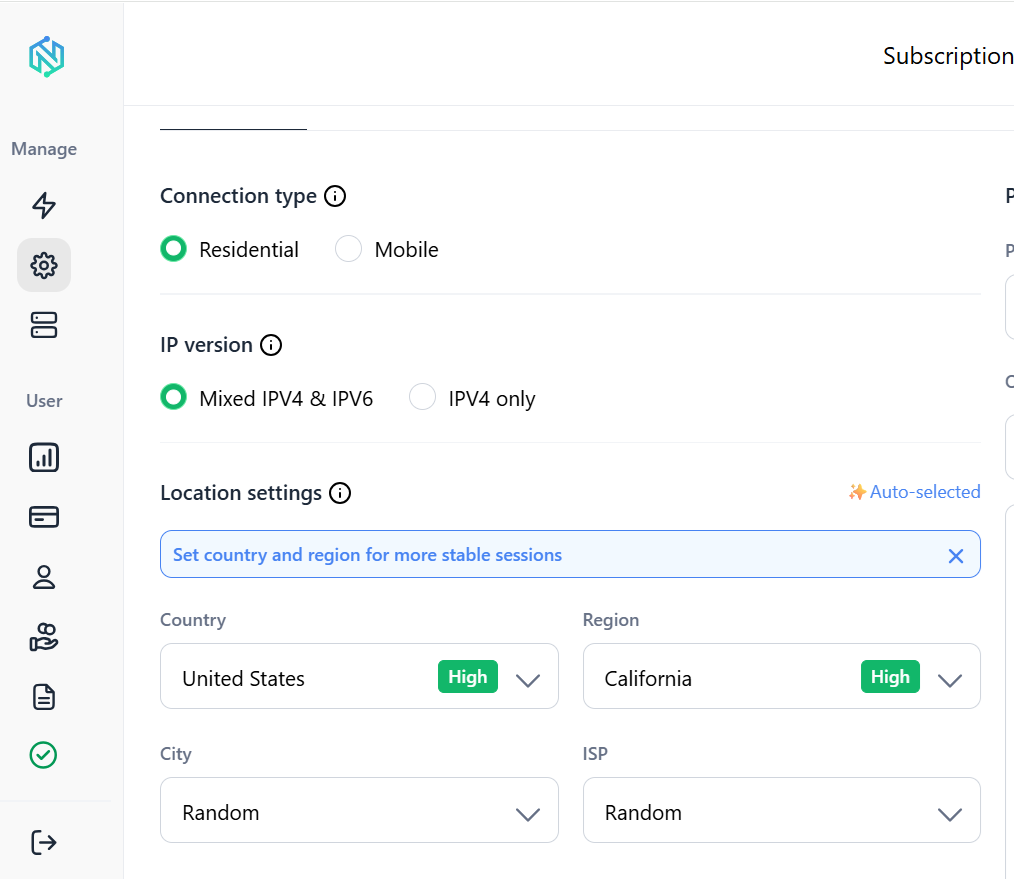
Вот как поддержка прокси подключается к скраперу, который мы уже создали:
Лучшие практики
- Быстрый чек-лист перед тем, как выводить скрапер Bing в продакшн:
- Задавайте реалистичные User-Agent и Accept-Language в каждом запросе
- Всегда используйте тайм-аут, никогда не позволяйте запросу зависать бесконечно
- Добавьте логику повторных попыток с экспоненциальной задержкой
- Рандомизируйте задержки между запросами вместо фиксированной паузы sleep
- Ротируйте User-Agent в рамках небольшого реалистичного пула
- Используйте резидентные прокси, как только объём превысит несколько запросов в день
- Удаляйте дубликаты результатов по URL перед экспортом
- Логируйте сбои с достаточным уровнем детализации, чтобы отладить их без повторного запуска задачи
- Проверяйте robots.txt и придерживайтесь разумных лимитов частоты запросов
- Аккуратно обрабатывайте отсутствующие поля, а не исходите из того, что каждый результат имеет одинаковую структуру
Скрапьте Bing в больших масштабах без лимитов на частоту запросов. Премиальные резидентные и мобильные прокси от NodeMaven начинаются всего от $3.50 с включёнными 750 MB
Часто задаваемые вопросы
Заключение
Скрапинг результатов поиска Bing на Python сводится к нескольким ключевым составляющим: правильно настроенной сессии, аккуратному парсингу разметки результатов, надёжной пагинации и грамотной обработке ошибок вокруг всего этого. Предсказуемая структура Bing делает его удобным местом для наработки этих навыков.
Код в этом руководстве — надёжная основа для рабочего скрапера, а не просто игрушечный пример. По мере роста объёма ваших запросов главное ограничение смещается с логики парсинга на репутацию вашего IP, и именно здесь резидентские прокси и разумное ограничение частоты запросов начинают играть наибольшую роль.


