
Google «Verifying Your Request»: что это значит и как исправить в 2026 году



Если Google показывает “Verifying your request” вместо результатов поиска, это значит, что Google добавил дополнительный этап проверки между вашим поисковым запросом и страницей результатов.
У обычных пользователей это может происходить из-за того, что Google обнаруживает необычный трафик из сети.
Для разработчиков и SEO-инструментов ситуация сложнее. Страница проверки может выглядеть как успешный HTTP-ответ, при этом не содержа никаких реальных результатов поиска. Техническое тестирование, опубликованное Cloro показало, что страница проверки может возвращать HTTP 200 с валидным HTML, а значит, скрапер, который проверяет только код состояния, может посчитать запрос успешным.
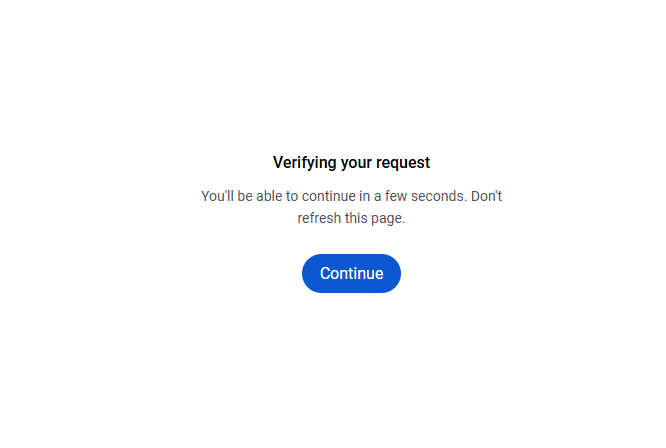
Google также тестирует новые сценарии проверки в 2026 году. В сентябре была замечена новая версия, в которой кнопка Продолжить остаётся неактивной, пока Google проверяет запрос, и становится доступной после завершения проверки.
В этом руководстве объясняется, что означает это сообщение, почему оно появляется, как обычным пользователям его устранить и что оно значит для скрапинга поисковой выдачи Google.

Создавайте более надёжные рабочие процессы для Google Поиска.
Начните пробный период NodeMaven за $3.50 и получите 750 MB премиального прокси-трафика
Что такое «Google Verifying Your Request»?
«Google Verifying Your Request» представляет собой страницу проверки, которая может появляться перед результатами Google Поиска, когда системы Google обнаруживают трафик, выглядящий необычным или автоматизированным. Официальная документация Справки Google Поиска сообщает, что пользователи могут увидеть сообщение «Наши системы обнаружили необычный трафик из вашей сети» когда сеть, которой они пользуются, включая VPN-сеть, по всей видимости, отправляет автоматизированный трафик.
Google перечисляет несколько возможных источников автоматизированного трафика, включая роботов, компьютерные программы, автоматизированные сервисы, поисковые скраперы, программы для проверки позиций в Google и большое количество запросов, отправленных за короткий промежуток времени. Проверка может включать reCAPTCHA, после прохождения которой, по словам Google, доступ к Поиску восстанавливается.
Google тестирует новые сценарии проверки
Проверка запросов в Google не ограничивается традиционной CAPTCHA.
В сентябре 2026 года было замечено, что Google тестирует новый сценарий Поиска, в котором страница просит пользователя подождать, пока Google проверяет запрос. Кнопка Продолжить изначально отображается неактивной и становится активной после завершения проверки.
Search Engine Roundtable сообщил, что этот тест заметили SEO-специалисты и что он также встречался на языках, отличных от английского.
Ранее, в августе 2026 года, было замечено, что Google также тестирует другой сценарий, в котором пользователей просили войти в аккаунт, чтобы подтвердить, что они не роботы, прежде чем продолжить работу с Поиском.
По этой причине конкретная страница, которую вы увидите, может отличаться.
Почему обычные пользователи могут видеть страницу проверки?
Столкнуться с проверкой Google можно, даже не будучи скрапером.
- Общий Wi-Fi
В кофейнях, аэропортах, отелях, университетах, офисах и других общих сетях множество пользователей могут выходить в интернет через один и тот же публичный IP-адрес.
- VPN-сервисы
Google прямо называет VPN-сети одним из возможных источников необычного трафика.
VPN может направлять множество пользователей через один и тот же выходной IP-адрес. Если через эту сеть отправляются автоматические поисковые запросы, с проверкой могут столкнуться и другие пользователи.
- Автоматическая активность на вашем устройстве
Google также рекомендует проверить устройство на вредоносное ПО, если сообщения о необычном трафике продолжают появляться.
Фоновое программное обеспечение может отправлять запросы без того, чтобы пользователь намеренно искал что-либо в Google.
- Большое количество запросов
Отправка большого числа поисковых запросов за короткий промежуток времени может привести к появлению сообщения о необычном трафике.
Как исправить «Verifying Your Request» обычному пользователю
Если вы пользуетесь Google в обычном режиме и видите страницу с сообщением о необычном трафике или проверкой, рекомендованные Google шаги по устранению проблемы довольно просты.
1. Пройдите reCAPTCHA
Если Google показывает reCAPTCHA, пройдите её. По словам Google, прохождение проверки может убрать сообщение о необычном трафике и восстановить доступ к Поиску.
2. Убедитесь, что JavaScript включён
Если CAPTCHA не отображается, Google рекомендует убедиться, что ваш браузер поддерживает reCAPTCHA и что JavaScript включён.
3. Временно отключите VPN
Google прямо рекомендует проверить использование VPN, если сообщения о необычном трафике продолжают появляться. Если после отключения VPN проблема исчезает, вероятно, причиной была VPN-сеть.
4. Попробуйте другую сеть
Переключение с общего Wi-Fi на другую сеть поможет понять, связана ли проблема с сетью, а не с вашим устройством.
5. Проверьте устройство на вредоносное ПО
Проверьте устройство на наличие вредоносного ПО, если сообщение о необычном трафике продолжает появляться.
6. Обратитесь к сетевому администратору или интернет-провайдеру
Если проблема затрагивает корпоративную, университетскую или другую общую сеть, обратитесь к сетевому администратору.
Для разработчиков и SEO-инструментов проблема выглядит иначе. Google может вернуть страницу проверки вместо запрошенной SERP, даже если сам HTTP-запрос выполнен успешно.
Почему Google может вернуть HTTP 200 вместо результатов поиска
Одна из важнейших технических деталей заключается в том, что страница проверки Google может вернуть HTTP 200.
Обычно скрапер может интерпретировать ответ так:
Но ответ со страницей проверки может выглядеть иначе:
С точки зрения HTTP сервер успешно вернул страницу. Проблема в том, что это не та страница результатов поиска, которую ожидал скрапер.
Так возникает скрытый сбой.
Скрапер может получить:
- HTTP 200
- Валидный HTML
- Без исключений
- Без результатов поиска
и записать ответ как успешный.
Нужны надёжные прокси для скрапинга Google Поиска?
Получите премиальный прокси-трафик с NodeMaven от $3.50
Что делать разработчикам?
Если ваше приложение собирает данные Google Поиска, первым делом убедитесь, что ваша система умеет распознавать ответ со страницей проверки.
Не полагайтесь исключительно на:
Вместо:
- Отправьте запрос.
- Проверьте HTTP-ответ.
- Изучите возвращённый контент.
- Убедитесь, что ожидаемые данные SERP присутствуют.
- Определяйте контент страницы проверки.
- Обрабатывайте проверку отдельно от настоящих поисковых выдач без результатов.
В противном случае ответ со страницей проверки может быть записан как:
тогда как на самом деле ситуация такая:
Это совершенно разные результаты.
Помогают ли прокси избежать проверки Google?
Характеристики сети могут способствовать обнаружению необычного трафика.
Для автоматизированных рабочих процессов хорошие прокси по-прежнему могут быть одним из самых полезных инструментов. Наше руководство по безопасному скрапингу Google Images описывает похожие уровни обнаружения, включая reCAPTCHA, отслеживание IP и JavaScript-проверки.
Однако смена IP не превращает автоматически автоматизированный запрос в обычную сессию браузера.
Поэтому прокси следует рассматривать как один из компонентов инфраструктуры скрапинга, а не как полное решение проблемы проверки Google.
Поддерживайте бесперебойную работу ваших рабочих процессов в Google Search.
Попробуйте NodeMaven: 750 MB премиального прокси-трафика всего за $3.50
Резидентные и мобильные прокси для Google Search: что выбрать
Резидентные и мобильные прокси используют IP-адреса, связанные соответственно с сетями домашних пользователей и мобильными операторами.
Они могут быть полезны, когда рабочему процессу требуется доступ через определённое географическое местоположение или тип сети. Если вы не уверены, какой тип подходит для вашего рабочего процесса, наш разбор мобильных, резидентных и серверных прокси сравнивает их между собой.
Однако было бы неверно утверждать, что Google автоматически доверяет любому резидентному или мобильному прокси. Гораздо важнее качество IP и репутация сети. NodeMaven предоставляет предварительно отфильтрованные IP которые с большей вероятностью пройдут уровень проверки Google без остановки.
Главный вывод
Страница Google «Verifying your request» («Проверяем ваш запрос») является частью более широкого набора систем, с помощью которых Google реагирует на трафик, который выглядит необычным или автоматизированным.
Для разработчиков главная техническая проблема иная: Google может вернуть страницу проверки вместо SERP, и при этом ответ по-прежнему будет иметь статус HTTP 200.
Это значит, что скрапер может выглядеть исправным, собирая при этом некорректные или пустые данные.
Самый надёжный подход: проверять фактическое содержимое ответа и отличать страницы проверки от настоящих поисковых запросов с нулевым результатом.
Нужны надёжные прокси для скрапинга Google Поиска?
Получите премиальный прокси-трафик с NodeMaven от $3.50


