
Калькулятор трафика прокси: сколько трафика вам нужно?




Большинство пользователей прокси сталкиваются с одной и той же проблемой: либо они недооценивают пропускную способность и заканчивают трафик в середине сценария, либо переплачивают, прежде чем узнают, сколько на самом деле использует их установка.
Это руководство работает как практический калькулятор пропускной способности прокси. Оно поможет вам оценить, какой объем трафика прокси вам может понадобиться, исходя из размера страницы, объема запросов, загрузки медиа, повторных попыток и поведения браузера.
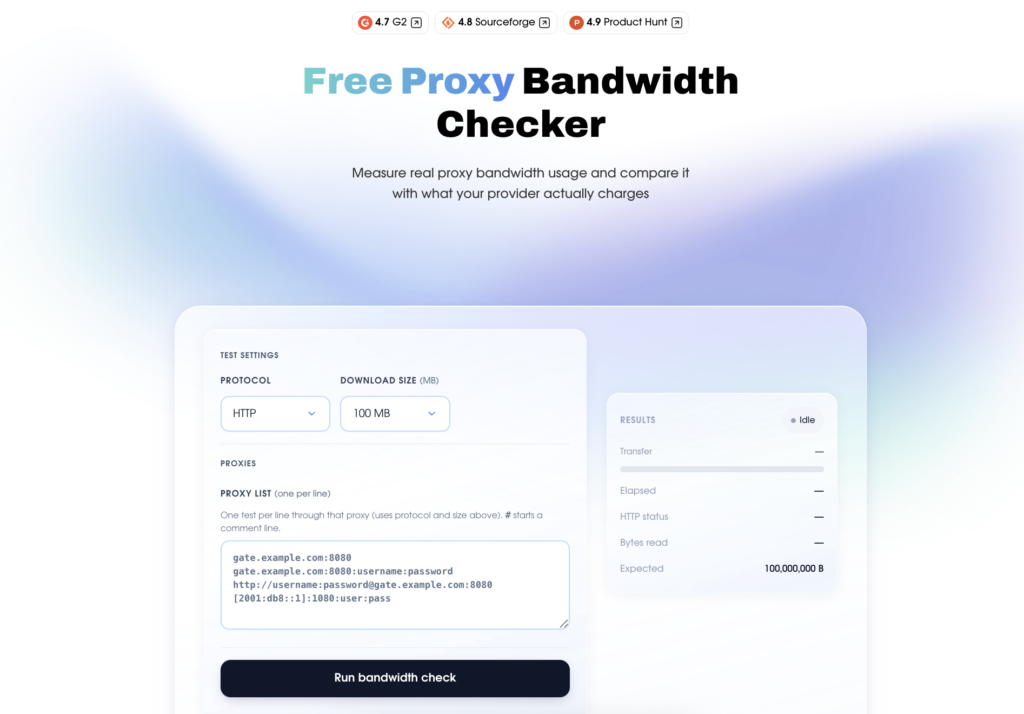
Это особенно важно для резидентские прокси, где трафик часто оплачивается по ГБ. Но оценки — это только первый шаг. Как только вы начнете тестирование, NodeMaven’s Проверка Трафика Бесплатного Прокси помогает измерить реальное использование трафика прокси и сравнить его с тем, что фактически взимает ваш поставщик.
Лучший подход прост: оценить, протестировать, проверить, а затем масштабировать.

Используйте чистые, предварительно отфильтрованные прокси-серверы для следующего тестирования сценария. Начните с 750 МБ за $3.50.
Что такое прокси-каналы и прокси-трафик?
Трафик прокси это общий объем данных, отправленных и полученных через ваше прокси-соединение.
Простыми словами, каждый раз, когда ваш инструмент загружает страницу, отправляет запрос, скачивает изображение, получает ответ API, загружает файл или повторяет неудачную операцию, это увеличивает ваш трафик прокси.
Итак, сколько трафика потребляет прокси-сервер?
Это зависит от того, что вы через него отправляете. Легкий API-запрос может использовать лишь небольшой объем данных, в то время как сессия браузера, загружающая полные страницы, изображения, скрипты и превью видео, может потребовать гораздо больше.
Трафик прокси
Трафик прокси может включать:
- HTML
- CSS
- JavaScript
- Изображения
- Шрифты
- Ответы API
- Предпросмотр видео
- Фоновые запросы браузера
- Загрузка и скачивание файлов
- Неудачные запросы и повторные попытки
Согласно современные эталонные показатели веса страниц, в 2025 году медианная стоимость дома составляла около 2,9 МБ на рабочем столе и 2,6 МБ на мобильном. Внутренние страницы были легче, но всё же измерялись в мегабайтах, а не в килобайтах. Современная веб-страница — это не просто один HTML-файл. Именно поэтому трафик прокси может оказаться выше ожидаемого.
Для пользователей прокси это означает, что один “посещение страницы” редко представляет собой всего один запрос. Если ваш скрейпер, инструмент автоматизации браузера или сценарий учетной записи загружает полные веб-страницы, каждое действие может использовать несколько мегабайт трафика еще до учета повторных попыток или дополнительных фоновых запросов.
Как оценить трафик прокси перед покупкой
Перед покупкой трафика резидентских прокси оцените, сколько пропускной способности может потребоваться вашему сценарию.
Простая калькулятор трафика подход помогает вам отвечать на вопросы вроде:
- Сколько трафика мне нужно?
- С какого количества ГБ мне следует начать?
- 5 ГБ будет достаточно для тестирования?
- Сколько трафика прокси-сервера будет использовать мой скрепер?
- Какой трафик мне нужен для нескольких учетных записей или автоматизированных сценариев?
Формула простого калькулятора трафика прокси
Для расчета использования трафика начните с этой формулы:
Месячный трафик прокси = средние данные на действие × действия в день × активные дни
Например, если одна загрузка страницы использует 3 МБ и ваш сценарий открывается 2000 страниц в день:
3 МБ × 2 000 = 6 000 МБ/день
6 000 МБ ÷ 1 024 = примерно 5,9 ГБ/день
5,9 ГБ × 30 = примерно 177 ГБ/месяц
Реальное использование может меняться из-за JavaScript, изображений, фоновых запросов, рендеринга браузера, неудачных загрузок и повторных попыток. Вот почему расчет использования трафика всегда включай буфер.
Добавьте запас к вашей оценке трафика
Прокси-сценарии редко используют одинаковое количество трафика каждый день. Страницы меняются, скрипты загружаются по-разному, аккаунты ведут себя по-разному, и инструменты автоматизации могут повторять неудавшиеся запросы.
Представьте себе оценку трафика вашего прокси как бюджет производительностиВы устанавливаете реалистичный предел для количества страниц, объема запросов и общего трафика, а затем корректируете его, увидев реальное использование.
| Сценарий | Предлагаемый буфер |
| API-скрейпинг | +10–20% |
| Стандартный веб-скрейпинг | +20–30% |
| Автоматизация браузера | +30–50% |
| Многопользовательские сценарии | +30–50% |
| Сценарии в социальных сетях | +50% и более |
| ИИ-агенты | +50% и более |
| Тестирование видео или медиа | Тестируйте сначала, потом масштабируйте |
Например, если ваша оценка — 100 ГБ/месяц для автоматизации браузера, более безопасной отправной точкой будет 130–150 ГБ/месяц.
Для менее предсказуемых сценариев, таких как ИИ-агенты или автоматизация социальных сетей, начните с небольшого теста, измерьте реальный трафик, и масштаб только после того, как вы поймете, сколько трафика на самом деле потребляет ваша установка.
Если не уверены, сначала NodeMaven Пробная версия объемом 750 МБ для $3.50. Запустите реальный сценарий, проверьте, сколько трафика он использует, а затем масштабируйтесь с помощью PAYG или ежемесячного плана.
Резидентские прокси NodeMaven используют ценообразование на основе ГБ, с оплатой по мере использования и ежемесячными подписками, начиная с $2.20/GB, поэтому вы можете начать с малого и расти, опираясь на фактическое использование, а не на догадки.
Используйте чистые, предварительно отфильтрованные прокси с коэффициентом успешности 99,61% для вашего следующего тестирования сценария. Начните с 750 МБ за 1,43 доллара.
Сколько трафика мне нужно для прокси? Оценки по сценариям
Объем трафика прокси, который вам понадобится, зависит от сценария.
Легковесный скрейпер, отправляющий простые HTTP-запросы, может потребовать всего несколько гигабайт в месяц. Сценарий на основе браузера, который загружает полные страницы, панели мониторинга, медиафайлы и фоновые запросы, может потребовать гораздо больше.
Используйте эту таблицу в качестве отправной точки при запросе, “сколько трафика мне нужно для прокси?”
| Пример использования | Легкое использование | Среднее использование | Активное использование |
| API-скрейпинг | 1–10 ГБ/месяц | 10–50 ГБ/месяц | 50 ГБ+/месяц |
| Браузерный скрейпинг | 10–50 ГБ/месяц | 50–300 ГБ/месяц | 300 ГБ+/месяц |
| Мониторинг цен | 5–30 ГБ/месяц | 30–200 ГБ/месяц | 200 ГБ+/месяц |
| Отслеживание позиций в поисковой выдаче | 3–20 ГБ/месяц | 20–100 ГБ/месяц | 100 ГБ+/месяц |
| Управление несколькими учётными записями | 10–50 ГБ/месяц | 50–300 ГБ/месяц | 300 ГБ+/месяц |
| Сценарии в социальных сетях | 20–100 ГБ/месяц | 100–500 ГБ/месяц | 500 ГБ+/месяц |
| ИИ-агенты и автоматизация | 10–100 ГБ/месяц | 100–500 ГБ/месяц | 500 ГБ+/месяц |
| Тестирование видео или медиа | 100 ГБ+/месяц | 500 ГБ+/месяц | 1 ТБ+/месяц |
Это плановые диапазоны, а не твердые обещания.
Реальный объем трафика через прокси зависит от размера страницы, загрузки ресурсов, повторных попыток, медиафайлов, рендеринга браузера, продолжительности сессии и поведения вашего инструмента. Скрапер, блокирующий изображения, может потреблять гораздо меньше трафика, чем система автоматизации браузера, которая загружает полные страницы.
Сценарий в социальных сетях, который открывает ленты, истории и предпросмотры видео, может использовать гораздо больше, чем простую проверку входа. Используйте таблицу, чтобы выбрать начальную оценку, а затем протестируйте свою реальную конфигурацию перед масштабированием.
Мониторинг цен и исследование рынка
Мониторинг цен и исследование рынка обычно легче оценить, поскольку сценарий повторяет аналогичные проверки.
Используйте эту формулу:
Страницы × средний размер страницы × проверки в день × дни
Пример:
1000 страниц товаров × 2,5 МБ × 4 проверки/день = 10 000 МБ/день
Это примерно 9.8 ГБ/день или 294 ГБ/месяц.
Перед масштабированием с поставщиком услуг используйте NodeMaven. Проверка Трафика Бесплатного Прокси для проведения контролируемого теста и сравнения фактического потребления с данными, сообщаемыми вашим поставщиком.
Трафик при управлении несколькими учетными записями
Многопользовательские сценарии часто используют больше трафика, чем ожидалось, поскольку профили браузера загружают панели мониторинга, сообщения, уведомления, мультимедиа, страницы аналитики и фоновые запросы.
Простой способ оценить использование — рассчитать трафик на учетную запись.
Если одна сессия аккаунта использует 100 МБ/день:
50 аккаунтов = 5 ГБ/день
30 дней = около 150 ГБ/месяц
Для сценариев учетной записи важна не только пропускная способность. Стабильность сессии также влияет на использование. Если сценарий завершается неудачно и повторяет вход в систему или перезагружает панели, это может привести к лишнему трафику.
NodeMaven резидентские прокси предварительно отфильтрованы по качеству и поддерживают стабильные сессии, включая длительные "липкие" сессии, что помогает сократить ненужные перезапуски для сценариев, основанных на учетных записях.
Прокси-трафик социальных сетей
Сценарии в социальных сетях обычно более требовательны к трафику, чем базовый скрейпинг.
Ленты, изображения, истории, ролики, элементы профиля, комментарии, реклама и панели аналитики могут быстро увеличить трафик прокси. Поэтому сценарии в социальных сетях обычно требуют большего буфера, чем скрейпинг текстов.
| Активность в социальных сетях | Предполагаемое использование |
| Проверка светового профиля | 20–50 МБ/учетная запись/день |
| Регулярная работа с аккаунтом (общение в чатах, ответы на комментарии и т. д.) | 50–150 МБ/аккаунт/день |
| Активный просмотр медиа (проверка медиа, загрузка/скачивание медиа и т. д.) | 150МБ+/аккаунт/день |
Пример:
100 аккаунтов × 75 МБ/день = 7,5 ГБ/день
Месячное использование ≈ 225 ГБ/месяц
Сценарии в социальных сетях обычно требуют большей пропускной способности, чем обычный скрейпинг, потому что они загружают ленты, изображения, истории, рилс, рекламу, ресурсы профилей и панели аналитики. Отраслевые отчеты о трафике показывают, что видео доминирует в интернет-трафике, именно поэтому прокси-сценарии, включающие предварительный просмотр видео или мультимедиа, требуют большего буфера трафика.
Используйте чистые, предварительно отфильтрованные прокси с коэффициентом успешности 99,61% для вашего следующего тестирования сценария. Начните с 750 МБ за 1,43 доллара.
ИИ-агенты и трафик веб-автоматизации
ИИ-агентов сложнее предсказать, потому что они не всегда следуют одному и тому же пути.
Одна задача может открыть три страницы. Другая может открыть двадцать страниц, прокрутить, повторить попытку, сделать скриншоты, отправить формы или загрузить динамический контент. Это делает Прокси ИИ-агента трафик менее предсказуем, чем у статического скрапера.
| Сценарий ИИ-агента | Предполагаемое использование |
| Простой поиск в интернете | 10–30 МБ/сессия |
| Многошаговая задача в браузере | 30–100 МБ/сессия |
| Сценарий агента, ориентированного на исследования | 100МБ+/сессия |
Пример:
1000 сессий просмотра ИИ в месяц × 50 МБ = примерно 50 ГБ/месяц.
Для ИИ-агентов и автоматизация браузера, сначала используйте калькулятор использования полосы пропускания для оценки, а затем протестируйте реальное использование в вашем сценарии. Резидентские прокси NodeMaven отлично подходят для ИИ-агентов, автоматизации, веб-скрейпинга и маркетинговых исследований, поскольку они сочетают в себе предварительно отфильтрованные чистые IP-адреса, контроль сессий и гибкое таргетирование.
Видео, потоковое вещание и трафик для игр
Тестирование видео и медиа должно рассчитываться по времени просмотра, а не только по количеству открытых страниц.
Например, Руководство по потреблению данных Netflix списки до 1 ГБ/час для SD, 3 ГБ/час для HD, и 7 ГБ/час для 4K. Именно поэтому сценарии с большим количеством видеофайлов могут очень быстро переходить от нескольких гигабайт к сотням гигабайт.
Если ваш сценарий с использованием прокси включает предварительный просмотр видео, проверку потоковой передачи, ролики, истории или тестирование мультимедиа, начните с небольшого теста. Измерьте фактическое использование, затем масштабируйте.
Для ресурсоемких медиа-сценариев, ISP прокси-серверы с неограниченным трафиком и высокоскоростными соединениями могут быть более подходящим вариантом, чем резидентские прокси из Великобритании. Они особенно полезны, когда вам нужны стабильные, долговременные сессии и предсказуемые расходы на трафик.
Игровой трафик
Игры отличаются от большинства прокси-процессов.
Когда пользователи спрашивают “сколько трафика мне нужно для игр” ответ не только в ГБ. задержка, пинг, стабильность соединения и скорость обычно важнее, чем просто ежемесячный трафик.
Резидентские прокси, как правило, лучше подходят для бизнес-процессов, таких как скрейпинг, автоматизация, исследование рынка и управление учетными записями.
Для сценариев, связанных с играми, где важна скорость и непрерывный трафик, ISP прокси может быть лучшим вариантом. Прокси NodeMaven ISP включают неограниченный трафик, статические IP-адреса и высокую производительность., что делает их более подходящими для высокоскоростных, постоянно активных подключений, чем тарифы с прокси на основе ГБ.
Как измерить использование трафика прокси Перед масштабированием
Оценка трафика прокси полезна, но реальное использование может отличаться, когда ваш сценарий начнет работать.
Чтобы измерить фактическое использование, вы можете проверить трафик на уровне браузера, экспортировать сетевые журналы или провести контролируемый тест пропускной способности через прокси. Это поможет вам понять, сколько данных проходит через прокси и точно ли ваш поставщик сообщает об использовании.
Используйте сетевые логи браузера для использования на уровне страницы
Для браузерных сценариев, Сеть панели разработчика Chrome является одним из самых простых способов проверки трафика прокси на уровне страниц.
Это полезно, когда вы хотите увидеть, почему одна страница потребляет больше трафика, чем ожидалось. Например, страница продукта может выглядеть просто, но панель "Сеть" может показать большие изображения, скрипты, запросы отслеживания или предварительный просмотр видео, загружающиеся в фоновом режиме.
Экспортировать HAR-файлы для дальнейших проверок
Для более глубокого тестирования вы можете экспортировать HAR-файлы из вашего браузера.
Файлы HAR записывают HTTP-транзакции во время загрузки страницы, включая запросы, ответы, время и данные о размере ресурсов. Это делает их полезными, когда вам нужно более внимательно изучить трафик прокси-сервера или сравнить несколько страниц.
Вы можете использовать HAR-файлы для проверки:
- Какие запросы использовали больше всего трафика
- Увеличивают ли изображения или скрипты трафик
- Сколько фоновых запросов было загружено
- Были ли неудачные запросы причиной дополнительных повторных попыток
- Сколько данных было передано за одну сессию браузера
Это полезно для отладки автоматизации браузера, сценариев сбора данных и сессий аккаунтов, где использование трафика кажется выше ожидаемого.
Используйте бесплатную проверку трафика прокси от NodeMaven для сравнения поставщиков.
Браузерные журналы показывают использование на уровне страницы. NodeMaven's Проверка Трафика Бесплатного Прокси предоставляет вам контролируемый тест через ваш прокси-туннель.
Используйте это, когда хотите сравнить:
- Измеренный размер полезной нагрузки
- Реально переданные байты
- Потребление трафика, о котором сообщил поставщик
Инструмент работает, передавая поток данных фиксированного размера через ваш прокси. Вы можете выбрать размер теста из 1 МБ — 500 МБ, затем сравните измеренный результат с тем, что сообщает ваш провайдер за ту же сессию.
Это особенно полезно перед покупкой более крупного плана у любого поставщика. Если вы протестируете полезную нагрузку в 100 МБ, но ваш поставщик сообщит о заметно более высоком использовании, вы сможете изучить разницу, прежде чем масштабировать свой сценарий с конкретным поставщиком.
NodeMaven создал этот инструмент, потому что трафик должен быть прозрачным. С NodeMaven резидентские прокси, вы получаете четкую отчетность о трафике, статистику использования в реальном времени и честная зарядка из Великобритании, так вы сможете с большей уверенностью планировать расходы на прокси, а не гадать, куда ушел ваш трафик.
Как сократить использование прокси-трафика
После того как вы рассчитаете использование пропускной способности, найдите трафик, который можно удалить без ущерба для сценария.
Небольшие изменения могут значительно сэкономить трафик прокси, особенно в сценариях скрейпинга, автоматизации и многоаккаунтных установок.
Блокировать активы, которые вам не нужны
Если вашему парсеру нужны только текст, цены или данные о товарах, не загружайте все содержимое страницы.
Вы часто можете уменьшить трафик, блокируя:
- Изображения
- Шрифты
- Видео
- Реклама
- Сторонние скрипты
Это особенно полезно при больших объемах скрейпинга, когда каждый лишний мегабайт умножается на тысячи страниц.
Используйте легковесные HTTP-запросы, где это возможно
Автоматизация браузера потребляет больше трафика, поскольку загружает скрипты, изображения, шрифты и фоновые запросы.
Если ваш сценарий не требует полнофункционального браузера, вместо этого используйте легковесные HTTP-запросы или запросы к API. Это, как правило, быстрее, дешевле и проще в оценке.
Снизить количество повторных попыток с чистыми IP-адресами
Повторные попытки тратят трафик. Если страница дает сбой, а ваш инструмент перезагружает ее несколько раз, объем трафика через ваш прокси растет, без получения дополнительных результатов.
NodeMaven использует чистые, предварительно отфильтрованные IP-адреса и стабильные сессии, чтобы помочь сократить количество неудачных запросов, повторных входов и ненужных перезагрузок.
Используйте липкие сессии для сценариев учетной записи
При управлении учетными записями, панелями мониторинга, формами и автоматизации браузера слишком частая ротация может привести к перезапуску сессий.
Sticky sessions помогают сохранять ту же самую IP-адрес активным в течение сценария, поэтому вы не тратите трафик на повторение одних и тех же шагов.
Отслеживать использование с помощью статистики в реальном времени
Монитор трафика прокси помогает сравнивать оценки с реальным использованием.
NodeMaven резидентский и мобильные прокси. включайте живую статистику, чтобы видеть, сколько трафика прокси фактически использует ваш сценарий, и иметь возможность корректировать его перед масштабированием.
Используйте чистые, предварительно отфильтрованные прокси с коэффициентом успешности 99,61% для вашего следующего тестирования сценария. Начните с 750 МБ за 1,43 доллара.
Почему нужно использовать NodeMaven в качестве поставщика прокси-трафика
Оценка пропускной способности полезна, но она не говорит обо всем. Вам также нужно знать, справедливо ли учитывается ваш трафик прокси, и не тратит ли ваша настройка пропускную способность впустую на повторные попытки, неудачные сессии или плохие IP-адреса.
Бесплатная проверка пропускной способности прокси для честных проверок трафика
Ваша цена за гигабайт имеет значение только в том случае, если гигабайты подсчитаны справедливо.
NodeMaven Проверка Трафика Бесплатного Прокси позволяет вам провести тест фиксированного размера через ваш прокси и сравнить измеренный результат с тем, что сообщает ваш поставщик. Это простой способ проверить, соответствует ли пропускная способность, за которую вам выставлен счет, трафику, который фактически прошел через прокси.
Чистые резидентские прокси, которые сокращают ненужные повторные попытки
Низкокачественные IP-адреса могут заставить инструменты повторно загружать ту же страницу, перезагружать сессии или повторять входы. Этот трафик все равно учитывается.
Резидентские прокси NodeMaven используют чистые, предварительно отфильтрованные IP-адреса и стабильные сессии, чтобы помочь сократить ненужные повторные попытки. Для таких сценариев, как скрейпинг, автоматизации, ИИ-агентов и управления учетными записями, что упрощает прогнозирование использования трафика.
Живая статистика для сравнения оценок с реальным использованием
Формула дает вам отправную точку. Реальное использование показывает, что на самом деле делает ваш сценарий.
Благодаря статистике NodeMaven в реальном времени вы можете проверить, сколько прокси-трафика использует ваша установка во время тестирования, и скорректировать его перед переходом на более крупный план.
Перенос трафика для экономии неиспользованных ГБ
Если ваша оценка выше фактического использования, перенос трафика помогает сократить потери.
С NodeMaven неиспользованный трафик переносится на следующий расчетный период, поэтому вам не придется принудительно использовать его, чтобы не потерять.
Резидентские и мобильные прокси в одном тарифе
Различные сценарии потребляют пропускную способность по-разному. Веб-скрейпинг, задачи, ориентированные на мобильные устройства, сценарии в социальных сетях и сессии учетных записей будут использовать трафик не одинаково.
NodeMaven включает резидентские и мобильные прокси в один план, так что вы можете тестировать различные настройки, не покупая отдельный доступ для каждого типа прокси.
Гарантия качества для дополнительной уверенности
Трафик имеет ценность только тогда, когда прокси-серверы, которые его используют, работают хорошо.
NodeMaven Гарантия качества добавляет еще один уровень защиты вашего бюджета. В случае подтвержденных проблем с качеством прокси, соответствующие случаи компенсируются в соответствии с политикой NodeMaven. Это помогает уменьшить убытки, вызванные низким качеством IP-адресов, и повышает вашу уверенность при тестировании или масштабировании сценариев.
Кэшбэк, который добавляет ценности использованному трафику
NodeMaven также предлагает кэшбэк для пользователей резидентских и мобильных прокси.
Это означает, что постоянное использование может принести дополнительную ценность вашему аккаунту в виде бонусного трафика. Для команд, регулярно занимающихся скрейпингом, автоматизацией, маркетинговыми исследованиями или многоаккаунтными сценариями, кэшбэк помогает повысить экономическую эффективность с течением времени.
Используйте чистые, предварительно отфильтрованные прокси с коэффициентом успешности 99,61% для вашего следующего тестирования сценария. Начните с 750 МБ за 1,43 доллара.


