Руководство по ротации прокси: когда использовать ротационные и «липкие» прокси



Прокси-ротация звучит просто: периодически меняйте IP-адрес и продолжайте работать.
На практике, то, как вы переключаете прокси, может сделать или сломать сценарий. Переключайтесь слишком часто, и вы можете прервать вход в систему, корзины, сессии или активность учетной записи. Держите один и тот же IP-адрес слишком долго, и задачи с большим объемом могут стать медленнее, менее эффективными или легче подвергаться ограничениям.
Вот почему выбор между ротационные прокси и липкие прокси вопросы.
Это руководство объясняет, как работает ротация прокси, когда использовать ротационные и «липкие» сессии, а также как выбрать правильную настройку для скрейпинга, автоматизации, исследования рынка, управления несколькими учетными записями и других бизнес-сценариев.

Хотите использовать как ротационные, так и «липкие» сессии в рамках одной настройки? Попробуйте резидентские и мобильные прокси NodeMaven для $3.50 и получите 750 МБ трафика
Что такое ротация прокси?
Вращение прокси это процесс смены IP-адреса прокси-сервера, используемого для вашего подключения.
Вместо того чтобы отправлять каждый запрос через один и тот же IP-адрес, прокси-сеть может автоматически назначать новый IP-адрес. В зависимости от вашей конфигурации это может происходить:
- При каждом запросе
- По истечении фиксированного периода времени
- Когда вы вручную измените идентификатор сессии
- Когда сессия истекает
- Когда ваш инструмент переподключится к шлюзу прокси
Цель не просто “сменить IP”. Цель — соответствие поведения IP-адреса задаче.
Например, веб-скрейпинг рабочий процесс может требовать частой ротации для сбора данных в больших масштабах. Рабочий процесс управления аккаунтами может требовать обратного: стабильного IP, который дольше остаётся неизменным.
Вот где полезны ротационные и прилипающие сессии.
Что такое ротационные прокси?
Ротационные прокси автоматически менять IP-адрес, используемый вашим соединением.
С ротационными прокси, вам не нужно вручную заменять учетные данные прокси каждый раз, когда вам нужен новый IP-адрес. Поставщик прокси-серверов назначает IP-адреса через прокси-шлюз, и ваши запросы маршрутизируются через различные IP-адреса в соответствии с вашими настройками ротации.
Ротационные прокси обычно используются, когда масштабируемость важнее сохранения одной фиксированной личности.
Они полезны для таких задач, как:
- Веб-скрейпинг
- Мониторинг цен
- Отслеживание позиций в поисковой выдаче
- Маркетинговые исследования
- Верификация рекламы
- Агрегация данных
- Автоматизированное тестирование
- Сценарии веб-скрейпинга с использованием ИИ
Для этих задач использование одного статического IP-адреса для каждого запроса может создать ненужные трудности. Ротация помогает распределить активность по более широкому пулу и делает крупные сценарии более стабильными.
Что такое "липкие" прокси?
Sticky-прокси держать один и тот же IP-адрес в течение более длительного периода.
Вместо смены IP-адресов при каждом запросе вы создаете сессию, которая удерживает один IP-адрес в течение установленного времени. Это может быть несколько минут, несколько часов или дольше, в зависимости от провайдера и типа прокси. С NodeMaven вы резидентские прокси‘Сессии могут длиться до 24 часов.
Sticky sessions полезны, когда веб-сайт или приложение ожидают стабильного поведения пользователя.
Например, если вы входите в систему с одного IP-адреса, просматриваете с другого и выполняете действие с третьего, сессия может выглядеть непоследовательной. "Sticky" прокси избегает этого, сохраняя тот же IP-адрес во время сценария.
Липкие прокси часто лучше для:
- Управление несколькими учётными записями
- Сценарии на основе входа в систему
- Сессии браузера
- Корзина и процесс оформления заказа
- Управление социальными сетями
- Прогрев аккаунта
- Длительные последовательности автоматизации
- Любая задача, где важна стабильность сессии
Ротационные прокси лучше подходят для повторяющихся запросов в больших масштабах. Липкие прокси лучше подходят для входов в систему, учетных записей и сценариев, где IP-адрес должен оставаться постоянным.
Ротационные прокси против «липких» прокси: в чем разница?
Основное отличие заключается в том, как долго IP-адрес остается активным.
Ротационные прокси автоматически меняют IP-адреса. Стики-прокси сохраняют один IP-адрес для более длительной сессии.
| Настройка | Как это работает | Лучшее для |
| Ротационные прокси | IP автоматически изменяется в зависимости от запроса, времени или пользовательских правил сессии | Скрейпинг, мониторинг, тестирование, сбор данных |
| Sticky-прокси | Один и тот же IP-адрес остается активным в течение более длительного периода | Управление учетными записями, входы в систему, сессии просмотра, автоматизация |
Ни один из вариантов не лучше другого. Правильный выбор зависит от того, что вы делаете.
Когда использовать ротационные прокси
Используйте ротационные прокси, когда ваш сценарий отправляет множество запросов и не требует сохранения одного и того же IP-адреса для каждого шага.
Это обычное явление при выполнении задач, связанных с большим объемом данных, где важны скорость, охват и распределение IP-адресов.
Веб-скрейпинг
Для скрейпинга, вращение обычно является выбором по умолчанию.
Парсеру может потребоваться собрать данные с сотен или тысяч страниц. Отправка всех запросов через один IP-адрес обычно замедляет сценарий или вызывает ошибки. Ротационные резидентские прокси помогает распределять запросы по нескольким чистым IP-адресам, что делает процесс более надежным в масштабе.
Это особенно полезно для:
- Скрейпинг данных о товарах
- Мониторинг общедоступных веб-сайтов
- Сбор результатов поиска
- Отслеживание цен на путешествия
- Мониторинг отзывов
- Исследование рынка
Мониторинг цен
Мониторинг цен часто требует многократных проверок в разных местах, на разных страницах и в разных категориях товаров.
Ротационные прокси помогают избежать зависимости от одного IP-адреса для всех проверок. Это полезно, когда вам требуется более широкий охват, более стабильный сбор данных и локализованные результаты.
Например, команда электронной коммерции может отслеживать цены на товары в разных городах или странах. С помощью ротации и геотаргетинга команда может собирайте больше релевантных данных без ручного переключения настроек прокси.
SEO и отслеживание SERP
Результаты поиска могут отличаться в зависимости от местоположения, типа устройства и среды просмотра.
Ротационные прокси помогают SEO-командам собирать данные SERP из разных регионов без зависимости от одного повторяющегося соединения. Это делает отслеживание рангов, исследование ключевых слов и мониторинг конкурентов более точными.
Для этого варианта использования качество прокси имеет большое значение. IP-адреса низкого качества могут возвращать ошибки, неполные результаты или приводить к необычному поведению при поиске. Мобильные и резидентские прокси NodeMaven проходят через фильтр качества IP-адресов, обеспечивая только высококачественное соединение.
Верификация рекламы
Проверка рекламы часто требует проверки того, как она отображается в различных местах, на разных устройствах и в различных средах.
Ротационные прокси помогают командам просматривать размещения из разных регионов на таких платформах, как Google, и снизить риск просмотра результатов с одной узкой перспективы сети.
Это полезно для проверки:
- Видимость локальной рекламы
- Поведение целевой страницы
- Доставка кампании
- Реклама конкурентов
- Региональные различия
Маркетинговые исследования
Командам, занимающимся маркетинговыми исследованиями, часто требуются общедоступные данные из множества источников.
Ротационные прокси помогают собирать эти данные более последовательно, особенно когда исследование включает несколько стран, категорий продуктов, торговых площадок или конкурентов. Например, для исследования рынка многие пользователи используют Амазон прокси в их сценарии.
В данном случае преимущество заключается не только во вращении IP-адресов. Это комбинация вращения, чистых IP-адресов и точного геотаргетинга.
Хотите использовать как ротационные, так и «липкие» сессии в рамках одной настройки? Попробуйте резидентские и мобильные прокси NodeMaven для $3.50 и получите 750 МБ трафика
Когда использовать «липкие» прокси
Используйте «липкие» прокси, когда ваш сценарий требует сохранения активности одного и того же IP-адреса от начала до конца.
Если задача включает вход в систему, просмотр внутри учетной записи, поддержание активной корзины или длительную сессию в браузере, слишком частая смена IP-адресов может прервать процесс. В таких случаях стабильные сессии важнее частой ротации.
С NodeMaven "липкие сессии" помогают сохранять постоянный IP-адрес до 24 часов, используя чистые, предварительно отфильтрованные резидентские IP-адреса. Это полезно, когда вам нужен высокий уровень доверия и стабильная производительность, а не постоянная смена IP-адресов.
Управление несколькими учётными записями
Многопользовательские сценарии обычно требуют стабильных сессий.
Если каждый аккаунт постоянно меняет IP-адреса, платформы могут расценить такую активность как необычную. «Липкие» прокси помогают каждому профилю браузера или аккаунту сохранять более стабильную сетевую идентичность во время сессии.
Это особенно полезно для команд, которые управляют:
- Аккаунты в социальных сетях
- Аккаунты маркетплейса
- Рекламные аккаунты
- Учетные записи электронной почты, такие как Gmail
- Профили клиентов
- Региональные бизнес-профили
NodeMaven разработан с учетом надежности в больших масштабах, поэтому вы можете сочетать «липкие» сессии с чистыми IP-адресами, точное геотаргетинг и статистику в реальном времени. Вместо того чтобы просто вращать как можно больше IP-адресов, вы можете обеспечить каждому аккаунту более стабильную настройку и отслеживать производительность вашего прокси-трафика.
Сценарии на основе входа в систему
Любой сценарий, начинающийся со входа в систему, обычно выигрывает от "липких сессий".
Когда вы входите в систему, платформа часто ожидает, что ваша сессия останется стабильной. Если IP-адрес внезапно изменится во время той же сессии, вы можете столкнуться с дополнительными проверками, ошибками или перебоями.
Стикер-прокси снижают этот риск, сохраняя тот же IP-адрес во время выполнения задачи.
Автоматизация браузера
Автоматизация браузера часто включает несколько этапов:
- Открыть страницу
- Загрузить активы
- Войти
- Перелистывать страницы
- Отправить форму или выполнить действие
Если IP-адрес изменится на полпути, сценарий может завершиться с ошибкой.
Sticky sessions делают автоматизацию браузера более предсказуемой, поскольку соединение остается стабильным во время выполнения автоматизации.
NodeMaven поддерживает sticky sessions вместе с HTTPS и SOCKS5, что упрощает подключение прокси к браузерам, антидетект-браузерам, инструментам автоматизации и настройкам для скрейпинга. Вы также можете использовать режимы фильтрации Quality и Speed для приоритизации более чистых или быстрых IP-адресов в зависимости от сценария.
Корзина, оформление заказа и сценарии форм
Некоторые сценарии зависят от непрерывности сессии.
Например, для покупателя лимитированных кроссовок внезапное изменение IP-адреса может нарушить процесс, когда он добавляет товар в корзину, заполняет данные и проходит несколько этапов оформления заказа.
То же самое применимо к покупке билетов, заполнению длинных форм, личных кабинетов, сценариев бронирования или любому процессу, где веб-сайт поддерживает активные данные сессии.
Липкие прокси — лучший вариант, поскольку они помогают сохранить стабильность сессии до завершения задачи.
С NodeMaven эта стабильность обеспечивается чистыми IP-адресами, длительными сессиями связи до 24 часов и Гарантия качества. Если ваш сценарий зависит от меньшего количества прерываний и более стабильной производительности, "липкие сессии" (sticky sessions) обычно являются лучшим выбором, чем агрессивная ротация.
Хотите использовать как ротационные, так и «липкие» сессии в рамках одной настройки? Попробуйте резидентские и мобильные прокси NodeMaven для $3.50 и получите 750 МБ трафика
Как настроить ротацию прокси в NodeMaven
Шаг 1: Выберите тип вашего прокси
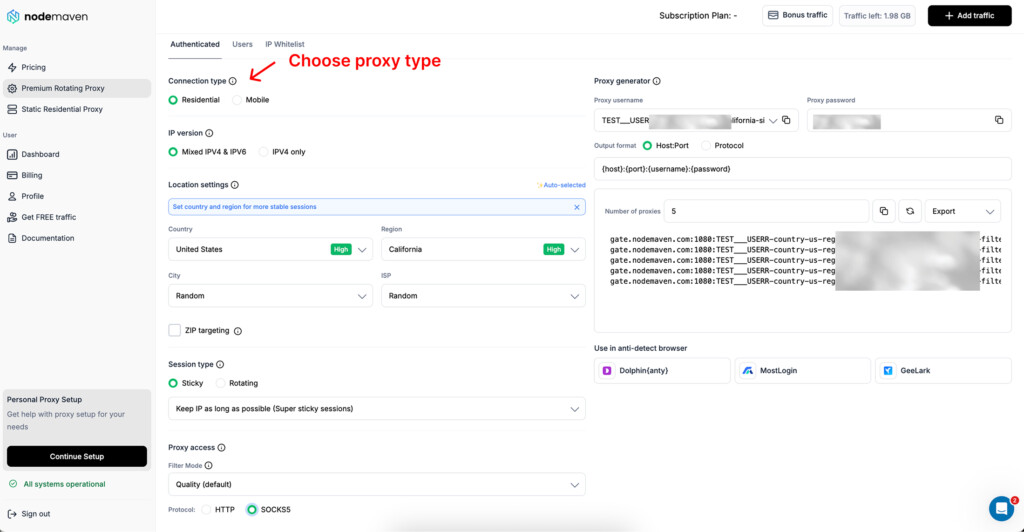
Начните с выбора типа прокси, который подходит для вашей задачи, в Личный кабинет.
Для большинства сценариев ротации прокси, резидентские прокси являются наиболее гибким вариантом. Они поддерживают крупномасштабное вращение, «липкие» сессии, точное геотаргетирование и различные режимы фильтрации.
Мобильные прокси может также пригодиться для мобильных сценариев, где важна работа IP-адресов мобильных устройств в реальных условиях.
Шаг 2: Выберите таргетинг на местоположение
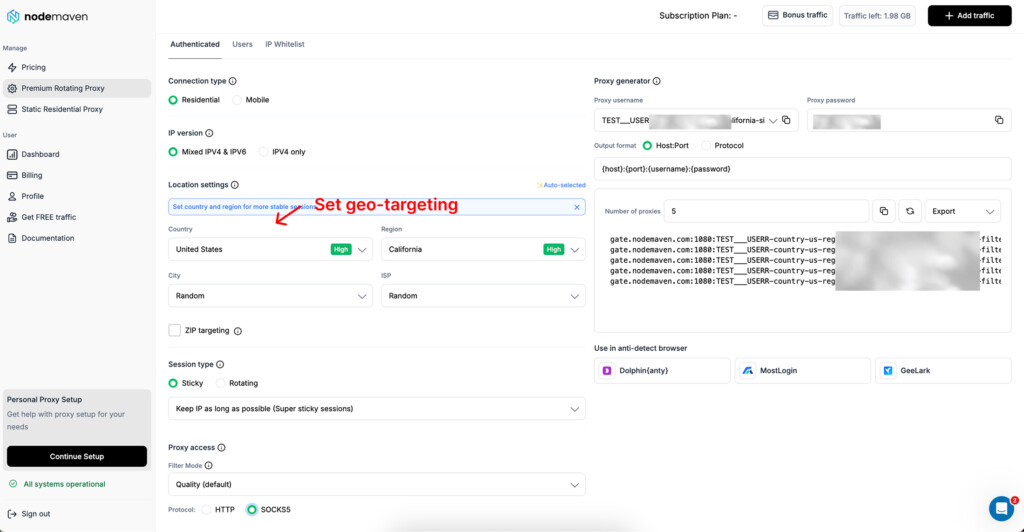
Перед установкой вращения выберите нужный вам объект.
Для некоторых сценариев достаточно таргетинга на уровне страны. Для других — города, ЗИП, или таргетинг на уровне интернет-провайдера может сделать результаты более точными.
Это важно для:
- Локальное SEO проверки
- Мониторинг цен
- Верификация рекламы
- Региональное тестирование
- Маркетинговые исследования
- Локализованные сценарии учетной записи
Чем более конкретен ваш сценарий, тем более важным становится таргетинг.
Шаг 3: Выберите тип сессии
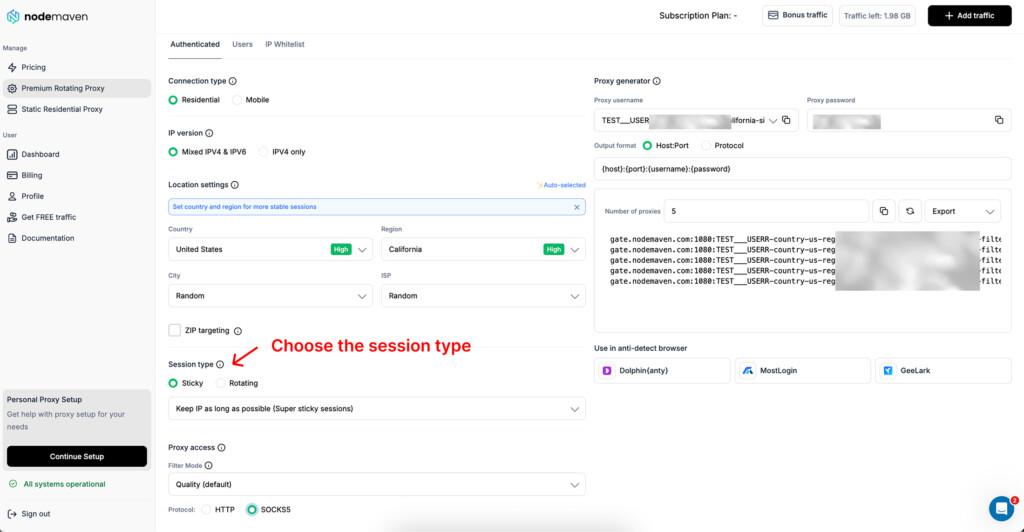
Далее, выберите, как часто должен меняться IP-адрес прокси.
В NodeMaven существует два основных типа сессий:
- Rotating: IP-адрес меняется с каждым запросом.
- Sticky: IP-адрес остается тем же для более длительной или пользовательской сессии.
Использование Rotating когда ваш сценарий требует частой смены IP-адресов. Это обычно лучший вариант для высокообъемного скрейпинга, мониторинга, сбора данных и других задач, основанных на запросах, где каждый запрос может использовать новый IP-адрес.
Использование Sticky когда вашему сценарию нужна стабильность сессии. Это лучше для входа в систему, управления учетными записями, автоматизации браузера, личных кабинетов, корзин, форм и любых задач, где смена IP-адресов в середине сессии может прервать процесс.
Простое правило:
- Выберите Rotating когда каждый запрос может использовать новый IP.
- Выберите Sticky когда одна и та же сессия должна оставаться стабильной в течение более длительного периода.
Вы также можете настроить режим фильтрации в зависимости от сценария. Для большинства задач, Качество или Качество + Скорость является самым безопасным выбором. Для интенсивного использования, когда доступ к большему пулу IP-адресов важнее строгой фильтрации, Максимальный размер пула может подойти лучше.
Шаг 4: Настройка поведения "липкой сессии"
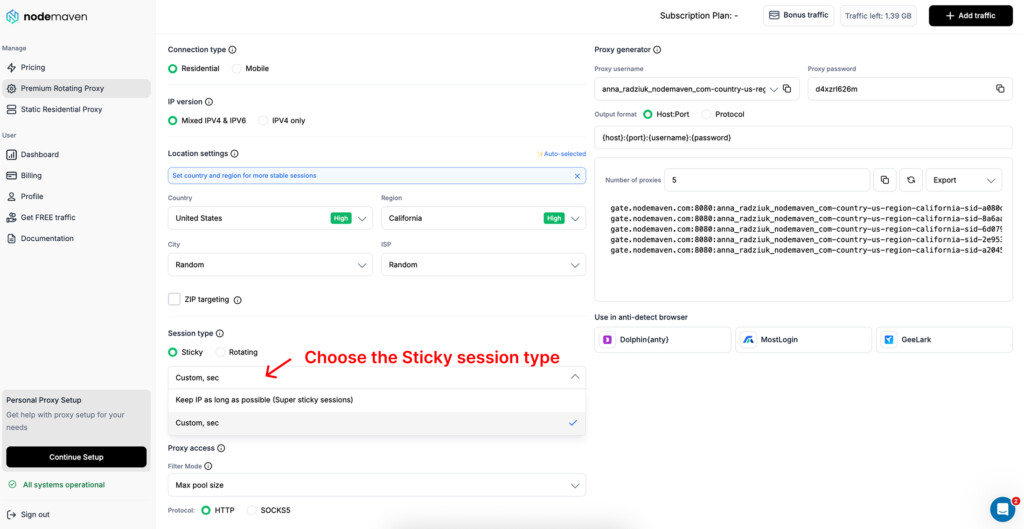
Если вы выберете Sticky, NodeMaven предоставляет вам два дополнительных варианта.
Первый вариант — Сохраняйте IP-адрес как можно дольше. Это указывает системе сохранять тот же IP-адрес, пока он доступен. Это полезно, когда ваш сценарий зависит от максимальной непрерывности, такой как управление учетными записями, покупка кроссовок, получение билетов, длительные сессии в браузере, личные кабинеты или многоэтапная автоматизация.
Второй вариант — пользовательская ротация по времени. Здесь вы определяете количество секунд до ротации IP. Это полезно, когда вам нужна стабильная сессия в течение определенного периода, но при этом требуется автоматическая ротация после каждого цикла сценария.
Например, если ваша автоматизация обычно занимает 20 минут, переключение при каждом запросе может нарушить сессию. Лучшей настройкой будет выбрать Sticky и установить пользовательское вращение для охвата всего времени сценария.
Практическая установка может выглядеть следующим образом:
- Короткая браузерная задачаЗалипает с пользовательским вращением через несколько минут.
- Сессия аккаунта: «Липкий», чтобы сохранять IP-адрес как можно дольше.
- Повторный цикл автоматизацииПрилипание с пользовательским вращением в зависимости от длины задачи.
- Масштабный скрейпингВращается с каждым запросом.
- Интенсивный сценарий ротации: Вращение в режиме фильтрации Max Pool Size.
Это дает вам больше контроля, чем просто случайное вращение. Вы можете решать, когда IP-адрес должен оставаться стабильным, а когда он должен меняться, в зависимости от того, как на самом деле работает сценарий.
Шаг 5: Скопируйте ваши учетные данные прокси
Предложить скриншот: Показать область учетных данных прокси.
Как только настройка будет готова, скопируйте ваши прокси-учетные данные и добавьте их в ваш инструмент.
Это может быть:
- Браузер
- Антидетект браузер
- Скребок
- Менеджер прокси
- Инструмент автоматизации
- Тестовая среда
Учетные данные прокси уже включают настройки сессии и таргетинга, поэтому соединение следует поведению, которое вы выбрали в личном кабинете.
Как часто следует ротировать прокси?
Нет универсального рекомендуемого интервала ротации. Правильная частота ротации зависит от сценария.
Для скрейпинга вы можете менять IP-адрес при каждом запросе. Для автоматизации вы можете менять IP-адрес после выполнения каждой задачи. При управлении аккаунтами вы можете использовать один и тот же IP-адрес часами или дольше.
Вот простой способ об этом подумать:
| Сценарий | Предполагаемое поведение при вращении |
| Масштабный скрейпинг | Поворачивать по каждому запросу |
| Мониторинг цен | Вращать по запросу, группе товаров или региону |
| Отслеживание SEO | Вращать по ключевому слову, местоположению или поисковой группе |
| Аккаунт-менеджмент | Используйте сессии sticky |
| Автоматизация браузера | Используйте сессии с сохранением, сохраняйте IP стабильным до завершения задачи |
| Маркетинговые исследования | Используйте ротацию с геотаргетингом |
| Верификация рекламы | Вращать по региону или тестовому сценарию |
Вход в систему нуждается в стабильности. Парсер нуждается в распределении. Локальный тест нуждается в правильной геолокации.
Распространенные ошибки при ротации прокси
Ротация прокси полезна, но неудачная настройка может создать больше проблем, чем решить.
Ошибка, которую допускают многие команды, заключается в том, что они рассматривают ротацию как простую функцию “менять IP-адреса как можно чаще”. В действительности, хорошая ротация прокси зависит от типа сессии, качества IP-адреса, таргетинга и самого сценария.
Вот самые распространенные ошибки, которых следует избегать.
- Вращение во время сессий входа
Изменение IP-адресов во время сессии входа в систему может нарушить сценарий.
Если задача включает вход в систему, загрузку личного кабинета, управление учетной записью, заполнение формы или выполнение нескольких шагов за одну сессию, вращение при каждом запросе обычно является неправильной настройкой.
Использование sticky сессии вместо.
С NodeMaven вы можете выбрать Sticky тип сессии и сохранять тот же IP активным дольше. Вы можете либо сохранять IP как можно дольше, либо настроить пользовательскую ротацию по секундам, в зависимости от того, сколько обычно занимает ваш сценарий.
Это помогает поддерживать стабильность сессии до завершения задачи.
- С использованием низкокачественных IP-адресов
Ротация не решает проблему низкого качества IP-адресов. Если в пуле имеются чрезмерно используемые, помеченные или нестабильные IP-адреса, их ротация не улучшит производительность. Это может просто привести к большему количеству неудачных запросов, сбоям в сессиях или несогласованным результатам.
NodeMaven построен на основе высокого качества IP-адресов. Фильтр качества IP помогает удалить IP-адреса низкого качества перед назначением, поэтому ваша настройка ротации начинается с более чистого пула, а не полагается только на объем.
Это имеет значение для скрейпинга, автоматизации, тестирования и сценариев с аккаунтами, где один плохой IP-адрес может замедлить весь процесс.
- Слишком часто вращается
Для задач, основанных на запросах, ротация с каждым запросом может иметь смысл. Для задач, основанных на браузере, сценариев учетных записей или длительных сессий, это может привести к ненужным прерываниям.
Используйте частое вращение только тогда, когда задача действительно в этом нуждается.
- Выбор неправильного режима фильтра
Настройки вращения — это лишь одна часть настройки.
Ваш режим фильтра NodeMaven также влияет на производительность.
Для большинства сценариев, Качество или Качество + Скорость является более безопасным выбором, так как он отдает приоритет более чистым и надежным IP-адресам. Это полезно, когда коэффициент успеха, стабильность сессии и стабильная производительность важнее, чем доступ к максимально возможному пулу.
Для сценариев с интенсивным использованием, Максимальный размер пула может быть полезным, поскольку дает доступ к большему количеству IP-адресов. Это может иметь смысл для масштабного веб-скрейпинга или сбора данных, когда объем имеет большее значение.
Ключ в том, чтобы подобрать режим фильтрации, соответствующий рабочей нагрузке:
- Качество: лучше для более чистых IP-адресов и стабильной производительности
- Качество + Скорость: лучше всего, когда вам нужны и чистые IP-адреса, и более быстрые ответы
- Скорость: лучше всего, когда скорость — главный приоритет
- Максимальный размер пула: лучше всего подходит для интенсивного использования и распределения запросов в больших масштабах
5. Игнорирование геотаргетинга
Если ваша задача зависит от местоположения, одной ротации прокси будет недостаточно.
Вам также необходима точная геотаргетинг. В противном случае IP-адрес может вращаться правильно, но результаты могут поступать из неправильной страны, города или от неправильного интернет-провайдера.
NodeMaven поддерживает точное таргетирование по стране, штату, городу, почтовому индексу и интернет-провайдеру для резидентских прокси. Это позволяет вам сочетать ротацию с точностью местоположения вместо того, чтобы рассматривать все изменения IP как равнозначные.
6. Использование одной и той же настройки для каждого сценария
Скрейпер, профиль браузера и автоматическая покупка билетов не требуют одинакового поведения прокси.
Каждый сценарий должен иметь собственную логику ротации.
Например:
- Скреперу может понадобиться Rotating с Максимальный размер пула
- Сценарий входа может потребоваться Sticky с Сохраняйте IP-адрес как можно дольше
- Задача автоматизации браузера может потребовать Sticky с пользовательским вращением по секундам
- Локальная SEO-проверка может потребоваться Качество + Скорость с таргетингом на уровне города
- Контекст сценария с конфиденциальными данными может требовать Качество режим и более длительные липкие сессии
NodeMaven предоставляет вам больше контроля, так как вы можете регулировать тип сессии, поведение прилипания, таргетинг и режим фильтрации из одного личного кабинета.
Зачем использовать NodeMaven для ротации прокси
Ротация прокси работает лучше всего, когда вы можете контролировать обе стороны настройки: как часто меняются IP-адреса и какие IP-адреса поступают в ваш сценарий.
NodeMaven разработан для команд, которым требуется больше, чем случайное переключение IP-адресов. Он предоставляет вам чистые IP-адреса, гибкие настройки сессии, точное таргетирование и режимы фильтрации, которые помогают сопоставить поведение прокси с задачей.
Гибкое управление сессиями для различных сценариев
Не каждая задача требует одинаковой логики ротации. С NodeMaven вы можете выбрать между:
- Ротационные сессии: ротация IP-адресов при каждом запросе для скрейпинга, мониторинга и высокообъемного сбора данных.
- Sticky-сессии: сохранять тот же IP-адрес активным для более длительных сценариев, таких как входы в систему, управление учетными записями, личные кабинеты и автоматизация браузера.
- Пользовательская вращающаяся липучка: определить, как долго IP-адрес должен оставаться активным перед автоматической ротацией.
Это поможет вам избежать одной из самых распространенных ошибок прокси: использования одной и той же конфигурации для каждого сценария.
Очистить IP-адреса перед началом ротации
Если пул прокси включает нестабильные, чрезмерно используемые или имеющие низкую репутацию IP-адреса, более частая смена IP-адресов может просто привести к большему количеству неудачных запросов.
NodeMaven уделяет внимание чистым, предварительно отфильтрованным IP-адресам. Его IP-фильтр качества помогает удалять IP-адреса низкого качества перед назначением, поэтому ваша конфигурация ротации начинается с более надежного пула. Это означает меньше проблем, вызванных плохой репутацией IP-адресов, и более стабильную работу при выполнении задач скрейпинга, автоматизации, тестирования и управления учетными записями.
Режимы фильтрации для лучшего контроля
NodeMaven позволяет настраивать поведение прокси с помощью различных режимов фильтрации:
- Качество: лучше для более чистых IP-адресов и стабильной производительности.
- Качество + Скорость: лучше всего, когда вам нужно и качество IP, и более быстрый отклик.
- Скорость: лучше всего, когда время отклика является главным приоритетом.
- Максимальный размер пула: лучше всего подходит для сценариев с интенсивной ротацией, требующих доступа к большему пулу IP-адресов.
Это делает настройку более практичной. Сценарий веб-скрейпинга может потребовать максимальный размер пула, в то время как сценарий управления учетными записями может потребовать режим качества и фиксированные сессии.
Создан для масштабирования без потери стабильности
Многие команды используют не один сценарий. Сегодня вам могут понадобиться ротационные прокси для веб-скрейпинга, завтра — «липкие» сессии для автоматизации браузера, статические IP-адреса для управления аккаунтами и таргетинга на уровне города для маркетинговых исследований на следующей неделе.
NodeMaven позволяет настраивать тип сессии, режим фильтрации и таргетинг из личного кабинета, поэтому вам не нужно перестраивать свою конфигурацию каждый раз, когда меняется сценарий.
Вы также получаете:
- Поддержка HTTPS и SOCKS5
- Аутентификация по имени пользователя и паролю
- Белый список IP-адресов
- Живая статистика
- Гарантия качества
- Кэшбэк за использование резидентских и мобильных прокси
В результате получается прокси-решение, спроектированное для обеспечения надежности в больших масштабах: чистые IP-адреса, стабильные сессии и неизменно высокая производительность для различных сценариев.
Хотите использовать как ротационные, так и «липкие» сессии в рамках одной настройки? Попробуйте резидентские и мобильные прокси NodeMaven для $3.50 и получите 750 МБ трафика