
ChatGPT Web Scraping: Easy Way to Build a Python Scraper



I wanted to see how far ChatGPT could actually go with web scraping. I decided to try it with a simple task: take a public product page, extract the title, price, rating, and availability, and save the result into a CSV.
In summary, ChatGPT can help a lot, but it is not a full scraping setup by itself.
If ChatGPT has web access, it can pull or summarize information from pages at a small scale. But if you want repeatable web scraping, structured data, multiple URLs, JavaScript rendering, retries, and fewer blocks, you still need code and infrastructure, which includes proxies.
For me, the useful setup ended up being:
- ChatGPT for writing and fixing the scraper
- Python for running the scraper
- Playwright when the page uses JavaScript
- Proxies when requests start getting blocked or become region-sensitive
Can ChatGPT Scrape Websites?
Yes, but only in a limited way. ChatGPT can work with web information when web features are available. That is useful if you need a quick lookup, a short summary, or a small manual check. But that is not the same as scalable web scraping.
If you need to scrape product prices, reviews, listings, search results, or market data across many pages, you need a scraper written in Python, JavaScript, or another programming language.
ChatGPT is best used as an assistant that helps you build that scraper.
It can:
- write the first version of the code
- explain which selectors to use
- fix Python errors
- rewrite the scraper for Playwright
- add CSV or JSON export
- add proxies
- add retries and block detection
OpenAI’s web search tools are designed for retrieving current information with citations, not running structured scraping pipelines.
How to Scrape With ChatGPT
Step 1: Pick a Page to Scrape
Choose an easy page to build and test your scraper. For the test, I used:
https://books.toscrape.com/
Books to Scrape is a sandbox website for web scraping practice.
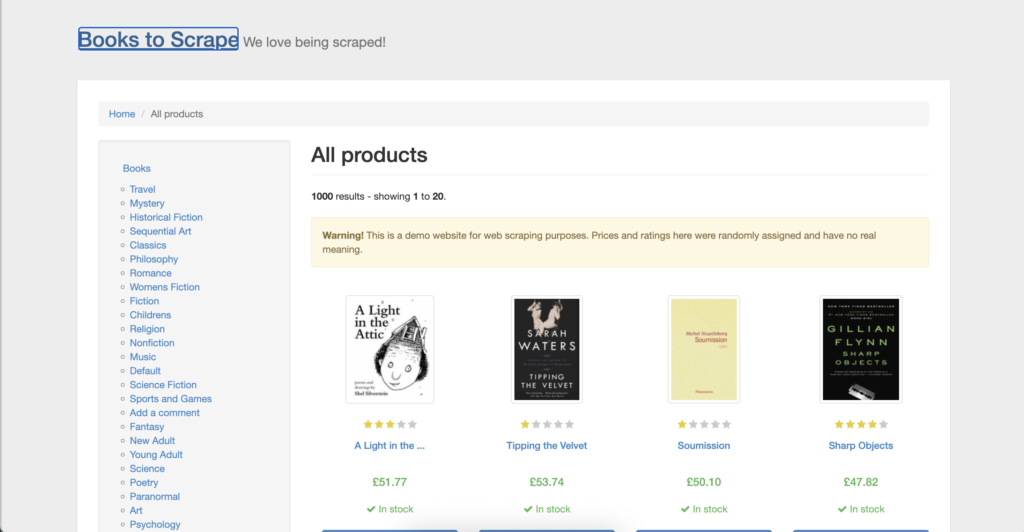
I kept the task simple. I wanted to get a CSV file as a result with:
- book title
- price
- availability
- product link
Step 2: Copy the Product Selectors
Before asking ChatGPT for code, I opened Books to Scrape in Chrome and inspected one of the book cards.
I right-clicked a book title, clicked Inspect, and looked at the HTML around the title, price, availability, and product link. Then I copied the selectors so ChatGPT would not have to guess the page structure.
The process was simple:
- Right-click a book title and click Inspect
- Right-click the highlighted HTML element
- Choose Copy → Copy selector
- Repeat for the price and availability
- For the product link, inspect the book title or image link
Step 3: Prompt ChatGPT to Build the Scraper
Then I gave ChatGPT the page URL, the fields I wanted, and the selectors I copied.
The prompt looked like this:
I want to scrape public product data from this demo website:
https://books.toscrape.com/

I need a CSV file with:
- book title
- price
- availability
- product link

Here are the selectors I copied from Chrome DevTools:
Book card selector: article.product_pod
Book title selector: h3 a
Price selector: .price_color
Availability selector: .availability
Product link selector: h3 a

Write a Python scraper that extracts all books from the first page and saves the results to books_to_scrape_products.csv.

Use requests and BeautifulSoup.
Add simple error handling for missing titles, prices, availability, or links.
Convert relative product links into full URLs.
You need a detailed prompt, not just “scrape this website.” ChatGPT knew the page, the fields, the output format, and the exact result I wanted.
Step 4: Start With BeautifulSoup
Books to Scrape is a static demo site, so I did not need Playwright for the first version.
That made the setup simpler.
The scraper flow was:
- open the Books to Scrape homepage
- find each product card
- extract the title, price, availability, and link
- convert the relative link into a full URL
- save everything into a CSV file
ChatGPT generated a BeautifulSoup version first, which made sense for this page.
If I were scraping a page where products load with JavaScript, I would ask ChatGPT to switch the script to Playwright. But for this test, BeautifulSoup was enough.
Step 5: Set Up the Python Project
After ChatGPT generated the scraper, I needed to run it locally.
First, I created a new folder:
Then I created a virtual environment.
On macOS, I used:
Then I activated it:
For Windows, the activation command is:
Then I installed the packages:
Then I quickly checked that Python could import them:
If pip install fails with a NameResolutionError, I would check the internet connection first. In my case, the command itself was right, but package installation can fail if Terminal cannot reach PyPI because of DNS, firewall, VPN, or network restrictions.
If the scraper later shows ModuleNotFoundError: No module named ‘requests’, it usually means the install did not finish or the virtual environment is not active.
Step 6: Create the Scraper File
Once the setup was ready, I created the Python file:
Then I opened it in a text editor.
On macOS, this may work:
If that command does not work, I would use any code editor or open the file directly from the folder. A terminal fallback is:
I pasted the ChatGPT-generated code into the file and saved it.
The script looked something like this:
Step 7: Run the Scraper and Check the CSV
Then I ran the script:
It created a CSV file called:
books_to_scrape_products.csv
To open and check the CSV on macOS, run:
The output had the fields I wanted.
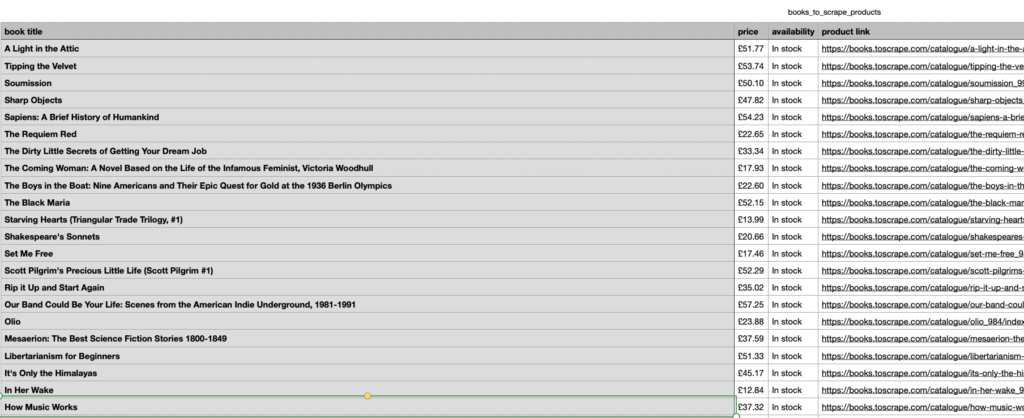
ChatGPT helped me build a scraper that opened a page, extracted structured data, and saved it into a usable CSV.
Step 8: Ask ChatGPT to Scrape Multiple Pages
The first version only scraped page one.
Books to Scrape has 50 pages, so the next step was obvious: ask ChatGPT to add pagination.
I used this prompt:
The scraper works for the first page.

Update it so it scrapes all pages on Books to Scrape.

The site has pagination.
Follow the "next" link until there are no more pages.

Keep the same CSV columns:
- book title
- price
- availability
- product link
ChatGPT updated the script to follow the next page link.
Step 9: Add Basic Debugging and Retry Logic
The scraper worked, but not perfectly. It scraped the first five pages, then page 6 timed out.
The terminal showed:
Scraping page 6: https://books.toscrape.com/catalogue/page-6.html
Failed to fetch page
Connection timed out
Skipping page 6 because it failed
Saved 100 books to books_to_scrape_products.csv
Then I asked ChatGPT to improve the script:
The scraper works, but page 6 timed out.

Update the script so it:
- retries a failed page up to 3 times
- waits 3 seconds between retries
- increases the request timeout to 30 seconds
- continues scraping if a page still fails after retries
- saves all successfully scraped products to the CSV at the end
This is the kind of fix that matters in real scraping. Even simple websites can time out. On large e-commerce sites, retries, timeouts, logs, and clean proxy sessions are not optional.
Step 10: Add Proxies for More Protected Websites
Books to Scrape proved that the scraper worked. But I would not use the same plain setup for real e-commerce sites, marketplaces, search results, or review platforms.
Those websites often have anti-bot systems, rate limits, regional content, and stricter IP checks. If every request comes from the same local IP, office Wi-Fi, cloud server, or free VPN, the scraper can start getting blocked, challenged, or served incomplete pages.
That is where I recommend adding proxies.
I would add them after the scraper works on a small test. First, I want to know if the code is correct. Then I add proxies to make the access layer more stable.
For scraping, proxies help with:
- keeping a stable session while testing
- scraping from a specific country, city, or ZIP code
- separating different scraping jobs by IP session
- reducing reliance on overused VPN or datacenter IPs
- checking regional prices, availability, or search results
- diagnosing whether a failure is caused by code or access issues
In NodeMaven, I would create a proxy setup like this:
- Proxy type: Residential
- Location: based on the target market
- Session type: Rotating
- Protocol: HTTP
- Host: gate.nodemaven.com
- Port: 8080
- Username and password from the dashboard
Then set the proxy credentials in Terminal, not directly inside the Python file.
On macOS or Linux:
On Windows PowerShell:
Then ask ChatGPT to update the scraper with this prompt:
The scraper works on a test website.

Now add authenticated NodeMaven proxy support.

Use environment variables for credentials:
- NODEMAVEN_PROXY_USERNAME
- NODEMAVEN_PROXY_PASSWORD

Proxy server:
http://gate.nodemaven.com:8080

Also add:
- timeout handling
- failed URL logging
- retry logic
- block page detection
- a clear error message if proxy credentials are missing
For a requests scraper, the proxy setup would look like this:
This keeps credentials out of the Python file. It also makes the scraper safer to share, screenshot, or commit to a repo.
This is the part ChatGPT does not solve by itself. It can write the scraper, but it cannot make a low-quality IP more trusted, add IP rotation or keep a session stable across protected websites. Clean residential proxies, sticky sessions, and location targeting give the scraper a better environment to work in.
Why NodeMaven Fits ChatGPT Web Scraping Workflows
NodeMaven is useful here because it helps with the part ChatGPT does not solve: access quality.
NodeMaven helps with:
- clean rotating residential IPs for more natural access
- sticky sessions for longer scraping runs
- country, city, ISP, and ZIP targeting
- SOCKS5 and HTTP support
- quality-focused filtering modes
- mobile proxies included with residential plans
- quality guarantee and cashback where relevant
Clean IPs and stable sessions make it easier to separate code problems from access problems. If a scraper fails on a clean setup, I know to check selectors, JavaScript, or page structure instead of guessing blindly.
ChatGPT Scraper vs Scraping API
After testing this, I would split the tools like this:
| Setup | Best for | Limitation |
|---|---|---|
| ChatGPT with web access | Small manual lookups | Not scalable structured scraping |
| ChatGPT + BeautifulSoup | Static pages like Books to Scrape | Breaks on JavaScript-heavy sites |
| ChatGPT + Playwright | Dynamic pages | Slower and more resource-heavy |
| ChatGPT + NodeMaven proxies | Real scraping workflows with better access control | Additional cost for proxies |
| Scraping API | Managed rendering, retries, and infrastructure | Less control over custom logic |
| MCP-style tools | Research and prototypes | Not always production-ready |
MCP is also worth watching. Instead of asking ChatGPT to write code and running it separately, MCP can connect an AI assistant to external tools. OpenAI documents MCP and connectors for connecting models to external systems.
Final Takeaway
ChatGPT can help with web scraping, but it is not a full scraping stack.
It can help you build a working scraper quickly, but for websites with anti-bot systems, like Amazon, you still need clean infrastructure, stable sessions, logging, retries, and data checks.
My practical takeaway is simple:
- Use ChatGPT to build and debug the scraper.
- Use Python or Playwright to run it.
- Use NodeMaven proxies when the workflow needs IP rotation, stable access, location control, and cleaner IPs.

Use NodeMaven residential, mobile, and ISP proxies with sticky sessions, geo-targeting, SOCKS5/HTTP support, and clean pre-filtered IPs. Start with 750MB for just $3.50.


