How to unblock websites: 7 easy and safe methods (2026)



You click a link and instead of the page you wanted, you get an error message. Or a message telling you the content isn’t available in your country. It happens to almost everyone at some point, and it’s rarely as serious as it looks.
There are several reasons a website stops loading, and just as many ways to fix it. Some fixes take ten seconds. Others take a bit more setup but give you a much more stable result.
This guide walks through 7 safe methods for how to unblock websites, from the quickest browser tweaks to tools built for people who need reliable access every day. We’ll also look at free unblockers and whether they’re actually safe to use, then compare every method side by side so you can pick the one that fits your situation.
If you’ve ever typed “how to unblock a website” into Google at 11pm hoping for a fast answer, this should cover it.

Unblock websites with fast, trusted residential, ISP, and mobile proxies. Try NodeMaven from $3.50 with 750 MB included
Why are websites blocked?
Before trying to unblock website access, it helps to know why it happened in the first place. The cause usually falls into one of these buckets.
- Geo restrictions
Some content is only licensed for certain countries. Streaming services do this constantly.
- ISP restrictions
Your internet provider, school, or workplace network may block specific sites on purpose.
- IP bans
A site can block an IP address after unusual activity, sometimes without you doing anything wrong.
- Temporary website restrictions
The site itself might be down, overloaded, or rolling out changes.
- Network filtering
Government-level or regional filtering blocks certain domains entirely in some countries.
Once you know which one applies, it’s much easier to pick the right way to unblock blocked websites instead of guessing.
Method 1. Use proxies (recommended)
An ISP, mobile or residential proxy routes your traffic through a real IP address, one assigned by an internet provider to an actual home device. Websites see a normal connection instead of a server or data center address.
This matters because most sites are much more suspicious of data center IPs. They’re cheap to get in bulk, so they’re the ones flagged first for blocks, CAPTCHAs, and rate limits.
Free web proxies and browser extensions can work for a quick peek at a page, but they usually share a small pool of IPs among thousands of users. Those addresses get flagged fast, and you’re stuck refreshing and hoping for a different one.
NodeMaven offers all types of proxies, so you can choose the best option for your needs.
For everyday browsing and long sessions, ISP proxies are the best choice thanks to their fast, stable connections and unlimited bandwidth.
If you need to access websites with stricter geo-restrictions or advanced anti-bot protection, residential and mobile proxies provide trusted IP addresses that are less likely to be blocked.
With 30+ million IPs across 190+ countries, flexible location targeting, sticky and rotating sessions, and an IP quality filter, NodeMaven delivers a much more dependable experience than free website unblockers.
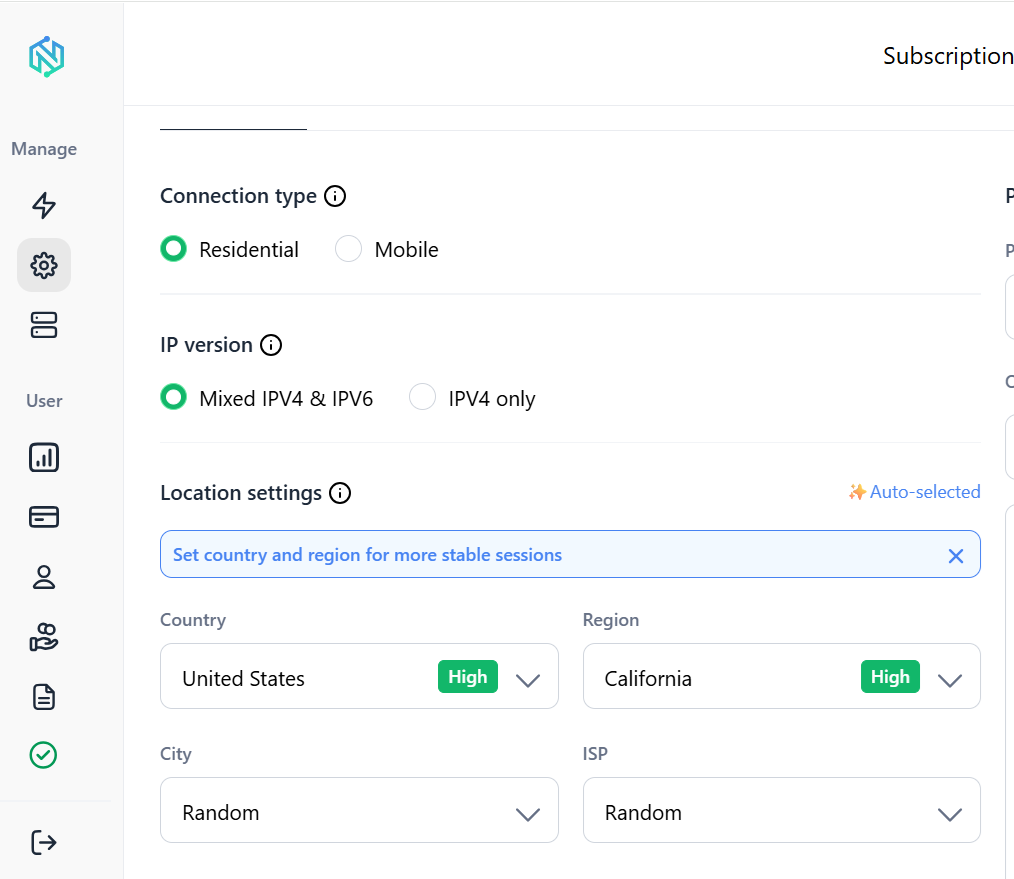
A dashboard where you pick your location, session type, and settings without touching a config file
None of this is about hiding what you’re doing. It’s about connecting through an IP address that a website has no reason to distrust, which is usually the difference between a page loading normally and a page throwing up a block screen.
Method 2. Use a VPN
A VPN encrypts your connection and routes it through a server in a location of your choosing. It’s probably the method most people have already heard of.
The upside is simplicity. Most VPN apps take a couple of minutes to set up, and once it’s on, your browsing is private from your ISP and from anyone watching the network.
The downside is that VPN server IPs are well known, since the same small set of addresses gets used by thousands of subscribers. Streaming platforms and some websites keep lists of these and block them outright. Speed can also drop, especially on busier or more distant servers.
A VPN is a solid, easy option for general privacy and for unblocking a lot of everyday sites. It’s just not always the most reliable choice against services that actively hunt for VPN traffic.
Method 3. Try a web proxy
A web proxy is a website that fetches another page for you and displays it in your browser. There’s nothing to install, no app, no settings menu. You paste a URL into a box and it loads the page through the proxy’s own connection.
This makes it genuinely useful for a fast, one-time check, like seeing if a specific page is viewable from another region. It’s the simplest way to unblock a website when you just need a quick answer.
The catch is that free web proxies tend to come with intrusive ads, and some struggle to load pages properly if the site uses a lot of scripts or media. They also aren’t built for anything you do regularly, since the connection resets every time and performance varies a lot from one proxy to the next.
Method 4. Change your DNS server
Your DNS server translates website names into addresses your device can connect to. Sometimes your default DNS, often set by your ISP, blocks or slows down certain sites.
Switching to a public DNS provider can solve this without touching anything else about your connection. It’s a small settings change, not a full unblock websites solution, but it’s worth trying since it takes only a couple of minutes and costs nothing.
Stop dealing with blocked websites and CAPTCHAs. Get clean residential, ISP, and mobile proxies with NodeMaven from $3.5
Method 5. Use Tor Browser
Tor routes your traffic through several volunteer-run servers before it reaches its destination, layering encryption at each step. It’s built with privacy as the priority, not speed.
Pages load noticeably slower than a normal browser, and some sites block Tor exit nodes outright, similar to how they block known VPN IPs. That said, for people who specifically need strong anonymity, or who are in a region with heavy internet censorship, Tor is one of the few tools designed for exactly that situation.
For everyday browsing or streaming, it’s usually overkill
Method 6. Check your browser settings
Sometimes the block isn’t coming from the network at all. Your own browser might be the problem.
A few things worth trying before anything else:
- Clear your cache and cookies, since old data can cause pages to fail loading.
- Disable extensions one at a time, especially ad blockers or privacy tools that can interfere with certain sites.
- Update your browser to the latest version.
- Try a different browser entirely. A page that won’t load in Chrome sometimes opens fine in Safari, or the other way around.
This won’t fix an actual geo-block or ISP restriction, but it rules out a much simpler explanation before you go looking for a bigger fix.
Method 7. Try another internet connection
If a site is blocked on your home Wi-Fi or a work network, switching connections entirely can confirm where the restriction is coming from.
- Try your phone’s mobile hotspot.
- Connect to a different Wi-Fi network if one is available.
- Test from a completely different network, like a public one, to compare results.
If the site loads fine elsewhere, the block is specific to your original network, which tells you a lot about what kind of fix you actually need.
Are free website unblockers safe?
Free tools are tempting, especially for a one-time need. But it’s worth knowing what you’re trading for that convenience.
| Risk | Explanation |
| Ads | Many free unblockers are funded entirely by aggressive, sometimes deceptive ads that can redirect you to other pages. |
| Tracking | Your traffic passes through their servers, so they can see and log what you’re browsing. |
| Malware | Some free browser extensions and unblock websites tools bundle in unwanted software or malicious code. |
| Slow speeds | Free servers are shared by huge numbers of users at once, so pages can take much longer to load. |
None of this means every free tool is dangerous. It just means the free ones cut corners somewhere, and it’s usually on privacy, speed, or both. For anything more than a quick, low-stakes check, a paid and properly maintained option is the safer bet.
Which method is best?
There’s no single best answer for everyone. It depends on how often you need access, how much you care about speed, and whether privacy matters as much as reliability.
| Method | Ease of use | Privacy | Speed | Best for |
| Proxy | Easy | Good | Fast | Reliable, frequent access without getting blocked |
| VPN | Easy | Good | Medium | General privacy and everyday unblocking |
| Web proxy | Very easy | Low | Medium | Quick, one-time checks |
| DNS change | Easy | Low | Fast | Simple ISP-level blocks |
| Tor | Medium | Very good | Slow | High-privacy or high-censorship situations |
For most people who need a website to work consistently, without constant re-blocks or dropped sessions, a residential proxy is the strongest overall option.
NodeMaven in particular gives you real household IPs, city-level targeting, and sticky sessions that don’t fall apart mid-task, which is exactly what casual free tools can’t offer.
Access blocked websites with reliable residential, ISP, and mobile proxies. Start your NodeMaven trial from $3.50 with 750 MB included