TikTok unblocked: 6 ways to access TikTok from school, work, or restricted countries



Few things are more frustrating than opening TikTok and seeing that it will not load.
Maybe your school Wi-Fi blocks social media. Maybe your workplace restricts access to entertainment sites. In some countries, TikTok is partially or completely unavailable due to government regulations.
The good news is that getting TikTok unblocked is usually easier than most people think.
In this guide, we’ll cover the most effective ways to unblock TikTok in 2026, explain why certain methods work better than others, and show you how to access TikTok safely from almost anywhere.

Unblock TikTok with real residential IPs. Get 750 MB of residential and mobile proxy traffic for just $3.50
Why is TikTok blocked?
Before choosing a solution, it helps to understand what type of restriction you’re dealing with.
Most TikTok blocks fall into one of these categories:
School and workplace restrictions
Many schools and businesses block TikTok to reduce distractions and save network bandwidth.
These restrictions are usually applied through:
- Firewalls
- DNS filtering
- Website blacklists
- Network monitoring tools
Regional restrictions
Some governments have imposed temporary or permanent restrictions on TikTok.
In these cases, internet providers may block access to TikTok’s servers at a national level.
App store limitations
Sometimes TikTok remains accessible through a browser but is removed from local app stores, making it difficult to download or update the app.
The best solution depends on which type of block you are facing.
6 ways to watch TikTok unblocked
Let’s start with the easiest options and move toward more advanced solutions.
1. Switch to mobile data
If TikTok is blocked only on a school or office Wi-Fi network, switching to mobile data is often the fastest fix.
Your cellular connection uses a completely different network, so local restrictions no longer apply.
Steps:
- Turn off Wi-Fi.
- Enable mobile data.
- Open TikTok.
- Check whether videos load normally.
This method works well for local network restrictions but will not help if TikTok is blocked throughout your country.
2. Use a residential or mobile proxy
For users who want a more reliable solution, a ISP or residential proxy is often a better option than a VPN.
Unlike VPN servers, residential proxies use real residential IP addresses assigned by internet service providers.
This makes your connection appear more natural and significantly harder to detect.
Benefits include:
- Better location targeting
- Lower detection rates
- Faster browsing speeds
- Access to region-specific content
If you’re looking for a TikTok unblock proxy solution, ISP proxies are usually the most effective choice.
Need reliable TikTok access? Connect through residential and mobile proxies with authentic IPs. Start with 750 MB for just $3.50
3. Change your DNS server
Some networks block TikTok using DNS filtering.
Changing your DNS server may help bypass these restrictions.
Popular public DNS providers include:
- Google DNS
- 8.8.8.8
- 8.8.4.4
- Cloudflare DNS
- 1.1.1.1
- 1.0.0.1
After changing your DNS settings, restart your browser and test TikTok again.
Keep in mind that DNS changes only work against basic filtering methods.
4. Access TikTok through a web browser
Many people assume TikTok only works through the mobile app.
In reality, TikTok’s web version offers most core features.
Simply visit TikTok in your browser and log in.
This can be useful if:
- The app is restricted
- You need TikTok online unblocked
- You want TikTok browser unblocked access on a computer
In some cases, browser access works even when the mobile application is restricted.
5. Install TikTok manually on Android
If TikTok has disappeared from your local Play Store, Android users can manually install the application using an APK file.
Basic steps:
- Enable installation from unknown sources.
- Download TikTok from a trusted APK repository.
- Install the APK.
- Open TikTok and sign in.
Always download APK files from reputable sources to avoid security risks.
6. Use a TikTok mirror site
Some websites display public TikTok content without requiring direct access to TikTok itself.
These mirror sites can sometimes provide:
- Public profiles
- Trending videos
- Hashtags
- Viral content
They can be useful when you simply want to watch TikTok unblocked without logging into an account.
However, mirror sites are unofficial and may not always be available.
VPN vs proxy for TikTok
Many users wonder whether they should choose a VPN or a proxy.
Here’s a simple comparison.
| Feature | VPN | Residential/Mobile Proxy |
| Changes IP address | Yes | You can set |
| Encrypts traffic | Yes | No |
| Location targeting | Good | Excellent |
| Detection resistance | Moderate | High |
| Speed | Good | Excellent |
| Multiple account management | Limited | Better |
| TikTok access reliability | Good | Excellent |
For users who need stable access, region-specific content, or professional social media workflows, proxies typically provide a more flexible solution.
TikTok blocked on school or work Wi-Fi? Use premium proxies and get 750 MB of trial traffic for only $3.50
This is particularly relevant for affiliate marketers who run multiple TikTok accounts to test creatives and scale campaigns across different offers. Communities like Affroom — affiliate marketing community — are a valuable resource for learning how experienced media buyers combine proxies, account warm-up routines, and platform-specific strategies to keep their TikTok campaigns running smoothly. Sharing insights with peers in such spaces can help affiliates avoid bans and get more consistent results from paid social traffic.
How to unblock TikTok at school
“TikTok unblocked at school” is one of the most searched phrases related to TikTok access.
Schools commonly use:
- Content filters
- Firewall rules
- DNS restrictions
- Device management systems
The most effective solutions are:
- Mobile data
- VPN
- Proxies
- Browser version of TikTok
If you’re using a Chromebook, browser-based solutions are often easier than installing software.
How to unblock TikTok on Chromebook
Try the following:
- Use TikTok’s web version.
OR
- Connect through a VPN extension.
OR
- Use a proxy.
OR
- Switch to mobile hotspot access.
These methods work on most Chromebook models without requiring advanced configuration.
How to unblock TikTok with NodeMaven proxies
If basic solutions are not working, proxies provide one of the most reliable ways to access TikTok.
NodeMaven offers ethically sourced residential and mobile proxies with real IP addresses, making them significantly harder to detect than many traditional VPN services.
Step 1: Get a NodeMaven residential proxy
Choose a proxy plan and select the country where TikTok is available.
Step 2: Match your location
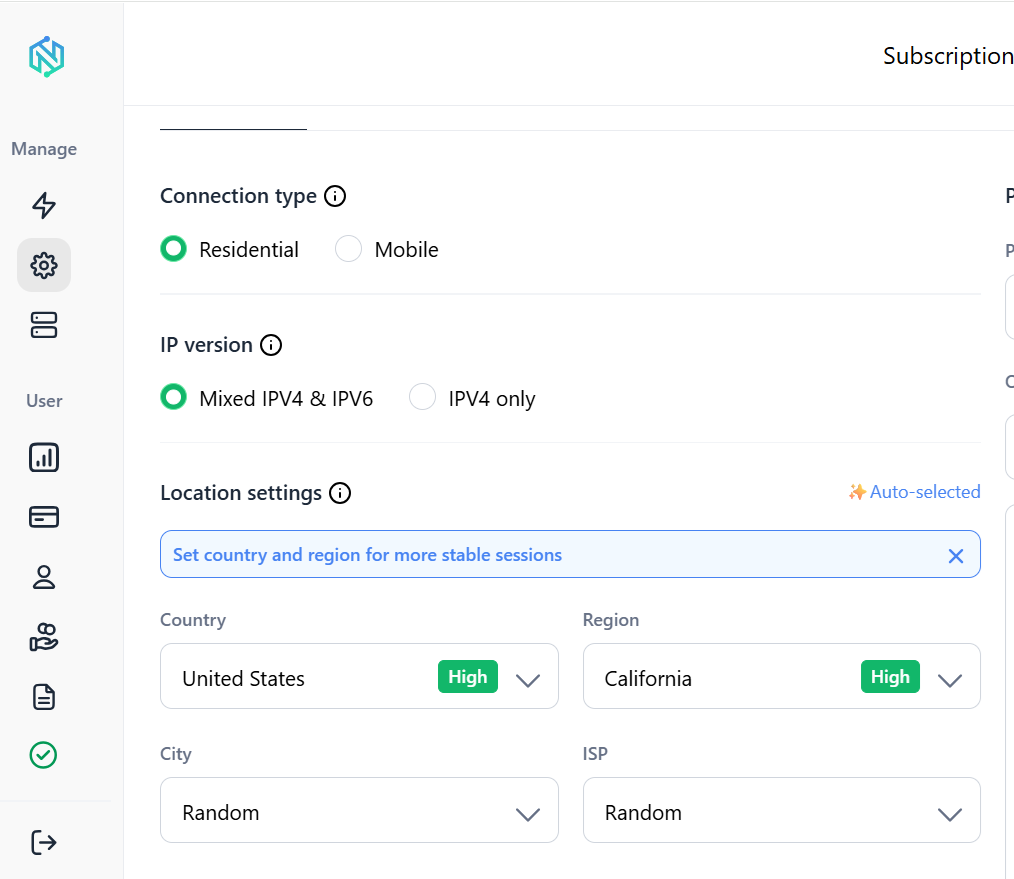
Choose a proxy location that aligns with the content you want to access.
For example:
- United States
- United Kingdom
- Canada
- Germany
Step 3: Configure the proxy
Add your proxy credentials to:
- Browser proxy settings
OR
- Proxy management software
OR
- Mobile proxy applications
Step 4: Open TikTok
Launch TikTok through your configured connection.
Because your traffic appears to originate from a legitimate IP address, access is often more stable than with traditional VPN solutions.
Why TikTok may still not work
Sometimes TikTok remains inaccessible even after changing your connection. Common reasons include:
Cached location data
TikTok may still remember your previous location.
Try clearing:
- App cache
- Browser cache
- Cookies
GPS mismatch
If your IP location says one country but your GPS shows another, TikTok may become suspicious.
Low-quality proxy or VPN
Some services use IP addresses that have already been flagged.
Network restrictions
Certain organizations use advanced filtering systems that require stronger solutions than DNS changes.
Final thoughts
Getting TikTok unblocked is usually much easier than it seems.
For simple network restrictions, switching to mobile data or using a VPN may be enough.
For more advanced blocks, residential or mobile proxies provide a more reliable long-term solution with better location control and lower detection rates.
If you need stable access to TikTok from school, work, or a restricted region, NodeMaven offers a straightforward way to browse, watch videos, and access region-specific content using real residential IP addresses.