Try for $3.50

Proxies for AdsPower

Integrate NodeMaven proxies with AdsPower to run multiple accounts
with stable IP sessions, flexible targeting, and consistent performance

The first proxy
cashback
on the market

Get rewarded every month by
turning used traffic into reusable
proxy credits

Welcome gift
valued at $100+

  • Quality & speed filters
  • ZIP-Level targeting
  • Personal proxy expert

Exclusive quality guarantee

Earn $1 in bonus traffic every time
a proxy fails to perform

Learn more

What is AdsPower?

The AdsPower anti-detect browser is a specialized web tool designed to protect
your online identity and privacy by masking your real digital footprint. This advanced browser
makes it difficult for websites and third parties to track or identify you, ensuring a higher level
of anonymity online. Whether you’re managing multiple accounts, running online campaigns,
or performing web scraping, AdsPower is invaluable for maintaining privacy,
enhancing security, and conducting a wide range of online activities safely and efficiently.


95% clean IP rate, guaranteed
Residential, mobile & ISP proxies
24/7 expert support

How to set up Nodemaven
proxies with AdsPower

Step 1

Create a new browser profile

To begin using our proxies in AdsPower, you should start by clicking the “New profile” button

Step 2

Set the browser profile name

Next, set the browser profile name. For the Browser, you can choose more options by simply clicking the “dropdown button” beside the SunBrowser/FlowerBrowser.

Step 3

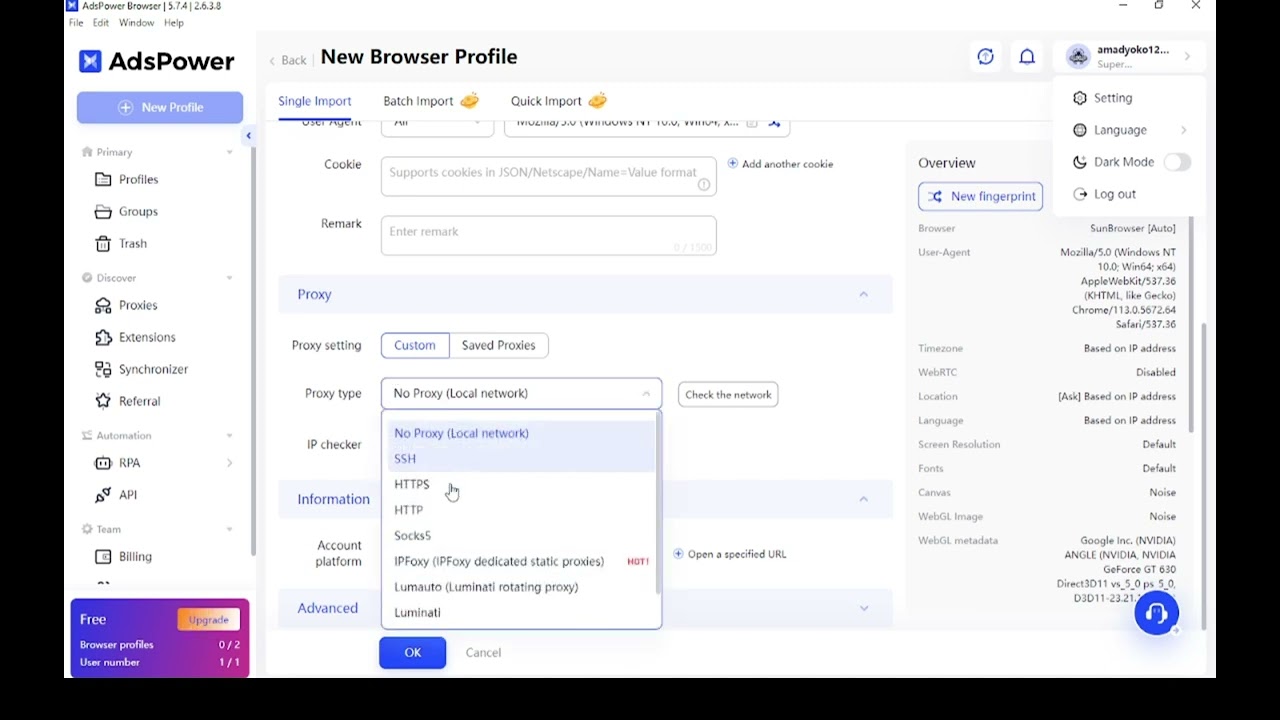
Select proxy protocol

Then scroll a bit down, then select “HTTP” or SOCKS5 in the Proxy type, and set the proxy manually
Step 4

Add proxy credentials

You can find your Proxy username and Proxy password on your NodeMaven page in the Proxy Setup section.


After choosing all the details that you need like Country/Region/City and Session type etc.

Simply copy the proxy details (highlighted in red) then paste them into Host:Port section of AdsPower settings.

The Host, Port, Proxy username, Proxy password section will automatically be filled out by your NodeMaven proxy details.

Set up NodeMaven proxies
in AdsPower

Watch a quick tutorial to integrate proxies
and start using them in minutes

Try Nodemaven’s proxy servers for $3.50 and get 750MB of bandwidth

Try Nodemaven’s proxy servers for $3.50 and get 750MB of bandwidth

Easy integrations

Effortlessly integrate our premium
proxies with all major third-party tools

Multilogin
Dolphin Anty
Morelogin
Gologin
Multilogin
Dolphin Anty
Morelogin
Gologin
Multilogin
Dolphin Anty
Morelogin
Gologin
Multilogin
Dolphin Anty
Morelogin
Gologin

Choose premium proxies
for your workflow

Experience uninterrupted connection with high-quality
proxy IPs from NodeMaven

Residential Proxies

Residential Proxies

Real household IPs with rotating and sticky sessions. HTTP(S) and SOCKS5 support with flexible GB-based pricing for scalable proxy workflows

Recommended for:
Mobile Proxies

Mobile Proxies

Mobile IPs with rotating and sticky sessions for automation and account workflows. HTTP(S) and SOCKS5 support with GB-based pricing


Recommended for:
ISP proxies

ISP proxies

Static proxy server IPs with long sessions and consistent identity. HTTP(S) and SOCKS5 support with IP-based pricing and unlimited traffic

Recommended for:
Not sure which proxy type to choose?

Reviews from our
clients and partners

Honest feedback from the people who use and trust NodeMaven

A unique antidetect phone solution built for managing mobile accounts at scale
"NodeMaven works closely with Geelark to support reliable mobile multi-account workflows, tested and proven in daily use"
The market’s first antidetect browser built for professional multi-accounting
"The only high-quality proxy provider we’ve chosen to integrate with. Nodemaven provides clean, stable traffic to power our workflows"
A leading antidetect browser trusted by users around the world
"We recommend NodeMaven as the #1 proxy service for multi-accounting. 
It integrates closely with Dolphin Anty to ensure smooth setup"

Frequently asked questions

AdsPower is an anti-detect browser designed for managing multiple accounts in isolated environments. Using proxies with AdsPower assigns a unique IP to each profile, helping maintain consistent sessions and more reliable account workflows.

In AdsPower, go to Profile Settings → Proxy, then enter your proxy details (host, port, username, and password). NodeMaven proxies support both credential-based authentication and IP whitelisting, so you can choose the setup that fits your workflow.

It depends on your use case:

NodeMaven offers all three, so you can match proxy type to your automation needs.

Yes. AdsPower allows you to assign a unique proxy to each browser profile. This helps keep sessions separate and ensures consistent behavior across accounts.

Yes. NodeMaven supports sticky sessions, allowing you to keep the same IP for extended periods. This is useful when you need stable sessions for account management or long-running tasks.

Common issues include:

  • Incorrect proxy credentials
  • Wrong port or protocol (HTTP vs SOCKS5)
  • IP not whitelisted (if using IP authentication)
  • Expired or inactive proxy plan

Double-check your NodeMaven dashboard settings and ensure they match your AdsPower configuration.

Yes. NodeMaven proxies are fully compatible with AdsPower and support HTTP and SOCKS5 protocols, flexible authentication methods, and stable connections for multi-account environments.

Buy proxy server for $3.50 and get 750MB of bandwidth

Start using high-quality proxies today
This site uses cookies to enhance your experience. By continuing, you agree to our use of cookies.