Попробовать

Бесплатно Сервис решения CAPTCHA

браузер для скрапинга NodeMaven solves supported CAPTCHA challenges automatically, inside the same cloud browser session that already handles your proxies and browser fingerprint. No separate CAPTCHA API, no separate solver fee, and no manual CAPTCHA integration

Автоматическое решение CAPTCHA
No separate solver fee
Works inside the browser session
Playwright, Puppeteer & AI Prompt

Handle CAPTCHA challenges without a separate service

Most CAPTCHA-solving tools work as a separate part of your stack. You detect a challenge, send it to another service, wait for the response, and return it to the page.

NodeMaven handles supported challenges inside the Браузер для скрейпинга session instead. Enable CAPTCHA Solver before launching the session, then let the browser handle supported challenges as part of the workflow

Part of the same session

Part of the same session

CAPTCHA Solver runs inside the same browser session as your automation. There is no separate CAPTCHA-solving service to connect to

Included, not billed separately

Included, not billed separately

CAPTCHA Solver has no separate usage fee. It is included with Scraping Browser for customers with an active NodeMaven Rotating Residential Proxy subscription

No extra integration

No extra integration

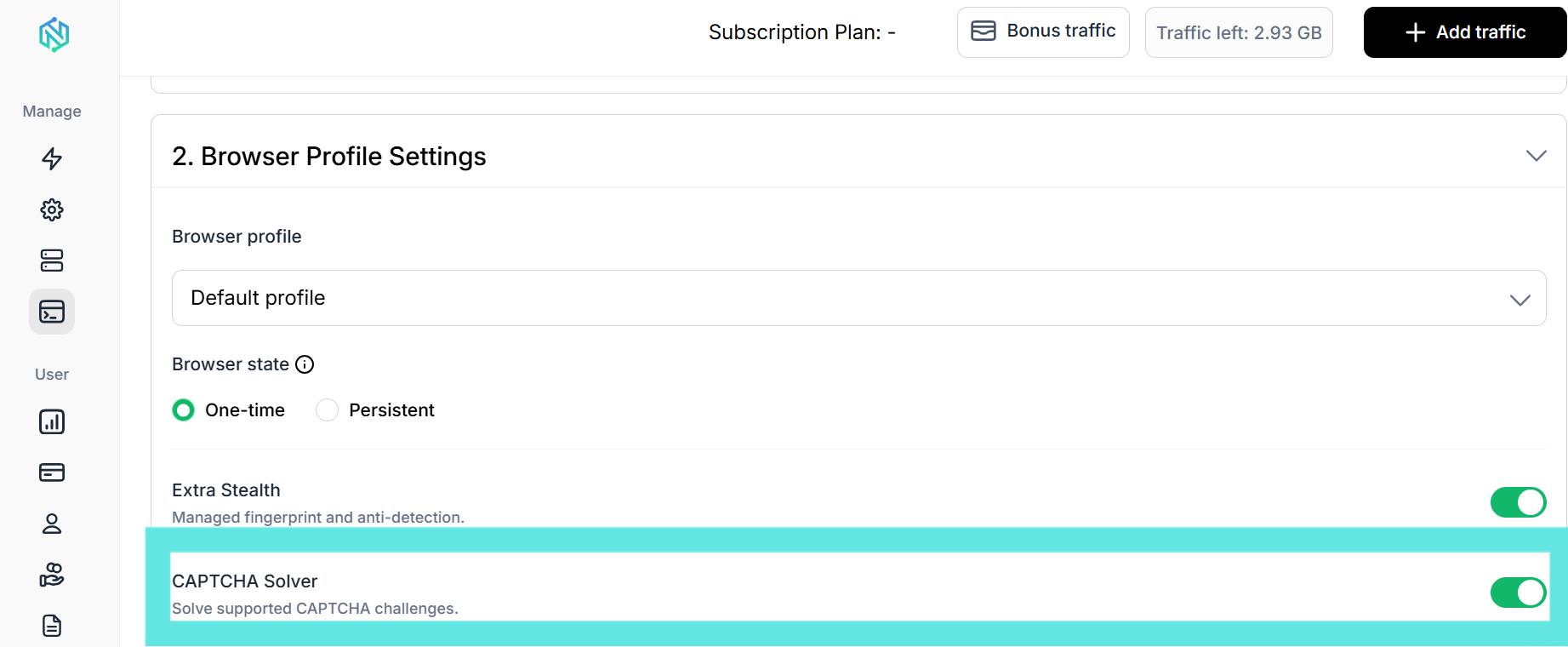
Enable CAPTCHA Solver in browser customization and run your workflow. You don't need to add another CAPTCHA API to your browser automation

Not sure how to use CAPTCHA solver?

How NodeMaven CAPTCHA Solver works

CAPTCHA solving is configured directly in your Scraping Browser session.

Before launching the browser, enable Сервис решения CAPTCHA in the browser customization settings. When a supported CAPTCHA challenge appears, NodeMaven handles it within the session while your browser workflow continues.

You can then watch the session in Live Browser, inspect the console output, and review the result of your automation.

Skip the separate CAPTCHA-solving service

Look at differences between adding a standalone CAPTCHA API to your stack and using free CAPTCHA solving that's already part of your browser session

Сравнительная характеристика
Standalone CAPTCHA API
Настройка

Turn on CAPTCHA Solver in the browser settings — nothing else to configure

Detect the challenge, extract a sitekey, call the API, poll for a token, then inject it into the page

Цена

Included with an active proxy subscription

Separate account and invoice on top of your proxy or scraping tool

Where it runs

Inside the same browser session as your proxy and browser fingerprint

Outside your browser session as a separate request

Integration

Works within the browser session your script or prompt is already using

Requires additional API calls and logic in your workflow

Built-in CAPTCHA solving with your NodeMaven proxy plan

Built-in CAPTCHA solving with your NodeMaven proxy plan

Use an automatic CAPTCHA solver where your workflow needs it

NodeMaven supports browser workflows built with Playwright, Puppeteer, Vanilla JavaScript, ready-made templates, and AI Prompt. CAPTCHA Solver is configured as part of the browser environment

Веб-скрейпинг

Handle supported CAPTCHA challenges that interrupt browser-based scraping workflows

Автоматизация браузера

Keep CAPTCHA handling inside the same session as the rest of your automated browser tasks

AI-assisted workflows

Build browser workflows with NodeMaven AI Prompt instead of writing every step manually. CAPTCHA Solver works regardless of how the workflow was created

Why do CAPTCHAs appear during automated browsing?

CAPTCHA challenges are designed to distinguish human visitors from automated activity. They can appear at different points in a browser workflow, depending on the website and the type of activity

Repeated requests

01

A website may show a CAPTCHA after a session makes multiple requests or performs repeated actions

Automated browser activity

02

Some websites use CAPTCHA challenges as an additional check when they detect automated browsing

Login and account flows

03

CAPTCHAs can appear during sign-in, registration, or other actions that require additional verification

Часто задаваемые вопросы

CAPTCHA Solver has no separate usage fee. It is included with Scraping Browser for customers with an active NodeMaven proxy subscription. You pay for the proxy traffic used during your browser sessions.

NodeMaven automatically handles supported CAPTCHA challenges when CAPTCHA Solver is enabled for the browser session. Support can vary depending on the challenge and target website.

Yes. CAPTCHA Solver runs at the browser-session level, so it can be used with Playwright browser workflows. NodeMaven also supports Puppeteer and Vanilla JavaScript.

No. NodeMaven CAPTCHA Solver is built into its cloud Scraping Browser. You don't need to install a Chrome extension.

Yes. CAPTCHA Solver can be used as part of browser-based scraping workflows when a supported CAPTCHA challenge interrupts the session.

No. CAPTCHA solving does not guarantee access to every website or every challenge. No browser or proxy setup can guarantee access to every website.

Yes. Enable CAPTCHA Solver in your Scraping Browser session and NodeMaven automatically handles supported CAPTCHA challenges during the workflow.

Этот сайт использует Файлы cookie чтобы улучшить ваш опыт. Продолжая, вы соглашаетесь на использование файлов cookie.