
Обзор Remotasks: законна ли платформа Remotasks и можно ли на ней заработать?



Если вы ищете Отзывы о Remotasks, вы, вероятно, хотите получить четкие ответы на три вопроса: реален ли Remotasks, платит ли Remotasks и стоит ли он того?
Короткий ответ: Remotasks обычно не обсуждают как мошенническую платформу. Лучше описать ее как реальный, но непоследовательный. Обсуждения в сообществе показывают, что некоторые пользователи действительно зарабатывают на Remotasks, особенно когда получают доступ к стабильным или более высокооплачиваемым проектам. В то же время многие пользователи жалуются на пустые очереди заданий, внезапное удаление проектов, медленную поддержку, сложности с началом работы, проблемы с контролем качества и споры по поводу оплаты.
Этот обзор Remotetask рассматривает обе стороны. Мы объясним, что такое Remotasks, какие задания Remotetask могут найти пользователи, сколько люди могут реалистично зарабатывать, и основные проблемы, которые обсуждают пользователи перед созданием учетной записи Remotetask.
Мы также рассмотрим, как резидентский прокси может помочь со стабильностью соединения Remotasks или с геоспецифическим созданием и управлением аккаунтами.

Используйте прокси-серверы из частных сетей, мобильные прокси и прокси-серверы интернет-провайдеров с фиксированными сессиями и предварительно отфильтрованными IP-адресами. Начните с 750 МБ всего за $3.50.
Что такое Remotasks?
Ремотаскс — это онлайн-платформа задач, связанная с Scale AI, где пользователи выполняют цифровые задачи, используемые для аннотирования данных, обучения ИИ, транскрипции, маркировки и проверки контента.
Простыми словами, Remotasks связывает пользователей с проектами, которые помогают обучать или улучшать системы искусственного интеллекта. Работа может варьироваться от простых задач по маркировке до более сложных проектов, связанных с оценкой ИИ, написанием текстов, рецензированием или программированием.
Какие виды заданий доступны на Remotask?
Задания на Remotasks могут включать:
- Разметка изображений
- Аудиозапись
- Классификация текстов
- Аннотирование 2D и 3D
- Маркировка LiDAR
- Рейтинг чат-ботов с ИИ
- Письменные задания
- Кодирование и задачи экспертного ИИ
Более ранние обсуждения Remotasks часто сосредотачивались на микрозадачах, таких как маркировка, транскрипция и аннотирование. В более поздних обсуждениях упоминаются и другие Работа, связанная с ИИ, такие как оценка чат-ботов, письменные задания, кодирование проектов и экспертная оценка.
Этот сдвиг важен. Remotasks больше не обсуждается только как простой сайт с микрозаданиями. Основываясь на пользовательских сообществах, он стал ближе к платформе для подработки на базе ИИ, где заработок, доступ к задачам и стабильность аккаунта в значительной степени зависят от доступности проектов, процесса онбординга, правил, связанных с местоположением, и проверок качества.
Легитимны ли Remotasks?
Да, Remotasks кажется настоящей платформой, а не поддельный веб-сайт. Но это не означает, что он предсказуем, стабилен или не несет рисков.
Более точный ответ: Remotasks законно, но непоследовательно.
Некоторые пользователи сообщают о получении выплат и возможности находить реальные задания, особенно когда они проходят отбор на более качественные проекты. В то же время, многие отзывы о Remotasks упоминают одни и те же проблемы: пустые очереди, ограничения учетных записей, медленная поддержка, внезапное удаление проектов и споры по поводу выплат.
Итак, если вы спрашиваете “Remotasks – это законно?”, то ответ не просто «да» или «нет». Это зависит от того, чего вы ожидаете от платформы.
Доступность задач может быстро меняться. Оплата может варьироваться в зависимости от проекта. Учетные записи могут быть проверены или ограничены. Техническая поддержка может задерживать ответ. Для новичков самый большой риск — потратить часы на адаптацию и обучение, не получив после этого стабильной оплачиваемой работы.
Итак, практический вывод:
Remotasks достаточно легитимна, чтобы попробовать, но слишком нестабильна, чтобы полагаться на нее как на основной источник дохода.
Резидентские прокси могу помочь с некоторыми проблемами, связанными с платформой. Давайте рассмотрим их ниже.
Используйте прокси-серверы из частных сетей, мобильные прокси и прокси-серверы интернет-провайдеров с фиксированными сессиями и предварительно отфильтрованными IP-адресами. Начните с 750 МБ всего за $3.50.
Платит ли Remotasks и можно ли на нем заработать?
Да, некоторые пользователи сообщают о получении платежей на Remotasks. Но заработок непостоянен, и надежность выплат является одной из самых распространенных проблем в отзывах о Remotasks.
Реалистичный ответ: На Remotasks можно заработать, но лучше относиться к этому как к дополнительному доходу, а не как к стабильной работе.
Сколько вы зарабатываете, зависит от проекта, вашего уровня навыков, рейтинга качества, региона и наличия достаточного количества задач после прохождения онбординга.
Почему заработок на Remotasks так сильно варьируется
Доход Remotasks сильно зависит от типа работы, которую вы разблокируете.
Простые задачи могут оплачиваться меньше, в то время как проекты, требующие более высокой квалификации, такие как оценка ИИ, экспертный обзор или кодирование, могут предлагать более высокую плату. Но доступ к этим проектам обычно труднее, и они могут требовать тестов, собеседований или высокой производительности.
Вот почему два пользователя могут получить совершенно разный опыт. Один может получать стабильную работу, связанную с ИИ, в течение нескольких недель, в то время как другой может завершить онбординг и по-прежнему ждать в пустой очереди.
Рекламируемые ставки обычно отражают конкретные проекты, а не средний опыт работы на Remotasks. Реальный заработок зависит от того, на что вы подходите, сколько работы доступно и как часто ваши задачи принимаются.
Распространенные жалобы на выплаты Remotasks
Проблемы с оплатой — одна из главных причин, по которым пользователи оставляют негативные отзывы о Remotasks.
Распространенные жалобы включают:
- Задержка выплат
- Просроченные или частичные платежи
- Неоправданно низкая прибыль
- Неясная оплата обучения
- Отклоненная работа
- Ожидаемый заработок после приостановки учетной записи
- Медленная поддержка при возникновении проблем с оплатой
Отсутствие, задержки или спорные выплаты являются кластером жалоб с высокой частотой в сообществах Remotasks.
Remotasks Доступные Страны: Где Пользователи Могут Получать Задания?
Доступность Remotasks зависит от страны, типа проекта и статуса верификации. В некоторых регионах может быть больше проектов, в то время как в других доступ может быть ограничен или отсутствовать вовсе.
Remotasks не публикует полный общедоступный список всех стран, где пользователи могут зарабатывать. Вместо этого доступ обычно осуществляется во время регистрации, онбординга и назначения проектов. Что касается проектов в области генеративного ИИ, Remotasks заявляет, что доступность ограничена страной и может меняться от проекта к проекту.
Страны, в которых доступ к Remotasks был ограничен
Некоторые страны столкнулись с подтвержденными ограничениями или закрытиями.
Остальной мир сообщалось, что работники Remotasks были отключены в:
- Кения
- Нигерия
- Пакистан
В том же отчете говорилось, что Remotasks прекратил регистрацию новых пользователей в:
- Таиланд
- Вьетнам
- Польша
Однако Remotasks оставался доступным для существующих подрядчиков в Польша, Индия, Таиланд и Вьетнам, при этом он будет снят с производства в некоторых других регионах.
Страны и места, где пользователи могут получать проекты Remotasks
Публичных данных здесь меньше; однако самым наглядным официальным примером является США.
Remotasks разместила объявление о работе с ИИ-чат-ботами для носителей английского языка в выбранных штатах и территориях США, с оплатой до эквивалента $15–$18 в час. Перечисленные места включали Алабама, Делавэр, Флорида, Джорджия, Гуам, Айдахо, Индиана, Айова, Канзас, Кентукки, Луизиана, Миссисипи, Монтана, Небраска, Невада, Нью-Гэмпшир, Северная Каролина, Северная Дакота, Огайо, Оклахома, Пенсильвания, Южная Каролина, Южная Дакота, Теннесси, Техас, Юта, Вирджиния, Западная Вирджиния, Висконсин и Вайоминг.
На основании общедоступных отчетов и обсуждений в сообществе, Remotasks также имел видимую активность рабочих в таких странах, как:
Но это не означает, что все эти страны в настоящее время имеют одинаковый доступ, объем задач или оплату. Некоторые из них упомянуты, потому что там были активные сообщества работников, в то время как другие упомянуты, потому что пользователи столкнулись с ограничениями, отключениями или блокировкой регистрации.
Если вам нужна стабильная маршрутизация браузера для геоспецифических задач, NodeMaven предоставляет вам доступ к предварительно отфильтрованным резидентский и реальных устройств в более чем 190 странах с точным указанием штата, региона и Таргетинг на уровне ZIP, с чистым качеством IP и стабильными сессиями для более быстрого и стабильного доступа.
Используйте прокси-серверы из частных сетей, мобильные прокси и прокси-серверы интернет-провайдеров с фиксированными сессиями и предварительно отфильтрованными IP-адресами. Начните с 750 МБ всего за $3.50.
Основные проблемы, упоминаемые пользователями в отзывах Remotasks
Наиболее негативный Отзывы о Remotasks сводятся к нескольким повторяющимся проблемам: недостаточно задач, долгий онбординг, ограничения аккаунта, проблемы с оплатой и медленная поддержка.
Пустая очередь задач после онбординга
Одна из самых распространенных жалоб — пустая очередь, которую часто называют ЭК.
Пользователи говорят, что они проходят онбординг или сдают тесты, но потом ждут платных заданий дни или недели. Пустые очереди и нестабильная работа, похоже, являются одними из основных причин, по которым пользователи считают Remotasks ненадежным источником дохода.
Долгая адаптация перед оплачиваемой работой
Многие пользователи тратят время на курсы, сертификаты, буткемпы, оценку навыков или техническое собеседование, прежде чем приступить к реальным оплачиваемым заданиям.
Вот почему важно разделять получение аккаунта и получение стабильной работы. Аккаунт Remotasks не всегда означает немедленный заработок.
Ограничения учетной записи и удаление проектов
Пользователи также сообщают о блокировках, внезапном удалении проектов, непрозрачных проверках качества и слабых механизмах апелляции. В некоторых случаях они беспокоятся о неучтенных доходах после потери доступа.
Распространенные проблемы с аккаунтом включают несоответствие личности, смену местоположения, наличие нескольких аккаунтов, подозрительное поведение при входе, низкое качество заданий и нарушения правил.
Если вы используете прокси, выберите высококачественные резидентские IP-адреса с липкими сессиями или ISP прокси (статические резидентские IP-адреса). Таким образом, вы можете сохранить свое местоположение стабильным без внезапных изменений или проблем с подключением.
Поддержка, технические и географические проблемы
Другие распространенные жалобы включают медленную поддержку, закрытые тиски, циклы верификации, ошибки загрузки, неработающие оценки, ограничения устройств и изменения доступа к учетной записи.
Некоторые пользователи также упоминают путаницу вокруг Outlier, еще одна платформа для обучения ИИ, связанная со Scale AI. В обсуждениях сообщества пользователи сообщают, что некоторые учетные записи или проекты Remotasks были перенесены в Outlier, что вызвало путаницу относительно того, где входить в систему, куда переместились задачи и как будут осуществляться выплаты или доступ к проектам.
Местоположение — еще одна щекотливая тема. Некоторые проекты специфичны для стран, и пользователи обсуждают заблокированные регионы или приостановку аккаунтов после смены региона. Именно поэтому в сообществах Remotasks появляются вопросы о VPN и прокси. Резидентский или мобильный прокси NodeMaven может помочь со стабильной маршрутизацией браузера из проверенного местоположения, например США.
Используйте прокси-серверы из частных сетей, мобильные прокси и прокси-серверы интернет-провайдеров с фиксированными сессиями и предварительно отфильтрованными IP-адресами. Начните с 750 МБ всего за $3.50.
Прокси для Remotasks: могут ли прокси помочь с Remotasks?
A Remotasks резидентский прокси может помочь с доступом и стабильностью соединения. Выбирайте высококачественные прокси, которые имеют высокий процент успешных подключений, чистые IP-адреса и широкое географическое покрытие. NodeMaven предоставляет только IP-адреса с низким уровнем мошенничества, отфильтрованные с помощью IP Quality Filter, и имеет серверы в более чем 190 странах.
Прокси против VPN для Remotasks
| Вариант | Плюсы | Риски |
| Бесплатный VPN | Прост в использовании | Общие IP-адреса, нестабильные местоположения |
| Публичный прокси | Дешево или бесплатно | Низкое качество IP, риски безопасности |
| Резидентский прокси | Более стабильное поведение IP | Должно использоваться в соответствии с правилами платформы |
| ISP прокси | Быстрое, статичное соединение | Менее гибкие, чем Residential proxy |
Почему резидентские прокси обычно лучше бесплатных прокси
Резидентские прокси обычно являются лучшим выбором, чем бесплатные VPN или публичные прокси поскольку они предоставляют более чистые IP-адреса и более стабильные сессии.
Резидентские прокси NodeMaven поддерживают HTTPS и SOCKS5, «липкие» сессии до 24 часов, настраиваемые параметры ротации, геотаргетинг, белые списки IP-адресов и статистику использования в реальном времени. Они обычно используются для управления учетными записями, сценариев на основе браузера, автоматизации, инструментов искусственного интеллекта и маркетинговых исследований.
Используйте прокси-серверы из частных сетей, мобильные прокси и прокси-серверы интернет-провайдеров с фиксированными сессиями и предварительно отфильтрованными IP-адресами. Начните с 750 МБ всего за $3.50.
Как использовать прокси-серверы для Remotasks
Примечание о соответствии: Использовать Прокси для Remotasks или Прокси для Remotasks только из вашего проверенного местоположения. Не используйте прокси-серверы для искажения вашей страны, личности, владения учетной записью или права на участие.
Шаг 1: Создайте отдельный профиль браузера
Перед настройкой прокси создайте отдельный профиль браузера Chrome для вашего Аккаунт Remotetask.
Это помогает отделять файлы cookie, сессии и данные входа от личного просмотра.
Или как альтернатива, используйте антидетект-браузер.
Чтобы сделать это:
- Открыть Chrome.
- Создать новый профиль браузера.
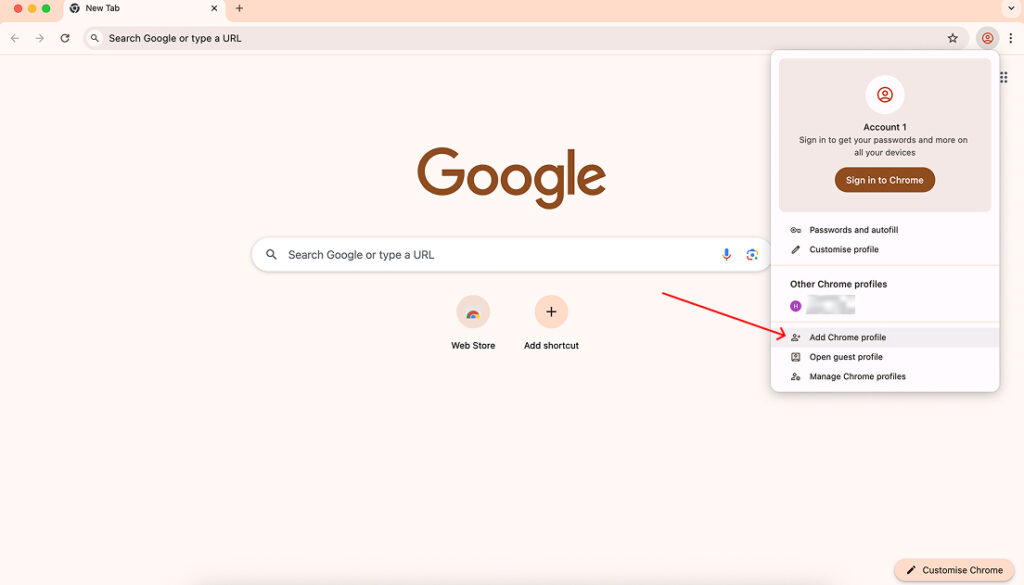
- Назови это “Remotasks” или чем-то похожим.
- Отключить синхронизацию с вашей персональной учетной записью браузера.
- Используйте этот профиль только для Remotasks.
Отдельный профиль браузера помогает предотвратить конфликты сессий и поддерживать порядок в рабочей среде.
Шаг 2: Настройка прокси с помощью Simple Proxy Switcher
Далее настройте стабильное прокси-соединение.
Внутри Личный кабинет NodeMaven:
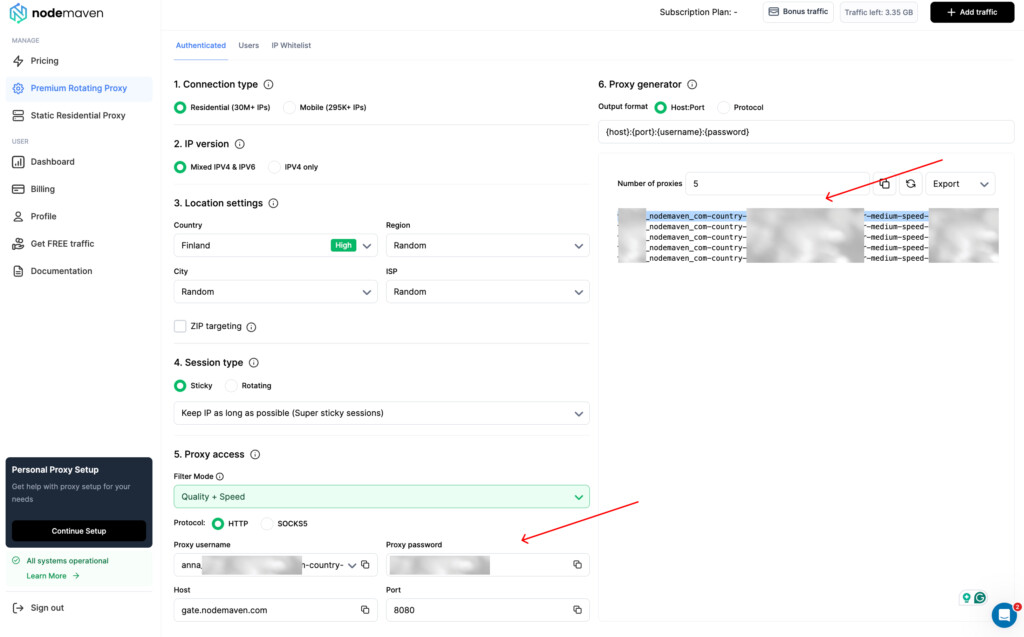
- Откройте Премиум ротационный прокси или статический резидентский прокси раздел.
- Выберите страну, соответствующую вашему местоположению в Remotasks.
- Включить Закреплённые сессии чтобы сохранить тот же IP-адрес в течение вашей рабочей сессии.
- Выбери Качество + Скорость Фильтр.
- Выберите HTTP или SOCKS5.
- Скопируйте ваш прокси-хост, порт, имя пользователя и пароль.
Теперь установите и настройте расширение браузера:
- Установить Простой переключатель прокси из интернет-магазина Chrome.
- Откройте настройки расширения.
- Создать новый профиль прокси.
- Введите данные прокси из вашего личного кабинета NodeMaven.
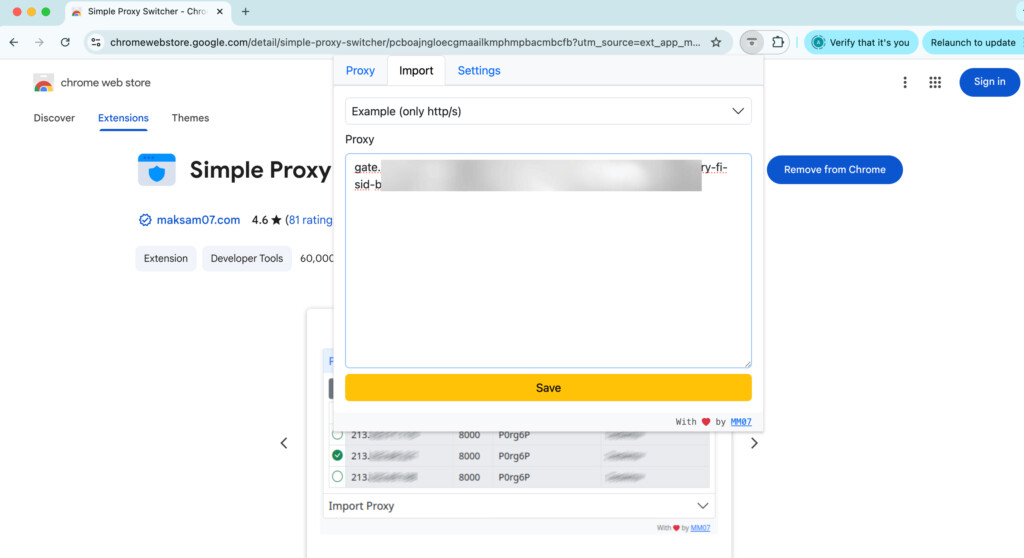
- Сохранить и включить профиль.
- Скопируйте имя пользователя вашего прокси и пароль прокси из личного кабинета для аутентификации.
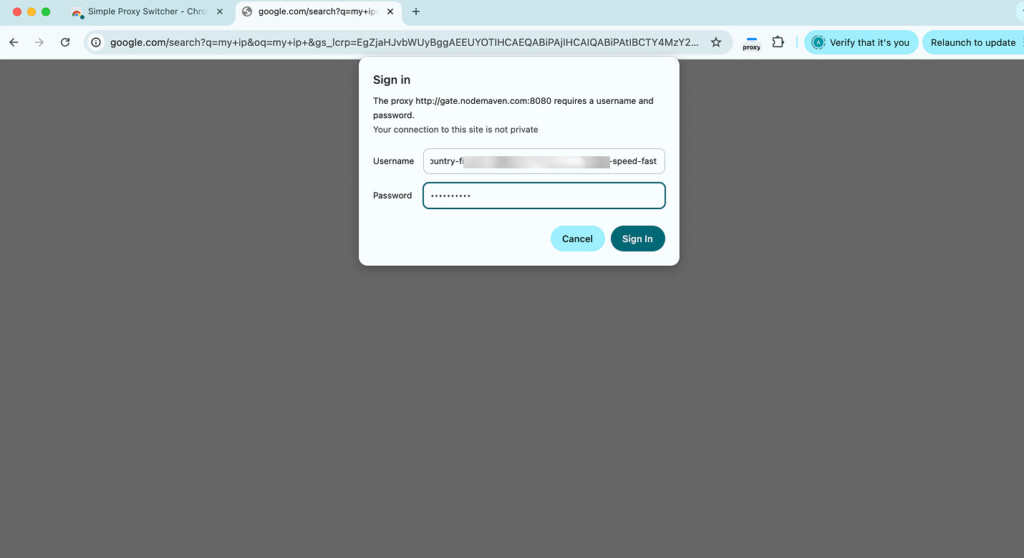
- Проверьте свое местоположение по IP с помощью инструмента проверки IP перед открытием Remotasks.
- Избегайте смены IP-адресов во время активной работы.
Использование «липкой» сессии помогает поддерживать постоянное соединение на протяжении всей сессии.
Ваш прокси настроен, и вы можете начать работу с Remotasks.
Лучшие настройки прокси для Remotasks
Для самого стабильного опыта:
- Резидентский прокси или ISP прокси
- Включены сессии с привязкой к пользователю (sticky sessions)
- Один и тот же IP-адрес в течение всей рабочей сессии
- Местоположение, соответствующее региону вашей подтвержденной учетной записи
- HTTPS или SOCKS5 протокол
- Без смены IP во время активных задач
- Нет бесплатных прокси
Совет по настройке NodeMaven
Для Remotasks прокси-сервер интернет-провайдера — отличный вариант, так как он предоставляет статический IP-адрес резидента, который остается неизменным на протяжении всей вашей рабочей сессии. Если вы предпочитаете прокси-серверы резидентов, используйте "липкую" сессию, чтобы сохранить тот же IP-адрес во время работы.
С NodeMaven вы можете выбрать между резидентскими и ISP-прокси, использовать «липкие» сессии до 24 часов и воспользоваться преимуществами предварительно отфильтрованных IP-адресов, статистики использования в реальном времени, переноса трафика, гарантии качества и кэшбэка. Для наиболее стабильной работы сохраняйте расположение прокси в соответствии с вашим подтвержденным рабочим регионом и избегайте смены IP-адресов во время активных задач.
Используйте прокси-серверы из частных сетей, мобильные прокси и прокси-серверы интернет-провайдеров с фиксированными сессиями и предварительно отфильтрованными IP-адресами. Начните с 750 МБ всего за $3.50.
Альтернативы Remotasks
Многие люди, ищущие отзывы о Remotasks или работу на Remotasks, также сравнивают альтернативные платформы для обучения ИИ и аннотирования данных. Если вы ищете более стабильную доступность проектов или хотите изучить другие возможности, рассмотрите:
- Outlier AI
- DataAnnotation
- То́лока
- Аппен
- Кликер
- ВанФорма
- ТЕЛУС Диджитал
- Amazon Mechanical Turk
В связи с изменениями, связанными с проектами Scale AI и миграцией аккаунтов, некоторые работники, ранее пользовавшиеся Remotasks, теперь выполняют аналогичную работу через Outlier.
Почему прокси NodeMaven — лучший выбор для Remotasks
Если вы решили использовать прокси для обеспечения стабильности легитимного соединения, NodeMaven предлагает несколько функций, которые хорошо подходят для сценариев Remotasks.
Длительные сессии входа
Сохраняйте один и тот же IP-адрес до 24 часов, что помогает поддерживать стабильное соединение во время рабочих сессий.
Чистые, предварительно отфильтрованные IP-адреса с высоким уровнем доверия
Фильтр качества IP NodeMaven ставит в приоритет низкий показатель мошенничества и IP-адреса, снижая вероятность проблем с подключением, вызванных адресами низкого качества.
Рут-прокси и прокси от интернет-провайдеров
Выберите ротационные резидентские прокси с «липкими» сессиями или статические прокси от интернет-провайдеров для стабильной идентификации в течение всего дня.
Таргетирование по местоположению
Выбирайте IP-адреса из вашего подтвержденного рабочего региона с таргетингом на страну, город, почтовый индекс и интернет-провайдера.
Гарантия качества
Если прокси не соответствуют стандартам качества, NodeMaven предлагает компенсацию или замену в зависимости от типа прокси.
Трафик-оверрол и кэшбэк
Неиспользованный трафик переносится на следующий расчетный период, а за использованный трафик пользователи могут получить кэшбэк в размере до 10%.
Самое главное, NodeMaven дает вам контроль над стабильностью сессии без необходимости полагаться на бесплатные прокси или нестабильные VPN. При использовании в соответствии с правилами Remotasks это может помочь создать более стабильный опыт работы в интернете во время рабочих сессий.
Используйте прокси-серверы из частных сетей, мобильные прокси и прокси-серверы интернет-провайдеров с фиксированными сессиями и предварительно отфильтрованными IP-адресами. Начните с 750 МБ всего за $3.50.


