
Хватит скрапить страницу, найдите API



Прежде чем воевать с браузером, проверьте, что он уже делает за вас.
Вы открываете страницу. Нужные данные прямо перед вами, на экране. Затем вы смотрите исходный код страницы — а он почти пустой. Скелет из div-ов. Ни цен. Ни объявлений. Ничего, что можно было бы распарсить.
Где-то ниже есть кнопка «Загрузить ещё», бесконечная прокрутка или спиннер, который заполняет страницу через мгновение после загрузки. Первый инстинкт подсказывает: Selenium. Или Playwright. Запустить браузер, ждать появления элементов, кликать по кнопкам, скрапить отрендеренный DOM.
Этот инстинкт обычно ошибочен.
Прежде чем писать хоть строчку браузерной автоматизации, проверьте, что ваш браузер уже делает. Он откуда-то получает эти данные. Иначе быть не может. «Пустая» страница наполняется товарами, потому что JavaScript обращается к бэкенду и превращает ответ в пиксели.
Найдите этот запрос. Скопируйте его. Выполните сами.
В этом и весь трюк. Это занимает минуты и может сэкономить вам часы борьбы с headless-браузерами, условиями ожидания и селекторами, которые ломаются при каждом редизайне.
Давайте его найдём.

Скрапьте быстрее с надёжными прокси. Попробуйте NodeMaven от $3.50 и получите 750MB трафика
Ваш браузер уже общается с источником данных
Современные сайты — это в основном интерфейсы поверх API. HTML, который вы получаете при первой загрузке, часто лишь оболочка. Реальный контент появляется после того, как страница отправляет запрос на бэкенд и получает в ответ JSON. JavaScript берёт этот ответ и отрисовывает его на экране.
Можете называть это «скрытым API», если хотите. Это практический ярлык, а не технический термин. Обычно ничего секретного в нём нет.
Это просто внутренний эндпоинт, который фронтенд вызывает, чтобы получить свои данные, и никто не проектировал его в расчёте на то, что скрапер обратится к нему напрямую. Именно поэтому он, как правило, куда честнее, чем HTML.
Почему это важно для вас:
- HTML создан для отрисовки, а не для парсинга. Он полон шума вёрстки, рекламных слотов и разметки, которая меняется с каждым редизайном.
- Автоматизация браузера стоит дорого. Каждый headless-экземпляр съедает память и CPU. Умножьте это на тысячи страниц, и расходы быстро растут.
- Ответ API обычно уже структурирован. Товары, цены, ID и изображения приходят в виде чистых полей, а не зарыты на глубине трёх div.
- Пагинация зачастую уже решена. Эндпоинт, который питает кнопку «Загрузить ещё», обычно принимает номер страницы или курсор. Вам не нужно нажимать кнопку. Вам нужно вызвать то, что вызывает кнопка.
- Фильтры и сортировка часто являются просто параметрами. Категория, порядок сортировки и поисковые запросы нередко видны прямо в URL запроса.
Пропустите отрисовку. Обращайтесь к источнику.
Найдите запрос вместо того, чтобы бороться со страницей
Основную работу здесь выполняет Chrome DevTools. Панель Network в Firefox работает точно так же.
- Откройте целевую страницу.
- Откройте DevTools (F12 или правый клик и Inspect).
- Перейдите на вкладку Network.
- Отфильтруйте по Fetch или XHR. Это скроет изображения, шрифты и CSS и оставит только тот трафик, который имеет значение.
- Перезагрузите страницу.
- Выполните действие, которое загружает нужные вам данные.
- Смотрите, как поступают запросы.
- Пройдитесь по ним и проверьте вкладку Response.
Действия, которые стоит выполнить:
- Нажатие «Load more» (Показать ещё)
- Прокрутка при бесконечной загрузке
- Ввод текста в поле поиска
- Применение фильтра
- Изменение порядка сортировки
- Переход по страницам результатов
- Выбор варианта товара
Что вы ищете в ответе:
- JSON, а не HTML
- Массив элементов (товары, объявления, посты, что бы ни показывала страница)
- Поля пагинации вроде page, totalPages или hasNext
- ID, которые соответствуют тому, что видно на экране
- Параметры в URL, которые, судя по всему, управляют запросом
Сначала вам придётся перебрать немало шума. Пинги аналитики, рекламные трекеры, сессионные heartbeat-запросы. Всё это игнорируйте. Вы ищете один-два запроса, которые действительно наполняют страницу данными.
Как понять, что вы нашли нужный эндпоинт
Не каждый 200 OK полезен. Пройдитесь по этому списку, прежде чем что-либо строить:
- Тело ответа содержит те самые записи, которые вам нужны
- При смене фильтра, страницы или поискового запроса на странице меняется и сам запрос
- Данные структурированы, а не свалены в сплошной HTML
- Эндпоинт принимает параметры, которыми вы можете управлять
- Тот же запрос можно отправить вне браузера и получить тот же результат
Зелёный код статуса означает лишь то, что сервер ответил. Однако некоторые эндпоинты возвращают частичные данные, пустые заглушки или HTML-фрагменты, предназначенные для одного виджета. Некоторые отдают GraphQL вместо простого массива. Каждый раз проверяйте фактическое содержимое, прежде чем строить вокруг него скрапер.
Скопируйте запрос и протестируйте его
Нашли что-то перспективное? Кликните правой кнопкой по запросу в DevTools и выберите Copy as cURL.
Вставьте это в:
- Postman
- Insomnia
- Python-скрипт с использованием запросы
Скопированный запрос даёт вам всё необходимое для его воспроизведения:
- The URL
- HTTP-метод
- Параметры запроса
- Тело запроса, если это POST
- Заголовки
- Файлы cookie
- Любое состояние сессии или авторизации, которое хранил браузер
Важно! Воспроизводите только те запросы, к которым у вас есть авторизованный доступ, и соблюдайте условия использования целевого сайта.
Вставьте запрос в выбранный инструмент, нажмите «Отправить» и проверьте, получаете ли вы тот же ответ, что видели в DevTools. Если да, у вас есть рабочий источник данных, который можно автоматизировать скриптом.
Нужны надёжные прокси для вашего скрапера? Начните с NodeMaven от $3.50 и получите 750MB для теста
Найдите параметры, которые делают основную работу
Именно здесь проявляется настоящая экономия времени.
Посмотрите на строку запроса (query string) в найденном вами запросе:
Типичные параметры, которые стоит проверить:
- страница или offset: какой срез результатов возвращается
- лимит или page_size: сколько результатов возвращается за один запрос
- cursor: токен пагинации вместо номера страницы
- запрос или q: поисковые слова
- Категория или фильтр: сужает набор результатов
- sort: меняет порядок результатов
Теперь немного поэкспериментируйте с ними.
Если фронтенд сайта всегда показывает только 20 элементов на странице, попробуйте запросить 50 или 100. Иногда бэкенд это принимает. Одно такое изменение может сократить общее количество запросов, а значит, меньше шансов попасть под ограничение частоты запросов и скрапер в целом работает быстрее.
Если эндпоинт отдаёт курсор, вы можете связывать запросы в цепочку напрямую вместо того чтобы угадывать количество страниц. Если фильтры передаются просто параметрами, вы можете запросить ровно тот срез данных, который вам нужен, вместо того чтобы выгружать всё и фильтровать на стороне клиента.
Не рассчитывайте, что это сработает всегда. Серверы часто ограничивают размер страницы. Некоторые игнорируют параметры, которые не распознают. Некоторые выдают ошибку, как только вы выходите за внутренний лимит. Проверяйте каждое изменение параметров.
От одного запроса к полноценному скраперу
Как только вы подтвердили эндпоинт и его параметры, превратить его в рабочий скрапер по большей части дело техники.
Вот и всё. Просто цикл, запрос и JSON-ответ, который можно разобрать напрямую.
Добавьте обработку ошибок, соблюдайте ограничения частоты запросов и сохраняйте результаты так, как вам удобно: в CSV, в базу данных, куда угодно, где их ожидает ваш пайплайн. Основной цикл редко должен быть сложнее этого.
Когда этот приём не работает
Прямые запросы к API не волшебство. Они дают сбои, и стоит заранее понимать, почему.
Частые причины, по которым этот короткий путь перестаёт работать:
- Эндпоинт требует аутентификации , которую вы не можете разумно воспроизвести
- Он зависит от сессионных файлов cookie, которые быстро истекают
- Токены динамически ротируются, и их нужно генерировать заново
- Эндпоинт ожидает состояние, сгенерированное браузером, например отпечаток или подписанный запрос
- Ограничения частоты запросов слишком жёсткие
- Ан антибот-система стоит перед эндпоинтом
- Зона эндпоинт часто меняется, поскольку он никогда не задумывался как стабильный публичный API
- Данные действительно появляются только после выполнения клиентского JavaScript, без какого-либо стоящего за ними запроса
Когда вы упираетесь в одну из этих стен, именно здесь автоматизация браузера оправдывает себя. Playwright или Selenium имеют смысл, когда сам браузер должен быть частью рабочего процесса, а не просто движком рендеринга, который вы пытаетесь обойти.
Где в API-скрапинге нужны прокси
Как только ваш скрапер обращается к эндпоинту напрямую, вы, как правило, отправляете гораздо больше запросов, чем когда-либо отправил бы человек, вручную кликая по страницам. В этом и есть весь смысл такого подхода. Но именно здесь начинают играть роль ограничения частоты запросов и блокировки по IP.
Кроме того, настройка прокси зависит от рабочего процесса. Для выгрузки результатов с пагинацией через тысячи запросов обычно нужны ротационные резидентские прокси, распределяющие трафик между разными IP.
Рабочим процессам, построенным вокруг авторизации или постоянной сессии, лучше подходят sticky сессии , которые сохраняют один и тот же IP на протяжении определённого времени.
Для длительных задач, которым нужна одна стабильная идентичность на протяжении часов, часто лучше подходят статические ISP-прокси.
NodeMaven предоставляет пул резидентных прокси из 30M+ IP в 190+ странах с ротацией и закреплёнными сессиями (до 24 часов), поддержкой HTTP(S) и SOCKS5, а также таргетингом на уровне города или ZIP-кода.
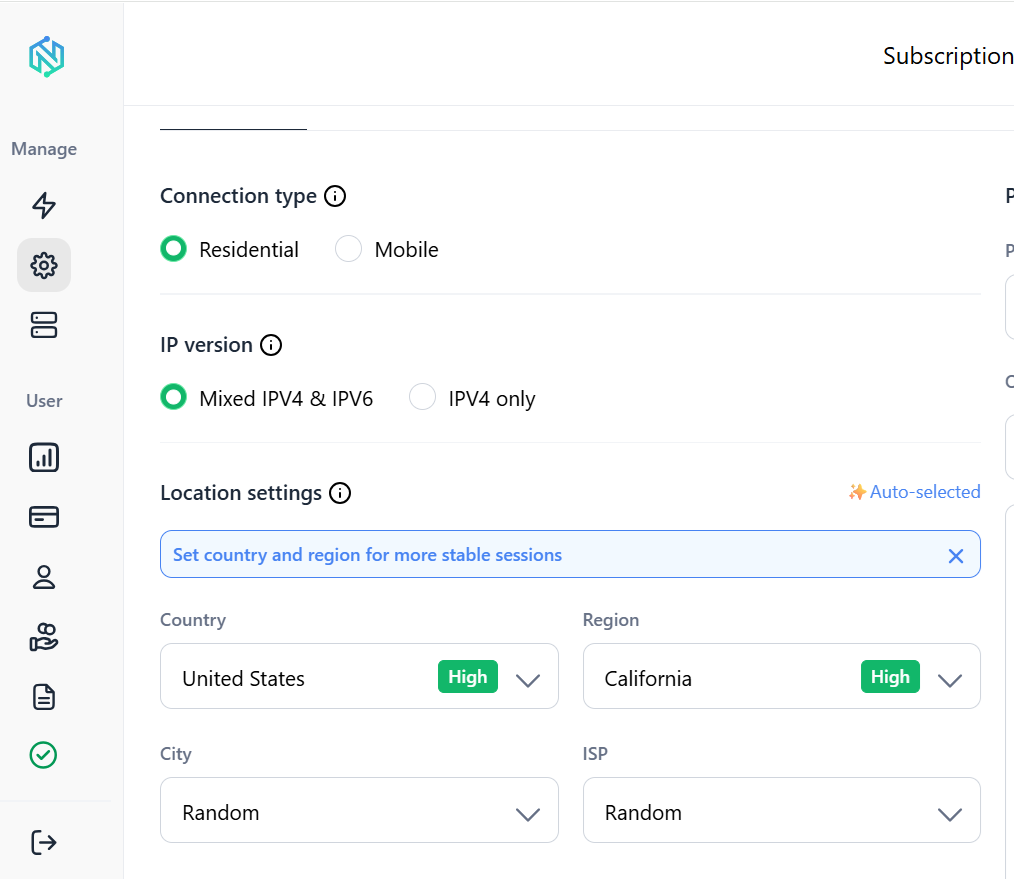
Мобильные и ISP-прокси покрывают рабочие процессы, которым нужен другой профиль. Всё это без проблем работает с библиотекой requests в Python, так что подключить прокси к описанному выше циклу можно простым изменением конфигурации.
Скрытый API или скрапинг через браузер?
| Подход | Лучшее для | Основное преимущество | Главный недостаток |
| Прямые запросы к API | Сайты, где фронтенд обращается к JSON-эндпоинту | Быстро, чистые данные, низкие затраты ресурсов | Эндпоинт может измениться без предупреждения, может потребоваться обработка авторизации |
| Playwright | Сайты с большим объёмом JS, сценарии, требующие поведения реального браузера | Обрабатывает рендеринг, клики и сложные сценарии | Медленнее и требует больше ресурсов, чем обычный запрос |
| Selenium | Устоявшиеся пайплайны автоматизации, унаследованные инструменты | Зрелая экосистема, широкая поддержка браузеров | Как правило, медленнее Playwright, больше накладных расходов на настройку |
Используйте самый простой уровень, который даёт вам нужные данные.
Обеспечьте свой скрапинг надёжными прокси. Начните работу с NodeMaven от $3.50 и 750MB трафика
Чек-лист на 30 секунд
Перед запуском Selenium или Playwright:
- Откройте вкладку Network
- Отфильтруйте по Fetch/XHR
- Перезагрузите страницу
- Вызовите загрузку динамического контента (прокрутка, клик, фильтр, поиск)
- Изучите JSON-ответы
- Найдите параметры пагинации или фильтров
- Скопируйте запрос как cURL
- Проверьте его вне браузера
- Автоматизируйте его с помощью цикла
- Добавьте прокси, если рабочему процессу нужен масштаб
Сайт, который вы видите, — не то место, где живут данные
Страница, которую вы видите, редко является настоящим источником данных. Где-то за ней уходит запрос и приходит ответ, и всё на экране строится из этого обмена.
Найдите этот запрос, прежде чем браться за браузер. Чаще всего это пятиминутный крюк, который экономит часы ожиданий Selenium, хрупких селекторов и медленного рендеринга страниц.
Как только ваш скрапер обращается напрямую к API, следующая проблема — масштаб. NodeMaven даёт вам резидентные, мобильные и ISP-IP-адреса, чтобы эти запросы продолжали работать, не упираясь в ограничения частоты запросов. Попробуйте за $3.50 и убедитесь, как далеко может завести вас чистый скрапер, работающий напрямую с API.
Готовы масштабировать свой скрапер? Попробуйте NodeMaven от $3.50 и получите 750MB трафика для старта


