






Chrome Data Usage: Why Your Proxy Traffic Runs Out Fast



Your scraper saves a few prices and product names, but the proxy balance drops by tens of megabytes. You haven’t downloaded a video or opened a gallery. Where did the traffic go?
Some of it may belong to Chrome itself. When we tested fresh Chrome profiles, we found that the browser downloaded components and other data through the proxy, separately from the website being visited. Repeating that startup for every task multiplied the overhead.
We measured Chrome data usage across Linux and Windows, compared it with Firefox and automation launches, and tested ways to reduce those background downloads.
Ключевые выводы
- Chrome downloads more than your target pages. Fresh-profile trials produced median background traffic of 50.5 MB on Windows and 73.1 MB on Linux.
- Most measured background downloads happened during startup. They finished within five minutes; the following 25 minutes added less than 0.1 MB.
- Find which domains consume your allowance. Inspect domain usage, then use the NodeMaven Proxy Bandwidth Checker to compare a known-size transfer with your provider’s usage counter.
- Reuse profiles or adjust automated Chrome launches to reduce repeat downloads. Existing-profile restarts usually generated 0.1 to 0.3 MB. Three tested flags together reduced fresh-start background traffic to 0.1 MB on Windows and 0.5 MB on Linux.

Test your workflow with NodeMaven’s screened residential and mobile proxies, then use domain-level statistics to see where the allowance goes. The $3.50 paid trial includes 750 MB across both pools, with no expiry and one trial per account
How much data does Chrome use through a proxy?
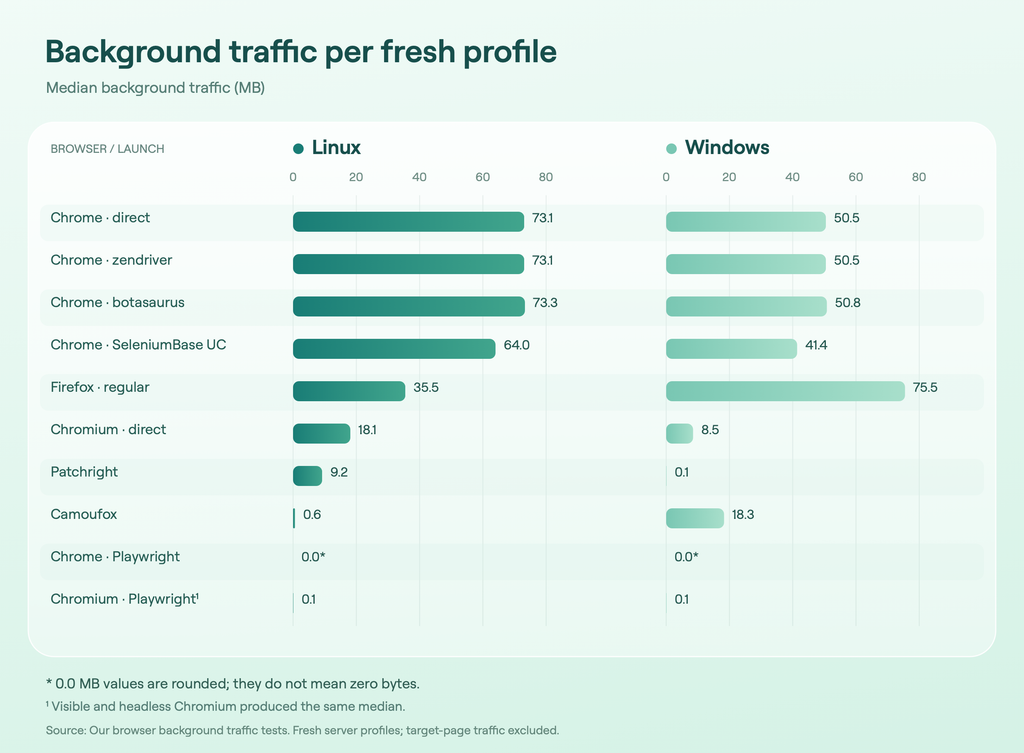
When we launched Chrome directly with a proxy flag and a fresh profile, we measured median background traffic of 73.1 MB on Linux and 50.5 MB on Windows. Those figures exclude traffic to the test website.
They describe a particular browser setup: Chrome 157 starting with a brand-new, empty profile on a server. Your total also includes the pages you visit, their resources, and any repeated attempts.
How we measured background traffic
Each browser connected through a local proxy that counted bytes by destination host and forwarded the traffic directly. We ran 6 to 16 trials per browser and operating system, interleaving configurations within each round.
Each trial followed the same sequence:
- Start a fresh profile and leave a blank page idle for two minutes.
- Load example.com 20 times. This page has no third-party resources.
- Leave the browser idle for another minute.
- Restart using the same profile and measure another two idle minutes.
We classified bytes sent to hosts other than example.com as background traffic. Separate trials left plain Chrome and regular Firefox idle for 30 minutes to see whether downloads continued.
For directly launched Chrome, Linux trials ranged from 42.7 to 73.2 MB, while Windows trials ranged from 50.5 to 50.6 MB. The local counter measured transfers; we didn’t compare these trials with a commercial provider’s invoice.
Why is Chrome using so much data?
Browser downloads outside your target website
The largest Chrome download in our tests came from Optimization Guide, a browser component that handles optimization instructions and machine-learning models supplied by Google. We recorded approximately 41 MB from its service in every trial of plain Chrome and the three libraries that launched the installed browser.
Other browser services added their own traffic:
| Download we identified | Observed host | Measured size and scope |
|---|---|---|
| Optimization Guide download | optimizationguide-pa.googleapis.com | Approximately 41 MB in plain Chrome and the three installed-Chrome library setups |
| Component updates | edgedl.me.gvt1.com | Approximately 20 MB for Chrome on Linux; approximately 9 MB for Chromium on Linux |
| Safe Browsing lists | safebrowsing.googleapis.com | Approximately 5 to 9 MB in most Chrome trials |
| Firefox settings data | firefox-settings-attachments.cdn.mozilla.net | Approximately 27 to 59 MB in regular Firefox trials |
A proxy usage report can therefore show Google or Mozilla domains even when your job only visits a retail website. Check the bytes transferred to each domain, rather than assuming every unfamiliar hostname belongs to the page.
This confusion appears in community reports too. In an r/chrome discussion about idle network usage, a user reported traffic in Windows Task Manager while Chrome’s own task manager showed none. That account doesn’t identify the cause, but it illustrates why a single browser view may leave traffic unexplained.
Page resources, browser warm-up, and retries
Website images, fonts, JavaScript, media, and API calls sit on top of browser startup traffic. A scraper might keep only a price while downloading the resources needed to render the entire product page.
Warm-up can add another substantial transfer. In our separate Google CAPTCHA experiment, visiting pages to warm up each new IP took about 64 MB, compared with about 1 MB when using an existing Google cookie set. We measured that traffic in a different workflow; don’t add it to our startup totals as a separate, nonoverlapping cost.
Retries become particularly expensive when each attempt creates a new profile, repeats the warm-up, and reloads the page. Check what your retry actually restarts before increasing the allowance.
Chrome vs. Firefox: which used more background traffic?
Firefox wasn’t consistently lighter. Its regular release used less background traffic than directly launched Chrome on Linux, but more on Windows.
Launch method also changed the results substantially:
| Browser or launch method | Linux median | Windows median |
|---|---|---|
| Chrome, launched directly | 73.1 MB | 50.5 MB |
| Chrome through zendriver | 73.1 MB | 50.5 MB |
| Chrome through botasaurus-driver | 73.3 MB | 50.8 MB |
| Chrome through SeleniumBase UC | 64.0 MB | 41.4 MB |
| Firefox, regular release | 35.5 MB | 75.5 MB |
| Chromium, launched directly | 18.1 MB | 8.5 MB |
| Patchright | 9.2 MB | 0.1 MB |
| Camoufox | 0.6 MB | 18.3 MB |
| Chrome through Playwright | 0.0 MB* | 0.0 MB* |
| Chromium through Playwright, visible or headless | 0.1 MB | 0.1 MB |
Playwright applies launch settings that suppress background activity. Its Chromium launch configuration includes controls for background networking, component updates, and OptimizationHints.
The results also challenge a common shortcut: switching to headless mode. Visible and headless Playwright Chromium both produced a median 0.1 MB here.
Why fresh Chrome profiles drain a proxy allowance faster
Most measured downloads arrived during startup
Chrome transferred 58% to 83% of its background bytes in the first minute. The measured startup downloads finished within five minutes, and the next 25 minutes added less than 0.1 MB. Regular Firefox completed its measured downloads within the first minute.
Restarting an existing profile usually generated only 0.1 to 0.3 MB, although an update occasionally added 9 to 22 MB. Reusing the profile avoided repeating most of the initial downloads in these tests.
That changes where to look for savings. If a worker creates a fresh browser profile for every URL, shortening each task by a few seconds may leave the repeated startup transfers largely untouched.
What happens when every page gets a fresh browser?
Using the Linux Chrome median of 73.1 MB, the modeled background traffic for 1,000 pages looks like this:
| Pages per fresh browser launch | Fresh launches | Background traffic | Illustrative cost at $3/GB |
|---|---|---|---|
| 1 | 1,000 | 73.1 GB | $219.30 |
| 10 | 100 | 7.31 GB | $21.93 |
| 100 | 10 | 0.731 GB | $2.19 |
These are calculations from the measured median, using 1 GB = 1,000 MB and an illustrative rate. They exclude target-page traffic and assume every launch starts with an empty profile.
To estimate the rest of the workload, use the proxy bandwidth calculator guide. Include browser startup separately so a small HTML response doesn’t become your estimate for an entire browser session.
How to reduce Chrome data usage through proxies
Reuse profiles for repeat work
Check whether your code deletes the profile directory, creates a new one for every URL, or launches a completely new browser after each failure. Batch compatible tasks in an existing environment where the workflow allows it.
Keep the browser process, profile, and automation context distinct. Playwright’s browser contexts isolate sessions inside a browser; creating a context is not equivalent to every fresh browser-profile launch measured here. Conversely, saving cookies alone doesn’t prove you’ve retained downloaded browser components.
Для управляемой автоматизации, браузер для скрапинга NodeMaven provides saved profiles. Its profile configuration can retain cookies, local storage, and cache between sessions when store_cache is enabled. A recurring scraper or AI agent can resume that saved state rather than reconstructing it for every task.
Run recurring scrapers and AI agents in NodeMaven Scraping Browser with saved profiles, configurable cookie and cache persistence, and an optional ad blocker. Browser access is included for NodeMaven users, sessions consume your residential or mobile proxy traffic balance.
Apply the tested Chrome launch settings
For directly launched automated Chrome, we tested these three flags together:
--disable-component-update
--disable-features=OptimizationHints
--disable-background-networking
Either of the first two flags alone left a substantial download. The combined configuration produced the largest reduction:
| Chrome configuration on Linux | Background traffic per fresh start |
|---|---|
| No additional flags | 73.1 MB |
--disable-component-update | 51.4 MB |
--disable-features=OptimizationHints | 31.1 MB |
Both flags plus --disable-background-networking | 0.5 MB |
We ran 10 Linux trials per configuration. The combined configuration produced 0.1 MB on Windows. We didn’t test the background-networking flag alone.
Add these arguments to the launch configuration that starts your automation browser. If you already supply --disable-features, add OptimizationHints to that comma-separated list rather than introducing a competing flag.
Use this configuration in a maintained automation environment: component updates suppressed during jobs need a separate update process. Disabling Safe Browsing in your everyday browser isn’t part of this recommendation.
Stop loading resources your task does not use
For price extraction, large images, video, and custom fonts may add bytes without contributing to the fields you need. A screenshot or visual-testing job may require those same resources, so compare the output after each blocking change.
There is a caching detail worth checking before adding request interception: Playwright documents that enabling routing disables HTTP caching. A rule that saves image downloads on one page can also remove cache reuse elsewhere in the session. Measure the complete sequence.
NodeMaven Scraping Browser includes an ad_blocker session option, allowing you to test reduced advertising traffic within the managed browser.
Fix repeated failures before increasing traffic
Log the number of attempts for each completed task and whether each attempt starts a new profile. A retry after full rendering can repeat most of the page transfer, even if extraction failed on a missing selector.
Наш 1,600-request browser and proxy comparison showed that changing the browser could alter delivery, while a successful first page didn’t establish that later pages would work. Use that diagnostic approach when failures repeatedly trigger a fresh start.
Scheduling alone is a weak substitute for checking the failing workflow. In our Google scraping time study, we found that the four-hour blocks stayed within about three percentage points of their day’s average when compared within the same day. Browser state and the day of the run had larger effects.
Measure Chrome traffic against your proxy usage
Start with one worker and one set of credentials. Other jobs using the same balance make a small test difficult to interpret.
- Record the usage baseline. Stop other work and allow earlier deductions to settle.
- Measure a fresh profile on a blank page for five minutes. Record transferred bytes and destination domains.
- Repeat with the existing profile. A large first-run spike followed by a much smaller restart points toward startup overhead.
- Run your actual task. Record attempts, target resources, and whether the output is complete.
- Compare a known-size transfer. Use the NodeMaven Proxy Bandwidth Checker and compare its result with the corresponding provider usage change.
The checker supports fixed payloads of 10, 50, 100, 300, and 500 MB through HTTP or SOCKS5 proxies. It reports transfer results, including bytes read. The test consumes your provider’s traffic allowance; it doesn’t identify Chrome’s background domains.
For that breakdown, open Обзор in the NodeMaven dashboard and review usage by domain. Compare the Трафик и Запросы columns. The charts and domain table have separate period and product filters, so align both before comparing them. You can also separate Proxy traffic from Scraping Browser traffic.
When comparing the fixed transfer with a provider’s counter, check the units, counted upload/download directions, and documented overhead. Allow for delayed traffic deductions before treating a balance change after closing Chrome as continued network activity.
For production jobs, track MB per completed task with valid output. Наш web scraping success research explains why an HTTP 200 response can still contain a block page. Keep the configuration that reduces transferred bytes while preserving the content your job needs.
Ограничения исследования
We ran these tests on Ubuntu 24.04 and Windows Server, not desktop computers. We tested Chrome 157, Chromium 151, regular Firefox 160, Playwright Firefox 153, Patchright 156, and Camoufox 158. Library versions included zendriver 0.17, SeleniumBase 4.57 UC, and botasaurus-driver 4.0.
We didn’t test Firefox flags or idle periods beyond 30 minutes. We measured background transfers, not provider billing accuracy or target-site acceptance. Browser versions and update availability can change the downloads received by a fresh profile.


