
Как настроить Streisand VPN: iPhone, Mac, ПК и Android



Streisand — это бесплатный прокси-клиент для iPhone и iPad. Приложение также работает на совместимых Mac с Apple Silicon. Оно поддерживает VLESS, VMess, Trojan, Shadowsocks, Socks, SSH, Hysteria2, TUIC и WireGuard, но не включает VPN-сервер или подписку. Вам нужно добавить подключение, предоставленное провайдером, или сервер, которым вы управляете сами.
Базовая настройка занимает четыре шага: установите Streisand, скопируйте ссылку на подписку или сервер, импортируйте её и подключитесь. Для Windows и Android официального приложения Streisand нет, поэтому в этом руководстве также рассмотрены клиенты, которые принимают такие же данные подключения.
Скачайте Streisand из официального App Store. Доступность приложения может отличаться в зависимости от страны или региона App Store.
Настройка Streisand в двух словах
- Установите Streisand из App Store.
- Скопируйте полную ссылку на подписку или сервер, предоставленную вашим провайдером.
- Откройте Streisand, нажмите +, и выберите Import from Clipboard.
- Выберите сервер, подключитесь и подтвердите запрос Apple на добавление конфигурации VPN.
Те же кнопки и порядок настройки действуют на iPad и Mac. Mac с Apple Silicon запускают версию приложения для iPhone и iPad, хотя некоторые элементы управления могут располагаться иначе в более широком окне.

Используйте ISP-прокси NodeMaven с поддержкой UDP для стабильных профилей браузера, быстрого соединения и длительных рабочих процессов. Используйте код ISP25 получить 25% off your first order with 2 or more IPs. For users from Russia, payments with Mir and YooMoney are available.
Как скачать Streisand VPN
Использование официальную страницу в App Store , а не IPA-файл или установщик из каталога загрузок. Перед установкой приложения убедитесь, что разработчик указан как ARCADIA ODYSSEY INC. . Однако в некоторых регионах приложение может быть недоступно. Измените страну или регион вашей учётной записи Apple , если приложение недоступно в вашем App Store.
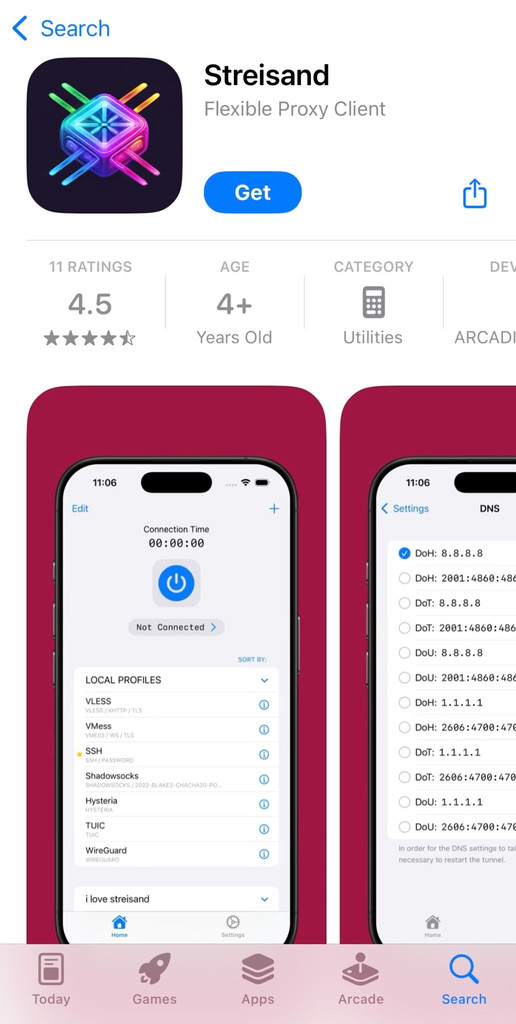
Согласно официальной странице, Streisand требует iOS 14 или новее на iPhone и iPadOS 14 или новее на iPad. Там же Streisand описывается как прокси-клиент, и указано, что пользователи должны создать или приобрести собственные серверы.
Streisand VPN для iPhone и iPad
- Откройте официальную страницу Streisand в App Store.
- Проверьте имя разработчика.
- Нажмите Получить и завершите установку в диалоге Apple.
- Откройте Streisand.
Streisand VPN для Mac
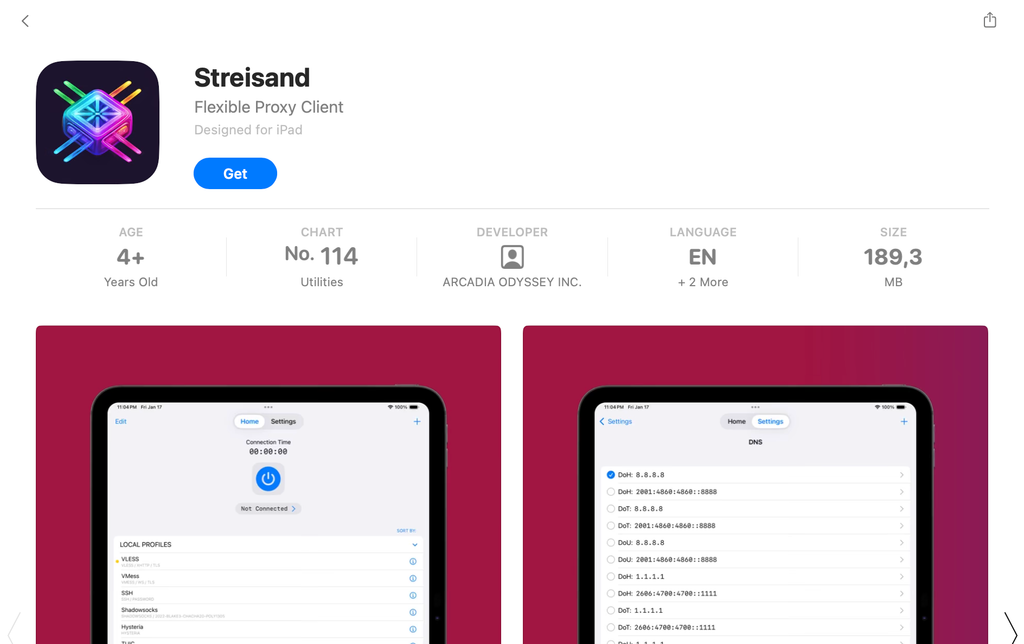
В App Store Streisand указан как совместимый с компьютерами Mac на macOS 12 или новее с чипом Apple M1 или новее. На таких Mac Apple запускает приложение для iPhone и iPad через Apple Silicon. Отдельной настольной версии у Streisand нет.
Откройте App Store на Mac, найдите страницу Streisand и перед установкой проверьте панель совместимости. Импорт и подключение выполняются по той же схеме, что и в инструкции для iPhone ниже.
Можно ли скачать Streisand для Windows или Android?
На актуальных страницах разработчика нет официального приложения Streisand для Windows или Android. Не используйте неизвестные файлы, которые выдают за Streisand APK или установщик для Windows. Они не распространяются через проверенную страницу Streisand в App Store.
Если вы ищете Streisand VPN для ПК или Streisand VPN для Android, мы рекомендуем использовать другой клиент с совместимой подпиской или прокси. Ознакомьтесь с альтернативами в таблице ниже.
| Устройство | Официальное приложение Streisand | Рекомендуемый способ |
| iPhone и iPad | Да | Установите его из App Store |
| Mac на Apple Silicon | Да | Установите приложение для iPhone и iPad из App Store |
| Mac на Intel | Проверенного способа нет | Используйте другой совместимый клиент |
| ПК с Windows | Нет | Использование Proxifier, Happ, или Hiddify |
| Андроид | Нет | Использование Happ, Hiddify, или SocksDroid |
Где взять ключ, подписку или сервер для Streisand
Streisand предоставляет приложение, а провайдер предоставляет подключение. Вы можете получить URL подписки, QR-код, отдельную ссылку протокола или данные SOCKS-сервера. Скопируйте значение полностью и в точности так, как его выдал провайдер. Удаление даже одного символа может нарушить импорт.
Зона официальной странице разработчика Streisand перечислены семейства протоколов, которые поддерживает клиент:
- VLESS(Reality)
- VMess
- Trojan
- Shadowsocks
- Носки
- SSH
- Hysteria(V2)
- TUIC
- Wireguard
Сверьтесь с этим списком, прежде чем покупать подключение для менее распространённого протокола.
Что такое ключ Streisand?
Провайдер может называть вашу ссылку для подключения ключ, конфигурацию, или подписку. Все три импортируются в Streisand одинаково.
- A ключ одного сервера добавляет один сервер. Обычно он начинается с vless://, vmess://, trojan:// или ss://.
- A ссылку на подписку может добавить сразу несколько серверов. Через ту же ссылку провайдер может также обновлять список доступных серверов.
| Что вы получили | Что сделать в Streisand |
| URL подписки | Скопируйте его и выберите Import from Clipboard |
| QR-код | Отсканируйте его через меню добавления |
| ссылку VLESS, VMess, Trojan или Shadowsocks | Импортируйте полную ссылку |
| SOCKS-сервер, порт, имя пользователя и пароль | Соберите Socks URL или используйте ручные поля Socks |
| Нет данных для подключения | Запросите у провайдера конфигурацию, совместимую со Streisand |
Можно ли использовать бесплатный прокси со Streisand?
Если вы хотите протестировать SOCKS-подключение, загляните в списка бесплатных проксиот NodeMaven. Выберите запись SOCKS5 и используйте указанные IP-адрес и порт. Ниже описано, как использовать SOCKS-прокси в Streisand.
Публичные прокси используются очень многими. Часть адресов уже перегружена или заблокирована, а другие перестают отвечать ещё до того, как вы их попробуете. Они подходят только для быстрой проверки подключения без чувствительных данных. Не передавайте пароли, платёжные данные, личные сообщения или сессии аккаунтов через неизвестный публичный прокси.
Если подключение должно быть быстрым, стабильно доступным и сохранять один и тот же IP, использовать выделенные статические прокси вместо перебора публичных адресов. NodeMaven предлагает приватные прокси от $2.33/IP/30 дней.
Как настроить Streisand VPN на iPhone, iPad и Mac
Скриншоты в этом руководстве сделаны на iPhone. На iPad порядок настройки и названия элементов интерфейса такие же. На Mac с Apple Silicon выполните ту же последовательность в приложении для iPhone и iPad. В более широком окне Mac некоторые элементы управления могут располагаться немного иначе.
Шаг 1: Подготовьте подписку или данные прокси
Streisand не запустится без подключения. Вы можете использовать подписку или ссылку на сервер от совместимого провайдера, отсканировать QR-код или подготовить SOCKS5-прокси в формате URL.
Если у вас уже есть подписка или ключ сервера, скопируйте значение целиком. Поддерживаемый ключ может начинаться с vless://, vmess://, trojan:// или ss://. Сохраните каждый символ ссылки.
Если вам нужен один качественный статический IP для длительных сессий, вы можете подготовить ISP-прокси NodeMaven для Streisand. ISP-прокси NodeMaven предоставляют приватный резидентный IP, безлимитный трафик, доступ по HTTP и SOCKS5, поддержку UDP и проверку качества перед выдачей. IP остаётся закреплённым за вами на выбранный тариф на 30 или 90 дней либо дольше при автопродлении, а цены начинаются от $2.33/IP/30 дней на планах на 90 дней. При покупке обязательно выберите протокол SOCKS5.
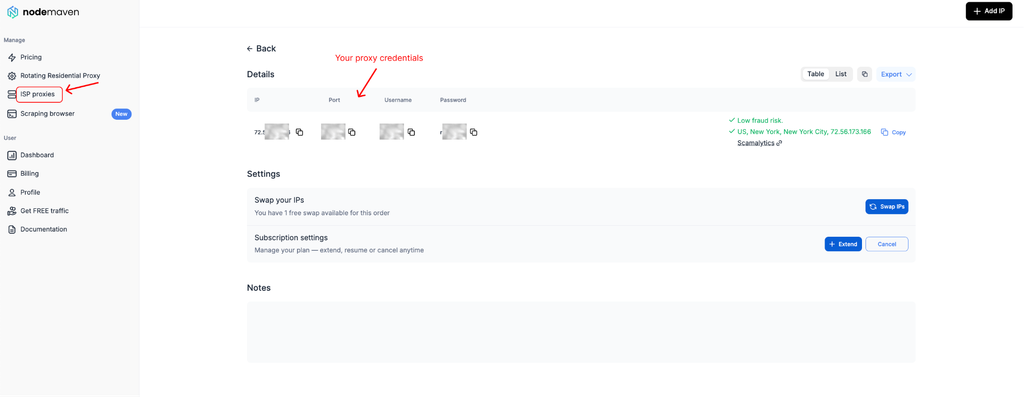
После покупки прокси откройте его данные в панель управления NodeMaven и скопируйте эти четыре значения:
- Сервер или IP-адрес
- Порт
- Имя пользователя
- Пароль
Используйте ISP-прокси NodeMaven с поддержкой UDP для стабильных профилей браузера, быстрого соединения и длительных рабочих процессов. Используйте код ISP25 получить 25% off your first order with 2 or more IPs
Вариант A:
Подставьте учётные данные в URL такого формата:
socks://USERNAME:PASSWORD@SERVER:PORT
Например, вот вымышленные данные:
- Сервер: 203.0.113.10
- Port: 1080
- Имя пользователя: demo_user
- Пароль: demo_password
Создайте такую ссылку:
socks://demo_user:[email protected]:1080
Используйте сервер, порт, имя пользователя и пароль, указанные в вашем личном кабинете. Пример выше не подключится.
Вариант B:
Вы также можете держите четыре значения учётных данных по отдельности и настройте прокси вручную в приложении Streisand. Так не нужно создавать URL, и этот способ работает надёжнее, если имя пользователя или пароль содержат символы вроде @, :, / или #.
Для ручной настройки подготовьте сервер, порт, имя пользователя и пароль . Вы введёте их в соответствующие поля Streisand после выбора протокола SOCKS.
Зона Руководство по настройке SOCKS5 объясняет, как работают значения сервера, порта и аутентификации в популярных инструментах управления прокси и на разных устройствах.
Шаг 2. Импортируйте подключение в Streisand
Вариант A:
Используйте импорт из буфера обмена для подписки, отдельного ключа сервера или подготовленного socks:// URL.
- Скопируйте полную ссылку подключения.
- Откройте Streisand.
- Нажмите + в правом верхнем углу.
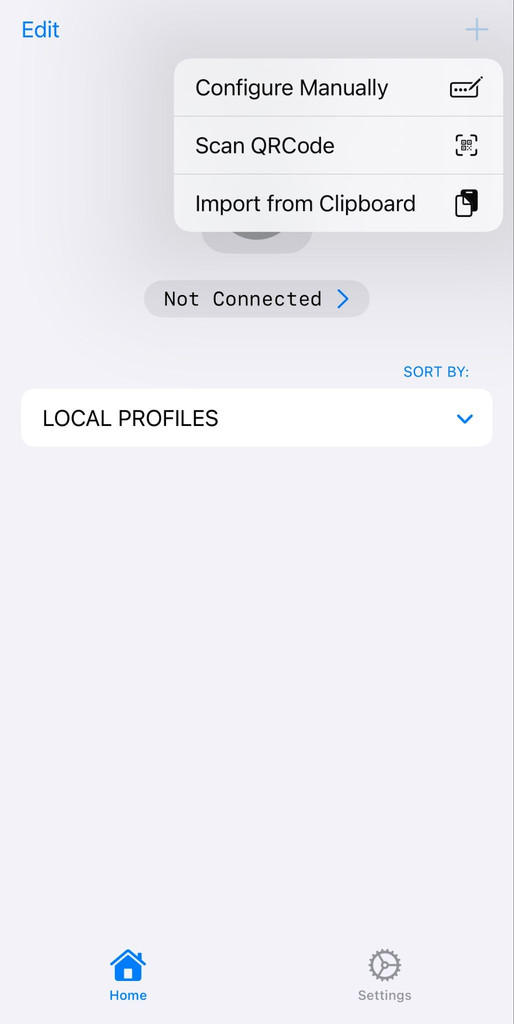
- Выберите Import from Clipboard.
- Разрешите Streisand вставку из буфера обмена, если iOS запросит разрешение.
- Дождитесь появления импортированного профиля.
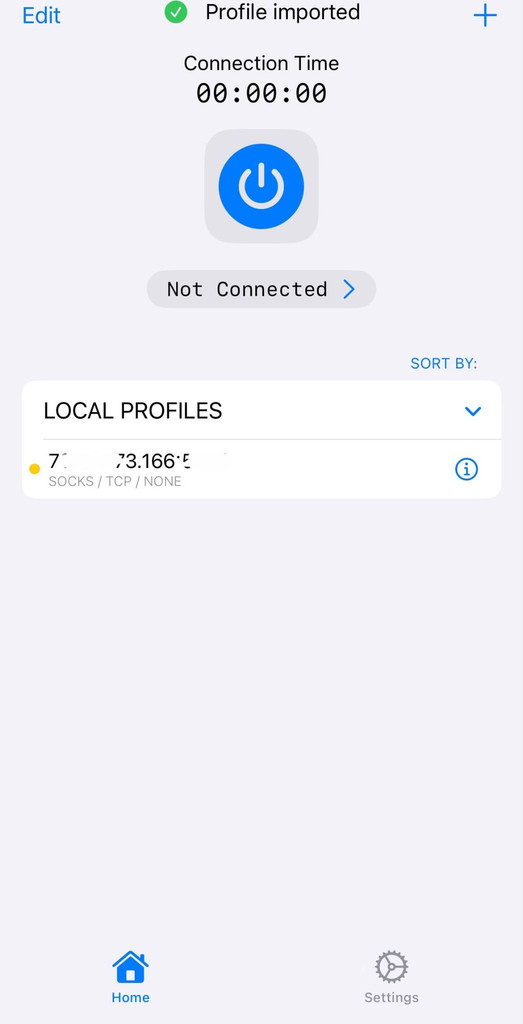
Вариант B:
Вы можете ввести учётные данные NodeMaven напрямую, если не хотите создавать ссылку socks://:
- Откройте Streisand и нажмите +.
- Выберите Configure Manually.
- Выберите Носки или SOCKS5, в зависимости от названия в вашей версии.
- Введите данные NodeMaven сервер или IP-адрес.
- Введите данные порт.
- Добавьте имя пользователя и пароль.
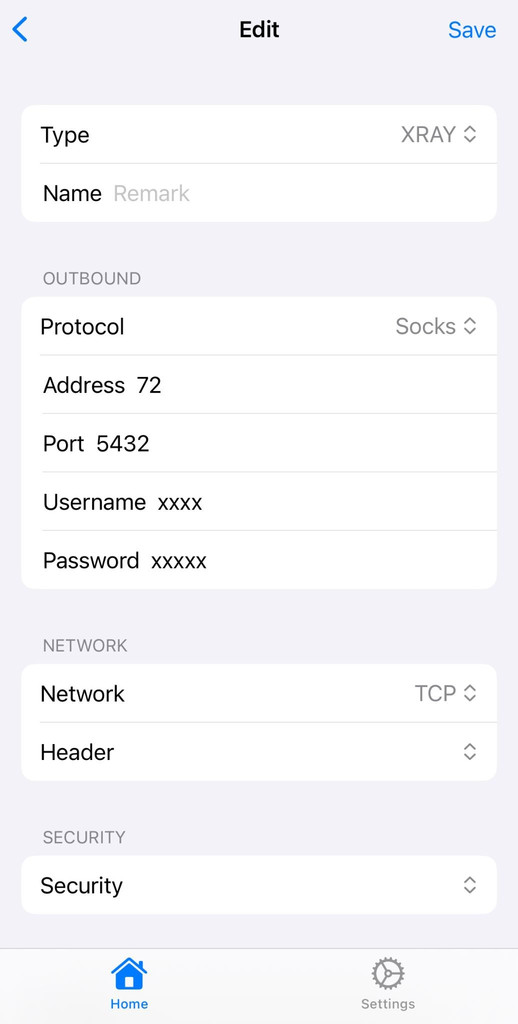
- Дайте профилю понятное имя, например NodeMaven ISP.
- Сохраните профиль.
Ручная настройка — самый простой способ подключить NodeMaven в Streisand , потому что для каждого значения из личного кабинета есть соответствующее поле. Выберите сохранённый профиль, прежде чем переходить к шагу подключения.
Для прокси NodeMaven найдите новый профиль с пометкой Socks. Если ничего не появилось, снова откройте меню добавления и проверьте, есть ли там пункт ручной настройки Socks. Введите сервер, порт, имя пользователя и пароль NodeMaven в соответствующие поля.
Streisand указывает Socks среди поддерживаемых протоколов, однако работа с буфером обмена может меняться от версии к версии. Если текущая версия не принимает URL с авторизацией и не имеет экрана ручного ввода, используйте те же учетные данные NodeMaven в Shadowrocket на iPhone, Proxifier на Windows или macOS либо SocksDroid на Android.
Шаг 3: импорт сервера по QR-коду
Пропустите этот шаг, если вы импортировали URL из буфера обмена или вручную.
- Откройте QR-код провайдера на другом телефоне, планшете или компьютере.
- Откройте Streisand и нажмите +.
- Выберите опцию сканирования QR-кода.
- Разрешите доступ к камере.
- Поместите QR-код целиком в рамку камеры.
- Сохраните импортированный профиль, если Streisand запросит подтверждение.
Если QR-код сохранен на том же iPhone, проверьте, поддерживает ли ваша версия Streisand импорт из изображения. В противном случае откройте его на другом экране и отсканируйте из приложения.
Шаг 4: выбор сервера и подключение
Откройте импортированный профиль и выберите нужный сервер. Подписка может содержать несколько локаций, тогда как ISP-прокси NodeMaven обычно отображается как один выделенный эндпоинт.
Если доступно несколько серверов подписки, сравните:
- Страна: Выберите локацию, которая нужна для сайта или приложения.
- Задержка: Среди похожих эндпоинтов более низкое и стабильное значение обычно означает более быстрый отклик.
- Протокол: Сохраняйте протокол и параметры безопасности, предоставленные провайдером.
- Согласованность сессии: Оставайтесь на одном и том же эндпоинте, если в рабочем сценарии нужно сохранять один публичный IP.
Нажмите круглую кнопку подключения в верхней части экрана. Выберите Разрешить , когда iOS предложит добавить конфигурацию VPN. При необходимости подтвердите действие кодом-паролем, Touch ID или Face ID.
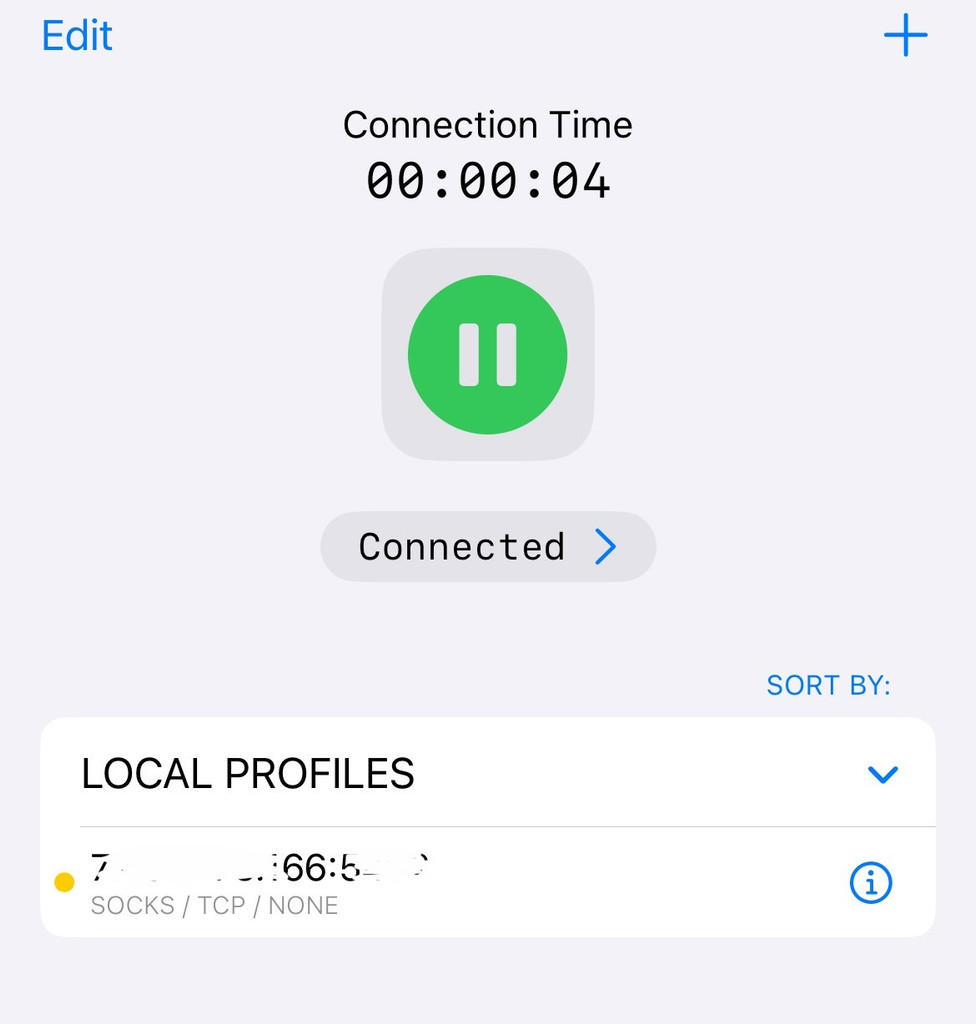
После подключения Streisand элемент управления подключением должен изменить состояние. На iPhone или iPad также может появиться индикатор VPN. На Mac проверьте подключение внутри Streisand и в настройках сети или VPN macOS.
Шаг 5: Проверьте IP-адрес и местоположение
После подключения откройте в Safari инструмент проверки IP от NodeMaven. Сравните отображаемый публичный IP и страну с выбранным сервером.
Убедитесь, что:
- Публичный IP отличается от вашего обычного мобильного или Wi-Fi-адреса.
- Отображаемая страна совпадает с выбранным эндпоинтом.
- Safari по-прежнему загружает страницы после повторного открытия.
- ISP-адрес NodeMaven остаётся неизменным в течение сессии.
Если исходный IP по-прежнему виден, вернитесь в Streisand и проверьте, какой профиль активен. Если подключение перестало загружать страницы, перепроверьте сервер, порт, имя пользователя и пароль.
Эндпоинт NodeMaven также можно ввести в совместимых клиентах, которые используются для маршрутизации трафика для ChatGPT, Telegram, и Claude. Соблюдайте условия каждого сервиса и используйте одно местоположение в рамках одной сессии аккаунта.
Используйте ISP-прокси NodeMaven с поддержкой UDP для стабильных профилей браузера, быстрого соединения и длительных рабочих процессов. Используйте код ISP25 получить 25% off your first order with 2 or more IPs
Streisand VPN для ПК и Android: что использовать вместо него
У Streisand пока нет официального приложения для Windows или Android. Вы всё равно можете использовать совместимую подписку или стандартные учётные данные прокси через другой клиент. Выбирайте клиент в зависимости от формата, который предоставляет ваш провайдер.
| Устройство | Клиент | Поддерживаемая настройка | Подходит, когда |
| Windows | Proxifier | Сервер, порт, имя пользователя и пароль | Вы хотите пустить через прокси отдельный браузер или десктопное приложение |
| Windows, macOS, Android и iOS | Happ | Совместимая подписка или поддерживаемый профиль прокси | Вам нужен один клиент на нескольких устройствах |
| Windows, macOS, Linux, Android и iOS | Hiddify | Совместимая подписка или ссылка на протокол | Ваш провайдер уже предоставляет профиль, совместимый с Hiddify |
| Андроид | SocksDroid | SOCKS5-сервер и учётные данные | Вам нужен прямой ввод SOCKS5 на Android |
| iPhone и iPad | Shadowrocket | Сервер, порт, имя пользователя и пароль | Вам нужны отдельные поля прокси на iOS |
Windows и macOS: используйте Proxifier
Proxifier принимает сервер прокси, порт, имя пользователя и пароль как отдельные значения. Он может направлять одно выбранное приложение через прокси, тогда как остальной трафик на компьютере продолжает идти через обычное соединение.
Следуйте полному руководству по настройке Proxifier от NodeMaven , чтобы добавить сервер, проверить аутентификацию и создать правило для приложения.
Android и использование на нескольких устройствах: выберите Happ или Hiddify
Happ работает на распространённых десктопных и мобильных платформах и подходит для совместимых конфигураций на основе подписки. В руководстве NodeMaven по настройке прокси в Happ показан актуальный порядок настройки.
Hiddify — ещё один кроссплатформенный клиент, но проще всего с ним работать, когда провайдер предоставляет совместимую подписку или ссылку на протокол. Для «сырых» учётных данных сервера может потребоваться подготовленный профиль вместо ввода в четыре поля.
Android: используйте SocksDroid для прямого ввода SOCKS5
SocksDroid — более короткий путь, если у вас уже есть SOCKS5-сервер, порт, имя пользователя и пароль. Следуйте инструкции по настройке прокси в SocksDroid , чтобы ввести значения и запустить подключение на Android.
Эти альтернативы также подходят, когда Streisand недоступен в вашем регионе App Store. Больше инструкций для конкретных устройств вы найдёте в библиотеке интеграций NodeMaven.
Streisand VPN не работает: решения по симптомам
Начните с проверки того, как был добавлен профиль. Импортированная подписка может не работать из-за повреждённой или истёкшей ссылки. Настроенный вручную профиль Socks обычно не работает из-за неверно введённого протокола, сервера, порта, имени пользователя или пароля.
Streisand не импортирует ключ, подписку или Socks-URL
- Скопируйте полную ссылку ещё раз. Проверьте, что в её начале есть префикс протокола, например vless://, trojan:// или socks://.
- Удалите пробелы, добавленные до или после ссылки.
- Убедитесь, что провайдер поддерживает Streisand или один из протоколов, перечисленных в приложении.
- Уточните, не истекла ли ссылка и не достигнут ли лимит устройств.
- Если iOS запретила доступ к буферу обмена, откройте Настройки, найдите Streisand и разрешите вставку, если такая опция доступна.
- Если вы приобрели прокси у NodeMaven, убедитесь, что ваш прокси в формате SOCKS5, а не HTTP. Обратитесь в поддержку, если вам нужна помощь.
Если socks:// URL с авторизацией не создаёт профиль, нажмите +, выбрать Configure Manually, и выберите Носки или SOCKS5. Введите сервер, порт, имя пользователя и пароль в отдельные поля. Это также позволит избежать ошибок, вызванных специальными символами внутри URL.
Настроенный вручную профиль Socks не подключается
Откройте сохранённый профиль и сверьте каждое поле с личным кабинетом прокси:
- Выберите Носки или SOCKS5 в качестве протокола.
- В поле сервера введите только имя хоста или IP-адрес. Не добавляйте socks://.
- В поле порта введите только число.
- Скопируйте имя пользователя и пароль ещё раз без пробелов.
- Проверьте, что авторизация включена, если в Streisand есть отдельный переключатель.
Для ISP-прокси NodeMaven используйте выделенный IP и порт, показанные в личном кабинете. Проверьте те же четыре значения с помощью прокси-чекера NodeMaven.
Если чекер подключается, а Streisand нет, ещё раз проверьте сохранённый профиль Streisand. Эндпоинт прокси работает, поэтому ошибка, скорее всего, в одном из полей, введённых вручную.
Streisand подключается, но сайты не загружаются
- Если вы используете подписку, выберите другой сервер из её списка.
- Проверьте подключение через мобильный интернет и Wi-Fi.
- Перед повторным подключением отключите любой второй VPN или сетевой фильтр.
- Обновите подписку, если её список серверов мог устареть.
- Уточните у провайдера, остаётся ли выбранный сервер онлайн.
Для вручную настроенного профиля NodeMaven снова откройте настройки Socks и перепроверьте все четыре учётных значения. Скопированный пробел в конце имени пользователя или пароля может нарушить аутентификацию.
Убедитесь, что профиль использует Socks или SOCKS5, а не HTTP.
Публичный IP не меняется
Убедитесь, что Streisand показывает состояние подключения и что выбран нужный профиль. Сохранение ручного профиля не запускает подключение автоматически. Вам всё равно нужно выбрать его и нажать кнопку подключения.
После подключения закройте и снова откройте Safari, затем проверьте публичный IP ещё раз.
Если Safari показывает IP прокси, а другое приложение показывает ваш обычный IP, правило маршрутизации может исключать это приложение или тип трафика. Проверьте настройки маршрутизации Streisand и убедитесь, что ручной профиль Socks является активным исходящим подключением.
Streisand отключается или имеет высокую задержку
Если вы используете подписку, выберите другой сервер в той же стране и снова проверьте подключение. Низкий пинг, показанный в приложении, не гарантирует, что эндпоинт останется стабильным под нагрузкой.
Обновите Streisand через App Store. Если все серверы одной подписки не работают, уточните у провайдера, не менялась ли её конфигурация.
Для ручного профиля NodeMaven должен оставаться выбранным тот же ISP IP. При повторяющихся отключениях нужно проверить учётные данные и отдельно протестировать прокси.
Streisand исчез из App Store
Доступность в App Store может отличаться в зависимости от региона. Проверьте свой магазин по прямой официальной ссылке на приложение. Не скачивайте случайные IPA-файлы и не используйте общие Apple ID с публичных сайтов.
Если официальная страница приложения недоступна, используйте поддерживаемый альтернативный клиент или смените регион своего аккаунта. Совместимые ссылки на подписку можно перенести в Happ или Hiddify. Обычные учётные данные Socks можно ввести напрямую в Proxifier, Shadowrocket или SocksDroid.
Используйте ISP-прокси NodeMaven с поддержкой UDP для стабильных профилей браузера, быстрого соединения и длительных рабочих процессов. Используйте код ISP25 получить 25% off your first order with 2 or more IPs


