

What Is a Backconnect Proxy? How the Gateway Works (With Real Examples)


A backconnect proxy gives you one address to connect to and a large pool of IPs behind it. You send every request to the same gateway. The gateway picks the exit IP for you.
That solves a common problem. A single IP gets rate-limited after a few hundred requests. A long list of proxies works, but you have to rotate it, test it and replace dead IPs yourself. That stops scaling fast.
This guide explains how backconnect proxies work, how rotating and sticky sessions differ, and whether a backconnect proxy is the same as a rotating proxy. Every concept is shown on a real gateway, the one NodeMaven uses for its residential and mobile proxies. You can copy the examples and test them yourself.

What is a backconnect proxy?
A backconnect proxy is a proxy server that works as a single gateway to a pool of IP addresses. You connect to one host and port. The gateway sends each request through an exit IP from the pool and rotates or holds that IP based on your settings.
The term describes how you connect, not where the IPs come from. Behind the gateway there can be residential, mobile, datacenter or ISP addresses.
Backconnect proxies exist because some IPs are impossible to hand out as a list. Residential and mobile IPs belong to real devices. They go online and offline all the time. A static list would be out of date within minutes. A gateway hides that churn. It always knows which IPs are live and sends your traffic through one of them.
Here is how a backconnect proxy compares to a classic proxy list.
| Backconnect proxy | Список прокси | |
| Что вы получаете | One host and port | Many host:port entries |
| Who rotates IPs | The provider’s gateway | You, in your own code |
| Dead or blocked IPs | Removed by the gateway | You find and replace them |
| Pool size | Millions of IPs | As many as you buy |
| Typical pricing | Per GB of traffic | Per IP |
| Лучшее для | Scale, residential and mobile IPs | Fixed IPs and full control |
Backconnect proxy vs reverse proxy
The names sound similar, but the tools work in opposite directions. A backconnect proxy is a forward proxy. It acts for you, the client, and hides your IP from the websites you visit. A reverse proxy sits in front of a website’s servers and protects them from visitors. If you run a scraper or manage accounts, you need the first one. You can read more in our guide to reverse proxies.
How a backconnect proxy network works
Every request through a backconnect proxy network follows the same path.
- Your app sends the request to the gateway address. This address never changes.
- The gateway reads your settings from the proxy username. That includes location, session type and IP quality level.
- It picks a matching exit IP from the pool.
- Этот request reaches the target website from that IP.
- Этот response travels back through the same gateway to your app.
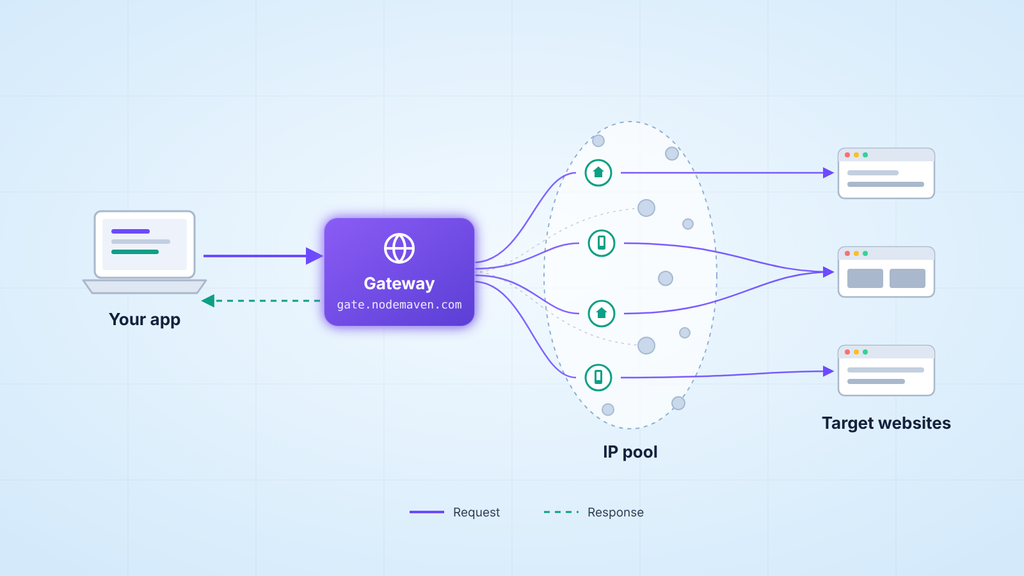
Your code never sees the pool. You do not track which IPs are burned or cooling down. The gateway does that in the background. That is the main reason backconnect proxies replaced manual proxy lists for most large projects.
Real example: reading a NodeMaven backconnect proxy string
All NodeMaven residential and mobile proxies go through one gateway. Here is what a connection looks like.
Host and Port
The host is the gateway itself. It stays the same for every location and every session type. The port picks the protocol. You do not need a separate backconnect proxy port for each country or each session.
Username parameters
NodeMaven puts all targeting inside the username. Each setting is a name and a value. They are joined with hyphens and added after your base username.
| Parameter | За что отвечает | Пример |
| Страна | Country of the exit IP | country-us |
| область | State or region inside the country | region-california |
| город | City inside the region | city-los_angeles |
| ип | Internet provider of the exit IP | isp-spectrum |
| type | Residential or mobile pool | тип-мобил |
| сид | Sticky session ID | sid-a1b2c3d4e5f6 |
| ttl | How long a sticky session lasts | ttl-24h |
| фильтр | IP quality level: low, medium or high | filter-high |
A full username with several settings looks like this.
Two details will save you a lot of debugging. First, the gateway ignores parameter names it does not know. A typo like contry-us still connects, but your location is not applied. Second, the session ID cannot contain a hyphen. The hyphen separates parameters, so the gateway would cut your ID short.
The free NodeMaven Python SDK checks both before a request goes out. Install it with pip install nodemaven and build the string in code.
You can find the full parameter reference and more examples on the NodeMaven SDK page on PyPI.
HTTP and SOCKS5 backconnect proxies
The same gateway accepts HTTP, HTTPS and SOCKS5 connections. An HTTP backconnect proxy on port 8080 works for most scrapers and browsers. Switch to SOCKS5 on port 1080 when your tool needs it. That is common for desktop apps, bots and some antidetect browser profiles. Your username and targeting stay the same. Only the scheme and port change.
Backconnect rotating proxy vs sticky session
A backconnect gateway can behave in two ways. It can give you a new IP, or it can hold the same one. You choose with the session parameters.
Rotating mode
Leave out the session ID and the gateway rotates. Each new connection gets a new exit IP.
Rotating mode fits tasks where each request stands alone. Think web scraping, SERP tracking and price monitoring. No single IP sends enough requests to hit a rate limit.
Sticky mode
Add a session ID and the gateway holds the same exit IP for that session. The ttl parameter sets how long. On NodeMaven a sticky session can last from 1 minute up to 24 hours, on both residential and mobile IPs.
Sticky mode fits tasks where the website expects one visitor. That includes logins, checkouts, multi-step forms and account management. Many sites tie cookies to the IP. A sudden IP change in the middle of a session is a classic bot signal.
One more rule. The whole parameter set defines the session, not only the session ID. If you change the country or the filter, you get a new session and a new IP, even with the same сид.
How to check that rotation works
This short Python script sends five requests in each mode and prints the exit IPs.
Compare the two lists. The rotating list should show different IPs. The sticky list should show the same IP five times. Then paste one of the IPs into the NodeMaven IP Lookup tool to confirm its location and ISP.
Does your rotating list show the same IP over and over? Check your HTTP client first. A requests.Session() or any client with keep-alive can reuse one open connection. One connection means one exit IP. Open a new connection per request when you need rotation.
Is a backconnect proxy the same as a rotating proxy?
In most cases, yes. The two terms describe the same product from two angles. Backconnect describes the architecture, which is one gateway in front of a pool. Rotating describes the behavior, which is an exit IP that changes. When a provider sells rotating residential proxies, it almost always delivers them through a backconnect gateway.
The terms only split at the edges. A backconnect gateway can also keep a fixed IP with a sticky session. And you can rotate IPs without a gateway by cycling through a proxy list in your own code. This table shows all four combinations.
| Rotating IP | Fixed or sticky IP | |
| Backconnect gateway | Rotating residential or mobile proxies. New IP per connection. | Sticky session on the same gateway. Same IP for up to 24 hours on NodeMaven. |
| Список прокси | You rotate through the list in your own code. | Dedicated or static IPs, one fixed address each. |
You do not have to choose between rotating backconnect proxies and some other product. You choose a mode. With NodeMaven both modes run on the same gateway and the same plan.
Geo-targeting with backconnect proxies
Location is the second thing you control through the gateway. NodeMaven supports country, region, city, ISP and ZIP code targeting across 190+ countries.
For example, US backconnect proxies with a California exit and a Spectrum IP use this username.
Precise location matters for local tasks. Local SERPs, local prices and regional ad checks all depend on it. A Google result in New York can look very different from one in Dallas.
There is one trade-off. The narrower your target, the smaller the pool of available IPs. A whole country gives the gateway a large share of the pool. A single ZIP code gives it far fewer options. For high-volume scraping, target as wide as your task allows.
Types of backconnect proxies
Any IP type can sit behind a gateway. The type decides how websites see your traffic and what you pay.
| Тип | IP-источник | Риск обнаружения | Лучшее для |
| Резидентские | Home internet connections | Низкий | Scraping, SEO and ad verification at scale |
| Мобильные | Сети мобильных операторов | Очень низко | Social media and mobile-first platforms |
| Центр обработки данных | Commercial servers | Высокий | Fast tasks on lenient websites |
| ISP | Residential IPs hosted on servers | Низкий | Long static sessions |
Residential backconnect proxies
Residential backconnect proxies route traffic through real home connections. To a website, each request looks like an ordinary visitor. That makes residential IPs the default choice for most scraping and research. The NodeMaven residential pool has 30M+ IPs, all reachable through the same gateway.
Mobile backconnect proxies
Mobile IPs come from carriers. Many real phones often share one address, so websites rarely block them. You switch the NodeMaven gateway to the mobile pool with one parameter, type-mobile. The mobile pool holds 295K+ IPs, and it is included in the same plan as residential.
Datacenter and ISP proxies
Datacenter IPs are fast and cheap, but websites recognize their ranges easily. ISP прокси sit in between. They are residential IPs hosted on fast servers. They usually come as static IPs rather than through a rotating gateway.
What backconnect proxies are used for
Most use cases need one of the two modes. Here is which one fits each task.
- Веб-скрейпинг. Rotating mode spreads thousands of requests across many IPs.
- СЕО and SERP monitoring. Rotation plus geo-targeting shows rankings as local users see them.
- Мониторинг цен. Rotating IPs collect prices from e-commerce sites without rate limits.
- Верификация рекламы. City-level targeting checks how ads appear in each market.
- Мультиаккаунтинг and social media. Sticky sessions keep one IP per account. Mobile IPs fit best here.
- ИИ-агенты and browser automation. Sticky sessions keep long browser runs on one identity.
How to use a backconnect proxy on PC
You do not need to install anything to start. The setup takes a few minutes.
- Open Proxy Setup in the NodeMaven dashboard.
- Pick the location, the session type (rotating or sticky) and the protocol.
- Copy the credentials in host:port:login:password format.
- Paste them into your tool. That can be a browser extension, an antidetect browser, a scraper or any app with proxy settings.
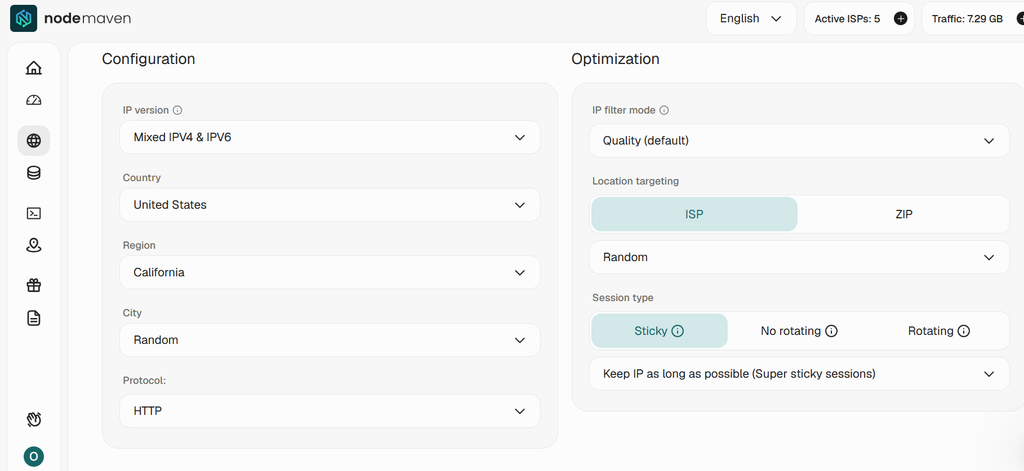
On Windows and macOS, app-level setup is the easiest route. A browser extension lets you switch proxies per browser without touching system settings. Our SwitchyOmega guide walks through it step by step.
For multi-accounting, add the credentials to each antidetect browser profile. Give every profile its own session ID so each account keeps its own IP. Our Руководства по интеграции cover setup for popular tools.
How to choose a backconnect proxy service
- Pool quality. Ask how IPs are filtered, not only how many there are. NodeMaven filters IPs in real time and keeps a 95% clean rate.
- Sticky session length. Make sure sessions last as long as your longest task.
- Targeting depth. Check for city, ISP and ZIP targeting, not only countries. NodeMaven supports all of them.
- Протоколы. You want HTTP and SOCKS5 on the same credentials. NodeMaven supports both.
- Модель ценообразования. Backconnect proxies are billed per GB, not per IP. Compare backconnect proxies per GB against your real traffic, not the headline price.
- A trial before you commit. Cheap backconnect proxies are only cheap if they work on your targets. The NodeMaven trial costs $3.50 for 750 MB.
The best backconnect proxies are the ones that pass these checks on your targets. Test first, then scale.
Заключение
A backconnect proxy is one gateway in front of a pool of IPs. It is the standard way to use residential and mobile proxies at scale. Rotating and sticky are not two products. They are two modes of the same gateway.
Judge a provider by what happens behind the gateway. Look at how clean the IPs are, how long sessions hold and how precisely you can target. NodeMaven covers all three on one gateway, with residential and mobile IPs in the same plan.
The fastest way to see it is to run the examples above on your own targets.


