

How to Scrape Google Search Results With Python: Free Open-Source Scraper (2026 Guide)


Scraping Google with Python used to take twenty lines of code. You sent a request, parsed the HTML and saved the links. That script stopped working in 2025. Many tutorials still teach it anyway.
This guide shows what works now. You will install SERP Maven, a free, open-source Google search scraper for Python. It runs a real Chrome browser through your own residential proxy and returns Google results as clean JSON. You can use it as a CLI, a Python library, a local HTTP API or an MCP server for AI agents.
Quick answer. Plain requests no longer gets Google results, because Google now requires JavaScript. To scrape Google search results with Python in 2026, install SERP Maven, add a residential proxy with sticky sessions and run one command. You get one JSON record per results page with organic results, People also ask, related searches and the AI Overview.

What changed in Google scraping in 2025 and 2026
Four changes broke the old way to scrape Google search results.
- JavaScript became mandatory. On January 15, 2025, Google started requiring JavaScript to show search results. An HTTP client that cannot run scripts now gets a page that asks you to enable JavaScript.
- The num=100 parameter stopped working. Since September 2025, Google returns 10 results per page. The top 100 now takes ten requests instead of one.
- The official API is closing. Google’s Custom Search JSON API no longer accepts new customers. Existing customers must move off it by January 1, 2027.
- The page itself got harder. AI Overviews sit above the organic results and load late. Result links are now wrapped in encrypted /goto redirects instead of the old readable /url?q= format.
- Google also judges each visitor by IP reputation and cookies. A fresh browser on a fresh proxy IP is often refused quickly.
Why requests and BeautifulSoup no longer work
Run the classic approach once so you recognize the failure.
You get a 200 status and no results. No header trick fixes this. The results are built by a script that requests never runs.
BeautifulSoup is still a fine HTML parser. The problem is the HTML you feed it. Old selectors like tF2Cxc или VwiC3b also change without warning. That is why most “scrape Google search results Python BeautifulSoup” tutorials quietly return empty lists today.
The requests example above teaches one lesson. A 200 status does not mean you got a results page. A good Google scraper has to check what came back before it parses anything.
SERP Maven: a free, open-source Google SERP scraper
SERP Maven is a self-hosted Google search scraper for Python, built by NodeMaven. The code is MIT licensed and published on PyPI. It drives real Chrome through Patchright, a patched build of Playwright, and returns results in the JSON format common to SERP APIs.
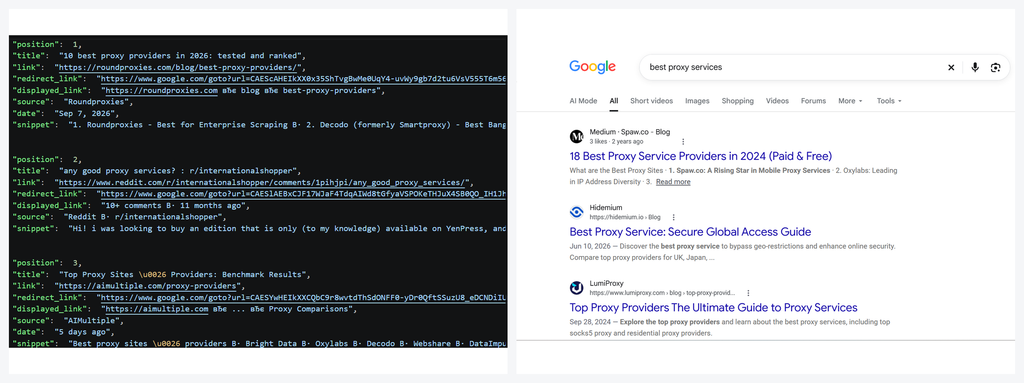
Here is what it does differently from a basic Playwright script.
- Hybrid mode. The browser passes Google’s checks. Then the next results pages come over HTTPS with the browser’s own cookies. This uses a fraction of a browser’s traffic and time.
- Poisoned results protection. Google sometimes returns a normal-looking page for a different query. SERP Maven catches it, drops that proxy IP and asks again on a fresh one.
- Honest failures. Captchas and blocks come back labeled. They never show up as “no results”.
- Bring your own proxy. Any residential proxy with sticky sessions works. NodeMaven support is built in.
- Run it your way. CLI, Python library, HTTP API, MCP server or Docker image. Every run prints the traffic used and the cost per 1,000 pages.
Install SERP Maven
You need Python 3.10 or newer. Install it in a virtual environment on macOS or Linux:
On Windows, use PowerShell:
Этот doctor command starts the browser on a blank page and sends nothing. It reports what a website would see, such as headless signals, WebGL and screen size. It ends with ready when the setup looks like a normal desktop. Run it first, because Google answers some machines much less than others.
Running on a Linux server
The browser runs with a window, so a server without a screen needs a virtual display. It also needs software WebGL when there is no GPU.
Then start every command with xvfb-run -a. The Docker image has all of this built in.
Run your first Google search from the CLI
SERP Maven needs a residential proxy with sticky сессии. Put {session} where your provider expects a session id in the username. The scraper fills it in for each new identity.
The first query takes a few minutes. The first proxy IP warms up on a few ordinary pages, and the terminal shows each step. Later queries take seconds, and new proxy IPs start from the cookies Google already accepted.

Scrape Google with NodeMaven proxies
With NodeMaven, the session id is handled for you and credentials come from the environment.
Want to cap a test run? The –nodemaven-demo flag creates a sub-user with a traffic limit from your dashboard API key. It deletes the sub-user when the run ends. A fresh warm-up alone uses about 60 MB, so keep the cap well above that.
Useful CLI options
–pages N scrapes N result pages per query.
–hl и –gl set the language and country of the results.
–workers N searches on N proxy IPs at once, one browser each.
–format csv writes the organic results as a table.
–price-per-gb adds the cost per 1,000 pages to the run summary.
–save-html DIR keeps every page’s HTML for debugging.
Scrape Google search results from Python
SERP Maven also works as a Python library. This is the basic pattern:
Each item the scraper yields is one results page. A failed query is a record too, with an ошибка field. So you can log failures instead of losing them.
Build a simple rank checker with CSV export
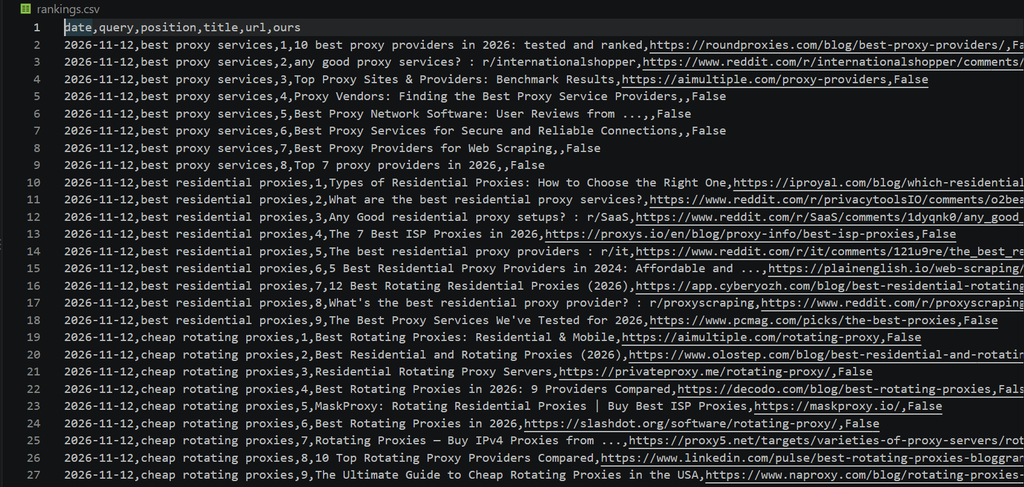
This script checks where your domain ranks for a list of keywords. It also saves every result URL to a CSV file, so you can scrape URLs from Google search results in the same pass.
Schedule it once a day with cron or GitHub Actions. After a month you have a ranking history for your keywords.
What’s in the JSON output
SERP Maven returns one JSON object per results page. The field names match the ones common to SERP APIs, so code written for a paid API often needs only small changes.
Here is every field you can work with:
- organic_results has the position, title, link and snippet of each result.
- ads holds the sponsored results when Google shows them.
- related_questions lists the People also ask questions.
- related_searches and pagination cover the bottom of the page.
- ai_overview holds the text of Google’s AI Overview on English pages (–hl en, the default).
- local_results lists the map pack places on local queries, with name, rating, reviews, type, address, phone and opening hours.
- exit shows which proxy IP answered and how many bytes the page cost.
- search_metadata shows the page verdict, whether the page came over HTTP or the browser, and per-step timings.
This makes SERP Maven a practical Google AI Overview scraper and a way to scrape Google local results without extra parsing. Knowledge panels, Shopping and Images are not parsed today.
How SERP Maven avoids getting blocked
Most guides say “use proxies and add delays”. That is not enough for Google in 2026. SERP Maven runs five steps for every proxy IP.
- New identity. It opens a sticky proxy session and a fresh browser profile.
- Warm-up. The first proxy IP visits a few ordinary pages and stays on each for 20 to 45 seconds. Later IPs start from the Google cookies of an IP that was already served.
- Поиск. The first query goes through the browser. Once Google serves it, the next pages come over HTTPS with the browser’s cookies. If that stops working, the browser takes over again.
- Check before parsing. A captcha or block is reported as one. It is never parsed as an empty result.
- Keep or drop. An IP Google serves is reused for up to 300 queries. One it refuses is dropped and the query is retried on a new one. If IP after IP is refused, the run stops instead of burning traffic.
Poisoned results protection
This is the failure most scrapers never notice. Google does not always block a bot. Sometimes it serves a normal results page for a different query. There is no captcha and no error, just wrong data in your pipeline.
SERP Maven compares each page with the query it asked. When a proxy IP starts returning unrelated results, it is dropped within a few pages and the query runs again on a fresh IP. The check runs on the page already downloaded, so it costs no extra traffic.
Real result links
Google wraps result links in encrypted /goto redirects. SERP Maven resolves each one with a small request on the same proxy IP, in the background while the next query runs. You get the real URLs, not Google redirects.
Run it as a local SERP API, in Docker or as an MCP server
A self-hosted SERP API on localhost
Already have code that calls a paid SERP API? Run SERP Maven as a local HTTP API with the same record format.
Вы можете установить hl и gl per request. The –prewarm flag finds a served proxy IP at startup, so the first request does not wait for a warm-up. Set SERPMAVEN_API_KEY to require a key. Without one, the server only listens on localhost.
Docker
Live Google search for AI agents
The MCP server gives Claude, Cursor and other MCP clients live Google search. Add this to your client’s MCP config:
The server exposes one tool, google_search(query, pages, hl, gl). It returns organic results, People also ask, related searches, and the AI Overview and map places when Google shows them.
What it costs to scrape Google with SERP Maven
- The code is free. You pay for residential proxy traffic, and SERP Maven shows exactly how much.
- A search uses about 0.4 MB of traffic on a warm proxy IP.
- A fresh warm-up uses about 60 MB, and cookie renewal keeps warm-ups rare.
- On long runs the average is about 0.45 GB per 1,000 searches.
At NodeMaven’s residential rate from $2.20/GB, that is about $1 per 1,000 Google result pages. Hosted SERP APIs charge per search instead. Compare their price per 1,000 with your own run summary before you choose.
Добавить –price-per-gb 2.2 to any run and the summary prints your real cost per 1,000 pages.
SERP Maven vs DIY Playwright vs paid SERP APIs
| SERP Maven | DIY Playwright script | Paid SERP API | |
| Настройка | pip install, add a proxy | Write and maintain everything | API ключ |
| Cost model | Proxy traffic, about $1 per 1,000 pages | Proxy traffic plus your time | Per search, by plan |
| Block handling | Warm-up, cookie reuse, IP rotation, labeled captchas | Up to you | Handled by the vendor |
| Wrong-query pages | Detected and retried | Usually missed | Depends on the vendor |
| AI Overview and local pack | Yes, as JSON fields | Custom parser needed | Often, on higher plans |
| Data control | Runs on your machine | Runs on your machine | Vendor servers |
| Лучшее для | Developers, SEO teams, AI agents | Обучение | Teams that need an SLA |
For a wider comparison of hosted options, see our guide to the best Google search scrapers and SERP APIs.


