
14 Open-Source GitHub Repos for Web Scraping in 2026



Fourteen open-source web scraping tools you can clone and run on your own infrastructure, with no credits and no per-page billing. We pulled star counts, licences and commit dates from GitHub on 19 August 2026, then read every README to check the projects do what they claim.
This is written for developers who already know what a headless browser is. If you’re choosing between managed platforms instead, our AI web scraping stack breakdown covers those.
One thing up front, because it shapes what’s in this article and what isn’t. Everything here assumes you’re collecting publicly available data, in line with the law and the target site’s terms of service. That’s a real constraint rather than boilerplate. It rules out some of what these tools technically make possible, and we’ve noted where that line sits.
Disclosure: NodeMaven sponsors open-source scraping projects, and every repository below carries a NodeMaven block in its README. That’s how we know these projects well, but it isn’t why they’re here. Selection is by adoption, maintenance activity and whether a project does something the others can’t. Scrapling, MediaCrawler and Camoufox would top any honest list regardless of who sponsors them.
The short version
If you write Python and want one tool that covers most of the job, take Scrapling. If an existing Playwright project has started failing, Patchright is a one-line change. If the output is going into an LLM, use webclaw. If you need infrastructure the whole team points at rather than a library each project imports, look at HeadlessX or trawl.
And whichever you pick, you still need a proxy. These projects handle parsing, rendering and fingerprinting. None of them controls the IP your request arrives from, which is the first thing most anti-bot systems check.
How we filtered repos
Actively maintained. Every repo below has a commit within the last six weeks. A stealth library that stopped updating in 2025 is worse than useless, because anti-bot vendors ship faster than that.
Solves something specific. Five projects here reduce blocked requests for browser automation, and they do it five different ways. We kept all five, because the right answer depends on whether you’re starting fresh or patching an existing stack.
Real adoption, with one deliberate exception. Star counts are reported honestly rather than pretending a new project has a community it hasn’t earned yet.
Install commands throughout are taken from each project’s README as of 19 August 2026. Check the repo before running them, since packaging changes.
All repos by category & stack
| Repo | Category | Stack | Stars | Licence | Proxy needed |
|---|---|---|---|---|---|
| Scrapling | Framework | Python | 75,066 | BSD-3-Clause | Yes, rotating |
| MediaCrawler | Vertical scraper | Python + Playwright | 62,928 | Check repo | Yes, sticky sessions |
| Obscura | Headless engine | Rust + V8 | 21,653 | Apache-2.0 | Yes |
| Camoufox | Anti-detect browser | C++ / Python | 11,227 | MPL-2.0 | Yes |
| pydoll | Browser automation | Python (CDP) | 7,029 | MIT | Yes |
| google-maps-scraper | Vertical scraper | Go | 5,554 | MIT | Yes, geo-targeted |
| webclaw | LLM extraction | Rust | 2,281 | AGPL-3.0 | Depends |
| HeadlessX | Self-hosted platform | TypeScript | 2,246 | Check repo | Yes |
| Patchright | Automation | Python | 1,469 | Apache-2.0 | Yes |
| Botright | Automation + captcha | Python + Playwright | 1,012 | GPL-3.0 | Yes |
| trawl | Challenge solver | Bun + Elysia | 698 | AGPL-3.0 | Built into tier 4 |
| GoScrapy | Framework | Go | 363 | Check repo | Yes, rotating |
| AutomatiQ | Script generation | Python + CDP | 165 | MIT | At runtime |
| scrapy-stealth | Scrapy plugin | Python | 2 | Check repo | Yes, built-in rotation |
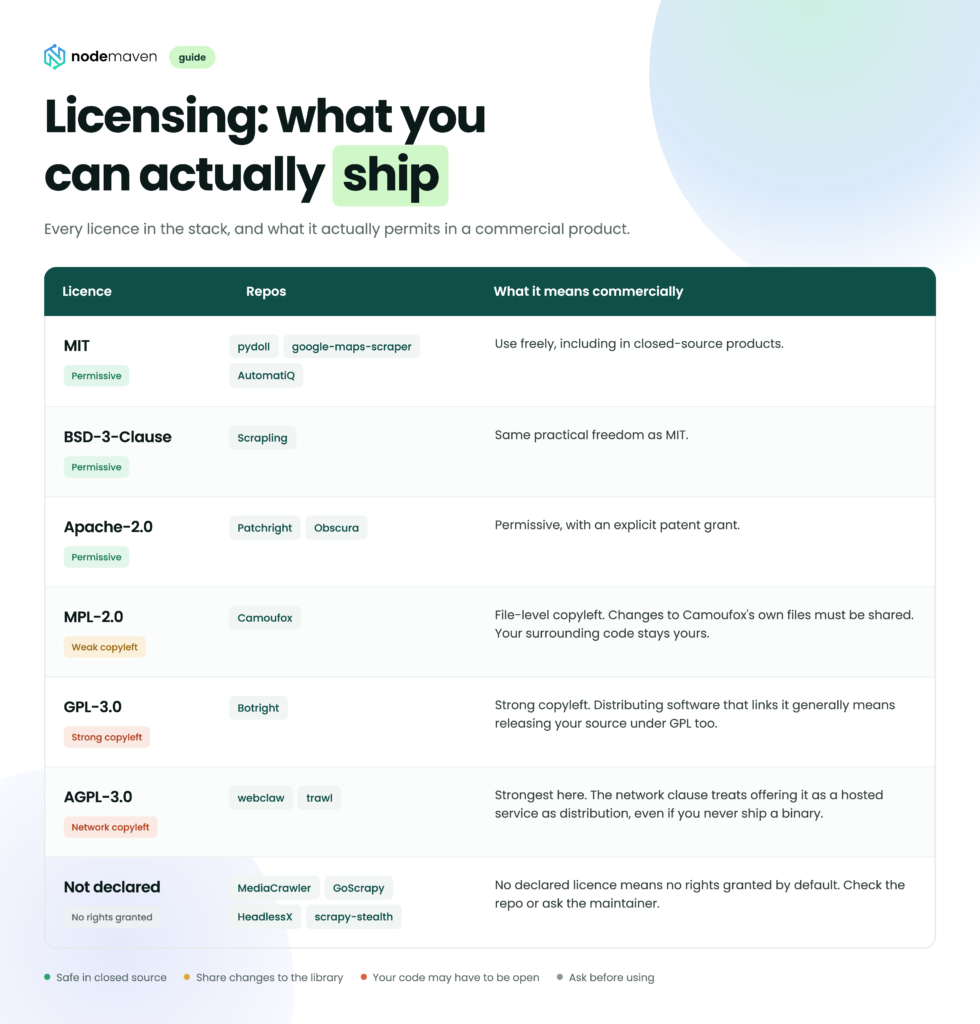
Stars and commit dates verified on GitHub, 19 August 2026. Licences come from each repository’s own metadata. Four projects don’t declare one in machine-readable form, so check before commercial use.
Anti-detect browsers and automation
Five projects, one job: reduce request failures and rate-limiting for browser-driven collection. They differ in where they normalise the browser fingerprint, and that determines how well the approach holds up.
1. Camoufox, 11,227 ⭐
Most stealth tooling injects JavaScript to overwrite navigator.webdriver and similar properties. The injection is itself a signal, because anti-bot scripts check whether properties have been tampered with. Camoufox takes a different route: it patches the fingerprint at the C++ and Juggler engine level in a modified Firefox build, so from JavaScript’s perspective there’s nothing to find. It’s the most mature project in this group and the reference point the others get measured against.
You’re on Firefox, though. If your target renders differently in Chrome, or your tooling assumes Chromium, that’s friction you’ll feel early.
pip install cloverlabs-camoufoxBest for: hard targets on a project you’re starting fresh.
2. Patchright, 1,469 ⭐
The pitch is unusually narrow, which is why it works. Standard Playwright leaks Chrome DevTools Protocol traces that Cloudflare-class systems pick up reliably. Patchright removes them and changes nothing else. You swap one import. No new API, no new browser, no rewriting selectors.
It patches the automation layer rather than the browser engine, so against the most aggressive targets Camoufox goes deeper. For most situations that trade is fine.
pip install patchrightBest for: an existing Playwright project that recently started getting blocked. Lowest-effort fix on this list.
3. pydoll, 7,029 ⭐
pydoll talks to Chrome directly over CDP via WebSocket. There’s no WebDriver binary and no navigator.webdriver flag, because there’s no WebDriver in the stack at all.
What makes it worth a separate slot is that it goes after behavioural detection rather than fingerprinting alone. Mouse movement follows Bezier curves, typing has realistic timing, scrolling has physics. The README makes a point worth repeating: a fingerprint is only as strong as its weakest layer, since anti-bot systems correlate signals across all of them. A flawless user agent paired with robotic mouse movement still fails.
pip install pydoll-pythonBest for: targets that score interaction patterns, not just headers.
4. Botright, 1,012 ⭐
Everything else in this section leaves captchas to you. Botright bundles solving into the same Playwright-based package as its fingerprint handling, which removes a third-party integration from your stack.
Two things to know. It’s from the same author as Patchright, and it’s actively maintained: the last commit was 18 August 2026, which corrects a fairly common assumption that the project went quiet. And it’s GPL-3.0, the strictest licence here, with real consequences for commercial products. See the licensing section before you build on it.
pip install botright

playwright install
Best for: workflows where captchas are the bottleneck and GPL is acceptable.
5. Obscura, 21,653 ⭐
A headless browser engine written in Rust on V8, positioned as a replacement for headless Chrome. According to its README, it runs at roughly 30 MB of RAM per instance against 200 MB or more for headless Chrome, with near-instant startup. It speaks CDP, so Puppeteer and Playwright clients connect without changes.
At scale that memory figure is the entire argument. It’s the difference between ten concurrent browsers on a box and a hundred. The caveat is that it’s a young engine rather than Chromium, so expect edge cases on complex sites. Test it against your worst-case page, not a demo one.
docker run -d --name obscura -p 127.0.0.1:9222:9222 h4ckf0r0day/obscura

Building from source with stealth enabled:

git clone https://github.com/h4ckf0r0day/obscura.git

cd obscura

cargo build --release -p obscura-cli --bins --features render,stealth
Best for: high-concurrency crawls where browser memory is the ceiling.
Scraping frameworks
6. Scrapling, 75,066 ⭐
By stars, Scrapling is the most adopted project on this list by a wide margin, and the gap keeps widening. The reason is self-healing selectors. When a site renames a CSS class or moves an element, the parser relocates it instead of returning None at 2am.
That’s the same capability managed platforms charge per-page LLM rates for, except here it’s a local parser with no API call attached. The fetchers also handle Cloudflare-class protection, so a single library covers both halves of the job.
pip install "scrapling[fetchers]"

scrapling install

Optional extras for AI-assisted extraction and the interactive shell:

pip install "scrapling[ai]"

pip install "scrapling[shell]"
Best for: almost any Python scraping project. If you take one repo from this list, take this one.
7. GoScrapy, 363 ⭐
Most Go scraping gets written from scratch against colly or raw net/http, and it shows in projects that outgrow their first design. GoScrapy keeps the spiders, middlewares and pipelines architecture Scrapy users already think in, so a team moving from Python to Go doesn’t have to redesign the whole shape of the project. Narrow need, genuinely underserved.
go install github.com/tech-engine/goscrapy/cmd/...@latestBest for: Go teams who want structure, and Python teams migrating for throughput.
8. scrapy-stealth, 2 ⭐
Being straight about this one: two stars, no community yet.
It’s here because it fills a gap nothing else covers. It’s the only actively maintained stealth layer purpose-built for Scrapy, and there’s a lot of production Scrapy quietly losing ground to modern protections with no upgrade path short of a rewrite. The plugin adds browser impersonation, proxy rotation, fingerprint cycling and retry logic underneath spiders that keep working as they are. There was a commit on the day we checked.
pip install scrapy-stealthBest for: an existing Scrapy codebase you’d rather not rebuild. Pin the version and read the source. At this adoption level you’re an early user, not a customer.

If you’re putting one of these together, our residential IPs pass a quality filter before they enter the pool, which is what keeps success rates high on the targets that actually push back. Start with a $3.50 trial and test it against your own worst-case page before you commit to anything.
Extraction for LLM and RAG pipelines
9. webclaw, 2,281 ⭐
webclaw turns web pages into clean Markdown, JSON or LLM-ready context, and it’s the closest open-source equivalent to Firecrawl. What sets it apart is shipping in every shape you’d want: CLI, MCP server, REST API, and SDKs for Node, Python and Go. The MCP server matters more than it sounds, because an AI coding agent can call it as a tool with no wrapper to build.
Proxy support is first-class rather than bolted on. WEBCLAW_PROXY takes a single endpoint, WEBCLAW_PROXY_FILE takes a pool.
It’s AGPL-3.0. If you’re embedding this in a hosted commercial product, read the licensing section first.
brew tap 0xMassi/webclaw

brew install webclaw

One-off through Docker:

docker run --rm ghcr.io/0xmassi/webclaw https://example.com

SDKs:

npm install @webclaw/sdk

pip install webclaw

go get github.com/0xMassi/webclaw-go
Best for: RAG ingestion and AI agents that need clean text from arbitrary URLs without a credit meter.
Self-hosted infrastructure
These are services your whole team points at, not libraries each project imports separately. That distinction is the reason they’re in their own section.
10. HeadlessX, 2,246 ⭐
Essentially Browserless with anti-detect built in, running on Camoufox. You stand up one endpoint and everyone submits automation jobs to it, with queueing, logs, API keys and proxy management handled centrally.
That last part earns its place faster than expected. Proxy credentials scattered across a dozen developers’ .env files is how they end up committed to a public repo.
Since it’s built on Camoufox, it inherits the same detection profile. If a target has learned to spot Camoufox, HeadlessX won’t rescue you.
npm install -g @headlessx-cli/core

headlessx init

headlessx status

headlessx doctor
Best for: teams who want shared browser infrastructure instead of everyone running their own.
11. trawl, 698 ⭐
trawl solves JavaScript challenges on behalf of your other tools, as a drop-in FlareSolverr replacement. Its README reports it running 2 to 6 times faster, with a Redis session cache returning repeat requests in roughly 500ms.
The smart part is the four-tier escalation. A request starts as a plain HTTP fetch. Blocked, it retries through a cached browser session. Still blocked, it solves the challenge fresh. Only at tier four does it route through a residential proxy. On a large crawl where most pages aren’t defended, that means you pay for expensive bandwidth only on the requests that actually need it.
git clone https://github.com/germondai/trawl

cd trawl

cp .env.example .env

docker compose up -d
AGPL-3.0, and Camoufox-based, so the inherited-fingerprint caveat from HeadlessX applies here too.
Best for: mixed workloads where some targets are defended and most aren’t.
Ready-made vertical scrapers
Sometimes the target is a known platform and there’s no reason to build anything.
12. MediaCrawler, 62,928 ⭐
A multi-platform collector for Chinese social media, covering Xiaohongshu, Douyin, Kuaishou, Bilibili, Weibo, Tieba and Zhihu. Second most-starred project on this list, which says something about how poorly served this data is elsewhere.
Architecturally it’s interesting because of what it refuses to do. Rather than reverse-engineering each platform’s request-signing algorithm, which breaks constantly and becomes a full-time maintenance job, it drives a browser context directly. Slower per request, far more durable.
Read the terms before you use this one. Several of these platforms restrict automated collection in their terms of service, and some of what MediaCrawler makes possible sits outside what those terms allow. Public data collection within a platform’s stated rules is fine. Working around access controls isn’t, and it isn’t something we’d help with.
uv run uvicorn api.main:app --port 8080 --reload

cd webui && npm install && npm run dev
Best for: research and market intelligence on Chinese platforms, within each platform’s rules.
13. google-maps-scraper, 5,554 ⭐
Pulls business listing data from Google Maps: names, phone numbers, websites, review counts, ratings, coordinates. It ships as CLI, web UI and REST API, plus an Agent Skill so an AI agent can run the workflow end to end. That last piece is unusual and useful if you’re building agentic pipelines.
mkdir -p gmaps-output

docker run \

  -v gmaps-playwright-cache:/opt \

  -v "$PWD/example-queries.txt:/queries.txt:ro" \

  -v "$PWD/gmaps-output:/out" \

  gosom/google-maps-scraper \

  -input /queries.txt

With the web UI on port 8080:

docker run -v "$PWD/gmapsdata:/gmapsdata" -p 8080:8080 \

  gosom/google-maps-scraper -data-folder /gmapsdata
Maps results are geo-dependent by definition, which makes location targeting a correctness requirement rather than an optimisation. Querying “dentists in Chicago” from a Frankfurt datacenter IP returns something, just not what a Chicago user sees.
Best for: local market research and location-based lead work.
Automation and script generation
14. AutomatiQ, 165 ⭐
AutomatiQ watches you use a site, then reverse-engineers the session into a standalone Python script. It records network traffic and interactions, a vision model annotates each action, and an agent iterates in a sandbox until the generated script works against real data.
The output runs without a browser. You get the underlying requests rather than a Playwright replay, which is the difference between a script costing 2 MB per page and one costing 50 KB. On a recurring job that gap compounds fast.
It’s alpha, at 165 stars. Treat the output as a strong first draft, not production code.
pip install automatiq

From source:

git clone https://github.com/StoneSteel27/AutomatiQ.git

cd AutomatiQ

uv sync

uv run automatiq run https://example.com
Best for: working out how a site’s public API actually behaves.
What you should know about licensing
If you’re running these internally, none of it matters much. If customers pay to access something you built on top, AGPL on webclaw and trawl is the line to look at carefully, and “we only run it on our own servers” is precisely the scenario AGPL exists to cover.
Not legal advice, and licence files change. Check the repository yourself before you build on it.
Where these tools need proxies
Every project here handles some combination of parsing, rendering and fingerprint normalisation. None of them controls the IP a request arrives from, and that’s the cheapest check an anti-bot system can run, so it usually happens first. A well-configured browser arriving from a flagged datacenter IP gets refused before the fingerprint is examined at all.
| Repo | Proxy needed | Type | Why |
|---|---|---|---|
| Camoufox, Patchright, pydoll, Botright | Yes | Residential | Fingerprint is handled. The IP isn’t. |
| Obscura | Yes | Residential | High concurrency means high request volume from one origin. |
| Scrapling, GoScrapy, scrapy-stealth | Yes | Rotating residential | Framework-scale volume hits rate limits quickly. |
| webclaw | Depends | Residential | Native WEBCLAW_PROXY support. Open URLs may not need it. |
| HeadlessX | Yes | Residential | Central proxy management is built in, so use it. |
| trawl | Built in | Residential | Tier four of the escalation model is a residential proxy. |
| MediaCrawler | Yes | Mobile, sticky | Session-based collection needs a stable identity for the life of the session. |
| google-maps-scraper | Yes | Residential, city-level | Results are geo-dependent, so location accuracy is data accuracy. |
| AutomatiQ | At runtime | Residential | Generated scripts call endpoints directly, with no browser in front. |
Two things worth internalising.
Rotating and sticky are different jobs. A crawl across 50,000 product pages wants a fresh IP per request. A session-based workflow wants one IP held for its duration. Mismatching them is how people conclude proxies don’t work, when the tool was simply pointed at the wrong task. Static ISP proxies sit in between and suit anything needing a fixed identity at speed.
You pay for bandwidth, not requests. A browser-rendered page with images and CSS runs 1 to 3 MB. The same data from the underlying JSON endpoint is closer to 50 KB. That’s a 20 to 60 times difference in cost for identical output, and it’s exactly why AutomatiQ’s approach of finding the endpoint is worth the effort on any recurring job. Our Python scraping guide covers how to find those endpoints in DevTools.
Before committing to a volume, measure what your pages actually cost. The bandwidth checker does it in a couple of minutes and it’s free.


