
Google Verifying Your Request: What It Means and How to Fix It in 2026



If Google shows “Verifying your request” instead of search results, it means Google has placed an additional verification step between your search request and the results page.
For regular users, this can happen because Google detects unusual traffic from the network.
For developers and SEO tools, the situation is more complicated. A verification page can look like a successful HTTP response while containing no actual search results. Technical testing published by Cloro found that the verification page can return HTTP 200 with valid HTML, which means a scraper that checks only the status code may treat the request as successful.
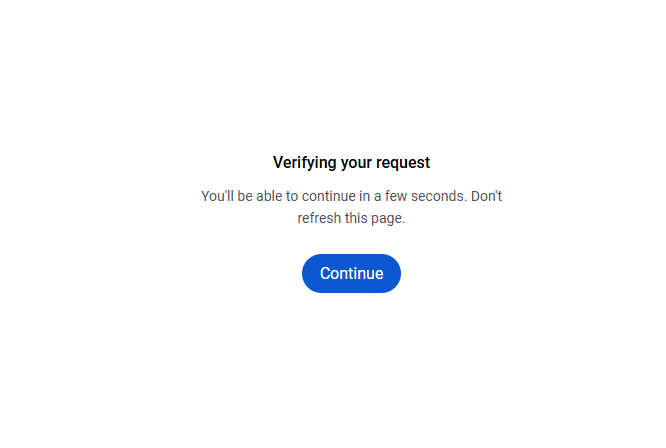
Google has also been testing new verification experiences in 2026. In September, a new version was observed where a Continue button remains disabled while Google verifies the request and becomes available after the check completes.
This guide explains what the message means, why it appears, how regular users can resolve it, and what it means for Google search scraping.

Build more reliable Google Search workflows.
Start your NodeMaven trial for $3.50 and get 750 MB of premium proxy traffic
What is “Google Verifying Your Request”?
“Google Verifying Your Request” is a verification page that can appear before Google Search results when Google’s systems detect traffic that appears unusual or automated. Google’s official Search Help documentation says users may see an “Our systems have detected unusual traffic from your computer network” message when the network they are using, including a VPN network, appears to be sending automated traffic.
Google lists several possible sources of automated traffic, including robots, computer programs, automated services, search scrapers, software used to check Google rankings, and large numbers of searches sent in a short period. The verification may include a reCAPTCHA, which Google says can restore access to Search after completion.
Google is testing new verification flows
Google’s verification experience is not limited to the traditional CAPTCHA.
In September 2026, Google was observed testing a new Search flow in which a page asks the user to wait while Google verifies the request. The Continue button initially appears disabled and becomes active after the verification is completed.
Search Engine Roundtable reported that this test was observed by SEO professionals and was also seen in languages other than English.
Earlier in August 2026, Google was also observed testing a different flow that asked users to sign in to verify that they were human before continuing to Search.
For that reason, the exact page you see can vary.
Why can normal users see the verification page?
You do not have to be a scraper to encounter Google’s verification.
- Shared Wi-Fi
Coffee shops, airports, hotels, universities, offices, and other shared networks can have many users connecting through the same public IP address.
- VPNs
Google specifically identifies VPN networks as one possible source of unusual traffic.
A VPN can route many users through the same exit IP address. If automated searches are being sent through that network, other users can encounter verification as well.
- Automated activity on your device
Google also recommends checking for malware when unusual-traffic messages continue to appear.
Background software can generate requests without the user intentionally searching Google.
- Large numbers of searches
Sending a large number of searches in a short period can contribute to an unusual-traffic message.
How to fix “Verifying Your Request” as a regular user
If you are using Google normally and see an unusual-traffic or verification page, Google’s recommended troubleshooting steps are straightforward.
1. Complete the reCAPTCHA
If Google displays a reCAPTCHA, complete it. Google says that completing the challenge can remove the unusual-traffic message and restore Search access.
2. Check that JavaScript is enabled
Google recommends checking that your browser supports reCAPTCHA and that JavaScript is enabled if a CAPTCHA does not appear.
3. Disable your VPN temporarily
Google specifically recommends checking VPN usage when unusual-traffic messages continue. If the problem disappears after disabling the VPN, the VPN network may have been contributing to the issue.
4. Try another network
Switching from a shared Wi-Fi connection to another network can help determine whether the issue is related to the network rather than your device.
5. Check for malware
Check the device for malware if the unusual-traffic message continues.
6. Contact your network administrator or ISP
If the issue affects a company, university, or other shared network, contact the network administrator.
For developers and SEO tools, the problem is different. Google may return a verification page instead of the requested SERP, even when the HTTP request itself is successful.
Why Google can return HTTP 200 instead of Search results
One of the most important technical details is that Google’s verification page can return HTTP 200.
Normally, a scraper might interpret the response like this:
But a verification response can instead look like:
From an HTTP perspective, the server successfully returned a page. The problem is that it was not the search-results page the scraper expected.
This creates a silent failure.
A scraper may receive:
- HTTP 200
- Valid HTML
- No exception
- No search results
and record the response as successful.
Need reliable proxies for Google Search scraping?
Get premium proxy traffic with NodeMaven from $3.50
What should developers do?
If your application collects Google Search data, the first step is to make sure your system can recognize a verification response.
Do not rely exclusively on:
Instead:
- Send the request.
- Check the HTTP response.
- Inspect the returned content.
- Confirm that expected SERP data is present.
- Detect verification content.
- Handle verification separately from genuine zero-result searches.
Otherwise, a verification response can be recorded as:
when the actual situation is:
Those are completely different outcomes.
Do proxies prevent Google Verification?
Network characteristics can contribute to unusual-traffic detection.
For automated workflows, good proxies can still be one of the most useful things. Our guide on scraping Google Images safely covers similar detection layers, including reCAPTCHA, IP tracking, and JavaScript challenges.
However, changing an IP does not automatically turn an automated request into a normal browser session.
A proxy should therefore be treated as one component of the scraping setup rather than a complete solution to Google’s verification.
Keep your Google Search workflows running smoothly.
Try NodeMaven with 750 MB of premium proxy traffic for just $3.50
Residential vs. mobile proxies for Google Search
Residential and mobile proxies use IP addresses associated with consumer networks and mobile carriers respectively.
They can be useful when a workflow requires access through a particular geographic location or network type. If you are unsure which type fits your workflow, our breakdown of mobile vs. residential vs. datacenter proxies compares them side by side.
However, it is not accurate to claim that Google automatically trusts every residential or mobile proxy. IP quality and network reputation matter much more. NodeMaven provides pre-filtered IPs which are more likely to skip Google Verification layer.
Final takeaway
Google’s “Verifying your request” page is part of the broader set of systems Google uses to respond to traffic that appears unusual or automated.
For developers, the biggest technical problem is different: Google can return a verification page instead of the SERP, and the response can still have an HTTP 200 status.
That means a scraper can appear healthy while collecting incorrect or empty data.
The safest approach is to validate the actual response content, distinguish verification pages from genuine zero-result searches.
Need reliable proxies for Google Search scraping?
Get premium proxy traffic with NodeMaven from $3.50


