7 best OpenCode skills to supercharge your AI coding workflow (2026)



OpenCode has become the go-to terminal agent for developers who want full agentic coding without vendor lock-in. It runs any LLM provider, from Claude to Kimi to local models through Ollama, and that model-agnostic design is exactly why the skills ecosystem around it has taken off.
Skills are what turn OpenCode from a fast code generator into something that actually works the way you do. Instead of re-explaining your planning process, your session habits, or your web research needs every time, you define them once and OpenCode picks them up automatically.
This guide covers 7 best OpenCode skills worth installing today: planning, session handoff, live web research, codebase understanding, documentation, token efficiency, and full multi-agent workflows. You’ll also get real installation commands, configuration details, and production workflows that show how these skills chain together, including where reliable proxy infrastructure fits in.

Power your OpenCode workflows with clean residential and mobile proxies. Try NodeMaven from $3.50 with 750 MB included
What are OpenCode skills?
An OpenCode skill is a folder containing a SKILL.md file. That’s the whole spec.
The file opens with YAML frontmatter (name and description are required) followed by markdown instructions the agent reads when the skill activates.
OpenCode exposes a native skill tool to the model. At session start, it scans every installed skill and reads only the name and description, roughly 100 tokens each. When you give it a task, it checks the list and calls skill({ name: “…” }) on anything that matches. The full instructions only load then.
This progressive loading is the whole trick. You can have dozens of skills installed and never pay a token cost for the ones that don’t apply.
OpenCode looks for skills in six locations:
| Scope | Path | Convention |
| Project | .opencode/skills/ | OpenCode-native |
| Project | .claude/skills/ | Claude Code-compatible |
| Project | .agents/skills/ | Agent Skills open standard |
| Global | ~/.config/opencode/skills/ | OpenCode-native user directory |
| Global | ~/.claude/skills/ | Claude Code-compatible |
| Global | ~/.agents/skills/ | Agent Skills open standard |
Global path is ~/.config/opencode/skills/, not ~/.opencode/skills/.
This is also why a skill built for Claude Code just works in OpenCode. Same SKILL.md format, same open standard, no conversion needed.
How we chose these skills
Not every skill on GitHub is worth your context budget.
These made the list based on:
- Real adoption. GitHub stars, install counts, and community discussion, not just a polished README.
- Specific trigger descriptions. A skill that says “helps with productivity” won’t activate reliably. One that says “use when the user asks to scrape a page or search the web” will.
- Maintenance. Recent commits, active issues, a maintainer who responds.
- Cross-agent compatibility. Skills that work in OpenCode, Claude Code, and Codex without modification score higher than single-harness tools.
- Real-world value. Does this solve a problem that developers actually hit, or is it a novelty.
Which skill should you install first?
If you’re new to OpenCode skills, don’t install all seven at once. Here’s a quick decision guide:
| Your situation | Install this first |
| You keep correcting wrong assumptions mid-build | Grill Me |
| Your sessions die from context limits constantly | Handoff |
| OpenCode can’t see current docs or live pages | Firecrawl |
| You’re dropped into an unfamiliar codebase | Understand Anything |
| Your generated docs read like AI wrote them (they did) | Stop Slop |
| Your API bill is higher than it should be | Caveman |
| You want a full planning-to-merge pipeline | Obra Superpowers |
Best OpenCode skills by category
Instead of ranking these 1 through 7, here’s what actually matters: which job each skill does best.
1. Best planning skill: Grill Me
What it does: Interviews you relentlessly about every branch of a plan before OpenCode writes a single line of code. It walks the decision tree, resolves dependencies one at a time, and gives a recommended answer for each question so you’re reacting instead of stuck.
Best for: Feature specs, architecture decisions, and any plan that feels more solid than it actually is.
Pros:
- Surfaces assumptions before they turn into bugs
- Recommended answers keep the session moving instead of stalling
- Reads the codebase first when a question can be answered that way
Cons:
- Needs an actual plan to work against. “I want to build X” is too vague
- Open-ended by design, not a fixed checklist
Example prompt:
2. Best session management skill: Handoff
What it does: Compresses your current OpenCode session into a structured markdown document, so you can continue in a fresh session or hand the work to a different agent entirely.
Sessions nearing the compaction limit don’t just slow down. Attention relationships strain past roughly 120k tokens and quality drops. Handoff gives you a clean exit before that happens.
Best for: Long sessions approaching context limits, delegating implementation to a different model, or splitting work across parallel worktrees.
Pros:
- You control exactly what the next session needs to know
- Works cross-agent: plan in one harness, implement in another
- Pairs naturally with OpenCode’s model-agnostic setup, route the handoff to whatever model fits the next task
Cons:
- Saves to your OS temp directory by default, commit it if you want it kept
- Less useful for short, single-threaded sessions
Example prompt:
3. Best web research skill: Firecrawl
What it does: Gives OpenCode live web context it doesn’t have by default: search, scrape, crawl, map, and browser interaction.
OpenCode ships with no live internet access. Whatever the underlying model learned during training is what it knows. Recent docs, library changelogs, and pages published after training are all invisible until you give it a way to fetch them.
The Firecrawl CLI is built specifically for agents. Results write to files instead of flooding the context window, JavaScript-heavy pages render automatically, and the commands map directly to how an agent thinks: search to find sources, scrape to read one, crawl to index a whole site, map to discover URLs, interact to control a live browser.
Best for: Documentation lookups, competitor research, changelog monitoring, and any task where the answer isn’t in the model’s training data.
Pros:
- Over 80% content recall on scraping benchmarks
- JavaScript rendering handled without extra setup
- File-based output keeps the context window clean
Cons:
- Free tier covers testing, but production workloads need a paid plan
- Credits run out fast on heavy crawl jobs
Example prompt:
Where proxies fit in: Firecrawl solves the scraping and automation layer. It doesn’t solve IP reputation. If you’re crawling at volume, hitting geo-restricted pages, or running the interact command against a site that fingerprints browser sessions, you’ll eventually hit rate limits or CAPTCHAs from a single origin IP. That’s a proxy problem, not a Firecrawl problem, and it’s where NodeMaven becomes part of the stack rather than a separate concern. Routing Firecrawl’s requests through NodeMaven’s residential IPs keeps the crawl distributed across real-user addresses instead of a single flagged data center range. More on this in the production workflows section below.
Crawling websites with Firecrawl? Reduce blocks and CAPTCHAs with NodeMaven residential proxies. Try it from $3.50 with 750 MB included
4. Best code understanding skill: Understand Anything
What it does: Turns a codebase into an interactive knowledge graph. A pipeline of specialized subagents (project-scanner, file-analyzer, architecture-analyzer, tour-builder, graph-reviewer, domain-analyzer) builds plain-English summaries for every file, function, and dependency, then exposes it through fuzzy search, semantic search, and guided tours.
It combines Tree-sitter’s deterministic structure parsing with LLM-generated summaries, so the graph is grounded in the actual code rather than a model’s guess at what the repo probably does.
Best for: Getting dropped into an unfamiliar codebase, onboarding, or checking blast radius before a risky change.
Pros:
- Incremental after the first run, cheap to keep updated
- /understand-diff shows what your change actually affects before you commit
- First-pass analysis can run on a cheap or local model, then switch to a frontier model for interactive queries
Cons:
- First run on a large codebase burns real tokens analyzing every file
- Requires a restart after install to register the commands
Example prompt:
5. Best documentation skill: Stop Slop
What it does: Strips the tells that make AI-written prose obvious: throat-clearing openers, business jargon, the “Not X. But Y.” rhythm, dramatic fragmentation, and rhetorical setups. It scores writing across five dimensions (Directness, Rhythm, Trust, Authenticity, Density) on a 1-10 scale and revises anything scoring below 35 out of 50.
This isn’t a code skill. It targets anything the agent writes for humans to read: READMEs, commit messages, changelogs, docs.
Best for: Any writing task where the output needs to ship, not just compile.
Pros:
- Concrete rubric beats a vague “make it sound less AI” instruction
- Reference files teach you to spot the patterns in your own writing too
- Works the same way across Claude Code, Codex, and OpenCode
Cons:
- Not built for code, only prose
- The rubric is opinionated. If your house style already leans on contrast structures, it’ll fight you
Example prompt:
6. Best token optimization skill: Caveman
What it does: Strips narration, filler, and pleasantries from every response while keeping technical facts and code blocks byte-for-byte intact. Average output token reduction sits around 65%, with a range of 22-87% depending on the task.
A normal explanation: “The reason your component is re-rendering is likely because you’re creating a new object reference on each render cycle. I’d recommend using useMemo to memoize the object.” In caveman mode: “New object ref each render. Inline object prop = new ref = re-render. Wrap in useMemo.” Same fix, a fraction of the words.
Best for: Long sessions where output tokens are adding up, or any workflow where you want the answer, not the narration around it.
Pros:
- Companion /caveman-compress shrinks your AGENTS.md by roughly 46%, cutting input tokens on every future session too
- Works across 30+ agents, not just OpenCode
- Includes commit-message and PR-review modes with the same compression
Cons:
- Adds roughly 1-1.5k input tokens per turn itself, so it can go net-negative on very short exchanges
- The OpenCode integration is newer and less battle-tested than the Claude Code version
Example prompt:
7. Best complete workflow: Obra Superpowers
What it does: The most complete multi-agent development framework available as an OpenCode-compatible skill set. It ships a plugin that injects a “1% rule” into every session (if there’s even a slim chance a skill applies, use it) plus a full library covering brainstorming, git worktrees, implementation planning, subagent-driven execution, TDD, systematic debugging, and verification before marking anything done.
OpenCode is a first-class target here. The repository ships a dedicated .opencode/ directory with harness-specific install instructions.
Best for: Projects with clear requirements where you want systematic execution rather than exploratory prototyping.
Pros:
- Subagent-driven approach fits OpenCode’s model flexibility well, route subagents to cheaper models and reserve frontier models for design review
- TDD enforcement means tests exist before code does
- Currently the highest-starred skills repository in the ecosystem
Cons:
- The bootstrap runs every session, adding ambient token cost
- Opinionated methodology (TDD, YAGNI) won’t fit every workflow
- Telemetry ships on by default, disable with SUPERPOWERS_DISABLE_TELEMETRY=1
Example prompt:
Skill combinations worth installing together
Individual skills solve individual problems. A few pairings are worth more than the sum of their parts.
| Combination | Why it works |
| Grill Me + Obra Superpowers | Grill Me resolves the plan, Superpowers executes it with TDD and subagent review. |
| Firecrawl + NodeMaven | Firecrawl fetches, NodeMaven keeps the fetching from getting blocked at scale. |
| Handoff + Caveman | Compress the session document, then keep every future session lean on output tokens. |
| Understand Anything + Grill Me | Understand the codebase first, then grill your plan against what actually exists instead of assumptions. |
| Stop Slop + any doc-generation task | Run it as a final pass on anything the agent writes for humans to read. |
Give OpenCode agents reliable access to the live web with premium residential proxies. Try NodeMaven from $3.50 with 750 MB included
How to install OpenCode skills
There’s no single unified OpenCode skill install command yet. Most skills use one of three patterns:
- The skills CLI: npx skills add [repo] pulls from GitHub and drops the skill into .agents/skills/ or a directory you specify.
- A curl-piped install script: common for skills with companion binaries or cross-agent detection, like Firecrawl and Caveman.
- A manual git clone: copy the skill folder directly into one of the six recognized directories.
Some skills, like Superpowers, ship harness-specific installers you paste as a prompt and let OpenCode run itself.
After installing, restart OpenCode so it re-scans the skill directories.
How to configure OpenCode skills
Every SKILL.md starts with YAML frontmatter. Only these fields are recognized:
| Field | Required | Notes |
| name | Yes | Lowercase, hyphen-separated, must match the folder name |
| description | Yes | 1–1,024 characters, specific enough for the agent to route correctly |
| license | No | |
| compatibility | No | |
| metadata | No | String-to-string map |
The name field must match this pattern: lowercase alphanumeric characters with single hyphens, no leading or trailing hyphen, no double hyphens.
Permissions are configured in opencode.json under permission.skill:
Wildcards work here. internal-* matches any skill starting with that prefix. deny hides a skill from the agent entirely. ask prompts you for approval before it loads. Per-agent overrides let different agents in the same project see different skill sets, and setting tools: { skill: false } on an agent disables the skill system for it completely.
Create your own OpenCode skill
The skills that save the most time are often the ones you write yourself, encoding your team’s specific process rather than a generic one.
Structure:
Best practices:
- Keep SKILL.md lean. Push edge cases and long context into a reference file that only loads on demand.
- Write the description like a routing rule. “Use when the user asks to X, Y, or Z,” not “helps with tasks.”
- One skill, one job. A skill trying to cover five workflows triggers at the wrong moments.
- Put deterministic work in scripts. Parsing, validation, and sorting belong in code, not in the model’s judgment.
- Show, don’t just tell. Three worked examples beat twenty bullet-pointed rules.
Minimal example:
Recommended OpenCode workflows
Individual skills are useful. Chained together, they cover full production tasks. Here are three real combinations.
Competitor monitoring
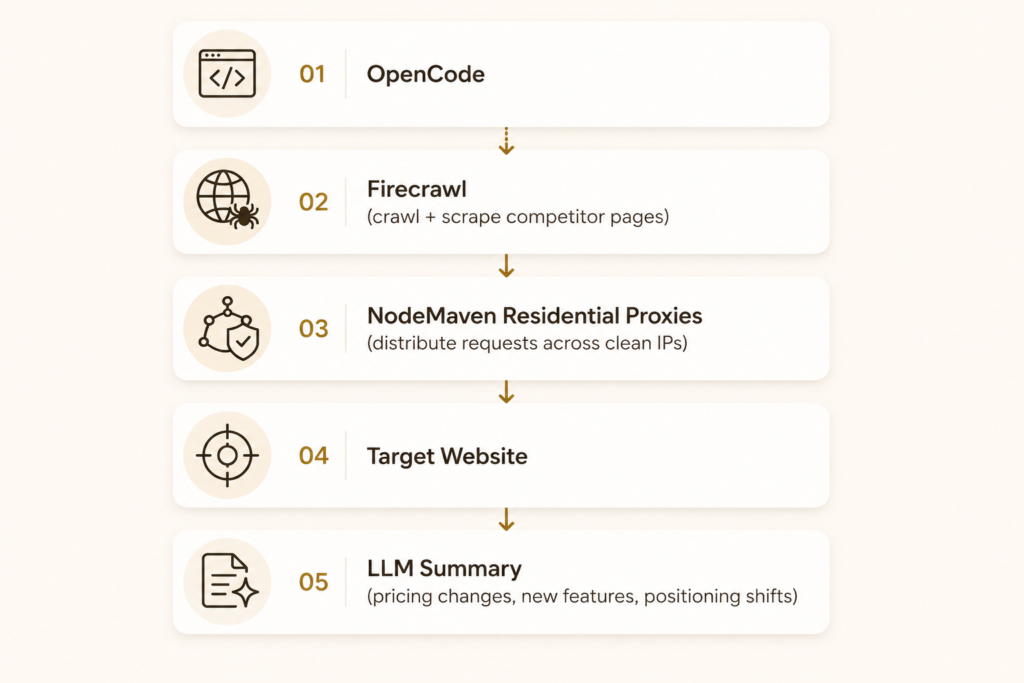
Run this on a schedule and you get a standing competitor watch instead of a one-off scrape.
Browser automation
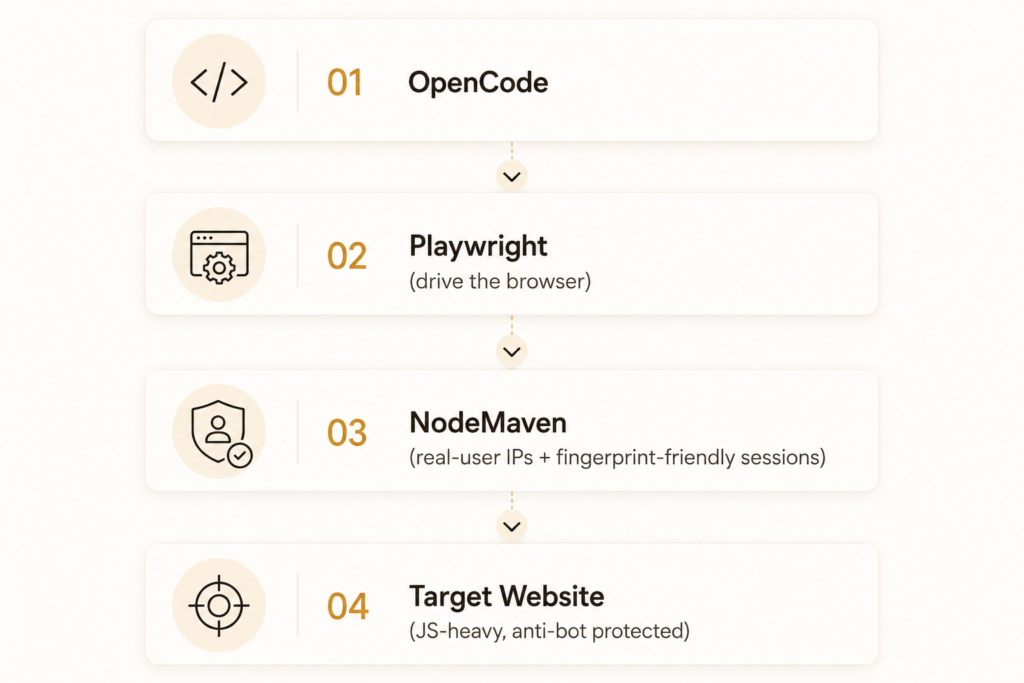
Useful for testing flows behind geo-restrictions, or QA against pages that behave differently for real-user traffic than for a flagged data center IP.
AI research pipeline
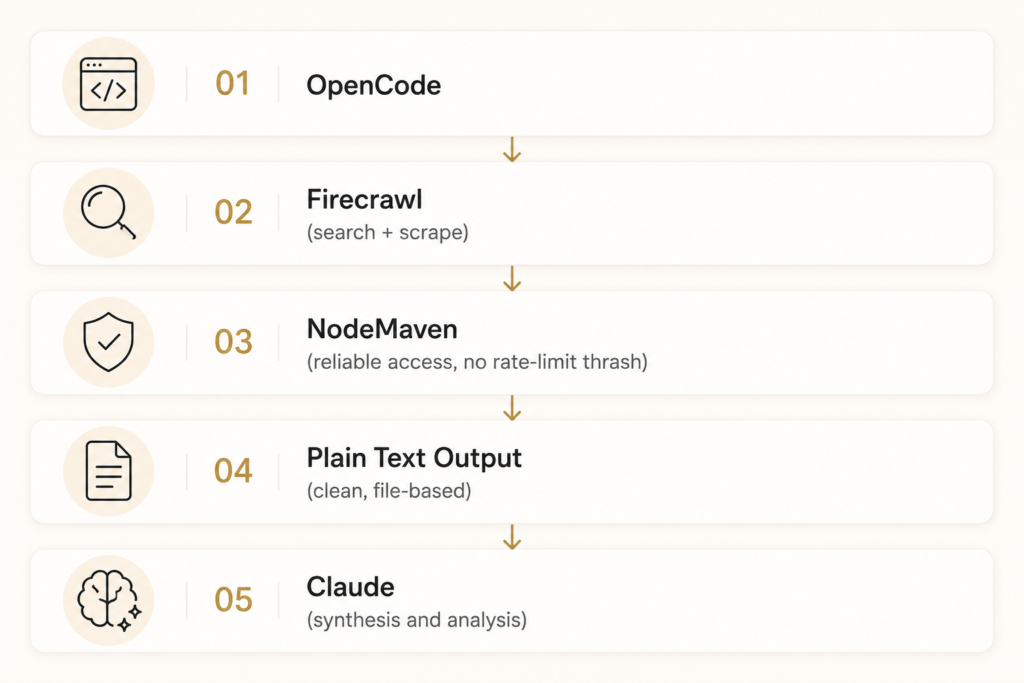
This is the shape of most research-heavy OpenCode sessions once you get past toy examples: gather, clean, synthesize.
Why production workflows need proxies
Skills like Firecrawl solve the capability gap. OpenCode can now reach the web. What they don’t solve is what happens when the web pushes back.
- Rate limits. A single IP making hundreds of requests looks like an attack to most servers, regardless of how well-behaved your crawl logic is.
- CAPTCHA walls. Anti-bot systems fingerprint IP reputation alongside browser behavior. A data center IP with no request history triggers challenges that a residential IP rarely does.
- IP reputation. Once an IP gets flagged, everything routed through it inherits that reputation. Shared data center ranges get burned fast under scraping load.
- Geo-testing. If your agent needs to verify how a page renders in a specific country, city, or even ZIP code, you need IPs that are actually there. A single origin IP can’t fake that.
- Browser automation at scale. Tools like Playwright and Puppeteer can perfectly mimic human interaction, but if every session originates from the same IP block, the fingerprint gives it away regardless of how convincing the click patterns are.
This is where a residential proxy layer stops being optional infrastructure and starts being part of the skill stack itself.
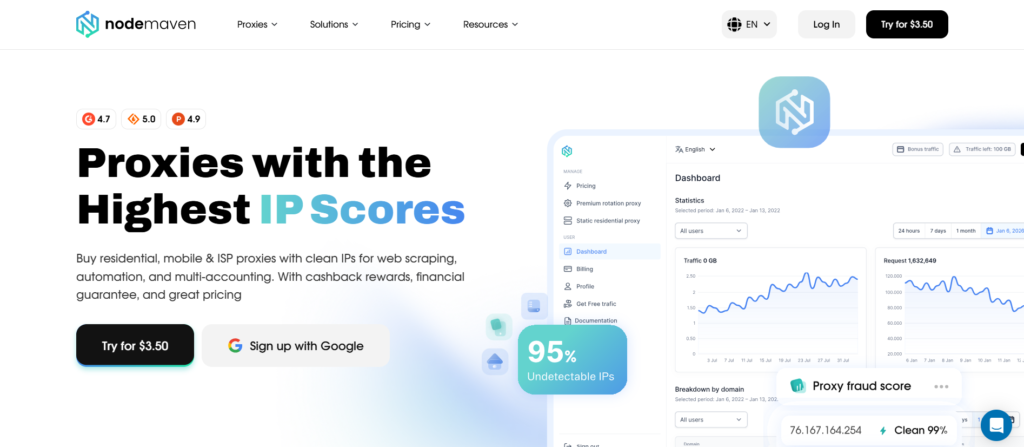
NodeMaven provides a pool of residential and mobile IPs across 190+ countries, with a 95%+ clean IP rate from real-time quality filtering before assignment.
Geo-targeting goes down to the ZIP level, which matters if your OpenCode agent is checking localized pricing or region-specific search results.
None of this replaces Firecrawl, Playwright, or the skills covered above. It sits underneath them. The skill gives OpenCode the ability to act; the proxy layer gives that action a clean, believable identity on the other end.
Conclusion
The best OpenCode setup isn’t one skill. It’s a stack that covers planning (Grill Me), session continuity (Handoff), live web access (Firecrawl), codebase understanding (Understand Anything), writing quality (Stop Slop), token efficiency (Caveman), and full workflow orchestration (Obra Superpowers) all working together.
Skills give OpenCode the capabilities. What determines whether those capabilities hold up in production is the infrastructure underneath them, including how reliably your agent can actually reach the web it’s trying to read. For any workflow that leans on Firecrawl, Playwright, or browser automation at scale, a residential proxy layer like NodeMaven is what keeps that access working past the first few requests.
Start with one or two skills from this list. Add the rest as you hit the specific problems they solve.
Scale web scraping and competitor monitoring with clean residential proxies. Try NodeMaven from $3.50 with 750 MB included