
Multilogin Review 2026: Cloud Phones & Multi-Account Platform



Social media platforms keep getting harder to manage at scale. When you run more than a couple of accounts from the same browser or device, platforms pick up on it fast, whether it’s client social profiles, marketplace storefronts, or brand pages that were never supposed to look related in the first place.
Multilogin was built for exactly this. This review gets into what the platform actually does, where Cloud Phones fit alongside browser profiles, and which use cases make sense for real teams, plus how pairing it with NodeMaven’s proxy network rounds out the setup.
What Is Multilogin?
Multilogin is a cloud phone platform for social media marketers. It lets people and AI agents manage and grow multiple social media profiles — each running on its own real Android device in the cloud. For teams that also need desktop-based workflows, Multilogin includes isolated browser profiles alongside, all managed from the same dashboard.
Cloud Phones are real, cloud-hosted Android environments, different from emulators and desktop browsers pretending to be mobile. Each one runs as its own standalone device, with its own storage, apps, and session data, accessible from anywhere without physical hardware. That makes them useful anywhere a genuine mobile environment matters: managing social accounts on platforms that are built mobile-first, testing how an app or site actually behaves for users on Android, or running region-specific research where a desktop browser simply won’t reflect the real user experience. Because each Cloud Phone is fully isolated, teams can run several in parallel without one account or session affecting another, and access them collaboratively from the cloud rather than tying the work to a single physical device.
Browser profiles apply the same isolation principle on desktop. Each profile behaves like its own separate device and user, with screen size, OS, timezone, WebRTC behavior, and other fingerprint parameters configured independently, so accounts stay cleanly separated instead of bleeding into each other through shared browser fingerprints.
What is Changed in 2026
Platforms have gotten better at flagging accounts that look connected when they shouldn’t be, with stricter rules and smarter anti-fraud systems. For agencies, e-commerce sellers, and social teams juggling multiple accounts, that raises the bar for how those accounts need to be set up and managed.
Cloud Phones have become central to how Multilogin addresses this. Because each one is a real, isolated Android environment, teams get a genuinely separate device for every account they manage.
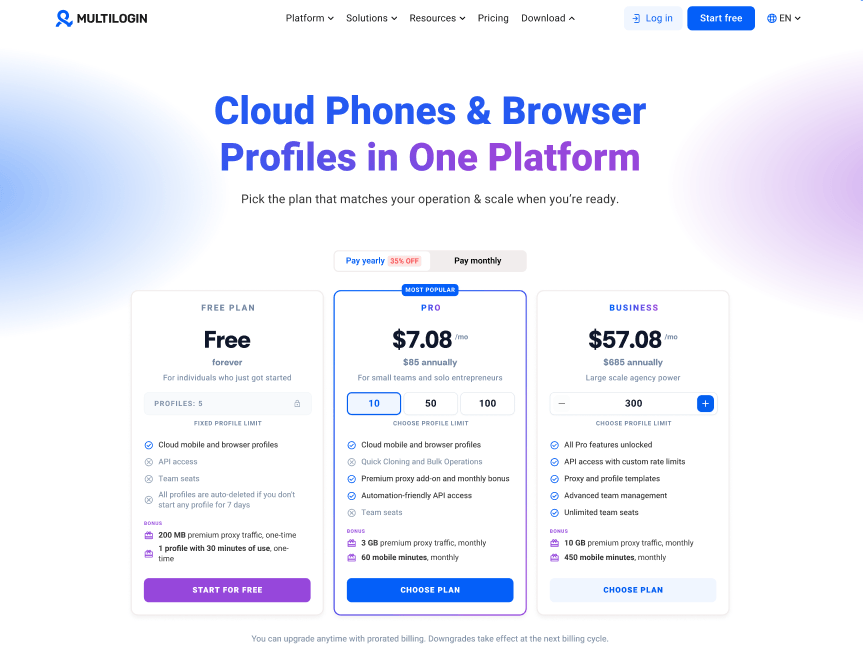
Multilogin has also moved to USD pricing in 2026, making costs more predictable for teams budgeting in that currency.
Tip: read more on how to manage multiple social media accounts for multiple clients in 2026.
How Proxies Fit Into the Setup
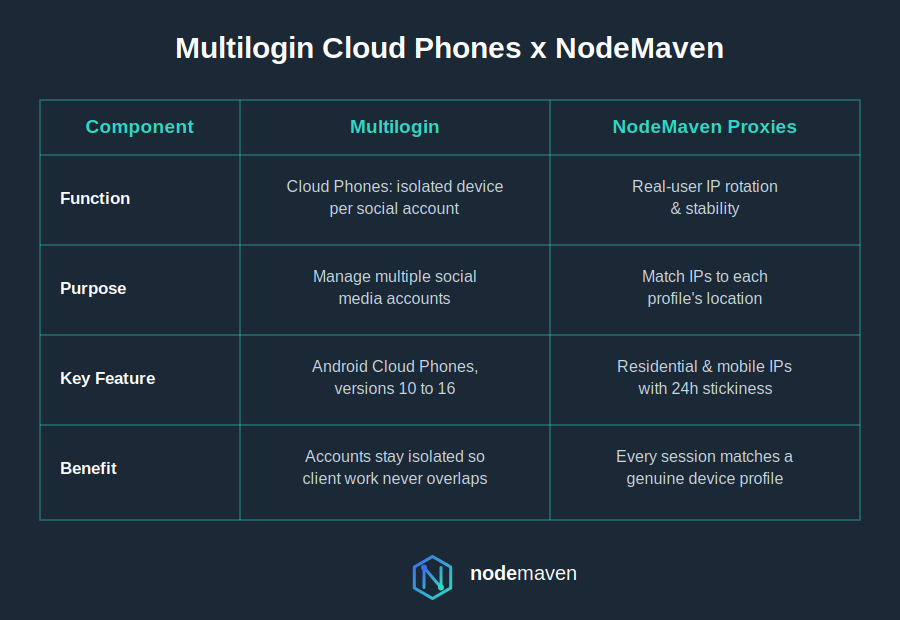
Cloud Phones handle the device side of isolation, while proxies handle the network side, and the two need to agree with each other, or the setup falls apart: a real device paired with a mismatched IP undermines the isolation Cloud Phones are built to provide.
NodeMaven’s residential and mobile proxies pair well with Multilogin’s Cloud Phones and browser profiles for a few reasons:
- Real residential and mobile IPs that match the device profile you’re presenting, rather than obviously mismatched data-center IPs — important for Cloud Phones, where a mobile-native IP keeps the device profile consistent
- 24-hour sticky sessions, useful for multi-step workflows like account setup, campaign builds, or checkout testing
- Geo-targeting down to city and ISP level, so each Cloud Phone or browser profile reflects a genuine local presence — important when you’re managing region-specific storefronts or ad accounts

Connect NodeMaven residential or mobile proxies to Multilogin with SOCKS5 support, precise geo-targeting, and stable sessions. Start with 750 MB of traffic for $3.50
Multilogin Review: Features and Functionality Breakdown
Before you invest your time or cash, or go looking for a Multilogin trial, let’s explore what makes this tool tick. Multilogin is loaded with features built for performance and scale.
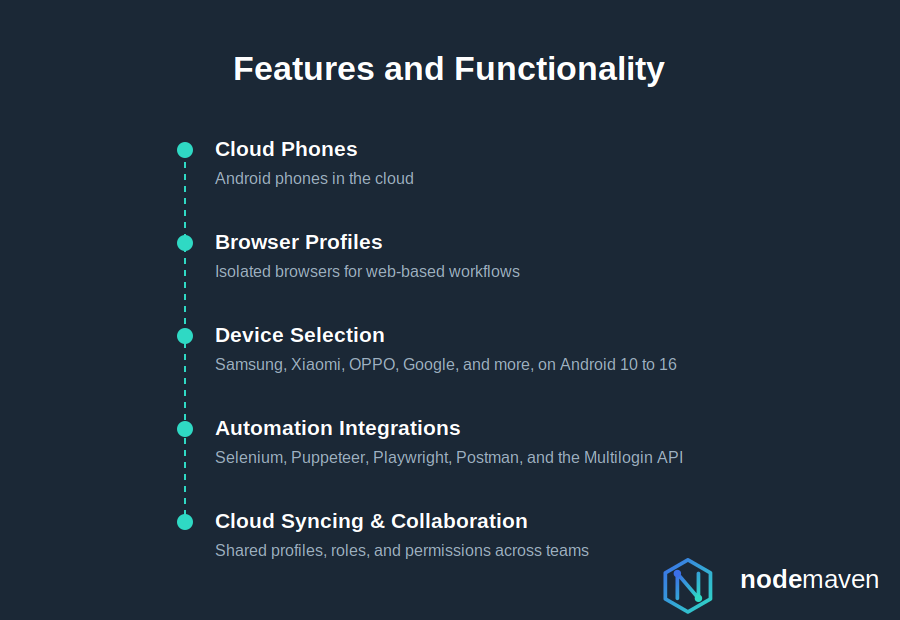
Cloud Phones
Multilogin’s Cloud Phones are cloud-hosted Android instances for workflows that genuinely need a mobile environment rather than a desktop browser emulating one. This is particularly useful for QA and mobile app testing, alongside mobile-first account management.
Some of the main benefits of using Cloud Phones include:
- A choice of real device models: Samsung, Xiaomi, OPPO, Vivo, Motorola, OnePlus, Google, Redmi, realme, Honor, Infinix, and Tecno
- Strict account isolation: one cloud phone or browser profile per account or client, with no shared app data, cache, or system signals
- Built-in proxies for consistent localization: 30+ million IPs across 150+ locations, matched to device geolocation, language, and time zone
- Automation-ready infrastructure: integrations with Selenium, Puppeteer, Playwright, Postman, and the Multilogin API, without breaking device identity
- Team collaboration built in: assign roles and share profiles or cloud phones securely, with unlimited seats on Business plans
Browser Fingerprint Isolation
Multilogin doesn’t just swap out your IP, it configures a distinct browser environment for each profile.
- Device configuration (screen size, OS, GPU parameters)
- Browser-level behavior, including WebRTC, canvas, and font handling
- Fingerprint consistency that holds up against fingerprint-checking tools like Pixelscan and CreepJS
This matters most when you’re operating on platforms like Facebook, Instagram, TikTok or Google Ads, that actively look for cross-account signals.
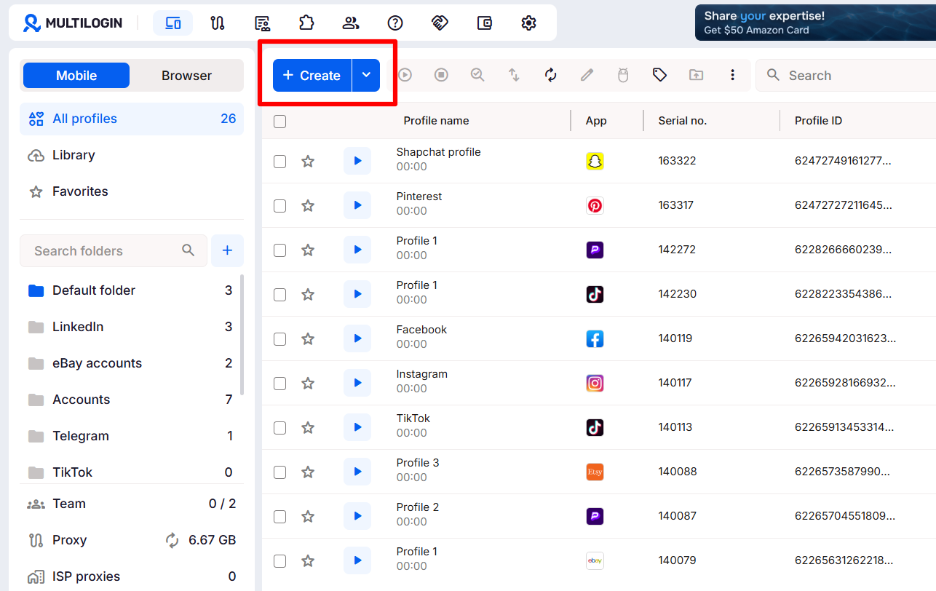
Profile Management for Multiple Accounts
Multilogin lets you spin up hundreds of profiles, each functioning as a separate, organized workspace:
- Separate cookies, storage, and cache per profile
- A dedicated proxy assignable to each cloud phone or browser profile
- Tagging and grouping for team-based workflows
For an agency running a dozen Google Ads accounts or an e-commerce team managing several Amazon storefronts, this turns what used to be a manual, error-prone process into something structured.
Automation Integrations
Automation isn’t just cool, it’s necessary. Multilogin integrates with the automation tools teams already use:
- Selenium/WebDriver: Automate profile actions from a script
- Puppeteer: Perfect for controlled scraping
- Playwright: Great for multi-browser automation with stealth
That makes Multilogin workable for developers and technically-inclined marketing teams who want repeatable, scriptable workflows rather than manual clicking.
Cloud Syncing and Collaboration
Profiles sync to the cloud and can be shared across a team without overlap:
- Secure cloud storage for profile data
- Shared access with defined permissions
- Organized workflows across multiple team members or VAs
For agencies or teams scaling past a single operator, this is what keeps the setup manageable.
Four Use Cases Where Multilogin Earns Its Keep
So you’ve heard the hype, seen the tutorials, maybe even dabbled with a Multilogin trial. But let’s cut through the noise – how do you actually make money using Multilogin?
The real value of Multilogin isn’t just the technology, it’s what genuine device and browser isolation lets teams do at scale. By giving every account its own real, isolated environment, Multilogin lets agencies, sellers, and teams run parallel accounts the way separate individuals or businesses actually would.
1. Managing Multiple Facebook and Google Ads Accounts
Media buyers, affiliate marketers and e-commerce sellers use Multilogin to keep client or store accounts cleanly separated:
- Farm and warm up ad accounts with unique fingerprints
- Prevent bans due to account linkage
- Run backup ad accounts preemptively
Each account operates in its own environment, from its own configured location — which matters when accounts genuinely belong to different clients or business units.
2. Social Media Management for Multiple Brands
Agencies and in-house social teams managing several brand or client accounts can use Cloud Phones to:
- Run multiple Instagram, TikTok, or other platform accounts per client roster
- Schedule posts, manage DMs, and handle day-to-day account activity
- Keep each client’s accounts isolated from one another, which is often a contractual requirement, not just a technical preference
Tip: discover the top 10 cloud phones for social media marketing in 2026.
3. QA, Localization, and Cross-Market Testing
Product, growth, and QA teams use Cloud Phones and browser profiles to test how apps, sites, and campaigns actually behave across regions and devices:
- Test app and web experiences from real Android devices and browser configurations, not emulators
- Check localization, pricing, and ad delivery as they appear in different countries and cities
- Reproduce device-specific bugs by matching the exact OS, device model, or region a customer reported
4. Scraping and Outreach at Scale
Lead gen teams and startups use Multilogin to:
- Automate LinkedIn scraping and outreach
- Run cold email campaigns from multiple inboxes
- Monitor inboxes without triggering spam filters
With proper proxy rotation and browser hygiene, your campaigns stay clean and scalable.
Pros and Cons: An Honest Review
No tool is perfect, but Multilogin has earned its reputation as a serious platform for multi-account management.
Before you decide to sign up or search for a Multiloin alternative, here’s the unfiltered rundown: what works, what could be better, and what real users are saying in 2026.
What Users Love (UX, Isolation Tech, Flexibility)
- Excellent fingerprint isolation: One of the best in the game
- Cloud Phones and browser profiles in one dashboard: No need to juggle separate tools for desktop and mobile account management
- Easy profile management: Tagging, grouping, and syncing are smooth
- Team-friendly: Cloud access, role-based user permissions, and collaboration
The experience is refined, and the setup is straightforward once you get the hang of it.
Tip: You can always pair browser profiles with quality residential proxies.
Where Can It Improve (Learning Curve)
- Steep Learning curve: Requires understanding fingerprinting, proxies, and session behavior
- Setup takes some ramp-up: Getting profiles, proxies, and Cloud Phones configured the right way may not be instant for first-time users
Pricing is now in USD and more accessible than in previous years, with an entry-level plan at $7.08/month and a free plan available for anyone who wants to test the platform before committing. No credit card is required, and there is no time limit, so users can explore every feature at their own pace before scaling up.
Community Feedback and Support Responsiveness
- Active community: Reddit, Discord, and X all have engaged user discussions and peer troubleshooting
- 24/7 multilingual support: Available around the clock in English, Vietnamese, Russian, Chinese, and Portuguese
- Growing knowledge center: Docs and tutorials are updated continuously, so guidance keeps pace with new features
Why NodeMaven Is the Ideal Proxy Partner for Multilogin Users
Here’s the truth: even the best cloud phone and browser is only as stealthy as the proxy behind it.
NodeMaven proxies are built to complement Multilogin’s isolation model:
- IPs that match the geolocation and device profile you’re presenting
- Reduced risk of triggering fraud or anomaly detection systems
- Stable, long-lasting sessions for multi-step workflows
What you get by pairing the two:
- Premium residential proxies, validated by PixelScan and ProxyWay
- Static residential proxies, well suited for ad account management and consistent logins
- Rotating residential proxies, useful for scraping and research at scale
- Precise geo-targeting down to country, city, or ISP
- IP quality filtering to avoid starting with a burned or blacklisted IP
- Free traffic roll-over so you use what you pay for
- Pay-as-you-go pricing instead of a bloated monthly commitment
- Fast setup with no dev skills required
- Dedicated human support over WhatsApp, Telegram, Zoom, and Slack
If you’re building a proper browser-and-proxy stack rather than piecing one together ad hoc, check out NodeMaven’s Multilogin Integration Page and get started today.
Connect NodeMaven residential or mobile proxies to Multilogin with SOCKS5 support, precise geo-targeting, and stable sessions. Start with 750 MB of traffic for $3.50


