




Why Google CAPTCHA Appears: We Tested 500 Fresh IPs


Резюме
We tested whether Google CAPTCHA depends on the IP address or on the browser behind it. The answer is the browser.
- In mid-October 2026, I ran 500 first searches on Google Search, each from a brand-new US residential IP and a fresh browser, in five groups of 100.
- An empty browser got search results 17 times out of 100. A browser with Google cookies made on another machine got results 91 times out of 100.
- Without the NID cookie, a trusted browser passed 20 times out of 100. With NID alone, it passed 93 times.
- Once the first search passed, 92 to 100% of follow-up searches on the same IP went through.
- Warming up a browser on each IP took 222 seconds and 64 MB of traffic. Google cookies took 14 seconds and 1 MB.
Google CAPTCHA shows up mostly because of your browser, not your IP address. In our test, an empty browser on a brand-new US residential IP got search results 17 times out of 100. The same kind of IP with a browser that already carried Google cookies got results 91 times out of 100, even though those cookies were created on a different machine.
That’s why switching to a “cleaner” IP often doesn’t make Google’s “I’m not a robot” page go away.
Why does Google CAPTCHA show up when you search?
Google shows a CAPTCHA when it doesn’t trust the browser sending the search. The IP address matters less.
The usual case looks like this: you turn on a VPN, open an incognito window or clear your cookies, search for something, and Google asks you to prove you’re human. Скреперы run into the same wall at scale, and the standard fix is to rotate to a fresh IP and try again.
We wanted to measure how much of Google’s decision depends on the IP and how much depends on the browser behind it.
How we tested Google CAPTCHA on 500 fresh IPs
In mid-October 2026, we ran 500 first searches on Google. Each one used a brand-new US residential IP and a fresh browser, and the trials were split into five groups of 100.
- Target: Google Search.
- IP-адреса: one brand-new sticky US residential IP per trial.
- Browser: one fresh browser per trial.
- Conditions: all five groups ran side by side on the same machine during the same hours, with the group order shuffled in every round.
- Cookies: taken from browsers warmed up on a Windows machine, then used on Linux, on IPs they had never been used with.
- Success: Google returned a results page for the first search instead of a CAPTCHA. Attempts that never reached Google were repeated and not counted.
The groups differed only in what the browser brought to the new IP:
- Nothing: an empty browser.
- A warm-up on this IP: the browser first visited six pages (theverge.com, wikihow.com, Google Translate, Google Scholar, Google Images and Google Trends), stayed 20 to 45 seconds on each, then typed the query on the Google homepage.
- Google cookies from another browser, with no warm-up.
- The same cookies with NID removed.
- Этот NID cookie alone.
Does Google judge the IP or the browser?
Google judges the browser. An empty browser on a new IP got results 17 times out of 100, while a browser carrying Google cookies got through 91 times.
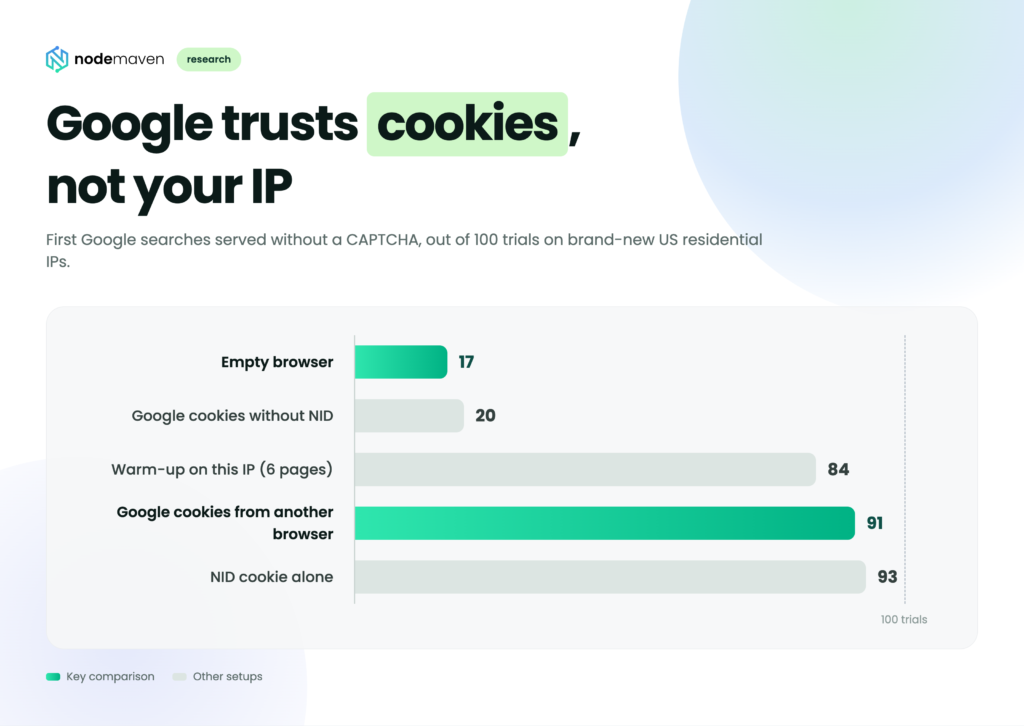
Every group used the same kind of brand-new residential IP. The only thing that changed was what the browser brought with it. The IP works like a gate check that lets the request in to be judged, and the browser is what Google actually scores.
What is the NID cookie and why does it matter for CAPTCHA?
NID is a Google cookie that carries most of a browser’s trust. Without it, a browser with an otherwise full set of Google cookies got results 20 times out of 100. With NID alone, it got results 93 times.
Согласно Google’s cookie policy, most people who use Google services have NID in their browser. Google uses it to remember preferences such as language, and it expires six months after last use. In our test it decided almost the whole outcome:
- Removing NID dropped a trusted browser to the level of an empty one: 20 vs 17.
- Keeping only NID did as well as the full cookie set: 93 vs 91.
The other Google cookies added close to nothing on their own.
Do Google cookies work on a different IP or device?
Yes. Cookies created on Windows worked on Linux and on IPs they had never seen, and one cookie set got through on 69 of 72 new IPs in a row.
We ran three smaller checks on top of the main test:
| Проверить | Served |
|---|---|
| One cookie set moved across 80 new IPs, one after another | 69 of 72 first searches that reached Google |
| One cookie set used by 5 browsers at the same time, on 5 IPs | 8 of 8 |
| Cookies 6 and 12 hours old | 23 of 23 |
In the 80-IP run, the few refusals came early in the series. The last 34 searches all went through, so the cookie set didn’t wear out with use.
These samples are small, so read them as a signal rather than a final number. They agree with the main test.
Does Google show a CAPTCHA after the first search?
Rarely. Once Google served the first search, 92 to 100% of the next searches from the same IP went through.
| Group | Searches 2 and 3 served |
|---|---|
| Warm-up on this IP | 98 of 98 |
| NID cookie alone | 96 of 97 |
| Cookies from another browser | 92 of 94 |
Counted over the first 50 served browsers in each group.
Most of the CAPTCHA risk sits in the first search on each IP.
Browser warm-up vs cookies: which costs less?
A browser with Google cookies gets its first result in about 14 seconds and 1 MB of traffic. Warming up a browser on each new IP takes about 222 seconds and 64 MB.
| Метод | First search served | Time to first result | Traffic to first result |
|---|---|---|---|
| Warm-up on the new IP | 84 of 100 | 222 s | 64 MB |
| Cookies from another browser | 91 of 100 | 14 s | 1.0 MB |
Both methods work, but the cost gap is large. On резидентские прокси you pay for traffic, so warming up 1,000 IPs burns about 64 GB before the first real query. The same 1,000 IPs with a trusted cookie set use about 1 GB.
Most of the warm-up time is the 20 to 45 seconds the browser spends on each of the six pages. Four of those pages are Google services, so the warm-up most likely collects Google cookies on the new IP before the first search. That would explain why it gets close to the cookie groups (84 vs 91), only slower and at a much higher traffic cost.

Our test shows a fresh IP only gets you through the door. Google decides the rest by the browser. Pair reliable резидентские прокси with a warmed-up browser to keep your CAPTCHA rate as low as possible.
How to avoid Google CAPTCHA when searching or scraping
Switching to a cleaner IP won’t stop Google CAPTCHA if the browser is empty. What helps is a browser that Google already recognizes.
If you see Google CAPTCHA as a regular user
A VPN plus an incognito window or freshly cleared cookies is the same setup as our empty-browser group, which got a КАПЧА 83 times out of 100. Searching from your normal browser profile, where Google already knows you, gives Google something to trust even when your IP changes.
If you scrape Google
- Don’t treat IP rotation as the fix for CAPTCHAs. A fresh IP with an empty browser passed only 17 times out of 100.
- Track browser state, not just IPs. In our test, the NID cookie decided most of the outcome.
- Put the effort into the first search. After it passes, 92 to 100% of follow-up searches on that IP go through.
- Count the traffic. A warm-up costs about 64 MB per IP, a trusted cookie set about 1 MB.
To keep browser sessions on proxies without building the setup yourself, try the браузер для скрапинга NodeMaven. If you only need Google results, the Google Search Scraper returns them without a browser on your side.
Limitations of this Google CAPTCHA test
We tested only Google Search, only US residential IPs, and only cookies up to 12 hours old.
- The main metric is the first search on each IP. Follow-up searches were counted over the first 50 served browsers per group.
- The extra checks (80 IPs in a row, parallel use, cookie age) used small samples.
- The test ran in mid-October 2026. Google changes its anti-bot systems over time, so the exact numbers may shift.
Ключевые выводы
- Google CAPTCHA depends mostly on the browser. A new IP with an empty browser passed 17 times out of 100, and the same IP with Google cookies passed 91 times.
- The NID cookie carries most of the trust. Without it a browser drops to 20 out of 100. With NID alone it reaches 93.
- Trust moves with the browser, not the IP. Cookies made on Windows worked on Linux, on IPs they had never seen, and across 69 of 72 new IPs in a row.
- The first search is the hard part. Once it passes, 92 to 100% of the next searches on that IP go through.
- Rotating to a cleaner IP won’t fix CAPTCHAs if the browser is empty. Google cookies fix it for about 1 MB of traffic per IP, compared with 64 MB for a warm-up.


