
Как проверить мета-теги для списка URL (и что делать, если не получается)




Чтобы прочитать мета-теги одной страницы, достаточно правого клика. Проверка мета-тегов по списку URL - совсем другая задача, и есть четыре практичных способа это сделать.
- Массовая проверка в браузере. Вставьте список, изучите результаты, экспортируйте CSV. Никакой настройки вообще.
- Десктопный краулер например Screaming Frog или Sitebulb. Он создан для того, чтобы находить URL по всему сайту, а не проверять те, которые у вас уже есть.
- Скрипт на Python. Никаких ограничений по количеству URL, полный контроль над каждым полем и скрапер, за которым теперь придётся следить вам.
- Формулы в таблицах.
IMPORTXMLв Google Sheets: бесплатно и привычно, ровно до того момента, когда страницы перестают отвечать.
Каждый способ выигрывает в своей ситуации и ломается по-своему. Ниже мы разберём все четыре, с сильными сторонами и ограничениями каждого, но сначала коротко посмотрим, что именно вы собираете.
Что находится в <head>
Всё это берётся из одного места: из HTML <head> публичной страницы. Вот поля, которые стоит собирать.
| Поле | За что отвечает | Частая проблема |
|---|---|---|
<title> | Заголовок в результатах поиска и во вкладках браузера | Отсутствует, дублируется или обрезается после ~60 символов |
мета-описание | Текст сниппета под результатом поиска | Отсутствует или написан для другой страницы |
link rel="canonical" | Указывает предпочтительную версию страницы | Ведёт на неверный URL после миграции |
meta robots | Директивы индексации и сканирования | Случайный noindex оставшийся со стадии стейджинга |
og:title, og:description, og:image | Что показывают Facebook и LinkedIn | Нет изображения, поэтому карточка репоста отображается серой |
twitter:card, twitter:title | Что показывает X | При отсутствии подставляется Open Graph, иногда некорректно |
hreflang | Сопоставляет языковые и региональные версии | Отсутствуют обратные теги или ошибки самоссылки |
JSON-LD <script> | Структурированные данные для расширенных результатов | Корректный синтаксис, но описан не тот объект |
Любое из этих значений легко проверить вручную. Проблема в объёме, и она усугубляется, когда часть страниц отказывается отвечать.
Четыре способа проверить мета-теги по списку URL
1. Браузерный массовый чекер
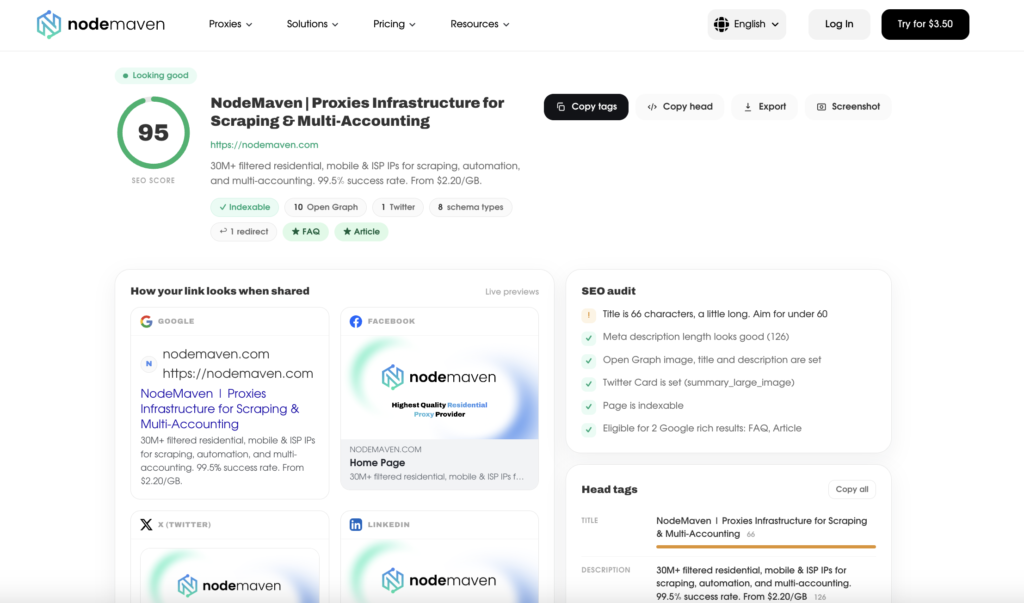
Вставьте свой список, запустите проверку, посмотрите результаты. Чекер мета-тегов от NodeMaven обрабатывает до 50 URL за один запуск.
Он возвращает title, description, canonical, директивы robots, типы схем, данные Open Graph и Twitter Card, а также живые превью того, как каждая ссылка выглядит в Google, Facebook, X и LinkedIn. Результаты экспортируются в CSV, и вы можете скопировать как отдельный тег, так и весь head страницы.
Начать стоит именно с этого, потому что здесь нечего устанавливать и нечего поддерживать. Для QA-проверки перед запуском, выборочной проверки после миграции или сравнения с конкурентами затраты на настройку любого другого метода будут больше, чем сама задача.
Где заканчиваются возможности: 50 URL за один запуск, нет публичного API, нет обнаружения страниц сайта. Список предоставляете вы, сам инструмент его искать не будет.
2. Десктопный краулер
Screaming Frog и Sitebulb решают другую задачу. Они стартуют с домена и обнаруживают URL, переходя по ссылкам, а это именно то, что нужно для полного технического аудита сайта, который вы видите впервые.
Этот же этап обнаружения делает их неподходящими для готового списка. Устанавливать краулер, настраивать его и ждать окончания обхода только ради проверки тридцати URL, которые уже лежат в таблице, - работа, не дающая ничего.
Бесплатный тариф Screaming Frog ограничен 500 URL. Лицензия по текущим ценам стоит около $259 в год.
Где заканчиваются возможности: тяжеловесно для небольших задач, только для десктопа, а бесплатный лимит на реальном сайте исчерпывается очень быстро.
3. Python
Двадцать строк дают вам воспроизводимый скрипт без ограничения по количеству URL:
python
import csv, httpx
from selectolax.parser import HTMLParser

def get_meta(url):
    r = httpx.get(url, follow_redirects=True, timeout=15,
                  headers={"User-Agent": "Mozilla/5.0"})
    tree = HTMLParser(r.text)

    def attr(selector, name="content"):
        node = tree.css_first(selector)
        return node.attributes.get(name, "") if node else ""

    title = tree.css_first("title")
    return {
        "url": url,
        "final_url": str(r.url),
        "status": r.status_code,
        "title": title.text() if title else "",
        "description": attr('meta[name="description"]'),
        "canonical": attr('link[rel="canonical"]', "href"),
        "robots": attr('meta[name="robots"]'),
        "og_title": attr('meta[property="og:title"]'),
        "og_image": attr('meta[property="og:image"]'),
    }

with open("urls.txt") as f:
    rows = [get_meta(line.strip()) for line in f if line.strip()]

with open("meta.csv", "w", newline="") as f:
    writer = csv.DictWriter(f, fieldnames=rows[0].keys())
    writer.writeheader()
    writer.writerows(rows)
Обратите внимание на final_url поле. Фиксация того, куда запрос попал на самом деле, стоит одной строки и отлавливает целый класс незаметных ошибок, о которых пойдет речь в следующем разделе.
Это верное решение, когда проверка должна выполняться по расписанию, передавать данные в другую систему или охватывать тысячи URL.
Где заканчиваются возможности: теперь у вас есть собственный скрапер. Все описанные ниже сценарии сбоев становятся вашей заботой, начиная с того, что этот скрипт видит только HTML, который отдает сервер, и ничего из того, что браузер достроил бы потом.
4. Формулы в таблицах
Google Sheets справится с этим вообще без каких-либо инструментов. Поместите URL в столбец A и:
=IMPORTXML(A2, "//title")
=IMPORTXML(A2, "//meta[@name='description']/@content")
=IMPORTXML(A2, "//link[@rel='canonical']/@href")
Бесплатно, привычно и вполне пригодно для десяти URL.
Где заканчиваются возможности: IMPORTXML получает исходный HTML, поэтому все, что отрисовывается через JavaScript, вернется пустым. Кроме того, Sheets агрессивно ограничивает частоту запросов, и столбец из пятидесяти пересчитывающихся формул начнет выдавать #N/A сам по себе. Кода статуса нет, поэтому заблокированная страница и страница без заголовка выглядят одинаково.
Какой метод для какой задачи подходит
| Метод | Настройка | URL limit | Видит JS-контент | Обходит блокировки | Экспорт |
|---|---|---|---|---|---|
| Браузерный чекер | Нет | 50 за запуск | Да, в режиме браузера | Built in | CSV |
| Десктопный краулер | Установка + настройка | 500 free | При включённом рендеринге | Ручная настройка | CSV, Excel |
| Питон | Написание + поддержка | Нет | Только с headless-браузером | Реализуете сами | Anything |
| Формулы в Sheets | Нет | ~10 на практике | Нет | Нет | Нативный |
Почему массовые проверки метаданных дают неверный результат
Выберите любой из описанных выше способов, механика будет одинаковой: запросить URL, прочитать <head>, записать строку. Эту цепочку рвут пять вещей, и большинство из них никак не связаны с метаданными страницы.
Для всех пяти работает одно правило: наращивайте сложность постепенно, не начинайте с тяжёлого. Прогоните весь список дешёвым способом, повторно запустите только неудачные URL с рендерингом в браузере, а затем ещё раз прогоните оставшиеся ошибки с другого IP. Большинству URL дорогой путь вообще не нужен.
Начните отсюда: сопоставьте симптом с причиной
| Что вы видите | Наиболее вероятная причина |
|---|---|
| Пустой заголовок, хотя в Chrome страница выглядит нормально | Рендеринг JavaScript |
| Одинаковый заголовок на нескольких несвязанных доменах | Ответила защита от ботов |
| Первые строки заполнены, последующие пустые | Ограничение скорости |
| Все поля заполнены, но значения выглядят странно | Контент, зависящий от страны |
| Полные данные для страницы, которую вы не запрашивали | Редирект или soft 404 |
Страница формирует заголовок через JavaScript
Вы открываете URL в Chrome и видите заголовок прямо во вкладке, но ваш скрипт ничего не возвращает. Оба наблюдения верны.
Сервер отдал почти пустую HTML-оболочку, а браузер выполнил JavaScript, который её заполнил. Так ведут себя все приложения на React, Vue, Angular и Next.js без серверного рендеринга. А также множество сайтов, которые отдают основной контент с сервера, но вставляют теги Open Graph на стороне клиента.
Как проверить: открыть view-source: вместо инспектора. Первое показывает то, что отдал сервер, второе - то, что построил браузер. Если заголовок есть во втором и отсутствует в первом, ответ найден.
Решение: выполнить рендеринг страницы. Это значит режим браузера в чекере, включённый JavaScript-рендеринг в краулере или Playwright вместо httpx в вашем скрипте. Рендеринг медленный и ресурсоёмкий, поэтому приберегите его для тех URL, которым он действительно нужен.
Вместо страницы ответила защита от ботов
Cloudflare, Akamai и DataDome стоят перед значительной частью коммерческого веба. Когда они решают, что запрос выглядит автоматизированным, они возвращают страницу-проверку. У этой страницы есть код ответа, HTML и свой собственный вполне корректный <title>, обычно что-то вроде “Just a moment…”.
Это хуже пустого результата, потому что не выглядит как ошибка. Вы получаете заполненную ячейку с неверным содержимым. Пока не прочитаете значения, вы этого не заметите.
Как проверить: отсортируйте экспорт по заголовку. Если у несвязанных доменов один и тот же заголовок, вы раз за разом проверяли одну и ту же страницу-проверку.
Решение: настоящий отпечаток браузера и IP, который не выглядит как датацентровый. Если ваши запросы приходят из диапазона адресов облачного провайдера, часть сайтов отклонит их независимо от того, как составлен сам запрос. Никакая логика парсинга это не обойдёт, ведь именно для этого и существуют резидентские прокси are for.
Вы упёрлись в лимит запросов
Пятьдесят запросов к одному домену за десять секунд - это не поведение обычного пользователя. Крупные издания, ecommerce-платформы и всё, что стоит за CDN, начнут возвращать 429, таймауты или пустые тела ответов уже в середине прогона.
Признак здесь позиционный. Первые URL обрабатываются успешно, а последние падают - такую картину не даёт ни одна проблема на стороне самой страницы.
Как проверить: перезапустите отдельно только те URL, которые не прошли. Если по отдельности они отрабатывают, дело было не в страницах.
Решение: замедлитесь и распределите нагрузку. Добавьте задержку между запросами, ограничьте параллельность на домен, ротируйте исходящий IP для больших задач. Список из 50 URL, ведущих на один домен, требует куда больше аккуратности, чем 50 URL на 50 разных доменов.
Страница отдаёт разные метаданные в зависимости от страны
Международные сайты меняют заголовки и описания в зависимости от локали, перенаправляют посетителей в страновую подпапку или отдают другой hreflang набор в зависимости от того, откуда пришёл запрос.
Проверка example.com/product from Istanbul and you may be reading the Turkish page. Your German colleague runs the same check and gets different values. Neither of you is wrong.
Как проверить: сравните URL, который вы запросили, с URL, который вам ответил. Редирект в страновую подпапку - это видимая форма проблемы. Невидимая форма сохраняет URL и подменяет содержимое.
Решение: проверяйте из той страны, которая вам важна. Этот момент легко недооценить, поэтому в следующем разделе он разобран подробно.
Статус 200 на не той странице
Soft 404 возвращают успешный код вместе со страницей ошибки. Цепочки редиректов приводят совсем не туда, куда вы целились. В любом случае метаданные реальны и полны, вот только описывают они другой URL, а не тот, что стоит у вас в таблице.
Как проверить: записывайте финальный URL рядом с запрошенным и сравнивайте два столбца.
Решение: ничего технического. Просто читайте столбцы. Это не стоит ничего и ловит именно те ошибки, которые сильнее всего похожи на чистые данные.
Метаданные, которых не увидеть из одной страны
Если вы аудируете международный сайт из одной локации, вы аудируете лишь одну его версию.
Допустим, у страницы есть немецкий заголовок, французский заголовок и английский вариант по умолчанию. С одного IP вы увидите только один из них. Два других останутся невидимыми, и ничто в вашей выгрузке не намекнёт на их существование. Внешне всё выглядит нормально. В CSV нет пустых ячеек, а заголовки, которые видят ваши немецкие клиенты, так и не попали в таблицу.
То же самое относится и к hreflang. Страница может объявлять полный набор языковых альтернатив для одного региона и урезанный - для другого. Проверка обратных тегов только из одной страны покажет вам конфигурацию, которая выглядит корректной, но сломана для всех остальных.
Три проверки, которые стоит выполнить на любом сайте с международным трафиком:
- Сохраняется ли запрошенный URL? Сравните то, что вы запросили, с тем, что ответило. Редирект в страновую подпапку означает, что все последующие поля описывают уже другую страницу.
- Меняется ли заголовок без изменения URL? Тот же адрес, другой контент, никакого сигнала в ответе. Именно это и проскакивает мимо любого аудита.
- Совпадает ли
hreflang-набор при запросе из каждого региона? Отсутствующие обратные теги - частая причина того, что в нужном рынке ранжируется не тот язык.
Все три проверки означают отправку запроса из той страны, которая вам важна, а именно это и делает прокси для веб-скрейпинга are for.
Но будьте точны в формулировке причины. Здесь прокси - это измерительный прибор, а не способ обойти систему блокировок. Проверять немецкие метаданные из Турции - всё равно что проверять перевод на языке, которого вы не знаете.
Практический рабочий процесс для аудита 50 URL
- Экспортируйте список URL из вашей карты сайта, Search Console или CMS. Держите список в пределах 50 адресов за один запуск.
- Сначала прогоните всё в режиме обычной загрузки, который стоит по умолчанию. Большинство URL откроются, а дешёвый проход покажет, какие из них не откроются.
- Отсортируйте по заголовку, прежде чем смотреть на пустые строки. Одинаковые заголовки на не связанных между собой доменах означают, что ответила защита от ботов. Это тот сбой, который прячется.
- Сравните запрошенный URL с конечным URL. Любое несовпадение обесценивает все остальные поля в этой строке.
- Перезапустите неудачные URL с рендерингом в браузере. Это позволяет получить страницы, собираемые через JavaScript, и часть защищённых страниц.
- Повторно запустите проверку всего, что зависит от локали, из целевой страны. Только для международных сайтов и только для страниц, которые важны коммерчески.
- Экспортируйте в CSV и сортируйте по типу проблемы, а не по URL. Отсутствующие title, отсутствующие description и случайные
noindexдирективы — это три отдельные задачи, и сортировка по типу проблемы группирует работу.


