Как разблокировать сайты: 12 простых и безопасных способов в 2026 году




Сайт может быть заблокирован по самым разным причинам. Виноваты могут быть ваш браузер, DNS-провайдер, сеть Wi-Fi, интернет-провайдер, IP-адрес или сам сайт. Некоторые сайты также недоступны в отдельных странах или регионах.
Правильный способ разблокировать сайт зависит от типа ограничения.
Прежде чем устанавливать VPN или прокси, попробуйте несколько простых шагов. Откройте сайт в приватном окне, попробуйте другой браузер, очистите кэш, переключитесь на другую сеть или проверьте настройки DNS. Если ограничение связано с вашим IP-адресом или местоположением, получить доступ помогут VPN, Tor или прокси.
В этом руководстве мы расскажем, как определить причину блокировки сайта, и покажем 12 способов получить доступ к сайту, который не загружается.

Разблокируйте сайты с помощью быстрых и надёжных резидентных, ISP- и мобильных прокси. Попробуйте NodeMaven от $3,50 с 750 МБ в комплекте
Почему сайты блокируются?
Прежде чем пытаться разблокировать доступ к сайту, полезно понять, почему это произошло. Причина обычно относится к одной из следующих категорий.
- Гео-ограничения
Некоторый контент лицензирован только для определённых стран. Стриминговые сервисы делают это постоянно.
- Ограничения со стороны интернет-провайдера
Ваш интернет-провайдер, учебное заведение или рабочая сеть могут намеренно блокировать определённые сайты.
- IP-баны
Сайт может заблокировать IP-адрес после необычной активности, иногда без каких-либо неправильных действий с вашей стороны.
- Временные ограничения сайта
Сам сайт может быть недоступен, перегружен или обновляться.
- Сетевая фильтрация
В некоторых странах фильтрация на государственном или региональном уровне полностью блокирует определённые домены.
Как только вы поймёте, какая из причин применима, будет гораздо проще выбрать правильный способ разблокировать заблокированные сайты, а не действовать наугад.
Как узнать, почему сайт заблокирован
| Что происходит | Возможная причина | Что попробовать |
| Сайт открывается в другом браузере | Настройки браузера или расширения | Очистите кеш и отключите расширения |
| Сайт работает в режиме инкогнито | Файлы cookie или сохранённые данные сессии | Очистите данные сайта |
| Сайт работает через мобильный интернет, но не через Wi-Fi | Ограничение на уровне DNS или сети | Проверьте настройки DNS и роутера |
| Сайт работает из другого местоположения | Географическое ограничение или блокировка по IP | Попробуйте VPN или прокси нужного региона |
| Проблема только на вашем устройстве | Локальные настройки | Проверьте файрвол, антивирус и разрешения браузера |
| Сайт не открывается ни у кого | Проблема на стороне сайта | Проверьте, не лежит ли сайт |
| Проблема только с вашим аккаунтом | Ограничение аккаунта | Проверьте настройки аккаунта или обратитесь в поддержку |
| Вы получаете ошибку DNS | Проблема с разрешением DNS | Попробуйте другой DNS-резолвер |
Простая схема поиска неполадок
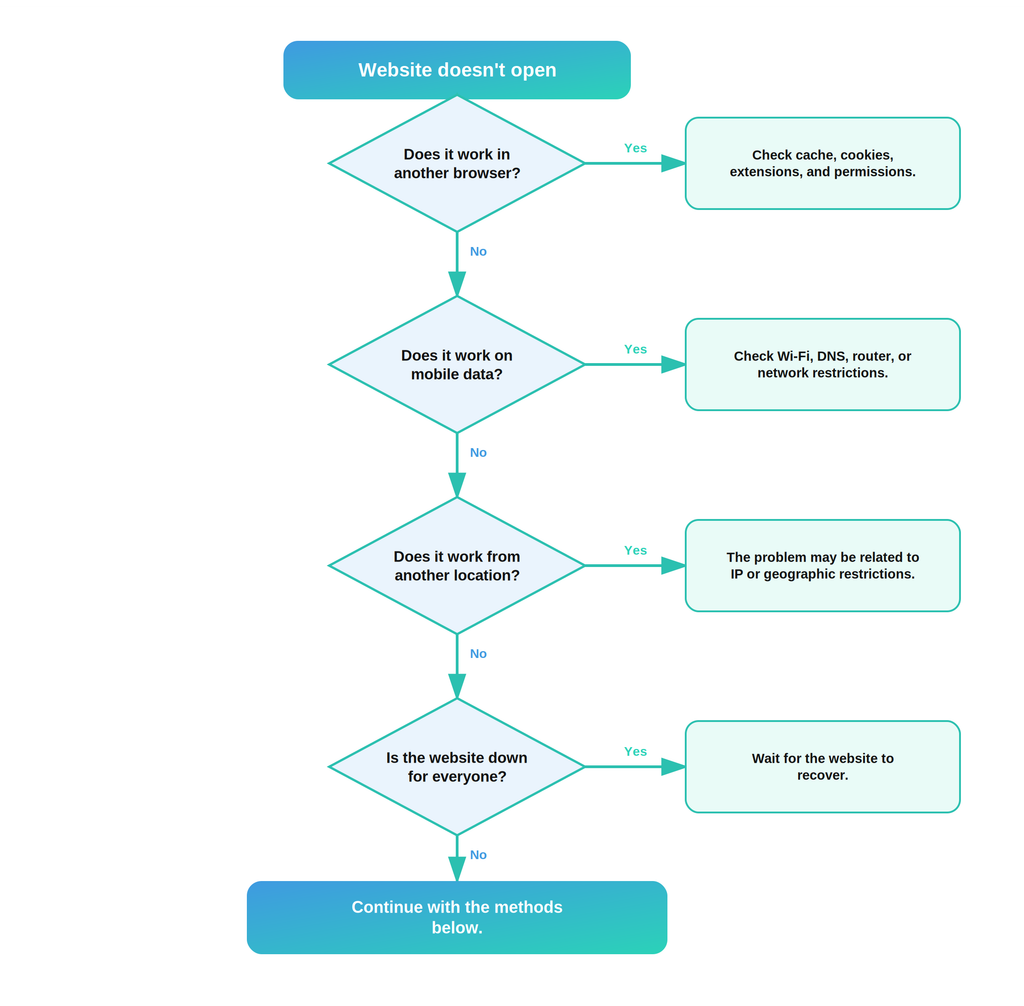
1. Откройте сайт в приватном окне или режиме инкогнито
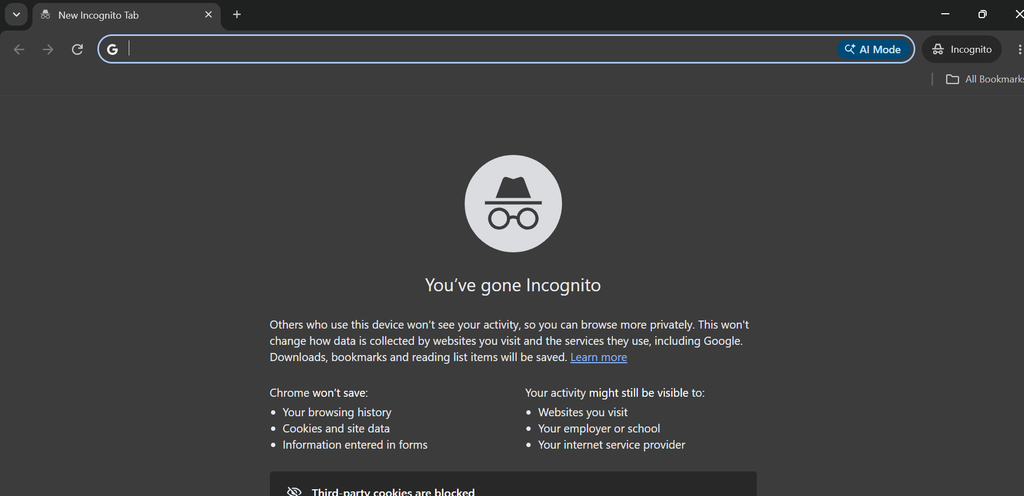
Приватный режим браузера — один из самых быстрых способов, которые стоит попробовать.
Окно в режиме инкогнито или приватном режиме запускает отдельную сессию браузера и не использует вашу текущую сессию так, как это делает обычное окно. Это может помочь, если устаревшие файлы cookie или данные сессии мешают корректной загрузке сайта.
Как это сделать
- Откройте браузер.
- Откройте новое окно в режиме инкогнито или приватном режиме.
- Введите адрес сайта.
- Попробуйте загрузить страницу ещё раз.
В Chrome выберите New Incognito Window в меню с тремя точками.
Если сайт работает в режиме инкогнито, проблема может быть связана с файлами cookie, кешированными данными, расширениями или вашей текущей сессией браузера.
2. Попробуйте другой браузер
Сайт, который не загружается в одном браузере, может нормально работать в другом.
Попробуйте открыть тот же URL в Chrome, Firefox, Edge, Safari или другом браузере, установленном на вашем устройстве.
Если сайт работает в другом браузере, проблема, скорее всего, связана с исходным браузером, а не с вашим интернет-соединением.
Затем вы можете проверить:
- расширения браузера;
- файлы cookie;
- кешированные файлы;
- Разрешения для сайтов;
- Настройки безопасности;
- Устаревшая версия браузера.
Это также полезный диагностический шаг, поскольку он не требует изменения настроек сети.
3. Очистите кэш и файлы cookie
Браузеры сохраняют файлы и данные сайтов локально, чтобы страницы загружались быстрее. Иногда эти данные устаревают или повреждаются.
Очистка файлов cookie и кеша сайта может устранить проблемы с загрузкой, циклические редиректы, ошибки входа и показ устаревших версий страниц.
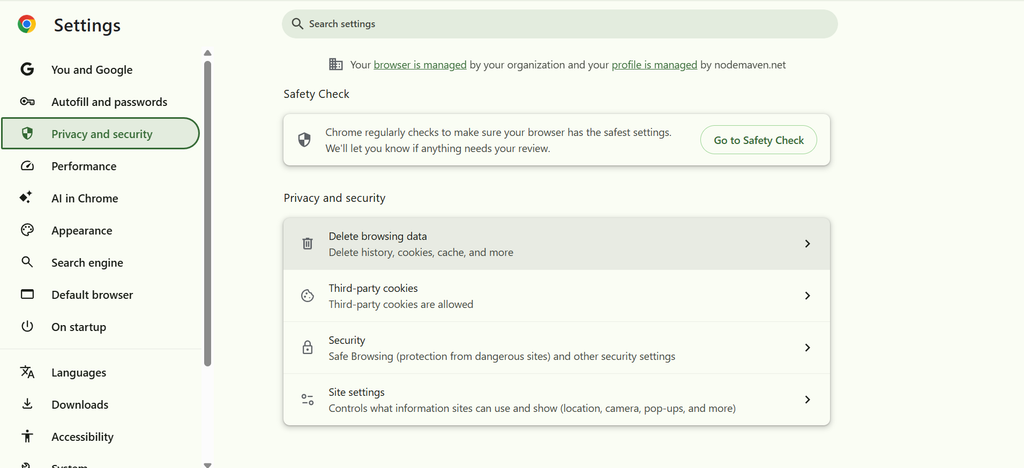
Как очистить данные браузера в Chrome
- Открыть Chrome.
- Иди Настройки.
- Выберите Конфиденциальность и безопасность.
- Нажмите Удалить данные браузера.
- Выберите «Изображения и другие файлы, сохранённые в кеше» и «Файлы cookie и другие данные сайтов».
- Укажите подходящий временной диапазон.
- Очистите данные.
- Снова откройте сайт.
Если вы не хотите выходить из аккаунтов на других сайтах, можно очистить данные только для проблемного сайта через настройки сайтов в Chrome.
4. Используйте резидентные или мобильные прокси
Прокси полезен, когда ограничение привязано к вашему IP-адресу или географическому местоположению.
Резидентские и мобильные прокси. предоставляют IP-адреса, принадлежащие резидентным или мобильным сетям. В зависимости от провайдера и настроек вы также можете выбрать конкретную страну, регион или город.
Резидентные и мобильные прокси: в чём разница
| Тип прокси | Типичные варианты использования |
| Резидентские | Просмотр сайтов, исследования и сбор данных с привязкой к местоположению |
| Мобильные | Тестирование трафика мобильных сетей и доступа из конкретных локаций |
| ISP / статические резидентные | Длительные сессии, требующие постоянного IP |
| Ротационный резидентский | Рабочие процессы, требующие нескольких IP-адресов |
Использование прокси NodeMaven
NodeMaven предлагает резидентные, мобильные и ISP-прокси с гео-таргетингом и различными настройками сессий.
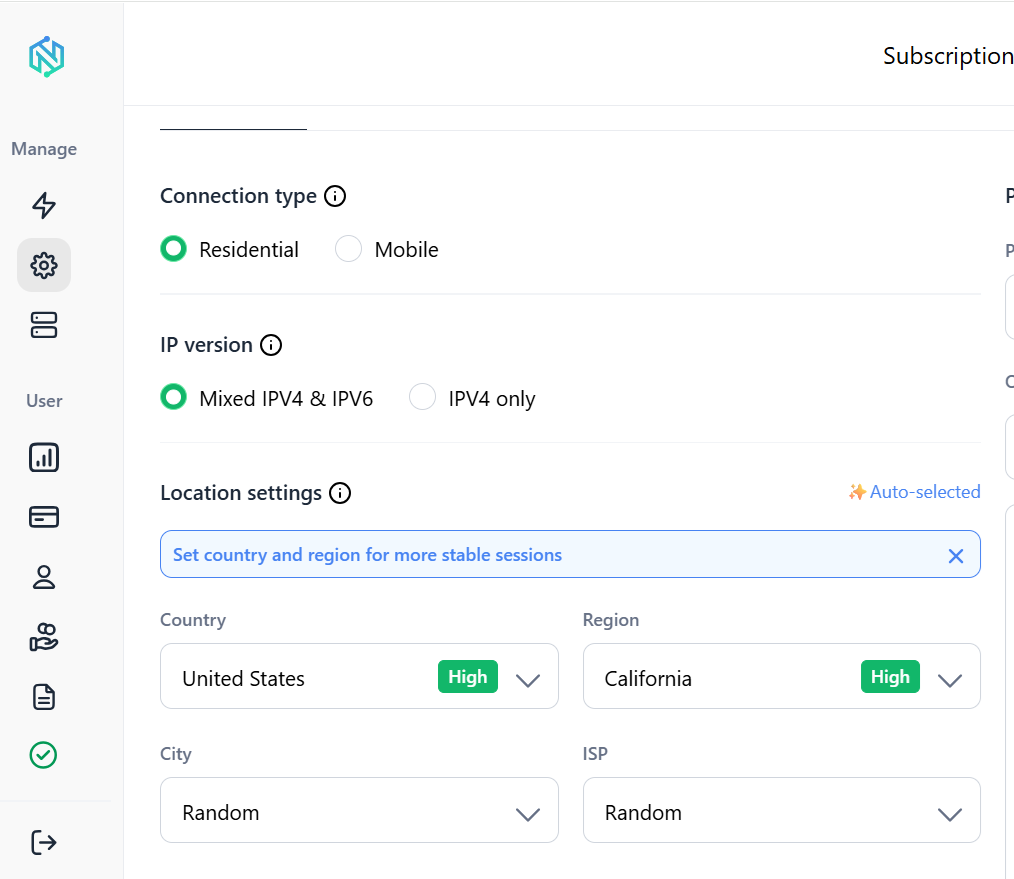
- Выберите тип прокси, который подходит для вашей задачи.
- Выберите страну или географическое расположение.
- Сгенерируйте учётные данные прокси.
- Добавьте прокси в браузер, приложение или инструмент автоматизации.
- Откройте сайт.
- Проверьте свой IP-адрес, чтобы убедиться, что подключение работает.
5. Отключите расширения браузера
Расширения браузера могут мешать работе сайтов.
Блокировщики рекламы, инструменты приватности, блокировщики скриптов, прокси-расширения и расширения безопасности иногда не дают загрузиться отдельным элементам страницы.
Как это проверить
- Откройте меню расширений браузера.
- Временно отключите расширения.
- Перезагрузите сайт.
- Проверьте, работает ли он.
- Если проблема исчезла, включайте расширения по одному, чтобы найти то, которое вызывает сбой.
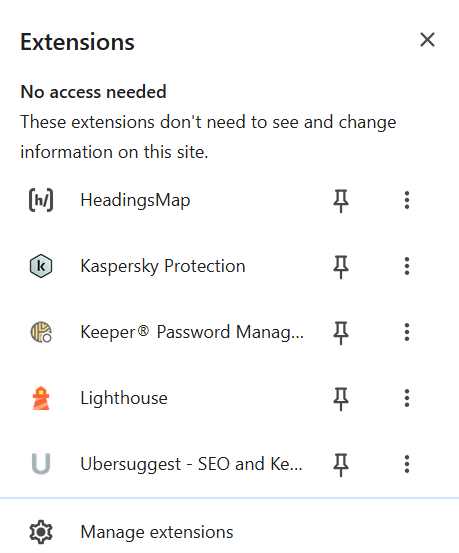
Не оставляйте расширения безопасности отключёнными навсегда, если вы не понимаете, какую защиту они обеспечивают.
6. Смените DNS-сервер
DNS отвечает за преобразование доменного имени, например example.com, в IP-адрес, который используется для подключения к серверу.
Если ваш текущий DNS-резолвер фильтрует домен или не может корректно его разрешить, смена DNS может помочь.
Популярные публичные DNS-резолверы:
Cloudflare DNS: 1.1.1.1
Google Public DNS: 8.8.8.8
Quad9: 9.9.9.9
Важное ограничение
Смена DNS не меняет ваш публичный IP-адрес и не шифрует интернет-трафик.
Это значит, что она помогает при некоторых ограничениях на уровне DNS, но не решит проблему с любым типом блокировки сайтов.
Как сменить DNS в Windows
- Открыть Настройки.
- Выберите Сеть и Интернет.
- Выберите подключение Wi-Fi или Ethernet.
- Найти Назначение DNS-сервера.
- Выберите Изменить.
- Выберите Инструкция.
- Введите адреса DNS, которые хотите использовать.
- Сохранить настройки.
- Попробуйте снова открыть сайт.
Точные названия пунктов меню могут отличаться в разных версиях Windows.
7. Попробуйте другое интернет-подключение
Смена сети — один из самых простых способов понять, связано ли ограничение с вашим текущим подключением.
Например, сайт не открывается, пока вы подключены к домашнему Wi-Fi, но сразу загружается при переключении на мобильный интернет. Сам сайт при этом может работать нормально. Проблема, скорее всего, связана с вашим роутером, DNS-резолвером, провайдером или локальной сетью.
Попробуйте такой тест
- Отключитесь от Wi-Fi.
- Включить мобильные данные.
- Откройте тот же сайт.
- Сравните результат.
Если сайт открывается через мобильный интернет, прежде чем менять что-либо ещё, проверьте своё Wi-Fi-подключение и настройки сети.
Если сайт заблокирован по вашему IP или местоположению, может помочь прокси. Попробуйте прокси NodeMaven от $3.50 с 750 MB трафика в комплекте
8. Проверьте файрвол, антивирус и разрешения сайта
Возможно, сайт блокируется локально на вашем устройстве.
Проверьте брандмауэр, веб-защиту антивируса, родительский контроль и разрешения браузера, если у вас есть доступ к этим настройкам.
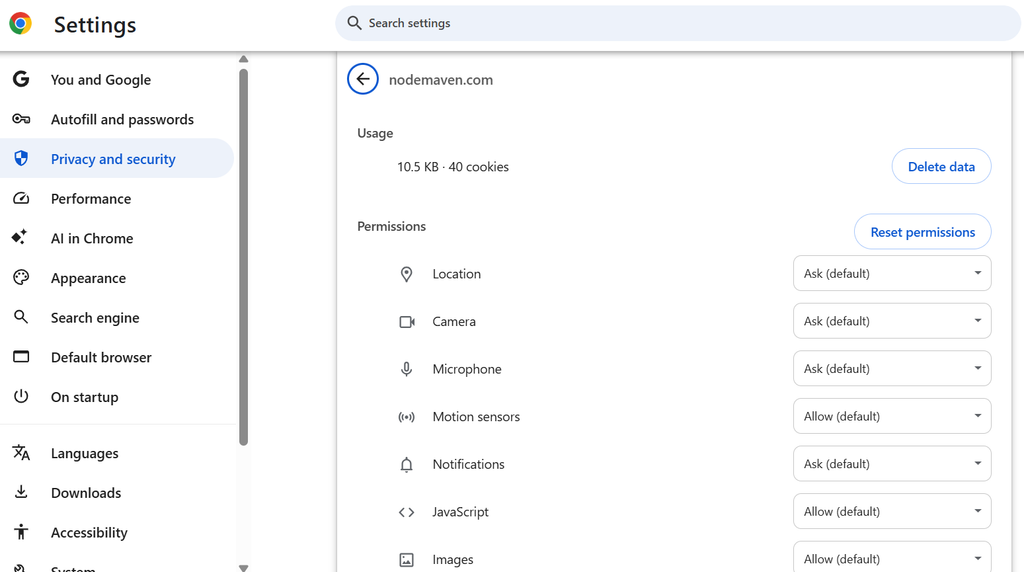
В Chrome можно также проверить разрешения для отдельного сайта.
В Chrome
- Откройте сайт.
- Нажмите на значок информации о сайте рядом с адресной строкой.
- Открыть Site settings.
- Просмотрите разрешения.
- При необходимости сбросьте или измените разрешение.
- Перезагрузите страницу.
Если вы используете Windows Security или сторонний антивирус, проверьте, не помечен ли домен как опасный и не заблокирован ли он.
9. Используйте VPN
VPN направляет ваш интернет-трафик через удалённый сервер и присваивает вашему подключению другой IP-адрес. Поэтому VPN может помочь при некоторых сетевых и географических ограничениях.
Кроме того, VPN шифрует трафик между вашим устройством и VPN-сервером.
Как разблокировать сайт с помощью VPN
- Выберите надёжного VPN-провайдера.
- Установите его приложение.
- Откройте приложение и при необходимости войдите в аккаунт.
- Выберите расположение сервера.
- Подключитесь к серверу.
- Снова откройте сайт.
Если вы хотите получить доступ к контенту, доступному в определённой стране, выберите сервер в соответствующем регионе.
Вы можете воспользоваться инструмент проверки IP , чтобы проверить, изменился ли ваш публичный IP-адрес после подключения.
10. Используйте браузерное расширение VPN или прокси
Браузерное расширение может быть полезно, когда нужно направить через другой сервер только трафик браузера.
Это особенно актуально на устройствах, где нельзя установить полноценное настольное приложение.
Учитывайте, что многие браузерные расширения, которые позиционируются как VPN, на деле работают как браузерные прокси. Они могут не обеспечивать такой же уровень шифрования и защиты всего устройства, как полноценное VPN-приложение.
Как использовать браузерное расширение
- Выберите надёжного провайдера.
- Установите расширение из официального магазина расширений браузера.
- Откройте расширение.
- Выберите сервер или локацию, если такая возможность есть.
- Подключитесь.
- Перезагрузите сайт.
Поскольку расширение затрагивает только поддерживаемый трафик браузера, остальные приложения на устройстве могут продолжать использовать ваше обычное подключение.
11. Используйте браузер Tor
Tor Browser направляет ваше подключение через сеть Tor, а не соединяется с целевым сайтом напрямую.
Это может помочь при некоторых сетевых ограничениях и обеспечивает дополнительную приватность, отделяя ваше подключение от вашего прямого IP-адреса.
Как использовать Tor Browser
- Скачайте Tor Browser с официального сайта Tor Project.
- Установите версию для вашей операционной системы.
- Откройте браузер.
- Подключитесь к сети Tor.
- Введите адрес сайта.
У Tor есть некоторые ограничения.
Соединение может быть медленнее обычного просмотра, некоторые сайты блокируют выходные узлы Tor, а отдельные сайты могут запрашивать дополнительную проверку.
12. Используйте веб-прокси
Веб-прокси выступает посредником между вашим браузером и сайтом, к которому вы пытаетесь получить доступ.
Вместо прямого подключения:
Ваш браузер → Сайт
соединение выглядит так:
Ваш браузер → Веб-прокси → Сайт
Сайт видит IP-адрес прокси, а не ваш реальный IP-адрес.
Веб-прокси удобны тем, что обычно не требуют установки программ.
Ограничения веб-прокси
Веб-прокси не являются универсальным решением.
Они могут работать медленно, нарушать функциональность сайтов и не работать с сайтами, которые активно обнаруживают или блокируют прокси-трафик.
Также будьте осторожны с неизвестными бесплатными прокси-сервисами. Не вводите пароли, платёжные данные и другую конфиденциальную информацию в прокси-сервисе, которому вы не доверяете.
Безопасны ли бесплатные сервисы для разблокировки сайтов?
Бесплатные инструменты соблазнительны, особенно для разовой задачи. Но стоит понимать, чем вы расплачиваетесь за это удобство.
| Риск | Объяснение |
| Реклама | Многие бесплатные сервисы для разблокировки полностью финансируются за счёт агрессивной, порой обманчивой рекламы, которая может перенаправлять вас на другие страницы. |
| Отслеживание | Ваш трафик проходит через их серверы, поэтому они могут видеть и логировать то, что вы просматриваете. |
| Вредоносное ПО | Некоторые бесплатные браузерные расширения и сайты-разблокировщики устанавливают вместе с собой нежелательное ПО или вредоносный код. |
| Низкая скорость | Бесплатными серверами одновременно пользуется огромное число людей, поэтому страницы могут загружаться намного дольше. |
Всё это не означает, что каждый бесплатный инструмент опасен. Просто бесплатные варианты где-то экономят, и обычно это происходит за счёт приватности, скорости или того и другого сразу. Для чего-то большего, чем быстрая и несерьёзная проверка, платный и должным образом обслуживаемый вариант будет более безопасным выбором.
VPN, прокси, Tor или DNS: что выбрать
Единого лучшего решения для всех не существует. Всё зависит от того, как часто вам нужен доступ, насколько для вас важна скорость и имеет ли приватность такое же значение, как надёжность.
| Метод | Простота использования | Конфиденциальность | Скорость | Лучшее для |
| Прокси | Легко | Хорошо | Быстро | Надёжный и частый доступ без блокировок |
| VPN | Легко | Хорошо | Medium | Общая приватность и повседневный обход блокировок |
| Веб-прокси | Очень легко | Низкий | Medium | Быстрые разовые проверки |
| Смена DNS | Легко | Низкий | Быстро | Простые блокировки на уровне ISP |
| ТОР | Medium | Очень хорошо | Медленно | Ситуации с повышенными требованиями к приватности или сильной цензурой |
Для большинства людей, которым нужно, чтобы сайт работал стабильно, без постоянных повторных блокировок и обрывов сессий, резидентные прокси — самый сильный вариант в целом.
NodeMaven, в частности, предоставляет вам реальные домашние IP, таргетинг на уровне города и «липкие» сессии, которые не разваливаются посреди задачи, — именно то, что не могут предложить простые бесплатные инструменты.
Получайте доступ к заблокированным сайтам с помощью надёжных резидентных, ISP- и мобильных прокси. Начните пробный период NodeMaven от $3,50 с 750 МБ в комплекте