7 лучших навыков OpenCode для ускорения вашего рабочего процесса AI-кодинга (2026)



OpenCode стал основным терминальным агентом для разработчиков, которым нужно полноценное агентное программирование без привязки к поставщику. Он работает с любым LLM-провайдером, от Claude до Kimi и локальных моделей через Ollama, и именно эта независимость от модели объясняет, почему экосистема навыков вокруг него так быстро набрала популярность.
Навыки — это то, что превращает OpenCode из быстрого генератора кода в инструмент, который действительно работает так, как удобно вам. Вместо того чтобы каждый раз заново объяснять свой процесс планирования, привычки в работе с сессиями или потребности в веб-исследованиях, вы определяете их один раз, и OpenCode подхватывает их автоматически.
В этом руководстве рассматриваются 7 лучших навыков OpenCode, которые стоит установить уже сегодня: планирование, передача сессии, живое веб-исследование, понимание кодовой базы, документация, эффективность использования токенов и полноценные мультиагентные рабочие процессы. Вы также получите реальные команды установки, детали настройки и продакшн-процессы, показывающие, как эти навыки объединяются в цепочки, включая то, где в них вписывается надёжная прокси-инфраструктура.

Обеспечьте свои рабочие процессы OpenCode чистыми резидентными и мобильными прокси. Попробуйте NodeMaven от $3.50 с 750 MB в комплекте
Что такое навыки OpenCode?
Навык OpenCode — это папка, содержащая SKILL.md файл. Это и есть вся спецификация.
Файл начинается с YAML-фронтматтера (имя и описание обязательны), за которым следуют markdown-инструкции, которые агент читает при активации навыка.
OpenCode предоставляет модели нативный навык инструмент. В начале сессии он сканирует каждый установленный навык и читает только имя и описание, примерно по 100 токенов на каждый. Когда вы даёте ему задачу, он проверяет список и вызывает skill({ name: “…” }) для всего, что подходит. Только тогда загружаются полные инструкции.
Эта прогрессивная загрузка — и есть весь секрет. У вас могут быть установлены десятки навыков, и вы никогда не заплатите токенами за те, которые не применяются.
OpenCode ищет навыки в шести местах:
| Область | Путь | Convention |
| Проект | .opencode/skills/ | Нативный формат OpenCode |
| Проект | .claude/skills/ | Совместимо с Claude Code |
| Проект | .agents/skills/ | Открытый стандарт Agent Skills |
| Глобальный | ~/.config/opencode/skills/ | Пользовательский каталог, встроенный в OpenCode |
| Глобальный | ~/.claude/skills/ | Совместимо с Claude Code |
| Глобальный | ~/.agents/skills/ | Открытый стандарт Agent Skills |
Глобальный путь - ~/.config/opencode/skills/, а не ~/.opencode/skills/.
Именно поэтому навык, созданный для Claude Code, просто работает в OpenCode. Тот же SKILL.md формат, тот же открытый стандарт, никакой конвертации не требуется.
Как мы выбирали эти навыки
Не каждый навык на GitHub стоит вашего бюджета контекста.
Эти попали в список на основе:
- Реальное распространение. Звёзды на GitHub, количество установок и обсуждения в сообществе, а не просто отполированный README.
- Точные описания триггеров. Навык, который гласит «помогает с продуктивностью», не будет надёжно активироваться. А тот, что гласит «используй, когда пользователь просит выполнить скрапинг страницы или поиск в интернете», сработает.
- Обслуживание. Свежие коммиты, активные issues, мейнтейнер, который отвечает.
- Совместимость между агентами. Навыки, которые работают в OpenCode, Claude Code и Codex без изменений, оцениваются выше, чем инструменты для одной оболочки.
- Реальная польза. Решает ли это проблему, с которой разработчики действительно сталкиваются, или это просто диковинка.
Какой навык стоит установить первым?
Если вы новичок в навыках OpenCode, не устанавливайте все семь сразу. Вот краткое руководство по выбору:
| Ваша ситуация | Установите это первым |
| Вы постоянно исправляете неверные предположения прямо во время сборки | Grill Me |
| Ваши сессии постоянно обрываются из-за лимитов контекста | Handoff |
| OpenCode не видит актуальную документацию и живые страницы | Firecrawl |
| Вы попадаете в незнакомую кодовую базу | Разберитесь в чём угодно |
| Ваша сгенерированная документация выглядит так, будто её написал ИИ (так и есть) | Остановите поток мусора |
| Ваш счёт за API выше, чем должен быть | Caveman |
| Вам нужен полный конвейер от планирования до слияния | Obra Superpowers |
Лучшие навыки OpenCode по категориям
Вместо того чтобы ранжировать их с 1 по 7, вот что действительно важно: какую задачу каждый навык решает лучше всего.
1. Лучший навык планирования: Grill Me
Что он делает: Настойчиво расспрашивает вас о каждой ветке плана, прежде чем OpenCode напишет хотя бы одну строку кода. Он проходит по дереву решений, по одной устраняет зависимости и даёт рекомендованный ответ на каждый вопрос, так что вы реагируете, а не заходите в тупик.
Лучше всего подходит для: Спецификации функций, архитектурные решения и любой план, который кажется более прочным, чем есть на самом деле.
Плюсы:
- Выявляет ошибочные допущения до того, как они превратятся в баги
- Рекомендованные ответы поддерживают темп сессии, а не тормозят её
- Сначала читает кодовую базу, если на вопрос можно ответить именно так
Минусы:
- Нужен реальный план, с которым можно работать. «Я хочу построить X» слишком расплывчато
- По задумке носит открытый характер, а не является жёстким чек-листом
Пример промпта:
2. Лучший навык управления сессиями: Handoff
Что он делает: сжимает вашу текущую сессию OpenCode в структурированный markdown-документ, чтобы вы могли продолжить работу в новой сессии или передать её полностью другому агенту.
Сессии, приближающиеся к лимиту компакции, не просто замедляются. После примерно 120k токенов связи внимания начинают ослабевать, и качество падает. Handoff даёт вам чистый выход до того, как это произойдёт.
Лучше всего подходит для: Длинные сессии, приближающиеся к лимитам контекста, делегирование реализации другой модели или распределение работы между параллельными worktree.
Плюсы:
- Вы точно контролируете, что нужно знать следующей сессии
- Работает между агентами: планируйте в одном окружении, реализуйте в другом
- Естественно сочетается с модель-независимой конфигурацией OpenCode: направьте handoff в ту модель, которая лучше подходит для следующей задачи
Минусы:
- По умолчанию сохраняется во временную директорию вашей ОС; закоммитьте файл, если хотите его сохранить
- Менее полезно для коротких однопоточных сессий
Пример промпта:
3. Лучший скилл для веб-исследований: Firecrawl
Что он делает: Даёт OpenCode актуальный веб-контекст, которого у него нет по умолчанию: поиск, скрапинг, обход, картирование и взаимодействие с браузером.
OpenCode поставляется без доступа к интернету в реальном времени. Он знает только то, что базовая модель усвоила во время обучения. Свежая документация, списки изменений библиотек и страницы, опубликованные после обучения, остаются невидимыми, пока вы не дадите ему способ их получить.
CLI Firecrawl создан специально для агентов. Результаты записываются в файлы, а не переполняют окно контекста, страницы с большим количеством JavaScript рендерятся автоматически, а команды напрямую соответствуют тому, как мыслит агент: search — найти источники, scrape — прочитать один, crawl — проиндексировать весь сайт, map — обнаружить URL, interact — управлять живым браузером.
Лучше всего подходит для: Поиск по документации, исследование конкурентов, мониторинг списков изменений и любые задачи, ответ на которые отсутствует в обучающих данных модели.
Плюсы:
- Более 80% полноты извлечения контента в бенчмарках скрапинга
- Рендеринг JavaScript обрабатывается без дополнительной настройки
- Файловый вывод сохраняет окно контекста чистым
Минусы:
- Бесплатного тарифа хватает для тестирования, но для рабочих нагрузок в продакшене нужен платный план
- Кредиты быстро заканчиваются на тяжёлых задачах обхода
Пример промпта:
Где здесь пригодятся прокси: Firecrawl решает задачу скрапинга и Автоматизация уровне. Это не решает проблему репутации IP. Если вы выполняете сканирование в больших объёмах, обращаетесь к страницам с гео-ограничениями или запускаете команду interact на сайте, который снимает отпечатки браузерных сессий, вы рано или поздно столкнётесь с ограничениями частоты запросов или CAPTCHA с одного исходного IP. Это проблема прокси, а не проблема Firecrawl, и именно здесь NodeMaven становится частью стека, а не отдельной задачей. Маршрутизация запросов Firecrawl через резидентные прокси NodeMaven Жилые IP позволяет распределить сканирование по адресам реальных пользователей вместо одного помеченного диапазона дата-центра. Подробнее об этом в разделе о продакшн-процессах ниже.
Сканируете сайты с помощью Firecrawl? Сократите количество блокировок и CAPTCHA с резидентными прокси NodeMaven. Попробуйте от $3.50 с включёнными 750 MB
4. Лучший навык для понимания кода: Understand Anything
Что он делает: Превращает кодовую базу в интерактивный граф знаний. Конвейер специализированных субагентов (project-scanner, file-analyzer, architecture-analyzer, tour-builder, graph-reviewer, domain-analyzer) создаёт понятные описания на простом английском для каждого файла, функции и зависимости, а затем предоставляет доступ к ним через нечёткий поиск, семантический поиск и управляемые туры.
Он сочетает детерминированный разбор структуры от Tree-sitter с описаниями, сгенерированными LLM, поэтому граф основан на реальном коде, а не на догадках модели о том, что репозиторий, вероятно, делает.
Лучше всего подходит для: Когда вас бросают в незнакомую кодовую базу, при онбординге или при оценке радиуса воздействия перед рискованным изменением.
Плюсы:
- Инкрементальный после первого запуска, дёшево поддерживать в актуальном состоянии
- /understand-diff показывает, что на самом деле затрагивает ваше изменение, ещё до коммита
- Анализ первого прохода может выполняться на дешёвой или локальной модели, а затем можно переключиться на передовую модель для интерактивных запросов
Минусы:
- Первый запуск на большой кодовой базе расходует реальные токены на анализ каждого файла
- Требует перезапуска после установки для регистрации команд
Пример промпта:
5. Лучший навык для документации: Stop Slop
Что он делает: Убирает признаки, по которым сразу видно текст, написанный AI: вступления с прочисткой горла, деловой жаргон, ритм «Не X. А Y.», нарочитую отрывистость и риторические подводки. Оценивает текст по пяти измерениям (прямота, ритм, доверие, аутентичность, плотность) по шкале от 1 до 10 и переписывает всё, что набирает меньше 35 из 50.
Это не навык для кода. Он нацелен на всё, что агент пишет для чтения людьми: README, сообщения коммитов, changelog, документацию.
Лучше всего подходит для: Любая задача по написанию текста, где результат должен быть готов к публикации, а не просто скомпилироваться.
Плюсы:
- Конкретная рубрика лучше расплывчатой инструкции «сделай, чтобы звучало менее по-AI-шному»
- Справочные файлы учат замечать эти паттерны и в собственном тексте
- Работает одинаково в Claude Code, Codex и OpenCode
Минусы:
- Создан не для кода, только для прозы
- Рубрика имеет свою точку зрения. Если в вашем стиле уже приняты контрастные конструкции, она будет с вами спорить
Пример промпта:
6. Лучший скилл для оптимизации токенов: Caveman
Что он делает: Убирает из каждого ответа повествование, воду и любезности, сохраняя технические факты и блоки кода байт в байт. Среднее сокращение выходных токенов около 65%, с разбросом 22–87% в зависимости от задачи.
Обычное объяснение: «Ваш компонент, скорее всего, перерисовывается потому, что вы создаёте новую ссылку на объект в каждом цикле рендера. Рекомендую использовать useMemo, чтобы мемоизировать объект.» В режиме caveman: «Новая ссылка на объект в каждом рендере. Встроенный объект в пропсе = новая ссылка = перерисовка. Оберни в useMemo.» То же решение, доля слов.
Лучше всего подходит для: Длинные сессии, где выходные токены накапливаются, или любой рабочий процесс, где вам нужен ответ, а не повествование вокруг него.
Плюсы:
- Companion /caveman-compress сжимает ваш AGENTS.md примерно на 46%, сокращая входные токены и во всех будущих сессиях
- Работает более чем с 30 агентами, а не только с OpenCode
- Включает режимы для сообщений коммитов и ревью PR с тем же сжатием
Минусы:
- Сам добавляет примерно 1-1,5 тыс. входных токенов за ход, поэтому на очень коротких обменах может уйти в минус
- Интеграция с OpenCode новее и менее обкатана, чем версия для Claude Code
Пример промпта:
7. Лучший комплексный рабочий процесс: Obra Superpowers
Что он делает: Наиболее полноценный фреймворк для многоагентной разработки, доступный в виде набора навыков, совместимого с OpenCode. Он поставляется с плагином, который внедряет «правило 1%» в каждую сессию (если есть хотя бы малейший шанс, что навык применим, используйте его), плюс полную библиотеку, охватывающую мозговой штурм, git worktrees, планирование реализации, выполнение с помощью субагентов, TDD, систематическую отладку и проверку перед тем, как что-либо помечать как выполненное.
OpenCode здесь является первоклассной целью. Репозиторий поставляется со специальной .opencode/ директорией с инструкциями по установке для конкретного окружения.
Лучше всего подходит для: Проекты с четкими требованиями, где вам нужно систематическое выполнение, а не исследовательское прототипирование.
Плюсы:
- Подход на основе субагентов хорошо сочетается с гибкостью моделей OpenCode: направляйте субагентов на более дешевые модели и резервируйте флагманские модели для ревью дизайна
- Принудительное применение TDD означает, что тесты существуют раньше, чем код
- На данный момент это репозиторий навыков с наибольшим числом звёзд во всей экосистеме
Минусы:
- Bootstrap запускается в каждой сессии, добавляя фоновые расходы на токены
- Категоричная методология (TDD, YAGNI) подойдёт не для каждого рабочего процесса
- Телеметрия включена по умолчанию, отключить можно через SUPERPOWERS_DISABLE_TELEMETRY=1
Пример промпта:
Сочетания навыков, которые стоит установить вместе
Отдельные навыки решают отдельные задачи. Некоторые связки дают больше, чем сумма их частей.
| Комбинация | Почему это работает |
| Grill Me + Obra Superpowers | Grill Me прорабатывает план, а Superpowers исполняет его с TDD и проверкой субагентами. |
| Firecrawl + NodeMaven | Firecrawl загружает данные, а NodeMaven не даёт этой загрузке блокироваться при работе в больших масштабах. |
| Handoff + Caveman | Сожмите документ сессии, а затем сохраняйте экономию выходных токенов в каждой последующей сессии. |
| Понять что угодно + Устрой мне допрос | Сначала разберитесь в кодовой базе, а затем проверьте свой план на прочность, сопоставляя его с тем, что действительно существует, а не с предположениями. |
| Stop Slop + любая задача по генерации документов | Запускайте это как финальный проход для всего, что агент пишет для чтения людьми. |
Дайте агентам OpenCode надёжный доступ к живому вебу с помощью премиальных резидентных прокси. Попробуйте NodeMaven от $3.50 с 750 MB в комплекте
Как установить навыки OpenCode
Единого унифицированного нет Установка навыка OpenCode команду. Большинство навыков используют один из трёх паттернов:
- CLI для навыков: npx skills add [repo] загружает из GitHub и помещает навык в .agents/skills/ или указанный вами каталог.
- Скрипт установки через curl-pipe: характерно для скиллов с сопутствующими бинарными файлами или кросс-агентным обнаружением, как Firecrawl и Caveman.
- Ручное клонирование через git clone: скопируйте папку скилла напрямую в один из шести распознаваемых каталогов.
Некоторые скиллы, например Superpowers, поставляются с установщиками под конкретный харнесс, которые вы вставляете как промпт и позволяете OpenCode выполнить всё самому.
После установки перезапустите OpenCode, чтобы он заново просканировал каталоги скиллов.
Как настроить навыки OpenCode
Каждый SKILL.md начинается с YAML-фронтматтера. Распознаются только эти поля:
| Поле | Обязательно | Заметки |
| имя | Да | В нижнем регистре, через дефис, должно совпадать с именем папки |
| описание | Да | От 1 до 1024 символов, достаточно конкретно, чтобы агент правильно направил запрос |
| лицензия | Нет | |
| совместимость | Нет | |
| метаданные | Нет | Карта соответствия строка-строка |
Поле name должно соответствовать этому шаблону: строчные буквенно-цифровые символы с одиночными дефисами, без дефиса в начале или конце и без двойных дефисов.
Разрешения настраиваются в opencode.json под permission.skill:
Здесь работают подстановочные символы. internal-* соответствует любому навыку, начинающемуся с этого префикса. deny полностью скрывает навык от агента. спросить запрашивает у вас подтверждение перед его загрузкой. Переопределения на уровне отдельных агентов позволяют разным агентам в одном проекте видеть разные наборы навыков, а установка tools: { skill: false } для агента полностью отключает для него систему навыков.
Создайте собственный навык OpenCode
Навыки, которые экономят больше всего времени, часто оказываются теми, что вы пишете сами, кодируя конкретный процесс вашей команды, а не универсальный.
Структура:
Лучшие практики:
- Сохранять SKILL.md компактным. Выносите крайние случаи и длинный контекст в справочный файл, который загружается только по требованию.
- Пишите описание как правило маршрутизации. «Используйте, когда пользователь просит сделать X, Y или Z», а не «помогает с задачами».
- Один навык — одна задача. Навык, пытающийся охватить пять рабочих процессов, срабатывает в неподходящие моменты.
- Детерминированную работу выносите в скрипты. Парсинг, валидация и сортировка — это задачи для кода, а не для суждений модели.
- Показывайте, а не просто рассказывайте. Три разобранных примера лучше двадцати правил в виде списка.
Минимальный пример:
Рекомендуемые рабочие процессы OpenCode
Отдельные навыки полезны сами по себе. Объединённые в цепочку, они покрывают полноценные производственные задачи. Вот три реальных комбинации.
Мониторинг конкурентов
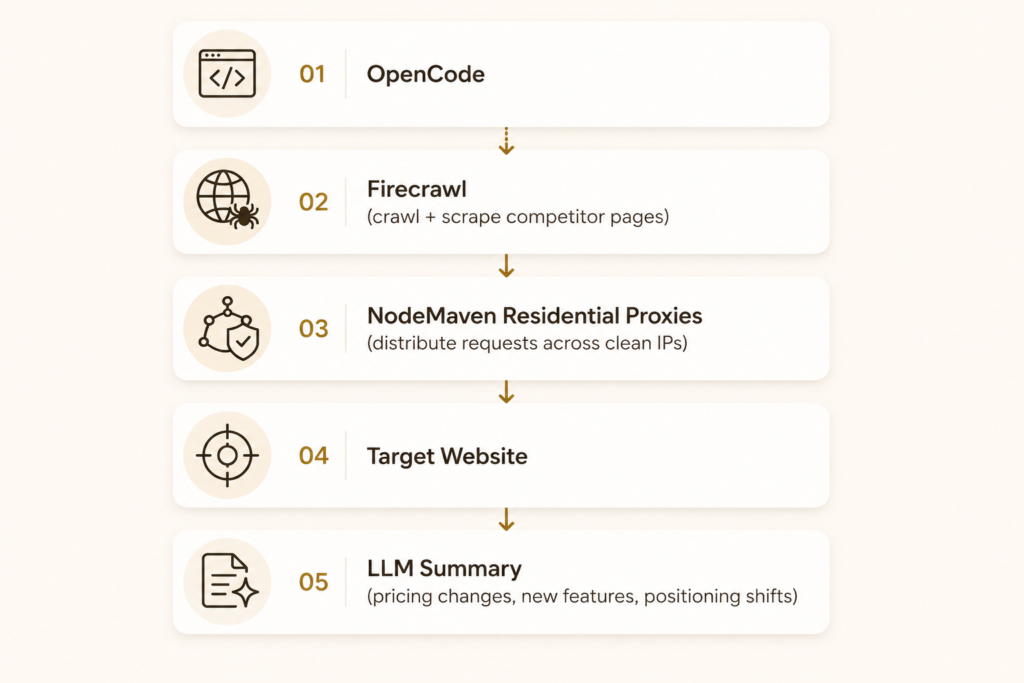
Запустите это по расписанию — и вместо разового скрапинга вы получите постоянное наблюдение за конкурентами.
Автоматизация браузера
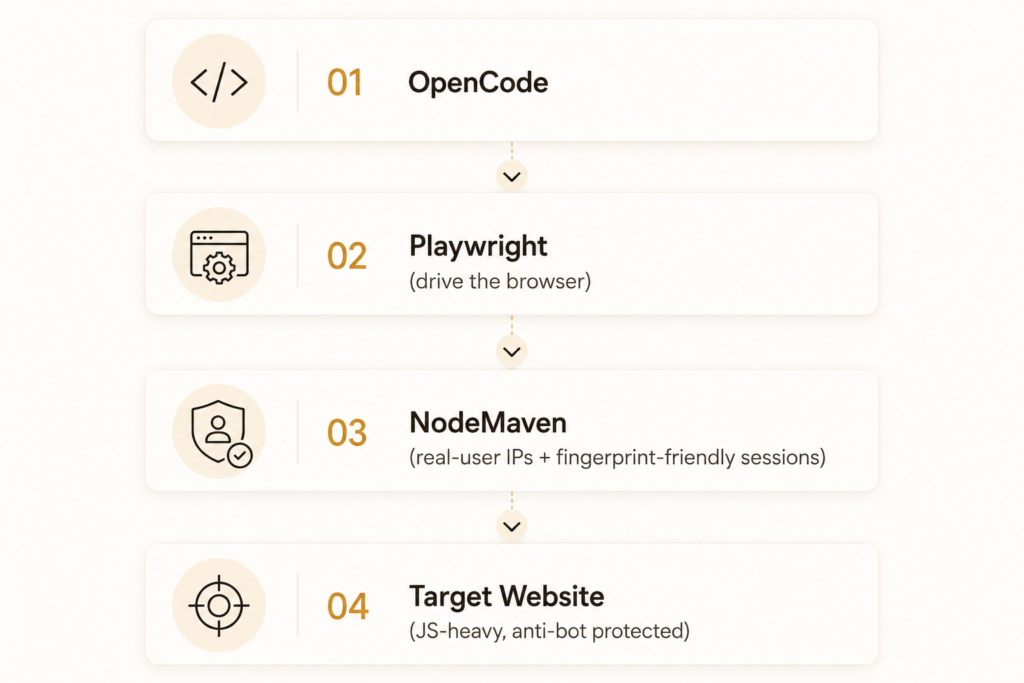
Полезно для тестирования сценариев за гео-ограничениями или для QA страниц, которые ведут себя иначе для трафика реальных пользователей, чем для помеченного IP дата-центра.
Исследовательский пайплайн с AI
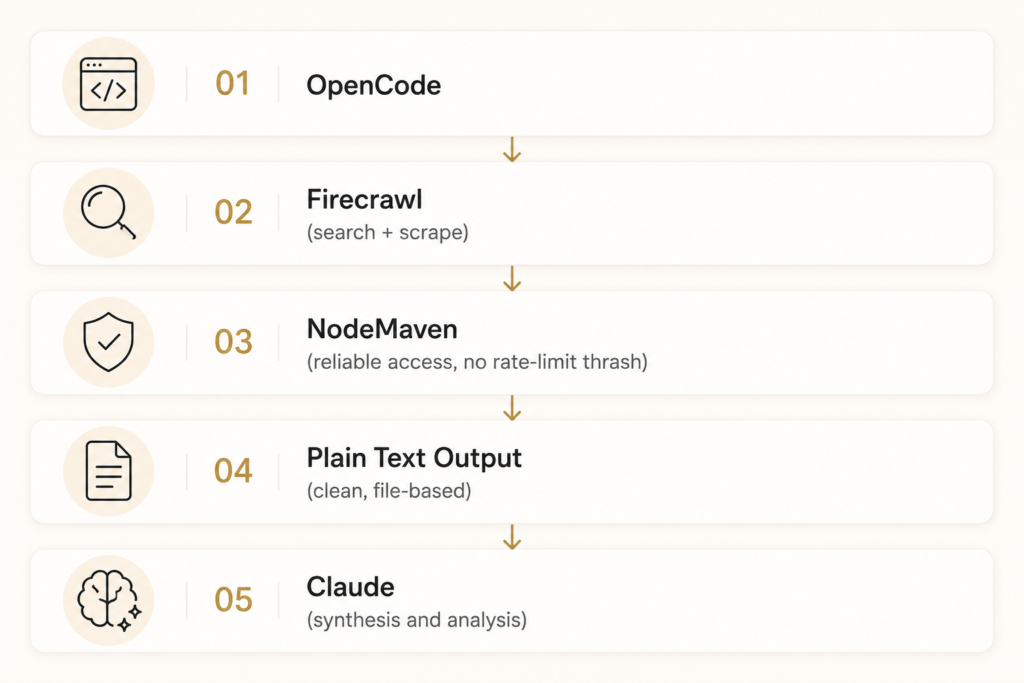
Так выглядит большинство ориентированных на исследования сессий OpenCode, когда вы выходите за рамки игрушечных примеров: собрать, очистить, синтезировать.
Почему производственным рабочим процессам нужны прокси
Навыки вроде Firecrawl решают проблему нехватки возможностей. Теперь OpenCode может выходить в интернет. Чего они не решают — так это того, что происходит, когда интернет даёт отпор.
- Ограничения по частоте запросов (rate limits). Один IP, делающий сотни запросов, выглядит для большинства серверов как атака — независимо от того, насколько корректно устроена логика вашего краулинга.
- Стены с CAPTCHA. Антибот-системы снимают отпечаток репутации IP наряду с поведением браузера. IP дата-центра без истории запросов вызывает проверки, которые у резидентного IP срабатывают редко.
- Репутация IP. Как только IP помечается, всё, что через него маршрутизируется, наследует эту репутацию. Общие диапазоны дата-центров быстро выгорают под нагрузкой скрапинга.
- Гео-тестирование. Если вашему агенту нужно проверить, как страница отображается в конкретной стране, городе или даже ZIP-коде, вам нужны IP, которые действительно там находятся. Один исходный IP не может это подделать.
- Автоматизация браузера в масштабе. Инструменты вроде Playwright и Puppeteer могут идеально имитировать действия человека, но если каждая сессия исходит из одного и того же блока IP, отпечаток выдаёт её, каким бы убедительным ни был паттерн кликов.
Именно здесь слой резидентных прокси перестаёт быть опциональной инфраструктурой и становится частью самого стека навыков.
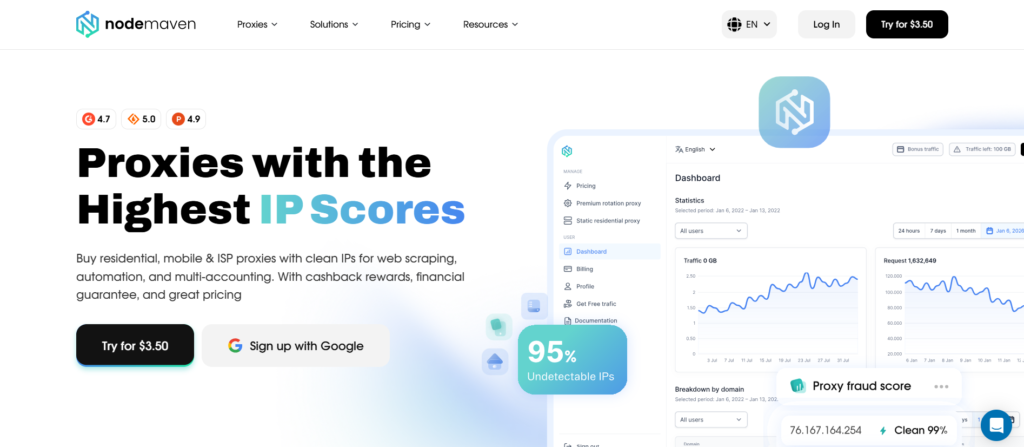
NodeMaven предоставляет пул резидентных и мобильных IP в более чем 190 странах, с долей чистых IP более 95% фильтрация качества в реальном времени перед назначением.
Геотаргетинг работает вплоть до уровня ZIP-кода, что важно, если ваш агент OpenCode проверяет локализованные цены или региональные результаты поиска.
Ничто из этого не заменяет Firecrawl, Playwright или навыки, рассмотренные выше. Оно располагается под ними. Навык даёт OpenCode способность действовать; слой прокси придаёт этому действию чистую, правдоподобную личность на другом конце.
Заключение
Лучшая настройка OpenCode это не один навык. Это стек, охватывающий планирование (Grill Me), непрерывность сессии (Handoff), живой доступ к вебу (Firecrawl), понимание кодовой базы (Understand Anything), качество текста (Stop Slop), эффективность токенов (Caveman) и полную оркестрацию рабочих процессов (Obra Superpowers), и всё это работает вместе.
Навыки дают OpenCode возможности. А то, выдержат ли эти возможности нагрузку в продакшене, определяет инфраструктура под ними, включая то, насколько надёжно ваш агент действительно может достучаться до веба, который он пытается прочитать. Для любого рабочего процесса, опирающегося на Firecrawl, Playwright или автоматизацию браузера в масштабе, слой резидентных прокси вроде NodeMaven это то, что сохраняет этот доступ работающим после первых нескольких запросов.
Начните с одного-двух навыков из этого списка. Остальные добавляйте по мере того, как сталкиваетесь с конкретными проблемами, которые они решают.
Масштабируйте веб-скрапинг и мониторинг конкурентов с помощью чистых резидентных прокси. Попробуйте NodeMaven от $3.50 с 750 MB в комплекте